
- Posts: 42
R0.24 No Longer Supported
[Solved] Something wrong with Joomdle Web Services
- Kyle
- Topic Author
- Offline
- Senior Member
-

Less
More
16 years 3 months ago #11
by Kyle
Replied by Kyle on topic Re:Something is wrong with Joomdle Web Services setup
This was the last issue I was experiencing. Joomdle system check was complaining about 'auth_plugin has not been enabled in moodle'. At this point I checked the forums once more to see that the 'Joomdle package file.zip' contained 2 zipped files within. Typically 'auth_joomdle.zip' and 'enrol_joomdle.zip'. I have copied the folder of 'auth_joomdle' to the specified location in the forums. I believe the location is /moodle/auth/joomdle. I am not sure if 'enrol_joomdle' was necessary as I believe that is only for VirtueMart and I am only making use of a online course system.
Is there anything else I can look into?
Is there anything else I can look into?
The topic has been locked.
- Antonio Durán
-

- Offline
- Moderator
-

Less
More
- Posts: 7950
16 years 3 months ago #12
by Antonio Durán
Replied by Antonio Durán on topic Re:Something is wrong with Joomdle Web Services setup
As you say, enrol package is only needed for Virtuemart.
I see you installed and enbaled the auth plugin, so I don't really know what can be happening: the tables don't have all the Joomdle rows....
I would try this:
- Disable plugin
- Visit Notifications
- Enable plugin
- Visit notifications
If it does not work, try this:
- Disable Joomdle plugin
- Remove moodle/auth/joomdle folder
- Visit Notifications
- Put back folde in place
- Visit Notifications again
- Enable plugin
I see you installed and enbaled the auth plugin, so I don't really know what can be happening: the tables don't have all the Joomdle rows....
I would try this:
- Disable plugin
- Visit Notifications
- Enable plugin
- Visit notifications
If it does not work, try this:
- Disable Joomdle plugin
- Remove moodle/auth/joomdle folder
- Visit Notifications
- Put back folde in place
- Visit Notifications again
- Enable plugin
The topic has been locked.
- Kyle
- Topic Author
- Offline
- Senior Member
-
Less
More
- Posts: 42
16 years 3 months ago #13
by Kyle
Replied by Kyle on topic Re:Something is wrong with Joomdle Web Services setup
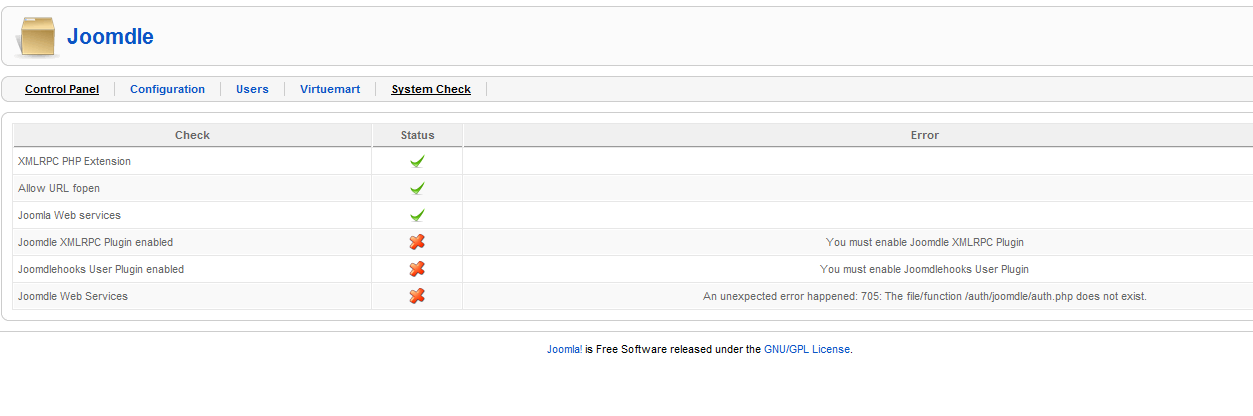
Disabled all plugins related to Joomdle.
Removed the 'joomdle' folder in /moodle/auth/ directory
Check 'System check' which showed error in image attached.
Added folder again from the new installation file.
System check changed error to 'Something is wrong with Joomdle Web Services setup'.
Enabled all plugins.
Same error...
Something is wrong with Joomdle Web Services setup
*cries*
Removed the 'joomdle' folder in /moodle/auth/ directory
Check 'System check' which showed error in image attached.
Added folder again from the new installation file.
System check changed error to 'Something is wrong with Joomdle Web Services setup'.
Enabled all plugins.
Same error...
Something is wrong with Joomdle Web Services setup
*cries*
The topic has been locked.
- Kyle
- Topic Author
- Offline
- Senior Member
-
Less
More
- Posts: 42
16 years 3 months ago #14
by Kyle
Replied by Kyle on topic Re:Something is wrong with Joomdle Web Services setup
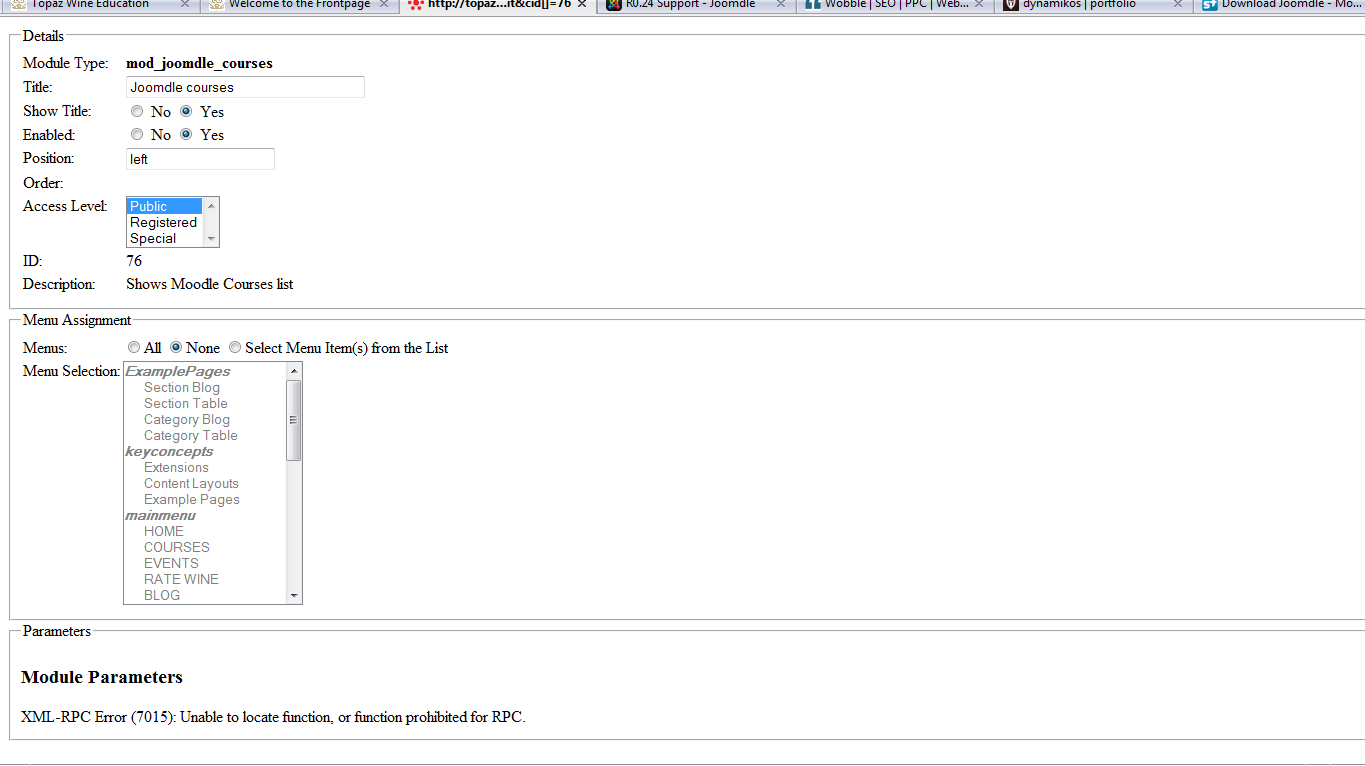
Another note, when I access one of the modules installed from Joomdle, the CSS goes messed up and complains about:
XML-RPC Error (7015): Unable to locate function, or function prohibited for RPC.
See screenshot for a better understanding. Maybe/most likely related to previous issue.
XML-RPC Error (7015): Unable to locate function, or function prohibited for RPC.
See screenshot for a better understanding. Maybe/most likely related to previous issue.
The topic has been locked.
- Kyle
- Topic Author
- Offline
- Senior Member
-
Less
More
- Posts: 42
16 years 3 months ago #15
by Kyle
Replied by Kyle on topic Re:Something is wrong with Joomdle Web Services setup
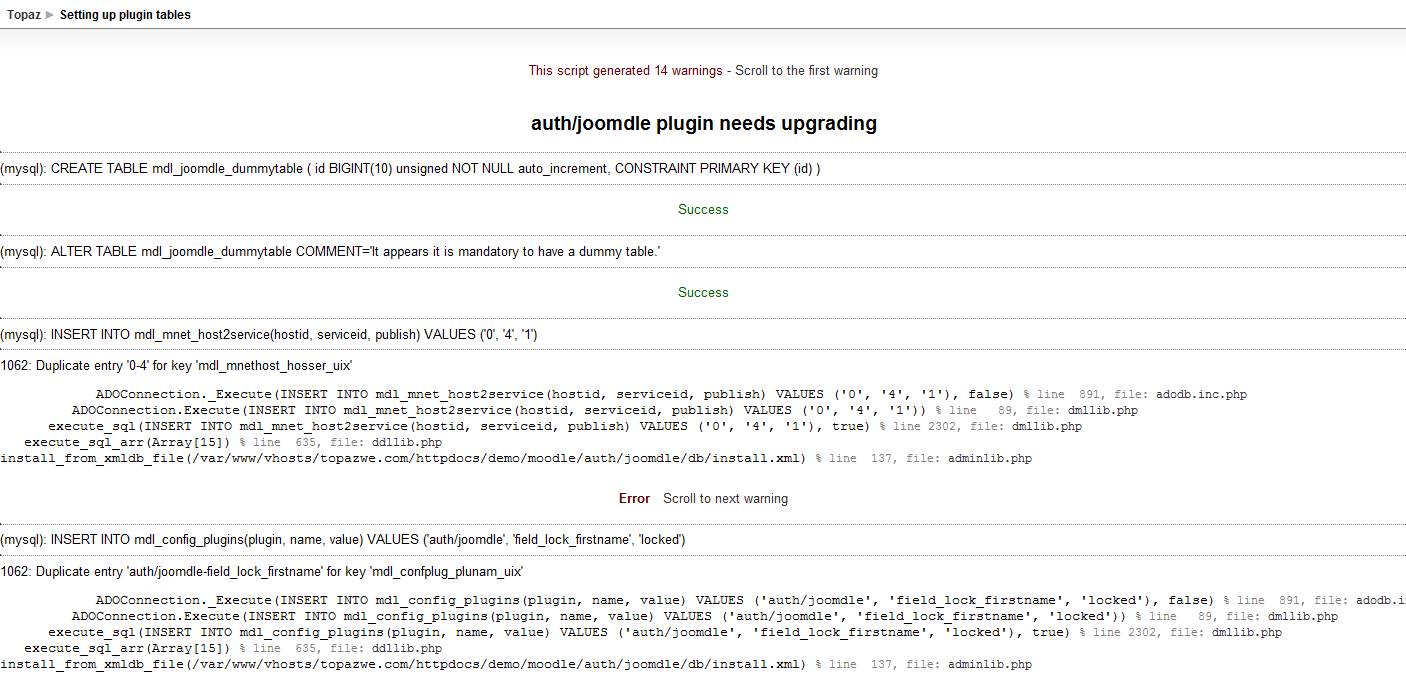
Apologies Antonio, it appears the 'Notifications' was giving errors in Moodle. I did not locate 'that' link, so delayed the help process here. 
Anyways, please help me here, I believe you helped others in similar error.
Once again, appreciate the help!!
Anyways, please help me here, I believe you helped others in similar error.
Once again, appreciate the help!!
The topic has been locked.
- Antonio Durán
-
- Offline
- Moderator
-
Less
More
- Posts: 7950
16 years 3 months ago #16
by Antonio Durán
Replied by Antonio Durán on topic Re:Something is wrong with Joomdle Web Services setup
Hi. You should delete everything that is giving errors, and then re-visit Notifications:
- delete from mdl_config_plugins where plugin like '%joomdle%';
- delete from mdl_mnet_host2service where hostid=0 and serviceid=4;
- drop table mdl_joomdle_dummytable
- delete from mdl_config_plugins where plugin like '%joomdle%';
- delete from mdl_mnet_host2service where hostid=0 and serviceid=4;
- drop table mdl_joomdle_dummytable
The topic has been locked.
- Kyle
- Topic Author
- Offline
- Senior Member
-
Less
More
- Posts: 42
16 years 3 months ago #17
by Kyle
Replied by Kyle on topic Re:Something is wrong with Joomdle Web Services setup
Hi Antonio, replied in the wrong forum. Just want to let you know that the above commands fixed the issue. I think also the fact Moodle wasn't properly 'registered' might also be a factor.
Thanks again for all the help!
Thanks again for all the help!
The topic has been locked.