
- Posts: 7
XMLRPC extension error
- Carla
- Topic Author
- Offline
- New Member
-

Less
More
15 years 3 months ago #1
by Carla
XMLRPC extension error was created by Carla
Hi
I just installed and configured Moodle 2.0.3+ and Joomdle for my Joomla 1.6 new website. I used the package Joomdle Alpha04 for J1.6 and my system is:
Ubuntu 11.04
Apache 2.2.17
PHP 5.3.5
I followed all the instructions and it ran well, only at the back-end it it shows a red alert at XMLRPC PHP Extension saying "You need to install/enable the XMLRPC extension in your PHP configuration".
But i have installed it, i did it using the command apt-get install php5-xmlrpc and the installation was successful.
What else do i need to do to get it working?? When i click Users and Course Requests at the back-end i get the following errors:
Fatal error: Call to undefined function xmlrpc_encode_request() in ..../administrator/components/com_joomdle/helpers/content.php on line 63
Fatal error: Call to undefined function xmlrpc_encode_request() in ..../administrator/components/com_joomdle/helpers/content.php on line 67
Could you please help me??
Carla
I just installed and configured Moodle 2.0.3+ and Joomdle for my Joomla 1.6 new website. I used the package Joomdle Alpha04 for J1.6 and my system is:
Ubuntu 11.04
Apache 2.2.17
PHP 5.3.5
I followed all the instructions and it ran well, only at the back-end it it shows a red alert at XMLRPC PHP Extension saying "You need to install/enable the XMLRPC extension in your PHP configuration".
But i have installed it, i did it using the command apt-get install php5-xmlrpc and the installation was successful.
What else do i need to do to get it working?? When i click Users and Course Requests at the back-end i get the following errors:
Fatal error: Call to undefined function xmlrpc_encode_request() in ..../administrator/components/com_joomdle/helpers/content.php on line 63
Fatal error: Call to undefined function xmlrpc_encode_request() in ..../administrator/components/com_joomdle/helpers/content.php on line 67
Could you please help me??
Carla
The topic has been locked.
- Antonio Durán
-

- Offline
- Moderator
-

Less
More
- Posts: 7944
15 years 3 months ago #2
by Antonio Durán
Replied by Antonio Durán on topic Re: XMLRPC extension error
Hi.
From the messages it is clear that the xmlrpc extensions is not installed/enabled.
If you already installed it, check that it is present in Apache configuration.
From the messages it is clear that the xmlrpc extensions is not installed/enabled.
If you already installed it, check that it is present in Apache configuration.
The topic has been locked.
- Carla
- Topic Author
- Offline
- New Member
-
Less
More
- Posts: 7
15 years 3 months ago #3
by Carla
Replied by Carla on topic Re: XMLRPC extension error
Hello again
I have looked up the httpd.conf and the apache2.conf files but i don't see any line related to xmlrpc. I am new on this, so i don't know exactly what i should look for. Are there specific lines that i should add or uncomment in those files?? Could you tell me exactly what i should be trying to find??
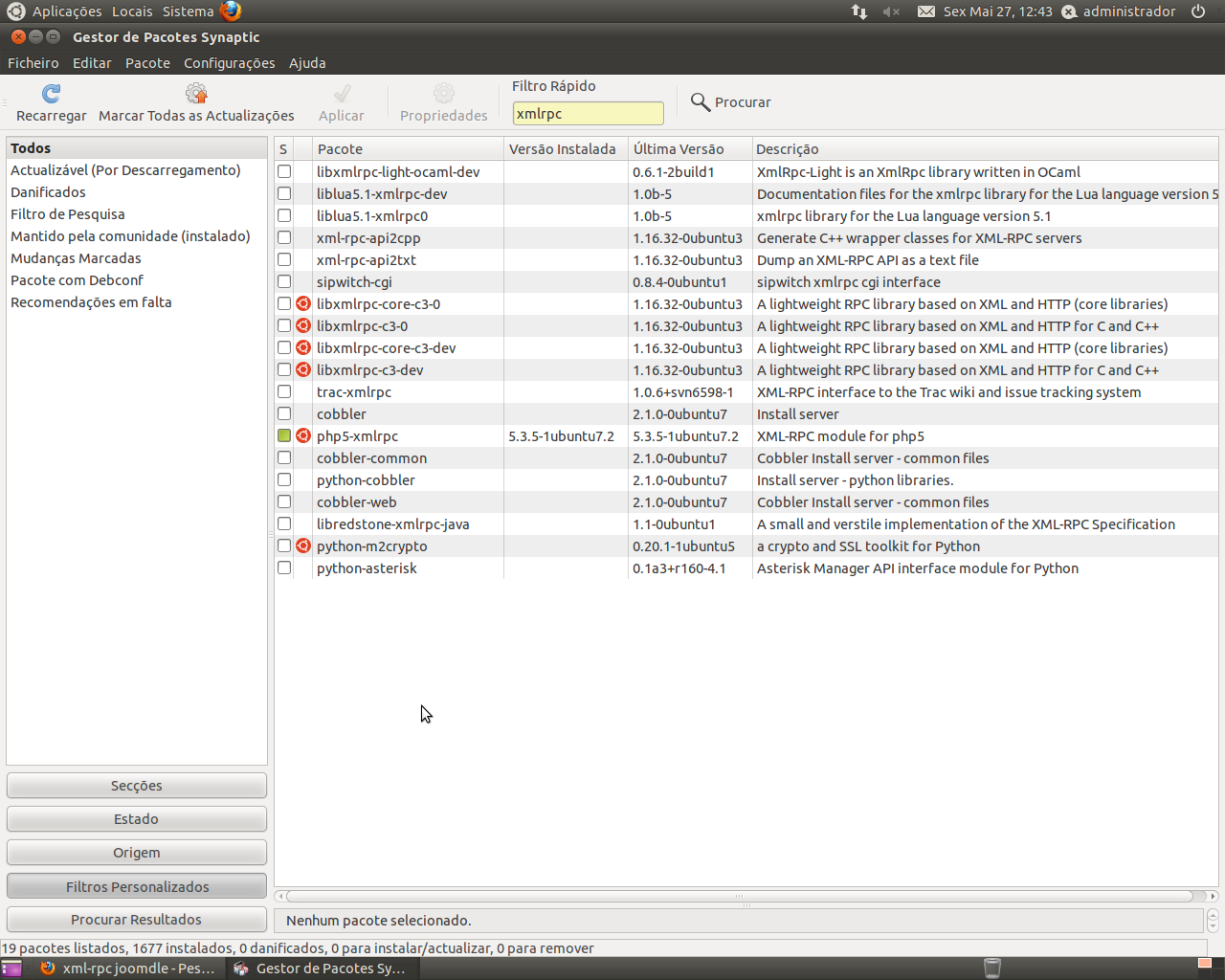
I have attached a file and here it shows the php5-xmlrpc extension installed. I don't know what else to do, i am setting up an intranet website that should integrate moodle.
I am using joomla 1.6.3.
Hope you have a hint on this.
I have looked up the httpd.conf and the apache2.conf files but i don't see any line related to xmlrpc. I am new on this, so i don't know exactly what i should look for. Are there specific lines that i should add or uncomment in those files?? Could you tell me exactly what i should be trying to find??
I have attached a file and here it shows the php5-xmlrpc extension installed. I don't know what else to do, i am setting up an intranet website that should integrate moodle.
I am using joomla 1.6.3.
Hope you have a hint on this.
The topic has been locked.
- Antonio Durán
-
- Offline
- Moderator
-
Less
More
- Posts: 7944
15 years 3 months ago #4
by Antonio Durán
Replied by Antonio Durán on topic Re: XMLRPC extension error
That depends on apache version and specific configuration.
You should have a line like this:
extension=xmlrpc.so
in some file in your php config, usually at /etc/php5
You should have a line like this:
extension=xmlrpc.so
in some file in your php config, usually at /etc/php5
The topic has been locked.
- Carla
- Topic Author
- Offline
- New Member
-
Less
More
- Posts: 7
15 years 3 months ago - 15 years 3 months ago #5
by Carla
Replied by Carla on topic Re: XMLRPC extension error
Hello again
I found the line that you mentioned, it is at /etc/php5/conf.d and uncommented (see attached file).
On the website back-end it keeps saying xmlrpc is not installed/activated, but it is. Do u have any other idea why it could be??
I found the line that you mentioned, it is at /etc/php5/conf.d and uncommented (see attached file).
On the website back-end it keeps saying xmlrpc is not installed/activated, but it is. Do u have any other idea why it could be??
Last edit: 15 years 3 months ago by Carla.
The topic has been locked.
- Carla
- Topic Author
- Offline
- New Member
-
Less
More
- Posts: 7
15 years 3 months ago #6
by Carla
Replied by Carla on topic Re: XMLRPC extension error
The topic has been locked.
- Antonio Durán
-
- Offline
- Moderator
-
Less
More
- Posts: 7944
15 years 3 months ago #7
by Antonio Durán
Replied by Antonio Durán on topic Re: XMLRPC extension error
Hi.
You just need to go into PHP info page, in Joomla backend, and confirm that XMLRPC is not enabled (you won't find a xmlrpc block)
There you can also see the files parsed by the web server, so you may need to go trough them to understand why xmlrpc is not enabled (maybe the file you saw is not parsed at all...)
You just need to go into PHP info page, in Joomla backend, and confirm that XMLRPC is not enabled (you won't find a xmlrpc block)
There you can also see the files parsed by the web server, so you may need to go trough them to understand why xmlrpc is not enabled (maybe the file you saw is not parsed at all...)
The topic has been locked.
- Carla
- Topic Author
- Offline
- New Member
-
Less
More
- Posts: 7
15 years 3 months ago #8
by Carla
Replied by Carla on topic Re: XMLRPC extension error
I just looked up the phpinfo page at http://localhost/xampp and the only part that refers to XMLRPC is in the Core section, and it says:
xml_error_number (Local Value=0 and Master Value=0)
xmlrpc_errors (Local Value=Off and Master Value=Off)
Is this Ok?? Is there something missing??
xml_error_number (Local Value=0 and Master Value=0)
xmlrpc_errors (Local Value=Off and Master Value=Off)
Is this Ok?? Is there something missing??
The topic has been locked.
- Antonio Durán
-
- Offline
- Moderator
-
Less
More
- Posts: 7944
15 years 3 months ago #9
by Antonio Durán
Replied by Antonio Durán on topic Re: XMLRPC extension error
it means xmlrpc is not enabled.
The topic has been locked.
- mag78
- Offline
- New Member
-
Less
More
- Posts: 7
15 years 3 months ago #10
by mag78
Replied by mag78 on topic Re: XMLRPC extension error
Look in php (xaamp/php) folder a find php.ini. There find something like ";extension=php_xmlrpc.dll" (on windows), delete ";" that coment this line (the extension). Restart apache a trie again. Sorry for my english, I hope this help you.
The topic has been locked.