
- Posts: 14
Joomdle 1.0 Installation
Joomla URL seems to be misconfigured in Joomdle auth plugin
- Miloud Eloumri
- Topic Author
- Offline
- New Member
-

Less
More
8 years 8 months ago #1
by Miloud Eloumri
Joomla URL seems to be misconfigured in Joomdle auth plugin was created by Miloud Eloumri
Hi Joomdle friends,
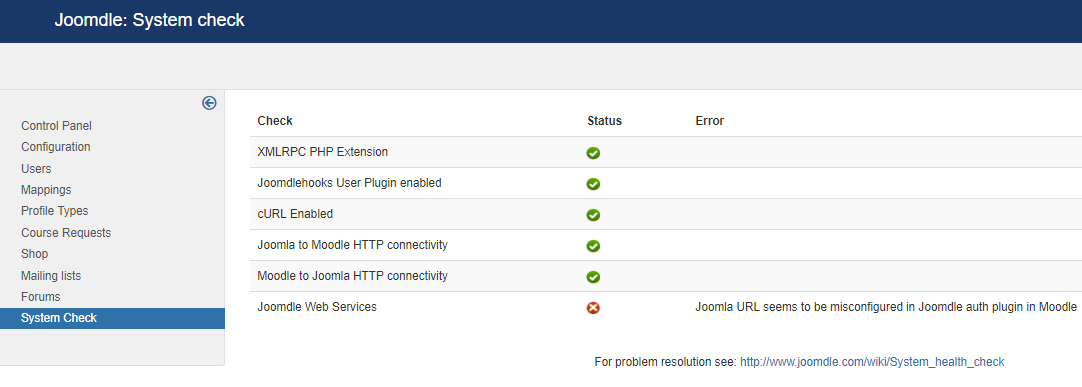
In Joomdle System check all is green except the last one (Joomdle Web Services) which shows : Joomla URL seems to be misconfigured in Joomdle auth plugin in Moodle
I have been trying to make it work (green) for several days, but haven not figure it out.
I went through all Joomdle docs and system check suggestions. Please note that all the configurations are correct in both Joomla and Moodle (trust me).
Please need to know how to at least debug the problem and figure out the cause.
- When I add to the file :/joomla/htdocs/administrator/components/com_joomdle/helpers/content.php :
print_r ($response);
exit();
in this location:
/* Test Moodle Web services in joomdle plugin */
$system[3] = JText::_ ('COM_JOOMDLE_JOOMDLE_WEB_SERVICES');
$response = JoomdleHelperContent::call_method_debug ('system_check');
print_r ($response);
exit();
I got :
Array ( [joomdle_auth] => 1 [mnet_auth] => 1 [joomdle_configured] => 1 [test_data] => [release] => 1.1.3 )
- When I go to my Joomla site adding : /index.php?option=com_joomdle&task=ws.server&format=xmlrpc
I got :
XML-RPC Error (1): Invalid token:
- When I visit my Joomla site with the wrapper /index.php/en-ca/?option=com_joomdle&view=wrapper&lang=en_ca
I can see the Moodle site wrapped in Joomla home page.
- When I check the file : /moodle/moodledata/temp/joomdle_system_check.xml, it is :
?xml version="1.0" encoding="UTF-8"?>
<head/><methodResponse>
<params>
<param>
<value>
<string>It works</string>
</value>
</param>
</params>
</methodResponse>
- When I check the file :/joomla/htdocs/log/joomdle_system_check.xml, it is :
<?xml version="1.0" encoding="UTF-8"?><methodResponse><params><param><value><struct><member><name>joomdle_auth</name><value><int>1</int></value></member><member><name>mnet_auth</name><value><int>1</int></value></member><member><name>joomdle_configured</name><value><int>1</int></value></member><member><name>test_data</name><value><string/></value></member><member><name>release</name><value><string>1.1.3</string></value></member></struct></value></param></params></methodResponse>
- My Joomla site is the main site and moodle site is under it: joomla url/moodle
- Both sites are on the same dedicated server, no virtual hosts.
- Joomla v : 3.8.0 , Moodle v : 3.1.2 , system: Linux, bitnami LAMP stack with Joomla and Moodle modules
- Note Joomla website and Moodle website were installed in two different servers and I migrated them in the same current server.
Thank a lot for your time and kind help.
In Joomdle System check all is green except the last one (Joomdle Web Services) which shows : Joomla URL seems to be misconfigured in Joomdle auth plugin in Moodle
I have been trying to make it work (green) for several days, but haven not figure it out.
I went through all Joomdle docs and system check suggestions. Please note that all the configurations are correct in both Joomla and Moodle (trust me).
Please need to know how to at least debug the problem and figure out the cause.
- When I add to the file :/joomla/htdocs/administrator/components/com_joomdle/helpers/content.php :
print_r ($response);
exit();
in this location:
/* Test Moodle Web services in joomdle plugin */
$system[3] = JText::_ ('COM_JOOMDLE_JOOMDLE_WEB_SERVICES');
$response = JoomdleHelperContent::call_method_debug ('system_check');
print_r ($response);
exit();
I got :
Array ( [joomdle_auth] => 1 [mnet_auth] => 1 [joomdle_configured] => 1 [test_data] => [release] => 1.1.3 )
- When I go to my Joomla site adding : /index.php?option=com_joomdle&task=ws.server&format=xmlrpc
I got :
XML-RPC Error (1): Invalid token:
- When I visit my Joomla site with the wrapper /index.php/en-ca/?option=com_joomdle&view=wrapper&lang=en_ca
I can see the Moodle site wrapped in Joomla home page.
- When I check the file : /moodle/moodledata/temp/joomdle_system_check.xml, it is :
?xml version="1.0" encoding="UTF-8"?>
<head/><methodResponse>
<params>
<param>
<value>
<string>It works</string>
</value>
</param>
</params>
</methodResponse>
- When I check the file :/joomla/htdocs/log/joomdle_system_check.xml, it is :
<?xml version="1.0" encoding="UTF-8"?><methodResponse><params><param><value><struct><member><name>joomdle_auth</name><value><int>1</int></value></member><member><name>mnet_auth</name><value><int>1</int></value></member><member><name>joomdle_configured</name><value><int>1</int></value></member><member><name>test_data</name><value><string/></value></member><member><name>release</name><value><string>1.1.3</string></value></member></struct></value></param></params></methodResponse>
- My Joomla site is the main site and moodle site is under it: joomla url/moodle
- Both sites are on the same dedicated server, no virtual hosts.
- Joomla v : 3.8.0 , Moodle v : 3.1.2 , system: Linux, bitnami LAMP stack with Joomla and Moodle modules
- Note Joomla website and Moodle website were installed in two different servers and I migrated them in the same current server.
Thank a lot for your time and kind help.
Please Log in or Create an account to join the conversation.
- Antonio Durán
-

- Offline
- Moderator
-

Less
More
- Posts: 7944
8 years 8 months ago #2
by Antonio Durán
Replied by Antonio Durán on topic Joomla URL seems to be misconfigured in Joomdle auth plugin
Hi.
All seems correct.... Please attach file /moodle/moodledata/temp/joomdle_system_check.xml in case I can see something weird.
All seems correct.... Please attach file /moodle/moodledata/temp/joomdle_system_check.xml in case I can see something weird.
Please Log in or Create an account to join the conversation.
- Miloud Eloumri
- Topic Author
- Offline
- New Member
-
Less
More
- Posts: 14
8 years 8 months ago #3
by Miloud Eloumri
Replied by Miloud Eloumri on topic Joomla URL seems to be misconfigured in Joomdle auth plugin
Hi Antonio,
Thank you for replying. Yes, it is odd. All seems good,yet, it did not work.
Please find attached the file : /moodle/moodledata/temp/joomdle_system_check.xml
Also, attached a Joomdle system check screenshot.
I thought this might be a false error, but when I sign up a user in Joomla, it does not get created in Moodle because when I check users list in Moodle, the created user doe not exist there (joomdle config: auto create and delete moodle users is on (yes)). Yet, in Joomla, when I check Joomdle -> Users and search for the user I've just created, Joomdle shows the created user is Joomla, Moodle and Joomdle user.
- Maybe the problem of Joomla URL seems to be misconfigured in Joomdle auth plugin is related to session handling and cookies in booth joomla and moodle. I modified this some ways, but it is still not green.
- It might be also because of some configs in .htaccess files or server configs or php.ini file.
- I though it also maybe related to firewalls. I use a firewall in Joomla. I disabled it, I added com_joomdle and moodle url as exceptions, yet in any case Joomdle web services is still not green and Joomla URL seems to be misconfigured in Joomdle auth plugin.
- xml attachments are not allowed here, so I put the xml file in the zipped folder.
Thanks for you time and help.
Thank you for replying. Yes, it is odd. All seems good,yet, it did not work.
Please find attached the file : /moodle/moodledata/temp/joomdle_system_check.xml
Also, attached a Joomdle system check screenshot.
I thought this might be a false error, but when I sign up a user in Joomla, it does not get created in Moodle because when I check users list in Moodle, the created user doe not exist there (joomdle config: auto create and delete moodle users is on (yes)). Yet, in Joomla, when I check Joomdle -> Users and search for the user I've just created, Joomdle shows the created user is Joomla, Moodle and Joomdle user.
- Maybe the problem of Joomla URL seems to be misconfigured in Joomdle auth plugin is related to session handling and cookies in booth joomla and moodle. I modified this some ways, but it is still not green.
- It might be also because of some configs in .htaccess files or server configs or php.ini file.
- I though it also maybe related to firewalls. I use a firewall in Joomla. I disabled it, I added com_joomdle and moodle url as exceptions, yet in any case Joomdle web services is still not green and Joomla URL seems to be misconfigured in Joomdle auth plugin.
- xml attachments are not allowed here, so I put the xml file in the zipped folder.
Thanks for you time and help.
Please Log in or Create an account to join the conversation.
- Miloud Eloumri
- Topic Author
- Offline
- New Member
-
Less
More
- Posts: 14
8 years 8 months ago #4
by Miloud Eloumri
Replied by Miloud Eloumri on topic Joomla URL seems to be misconfigured in Joomdle auth plugin
It looks I forgot to attache Joomdle system check screenshot.
Please Log in or Create an account to join the conversation.
- Antonio Durán
-
- Offline
- Moderator
-
Less
More
- Posts: 7944
8 years 8 months ago #5
by Antonio Durán
Replied by Antonio Durán on topic Joomla URL seems to be misconfigured in Joomdle auth plugin
Looking at the file it is easy to spot the problem: if you open it in Firefox it will show you where the problem is: a <head/> in the midle of the XML.
This is probably caused by template or some system plugin, not related to Joomdle. It is outputting the head tag, breaking the xml.
This is probably caused by template or some system plugin, not related to Joomdle. It is outputting the head tag, breaking the xml.
Please Log in or Create an account to join the conversation.
- Miloud Eloumri
- Topic Author
- Offline
- New Member
-
Less
More
- Posts: 14
8 years 8 months ago #6
by Miloud Eloumri
Replied by Miloud Eloumri on topic Joomla URL seems to be misconfigured in Joomdle auth plugin
Thanks Antonio for the feedback. Yes, I can see that generated head tag. So, this maybe the first step to debug the problem. I thought this xml file is completely generated and controlled by Joomdle, so how other system plugins or templates can modify or insert tags in this xml file. If so, what kind of plugins or templates that can cause such malformed xml file. Is it possible that some of Joomdle php files especially that is responsible of generating this xml file is some how incorrectly modified ? Can you please let me know where to look for related Joomdle files that has to do with this xml file. I might replace some current Joomdle files with original ones and see if it works. Thanks a lot again.
Please Log in or Create an account to join the conversation.
- Antonio Durán
-
- Offline
- Moderator
-
Less
More
- Posts: 7944
8 years 8 months ago #7
by Antonio Durán
Replied by Antonio Durán on topic Joomla URL seems to be misconfigured in Joomdle auth plugin
> I thought this xml file is completely generated and controlled by Joomdle, so how other system plugins or templates can modify or insert tags in this xml file.
Template is executed in all pages, as are system plugins.
> Is it possible that some of Joomdle php files especially that is responsible of generating this xml file is some how incorrectly modified
No, this is coming from some place else. I have already seen this problem a number of times.
To know if it is the template it is easy: just change to stock template for a moment and run system check.
If it is not the template, you can try disabling some non core system plugins to try to find the one causing the problem.
Template is executed in all pages, as are system plugins.
> Is it possible that some of Joomdle php files especially that is responsible of generating this xml file is some how incorrectly modified
No, this is coming from some place else. I have already seen this problem a number of times.
To know if it is the template it is easy: just change to stock template for a moment and run system check.
If it is not the template, you can try disabling some non core system plugins to try to find the one causing the problem.
Please Log in or Create an account to join the conversation.
- Miloud Eloumri
- Topic Author
- Offline
- New Member
-
Less
More
- Posts: 14
8 years 8 months ago #8
by Miloud Eloumri
Replied by Miloud Eloumri on topic Joomla URL seems to be misconfigured in Joomdle auth plugin
Thanks a lot Antonio, I have really several plugins and templates, so it is hard to know where to start. Do you think my problem of Joomdle Web Service : (Joomla URL seems to be misconfigured in Joomdle auth plugin in Moodle) is in only Moodle side, Joomla side or both ?
Please Log in or Create an account to join the conversation.
- Antonio Durán
-
- Offline
- Moderator
-
Less
More
- Posts: 7944
8 years 8 months ago #9
by Antonio Durán
Replied by Antonio Durán on topic Joomla URL seems to be misconfigured in Joomdle auth plugin
Problem is on Joomla side.
> have really several plugins and templates
You can only have one default front end template in Joomla. Change that to stock one, and run system check.
> have really several plugins and templates
You can only have one default front end template in Joomla. Change that to stock one, and run system check.
Please Log in or Create an account to join the conversation.
- Miloud Eloumri
- Topic Author
- Offline
- New Member
-
Less
More
- Posts: 14
8 years 8 months ago #10
by Miloud Eloumri
Replied by Miloud Eloumri on topic Joomla URL seems to be misconfigured in Joomdle auth plugin
Thank you. I am using JSN Template (joomlashine) for Joomla front end , but no stock or default templates are there. The default templates that come with my Joomla version installation are Protostar (Default template) and Beez 3. In extensions -> manage -> discover, I am getting a note that Protostar and Beez 3 have not gone through the normal installation process. Will check what is wrong with these templates and let you know. Thanks a lot.
Please Log in or Create an account to join the conversation.