
- Posts: 19
joomdle"sell on shop" on clicking link, getting a blank page
- senthil
- Topic Author
- Offline
- New Member
-

Less
More
15 years 3 weeks ago - 15 years 3 weeks ago #1
by senthil
joomdle"sell on shop" on clicking link, getting a blank page was created by senthil
In Joomla Admin panel joomdle's shop menulink, I am able to see the courses that i created in Moodle. When i click the link "sell on shop" publish / activate. I am getting a blank page.
Note: Versions i am using
Moodle 2.0.3+
Joomla 1.5.23
Joomdle 0.52
VirtueMart 1.1.8
Please help me out on resolving this issue.
Note: In Joomla Joomdle's system check menu link, for the "Joomdle Web Services" check => i am gettign the message as "Joomla URL seems to be misconfigured in Joomdle auth plugin in Moodle ".I have followed every instruction properly mentioned on the url www.joomdle.com/wiki/Installation
Note: Versions i am using
Moodle 2.0.3+
Joomla 1.5.23
Joomdle 0.52
VirtueMart 1.1.8
Please help me out on resolving this issue.
Note: In Joomla Joomdle's system check menu link, for the "Joomdle Web Services" check => i am gettign the message as "Joomla URL seems to be misconfigured in Joomdle auth plugin in Moodle ".I have followed every instruction properly mentioned on the url www.joomdle.com/wiki/Installation
Last edit: 15 years 3 weeks ago by senthil.
Please Log in or Create an account to join the conversation.
- senthil
- Topic Author
- Offline
- New Member
-
Less
More
- Posts: 19
15 years 3 weeks ago #2
by senthil
Replied by senthil on topic Re: joomdle"sell on shop" on clicking link, getting a blank page
I have setup my application in the folder http://localhost/joomla20 for Joomla and moodle is set up as http://localhost/moodle20/
In the moodle application, under the Joomdle authentication plugin for the textfield "Joomla URL" i gave the url as "http://localhost/joomla20/". But why in Joomla's Joomdle system check for Joomdle web services i am getting the msg as "Joomla URL seems to be misconfigured in Joomdle auth plugin in Moodle ".
In the moodle application, under the Joomdle authentication plugin for the textfield "Joomla URL" i gave the url as "http://localhost/joomla20/". But why in Joomla's Joomdle system check for Joomdle web services i am getting the msg as "Joomla URL seems to be misconfigured in Joomdle auth plugin in Moodle ".
Please Log in or Create an account to join the conversation.
- Antonio Durán
-

- Offline
- Moderator
-

Less
More
- Posts: 7936
15 years 3 weeks ago #3
by Antonio Durán
Replied by Antonio Durán on topic Re: joomdle"sell on shop" on clicking link, getting a blank page
Hi.
Nothing will work until system check is all ok.
You can try 0.53 which includes another system check, in case your problem is related to that.
Nothing will work until system check is all ok.
You can try 0.53 which includes another system check, in case your problem is related to that.
Please Log in or Create an account to join the conversation.
- senthil
- Topic Author
- Offline
- New Member
-
Less
More
- Posts: 19
15 years 2 weeks ago #4
by senthil
Replied by senthil on topic Re: joomdle"sell on shop" on clicking link, getting a blank page
Hi Antonio,
Thanks for the information. I will give a try and let u know.
Thanks for the information. I will give a try and let u know.
Please Log in or Create an account to join the conversation.
- senthil
- Topic Author
- Offline
- New Member
-
Less
More
- Posts: 19
15 years 2 weeks ago #5
by senthil
Replied by senthil on topic Re: joomdle"sell on shop" on clicking link, getting a blank page
Hi Antonio,
It works now. Thanks a lot.
I have one more issue now. I followed the steps mentioned here www.joomdle.com/wiki/VirtueMart
But the problem is whatever amount i am setting in Moodle using the Joomdle's enrollment plugin. That amount is not displayed in the Virtuemart Shopping cart page.
Note: I am not using tienda cart.
Please help me out, even the product is published automatically and we are able to add it to cart usign Virtume mart, but the amount is displayed as 0.
It works now. Thanks a lot.
I have one more issue now. I followed the steps mentioned here www.joomdle.com/wiki/VirtueMart
But the problem is whatever amount i am setting in Moodle using the Joomdle's enrollment plugin. That amount is not displayed in the Virtuemart Shopping cart page.
Note: I am not using tienda cart.
Please help me out, even the product is published automatically and we are able to add it to cart usign Virtume mart, but the amount is displayed as 0.
Please Log in or Create an account to join the conversation.
- Chris
-

- Offline
- Moderator
-
15 years 2 weeks ago #6
by Chris
Replied by Chris on topic Re: joomdle"sell on shop" on clicking link, getting a blank page
Aside from the joomdle plugin have you configured the course with its on own cost?
Please Log in or Create an account to join the conversation.
- senthil
- Topic Author
- Offline
- New Member
-
Less
More
- Posts: 19
15 years 2 weeks ago #7
by senthil
Replied by senthil on topic Re: joomdle"sell on shop" on clicking link, getting a blank page
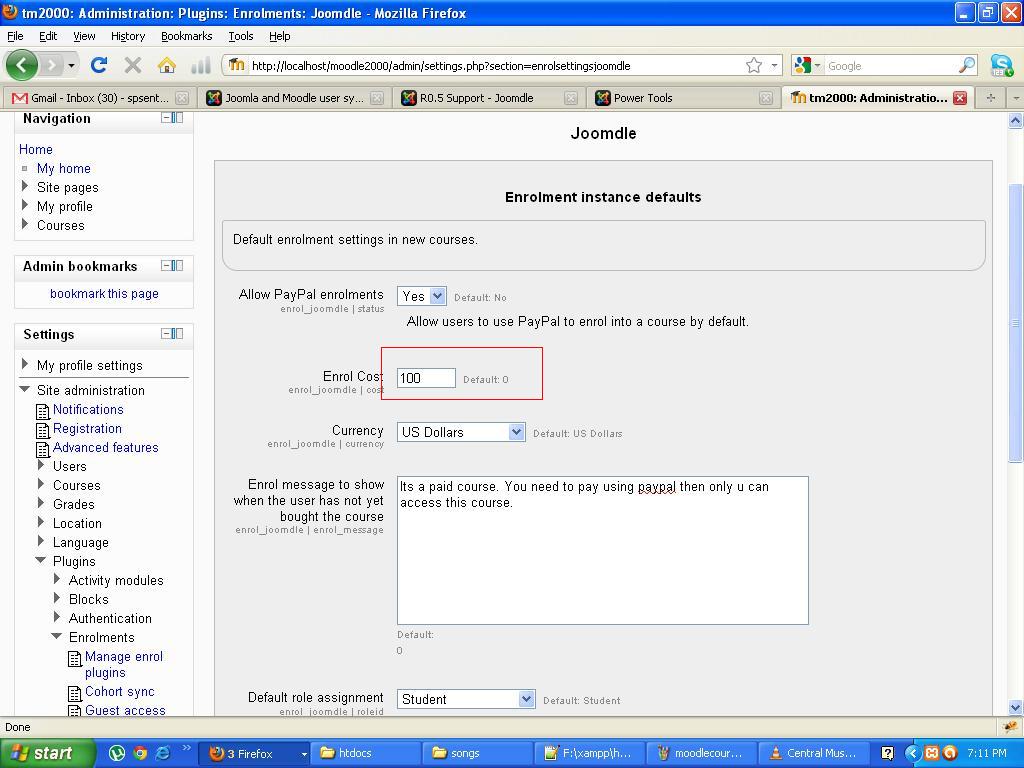
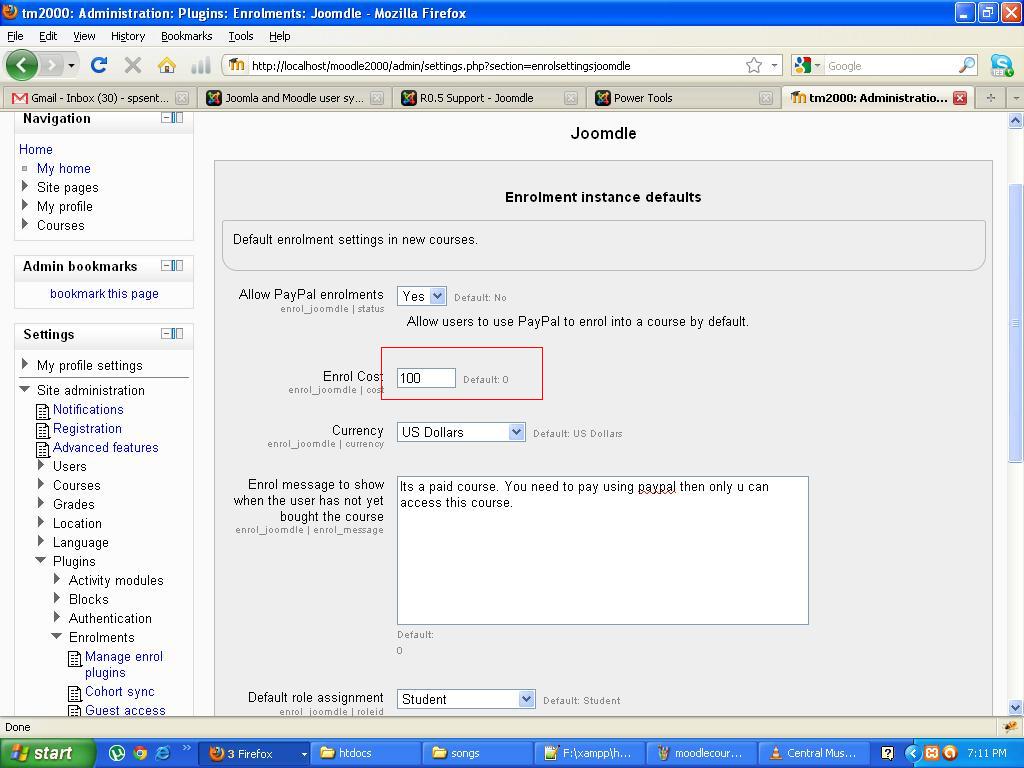
Yes, i have configured with a default cost of $100. But its not displayed in Joomla virtuemart.
Please Log in or Create an account to join the conversation.
- Chris
-
- Offline
- Moderator
-
15 years 2 weeks ago #8
by Chris
Replied by Chris on topic Re: joomdle"sell on shop" on clicking link, getting a blank page
Actually I was referring to the course cost field. What you are showing me is the settings of the Joomdle enrollment plugin. Have set up a cost in the course settings? Does the course settings choose a different enrollment plugin?
Please Log in or Create an account to join the conversation.
- senthil
- Topic Author
- Offline
- New Member
-
Less
More
- Posts: 19
15 years 2 weeks ago - 15 years 2 weeks ago #9
by senthil
Replied by senthil on topic Re: joomdle"sell on shop" on clicking link, getting a blank page
I am a newbie to Moodle and Joomdle. Could you pls elaborate. When i went to Moodle's Course default settings i did not find any field named "cost". And also i have disabled all the enrollment plugin excluding Joomdle. But also i don't have any luck, that the amount is not displayed. ITs always showing as zero $.
Last edit: 15 years 2 weeks ago by senthil. Reason: typoerror
Please Log in or Create an account to join the conversation.
- Chris
-
- Offline
- Moderator
-
15 years 2 weeks ago #10
by Chris
Replied by Chris on topic Re: joomdle"sell on shop" on clicking link, getting a blank page
You will want to look through the Moodle docs in more detail to familiarise yourself with the product.
That said very a quick summary:
- each enrollment plugin can be set up with its own default cost which will apply to those courses using this plug-in
- if there is a cost of $0 in the plugin, you will not see the cost field in the course settings
- if there is a cost in the plugin you will see the cost field in the course settings but only if you have also chosen that plugin as the enrollment method in the course settings.
Play around with this to see what you find.
That said very a quick summary:
- each enrollment plugin can be set up with its own default cost which will apply to those courses using this plug-in
- if there is a cost of $0 in the plugin, you will not see the cost field in the course settings
- if there is a cost in the plugin you will see the cost field in the course settings but only if you have also chosen that plugin as the enrollment method in the course settings.
Play around with this to see what you find.
Please Log in or Create an account to join the conversation.