
- Posts: 33
[Solved] No token!
- Graham Nelmes
- Topic Author
- Offline
- Junior Member
-

Less
More
14 years 8 months ago - 14 years 8 months ago #1
by Graham Nelmes
[Solved] No token! was created by Graham Nelmes
I don't seem to be able to get a token from Moodle when setting up web services. I am using Joomla 1.5 and Moodle 2.0 and have followed the Preparing Moodle instructions at every step but it fails at the last stage with the message
"The user hasn't the required capability to use this service" and i thought I had done this.
I am a bit confused when I do this step
Click on Authorized users for the new service and add the Joomdle Web services user we created before.
The diagram shows a user called joomla system but I don't have one by that name. should I have created one? Any help please.
All the other health checks for Joomdle are Ok.
"The user hasn't the required capability to use this service" and i thought I had done this.
I am a bit confused when I do this step
Click on Authorized users for the new service and add the Joomdle Web services user we created before.
The diagram shows a user called joomla system but I don't have one by that name. should I have created one? Any help please.
All the other health checks for Joomdle are Ok.
Last edit: 14 years 8 months ago by Antonio Durán.
The topic has been locked.
- Antonio Durán
-

- Offline
- Moderator
-

Less
More
- Posts: 7936
14 years 8 months ago #2
by Antonio Durán
Replied by Antonio Durán on topic Re: No token!
Hi.
You need to create a Moodle user (for example, joomdle connector), which will be used by Joomdle's web services.
You need to add the user, and add him to the Web services sytem role you need also created.
You need to create a Moodle user (for example, joomdle connector), which will be used by Joomdle's web services.
You need to add the user, and add him to the Web services sytem role you need also created.
The topic has been locked.
- Graham Nelmes
- Topic Author
- Offline
- Junior Member
-
Less
More
- Posts: 33
14 years 8 months ago #3
by Graham Nelmes
Replied by Graham Nelmes on topic Re: No token!
Thanks but I think I have done this. I have created the user joomdle connector, created the web service, added this user to use this service. It is at the last stage the token that it fails. What can i check please?
The topic has been locked.
- Antonio Durán
-
- Offline
- Moderator
-
Less
More
- Posts: 7936
14 years 8 months ago #4
by Antonio Durán
Replied by Antonio Durán on topic Re: No token!
did you add the required capabilities to the web services role?
The topic has been locked.
- Graham Nelmes
- Topic Author
- Offline
- Junior Member
-
Less
More
- Posts: 33
14 years 8 months ago #5
by Graham Nelmes
Replied by Graham Nelmes on topic Re: No token!
If you mean
Web service: XML-RPC protocol
and View discussions
I have done this . Should I have added others?
Web service: XML-RPC protocol
and View discussions
I have done this . Should I have added others?
The topic has been locked.
- Antonio Durán
-
- Offline
- Moderator
-
Less
More
- Posts: 7936
14 years 8 months ago #6
by Antonio Durán
Replied by Antonio Durán on topic Re: No token!
No, those are the needed ones.
I am not sure why you get that message, if you added the capabilities to the role, and also added the user to the web services role.
Re-do all the steps just in case something went wrong...
I am not sure why you get that message, if you added the capabilities to the role, and also added the user to the web services role.
Re-do all the steps just in case something went wrong...
The topic has been locked.
- Graham Nelmes
- Topic Author
- Offline
- Junior Member
-
Less
More
- Posts: 33
14 years 8 months ago #7
by Graham Nelmes
Replied by Graham Nelmes on topic Re: No token!
Thanks - I have checked everything and also tried by creating another user but I still have the same problem. Can I check anything in the Moodle tables to assist in solving the problem?
The topic has been locked.
- Antonio Durán
-
- Offline
- Moderator
-
Less
More
- Posts: 7936
14 years 8 months ago #8
by Antonio Durán
Replied by Antonio Durán on topic Re: No token!
Did you add the user to the service?
I did a quick check moodle code, and it seems it throws that error when the user has not been added to the service.
Re-check that you added it (not only to the web service role, but to the service you created in moodle web services)
I did a quick check moodle code, and it seems it throws that error when the user has not been added to the service.
Re-check that you added it (not only to the web service role, but to the service you created in moodle web services)
The topic has been locked.
- Graham Nelmes
- Topic Author
- Offline
- Junior Member
-
Less
More
- Posts: 33
14 years 8 months ago - 14 years 8 months ago #9
by Graham Nelmes
Replied by Graham Nelmes on topic Re: No token!
Hi Thanks again for your reply and I have checked again but cannot find the problem. I am attaching some screen dumps.
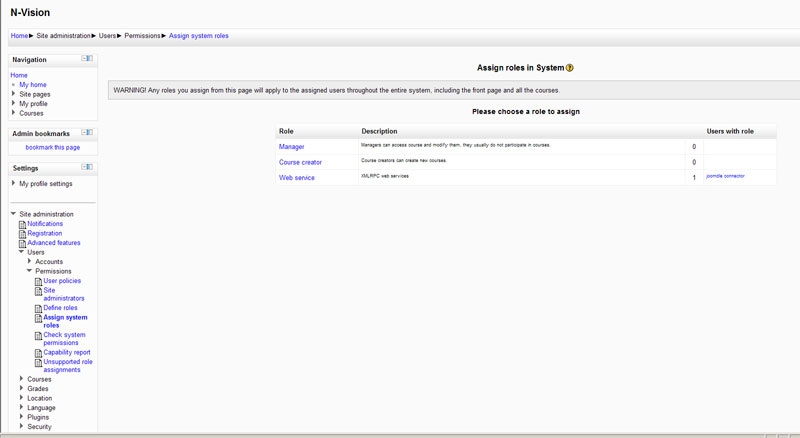
I created the user joomdle connector, created the role Web service - the screen dumpw shows Joomdle connector with this role.
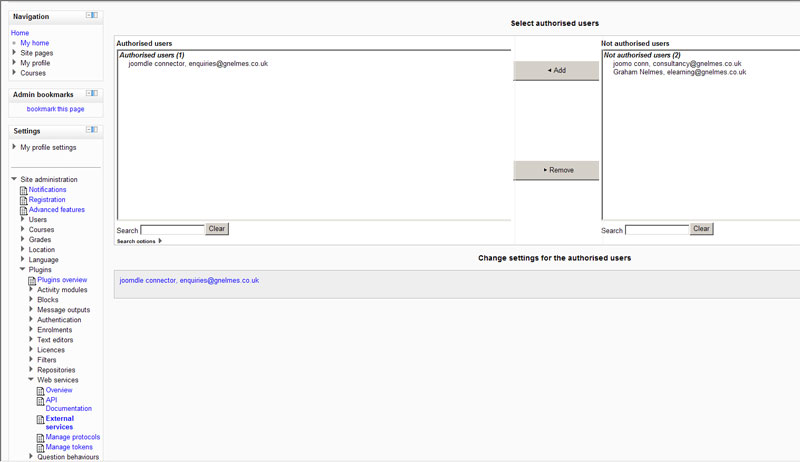
I created the Web service Joomdle and the other screen dump shows joomdle connector as an authorised user.
I am not sure what to do next!
I created the user joomdle connector, created the role Web service - the screen dumpw shows Joomdle connector with this role.
I created the Web service Joomdle and the other screen dump shows joomdle connector as an authorised user.
I am not sure what to do next!
Last edit: 14 years 8 months ago by Graham Nelmes.
The topic has been locked.
- Antonio Durán
-
- Offline
- Moderator
-
Less
More
- Posts: 7936
14 years 8 months ago #10
by Antonio Durán
Replied by Antonio Durán on topic Re: No token!
I don't really know what else to tell you, as you seem to have followed the steps (but it's clear that something did go wrong).
So, I would just delete the web service role, the user, the service.... and try starting over.
So, I would just delete the web service role, the user, the service.... and try starting over.
The topic has been locked.