
How To / General
Unable to restrict students from editing their profiles in Moodle
- Web Buster UK Ltd
-
 Topic Author
- Offline
- Elite Member
-

Less
More
6 years 10 months ago - 6 years 10 months ago #1
by Web Buster UK Ltd
Unable to restrict students from editing their profiles in Moodle was created by Web Buster UK Ltd
Authentication method set is "Joomdle" for affected users. In Moodle, within Site Administration -> Plugins -> Authentication -> Joomdle, all user fields are locked. However, when the user logs in and edit his profile within Moodle, all the fields are unlocked.
When authentication method for the user is changed to "Manual account" (corresponding settings for locking profile fields is set for "manual account" authentication method), the fields are locked.
Also, is there a way to completely prevent a user from editing their profile field values in Moodle? The "Lock user fields" settings in Joomdle do not cover all - eg, profile pictures.
When authentication method for the user is changed to "Manual account" (corresponding settings for locking profile fields is set for "manual account" authentication method), the fields are locked.
Also, is there a way to completely prevent a user from editing their profile field values in Moodle? The "Lock user fields" settings in Joomdle do not cover all - eg, profile pictures.
Last edit: 6 years 10 months ago by Web Buster UK Ltd.
Please Log in or Create an account to join the conversation.
- Antonio Durán
-

- Offline
- Moderator
-

Less
More
- Posts: 7945
6 years 10 months ago #2
by Antonio Durán
Replied by Antonio Durán on topic Unable to restrict students from editing their profiles in Moodle
Thanks for the info. I will look into it and get back to you as soon as possible.
Please Log in or Create an account to join the conversation.
- Antonio Durán
-
- Offline
- Moderator
-
Less
More
- Posts: 7945
6 years 10 months ago #3
by Antonio Durán
Replied by Antonio Durán on topic Unable to restrict students from editing their profiles in Moodle
Hi.
I looked into this, and found the problem.
To fix it, edit file: moodle/auth/joomdle/auth.php
Function: __construct
Change:
By:
As for totally locking profile editing:, this may come handy:
docs.moodle.org/36/en/Capabilities/moodle/user:editownprofile
You would need to remove that capablity from the authenticated user role, so teachers cannot edit profiles either (which I guess is ok, as profile editing is done in Joomla).
Also for profile image you can check this:
moodle.org/mod/forum/discuss.php?d=321642
I looked into this, and found the problem.
To fix it, edit file: moodle/auth/joomdle/auth.php
Function: __construct
Change:
Code:
// $this->config = get_config('auth/joomdle');
Code:
$this->config = get_config('auth_joomdle');
As for totally locking profile editing:, this may come handy:
docs.moodle.org/36/en/Capabilities/moodle/user:editownprofile
You would need to remove that capablity from the authenticated user role, so teachers cannot edit profiles either (which I guess is ok, as profile editing is done in Joomla).
Also for profile image you can check this:
moodle.org/mod/forum/discuss.php?d=321642
Please Log in or Create an account to join the conversation.
- Web Buster UK Ltd
-
Topic Author
- Offline
- Elite Member
-
6 years 10 months ago - 6 years 10 months ago #4
by Web Buster UK Ltd
Replied by Web Buster UK Ltd on topic Unable to restrict students from editing their profiles in Moodle
Changed the code for __construct as above, but now we can't save moodle's joomdle authentication plugin settings.
It came up with "Error writing to database" when we click save changes. Looking at the console, it came up with this error:
Failed to load resource: the server responded with a status of 404 ()
ourwebsite.com/moodle/admin/settings.php...n=authsettingjoomdle
It also still doesn't stop users from editing their profile fields.
It came up with "Error writing to database" when we click save changes. Looking at the console, it came up with this error:
Failed to load resource: the server responded with a status of 404 ()
ourwebsite.com/moodle/admin/settings.php...n=authsettingjoomdle
It also still doesn't stop users from editing their profile fields.
Last edit: 6 years 10 months ago by Web Buster UK Ltd.
Please Log in or Create an account to join the conversation.
- Antonio Durán
-
- Offline
- Moderator
-
Less
More
- Posts: 7945
6 years 10 months ago #5
by Antonio Durán
Replied by Antonio Durán on topic Unable to restrict students from editing their profiles in Moodle
Hi.
Did you change the code or just uncomment it? There is a small change.
The change is working for me locally.
Did you change the code or just uncomment it? There is a small change.
The change is working for me locally.
Please Log in or Create an account to join the conversation.
- Web Buster UK Ltd
-
Topic Author
- Offline
- Elite Member
-
6 years 10 months ago - 6 years 10 months ago #6
by Web Buster UK Ltd
Replied by Web Buster UK Ltd on topic Unable to restrict students from editing their profiles in Moodle
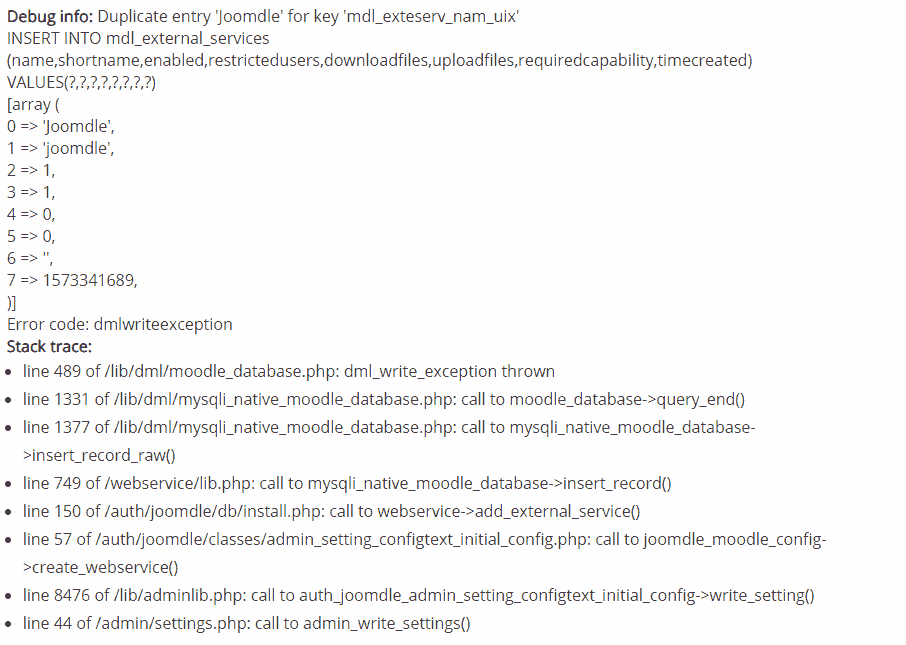
Yeah, we changed it, but users are still able to edit their profile fields. Not sure if this is related, but every time we try to save joomdle authentication plugin settings it throws up this error. Would you know what is causing this?
[hr]
[hr]
If I understood that right, it seems that it's trying to add "Joomdle" into the table mdl_external_services, but there is already an entry for Joomdle in that table (likely from previous manual creation of joomdle external service). We ended up just dropping the existing key and that solved the issue.
Edit: The issue with users still allowed to edit their profile fields possibly is a bug with the adaptable template. We just turned off the ability to editownprofile for now.
[hr]
[hr]
If I understood that right, it seems that it's trying to add "Joomdle" into the table mdl_external_services, but there is already an entry for Joomdle in that table (likely from previous manual creation of joomdle external service). We ended up just dropping the existing key and that solved the issue.
Edit: The issue with users still allowed to edit their profile fields possibly is a bug with the adaptable template. We just turned off the ability to editownprofile for now.
Last edit: 6 years 10 months ago by Web Buster UK Ltd.
Please Log in or Create an account to join the conversation.
- Antonio Durán
-
- Offline
- Moderator
-
Less
More
- Posts: 7945
6 years 10 months ago #7
by Antonio Durán
Replied by Antonio Durán on topic Unable to restrict students from editing their profiles in Moodle
Thanks for the info.
The problem with the database happens because of a duplicate index problem. I hadn't noticed this index before, so there are no check in the code, like there are so there is no duplicate values for unique fields.
With your detailed report I could replicate the issue and should be able to fix it. Even if it is not an issue for you anymore, I am sure it can help other users.
The problem with the database happens because of a duplicate index problem. I hadn't noticed this index before, so there are no check in the code, like there are so there is no duplicate values for unique fields.
With your detailed report I could replicate the issue and should be able to fix it. Even if it is not an issue for you anymore, I am sure it can help other users.
Please Log in or Create an account to join the conversation.