
Joomdle Community Builder Integration
- Wynand Louw
-
 Topic Author
- Offline
- Premium Member
-

Less
More
5 months 4 weeks ago #21
by Wynand Louw
Replied by Wynand Louw on topic Joomdle Community Builder Integration
Thanks Antonio. It is working. Looks great.
Appreciate your efforts and hard work in the Joomla Community.
Appreciate your efforts and hard work in the Joomla Community.
Please Log in or Create an account to join the conversation.
- Web Buster UK Ltd
-

- Offline
- Elite Member
-

5 months 4 weeks ago #22
by Web Buster UK Ltd
Replied by Web Buster UK Ltd on topic Joomdle Community Builder Integration
Thank you. This is much better. I now only have 2 issues. I am sorry the list seems to go on.
Issue One:
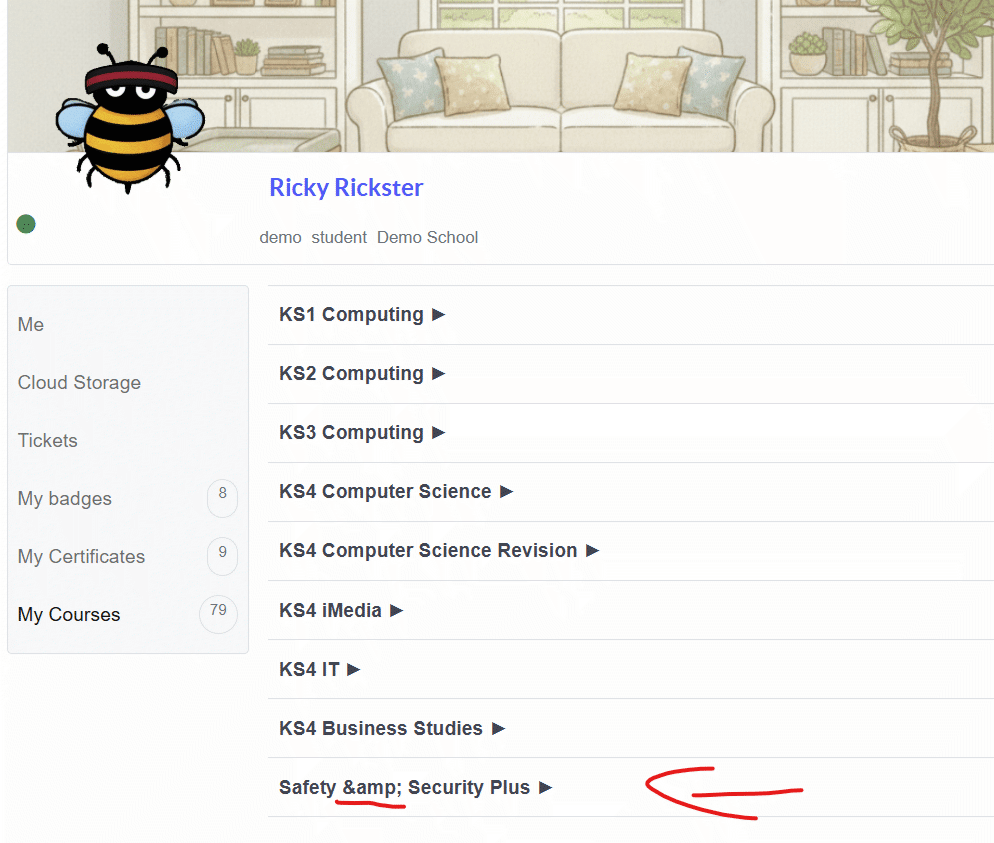
I attach a screenshot, the system displays & in the course title.
Safety & Security Plus
Issue Two
This section shows ALL courses. I really need an option to show ALL or My Courses.
If "My Courses" is selected, the courses the student has started should be listed, but courses the student has never started should be excluded. This ensures the student has a list of their courses.
As some of your customers will want ALL courses, an option to set it to ALL or CURRENT would solve our issue and prevent lists from becoming too long.
If the category has no courses started in it, then the category heading is not needed either until a course in that category has been started.
Issue One:
I attach a screenshot, the system displays & in the course title.
Safety & Security Plus
Issue Two
This section shows ALL courses. I really need an option to show ALL or My Courses.
If "My Courses" is selected, the courses the student has started should be listed, but courses the student has never started should be excluded. This ensures the student has a list of their courses.
As some of your customers will want ALL courses, an option to set it to ALL or CURRENT would solve our issue and prevent lists from becoming too long.
If the category has no courses started in it, then the category heading is not needed either until a course in that category has been started.
Please Log in or Create an account to join the conversation.
- Wynand Louw
-
Topic Author
- Offline
- Premium Member
-
5 months 4 weeks ago - 5 months 4 weeks ago #23
by Wynand Louw
Replied by Wynand Louw on topic Joomdle Community Builder Integration
It is because you use & in the name of the course. If you replace it with Safety and Security instead of Safety & Security, it will disappear. Think it is Moodle thing.
Last edit: 5 months 4 weeks ago by Wynand Louw.
Please Log in or Create an account to join the conversation.
- Antonio Durán
-

- Offline
- Moderator
-

Less
More
- Posts: 7944
5 months 3 weeks ago #24
by Antonio Durán
Replied by Antonio Durán on topic Joomdle Community Builder Integration
Thank you both for the feedback, I am glad it is working better.
> I attach a screenshot, the system displays & in the course title.
I cannot replicate this as this is displaying properly as you can see in the screenshot... I don't know what can be different between our sites to cause that.
> This section shows ALL courses. I really need an option to show ALL or My Courses.
It only shows "My courses", not all: courses where the user has an active enrollment.
> If the category has no courses started in it, then the category heading is not needed either until a course in that category has been started.
Ah, maybe you want to show only courses where students had an access, not all his courses? I think that may need so work on the Moodle side, as right now that info is not available on the my courses call.
> I attach a screenshot, the system displays & in the course title.
I cannot replicate this as this is displaying properly as you can see in the screenshot... I don't know what can be different between our sites to cause that.
> This section shows ALL courses. I really need an option to show ALL or My Courses.
It only shows "My courses", not all: courses where the user has an active enrollment.
> If the category has no courses started in it, then the category heading is not needed either until a course in that category has been started.
Ah, maybe you want to show only courses where students had an access, not all his courses? I think that may need so work on the Moodle side, as right now that info is not available on the my courses call.

Please Log in or Create an account to join the conversation.
- Web Buster UK Ltd
-
- Offline
- Elite Member
-
5 months 3 weeks ago #25
by Web Buster UK Ltd
Replied by Web Buster UK Ltd on topic Joomdle Community Builder Integration
Hi
Thank you.
Basically, if they start the course, it shows on the list; if the course has NOT been started, it's not shown on the list.
Yes, we do use & in the course name to make it fit in the menu on Moodle. Is there no way, your plugin can allow it's use?
Thank you.
Basically, if they start the course, it shows on the list; if the course has NOT been started, it's not shown on the list.
Yes, we do use & in the course name to make it fit in the menu on Moodle. Is there no way, your plugin can allow it's use?
Please Log in or Create an account to join the conversation.
- Antonio Durán
-
- Offline
- Moderator
-
Less
More
- Posts: 7944
5 months 3 weeks ago #26
by Antonio Durán
Replied by Antonio Durán on topic Joomdle Community Builder Integration
> Yes, we do use & in the course name to make it fit in the menu on Moodle. Is there no way, your plugin can allow it's use?
As I wrote in my previous post, this is working in my installation, so it must be something specific to your setup.... Wynand, can you test this please? So we can see if it is a widespread problem and I am the outlier.
> Basically, if they start the course, it shows on the list; if the course has NOT been started, it's not shown on the list.
I will add this to Feature Requests, to see if we can add it.
As I wrote in my previous post, this is working in my installation, so it must be something specific to your setup.... Wynand, can you test this please? So we can see if it is a widespread problem and I am the outlier.
> Basically, if they start the course, it shows on the list; if the course has NOT been started, it's not shown on the list.
I will add this to Feature Requests, to see if we can add it.
Please Log in or Create an account to join the conversation.
- Wynand Louw
-
Topic Author
- Offline
- Premium Member
-
5 months 3 weeks ago - 5 months 3 weeks ago #27
by Wynand Louw
Replied by Wynand Louw on topic Joomdle Community Builder Integration
I will check that & because it does display if you use it instead of and, I think it might be Moodle specific thing, or it could be html thing, like Joomla links will have %20 in space within File names. So, it depends on the local setup.
I use file links as my_Link_File instead of My Link File which then removes the Joomla %20 in the URL. If a student was not subscribed to a course, then it will not show in their profile, unless you have a open time restriction on the course before it opens it might not show. For me a work around is the not block the whole course and the Announcements, but only the rest of the course, the the student will see it if subscribed, and they can see the announcement. If you block the whole course, then it will only be visible on the date set.
Will check and repost back.
I use file links as my_Link_File instead of My Link File which then removes the Joomla %20 in the URL. If a student was not subscribed to a course, then it will not show in their profile, unless you have a open time restriction on the course before it opens it might not show. For me a work around is the not block the whole course and the Announcements, but only the rest of the course, the the student will see it if subscribed, and they can see the announcement. If you block the whole course, then it will only be visible on the date set.
Will check and repost back.
Last edit: 5 months 3 weeks ago by Wynand Louw.
Please Log in or Create an account to join the conversation.
- Wynand Louw
-
Topic Author
- Offline
- Premium Member
-
5 months 3 weeks ago #28
by Wynand Louw
Replied by Wynand Louw on topic Joomdle Community Builder Integration
I look around a bit and it seems that it is common in Joomla and Moodle since the system see it as HTML code.
This usually happens when the CMS or a plugin/module is applying htmlspecialchars() or similar encoding twice, or failing to decode before rendering.
You can try the fix or just replace with and:
Check the course title field in Site administration → Courses → Manage courses. If the raw text already contains &, replace it with &. Sometimes this happens.
If it keeps re‑encoding, look at the theme or custom code. Some themes echo course names with format_string() or htmlspecialchars(). Removing the extra encoding could fix it.
If it is a Joomla display:
In the article or menu item title, switch to the HTML/source editor. If you see &, replace it with &.
If Joomla keeps converting it, check the template override or module that displays the title. It may be calling htmlspecialchars() unnecessarily.
That is the best I could find, for me the simple answer way back was just to use and.
This usually happens when the CMS or a plugin/module is applying htmlspecialchars() or similar encoding twice, or failing to decode before rendering.
You can try the fix or just replace with and:
Check the course title field in Site administration → Courses → Manage courses. If the raw text already contains &, replace it with &. Sometimes this happens.
If it keeps re‑encoding, look at the theme or custom code. Some themes echo course names with format_string() or htmlspecialchars(). Removing the extra encoding could fix it.
If it is a Joomla display:
In the article or menu item title, switch to the HTML/source editor. If you see &, replace it with &.
If Joomla keeps converting it, check the template override or module that displays the title. It may be calling htmlspecialchars() unnecessarily.
That is the best I could find, for me the simple answer way back was just to use and.
Please Log in or Create an account to join the conversation.
- Antonio Durán
-
- Offline
- Moderator
-
Less
More
- Posts: 7944
5 months 3 weeks ago #29
by Antonio Durán
Replied by Antonio Durán on topic Joomdle Community Builder Integration
Thank you Wynand.
Chye: did you solve the issue? I went it to check your site to try to understand the problem but & is showing fine for me, as shown in the screenshot.
Chye: did you solve the issue? I went it to check your site to try to understand the problem but & is showing fine for me, as shown in the screenshot.

Please Log in or Create an account to join the conversation.
- Wynand Louw
-
Topic Author
- Offline
- Premium Member
-
4 months 4 weeks ago #30
by Wynand Louw
Replied by Wynand Louw on topic Joomdle Community Builder Integration
Hi Antonio
Within the course Plugin for Community Builder, must I every time change the Include Course when I add a course.
See that if I do not do that it does not display the course but do display the category.
Within the course Plugin for Community Builder, must I every time change the Include Course when I add a course.
See that if I do not do that it does not display the course but do display the category.
Please Log in or Create an account to join the conversation.