
- Posts: 3
Joomdle 1.0 Installation
[Solved] Moodle 2.7 - Joomla 3.3.6 connectivity problem
- befaly
- Topic Author
- Offline
- New Member
-

Less
More
11 years 6 months ago - 11 years 5 months ago #1
by befaly
[Solved] Moodle 2.7 - Joomla 3.3.6 connectivity problem was created by befaly
Hi,
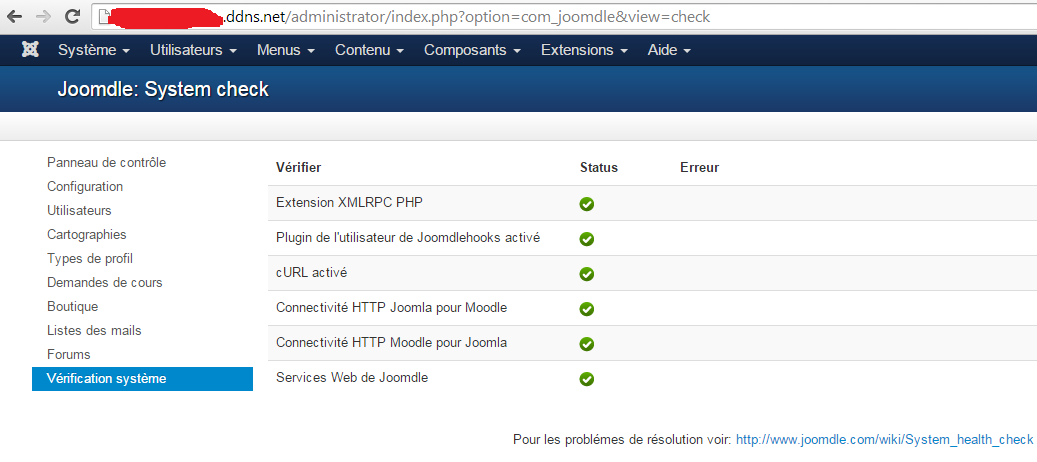
I'm buiding a Moodle 2.7 site and use Joomdle 1.0 and Joomla 3.3.6 to display the Moodle content. They are in the same domain, Moodle : mydomain.ddns.net/moodle and Joomla : mydomain.ddns.net/ I followed the instructions for Moodle such as Joomla and Joomdle, but i have always the 3 errors :
"Joomla cannot connect to Moodle"
"Moodle cannot connect to Joomla"
"Received empty response from Moodle"
The server is debian 7 with ISPconfig 3.
Thanks
I'm buiding a Moodle 2.7 site and use Joomdle 1.0 and Joomla 3.3.6 to display the Moodle content. They are in the same domain, Moodle : mydomain.ddns.net/moodle and Joomla : mydomain.ddns.net/ I followed the instructions for Moodle such as Joomla and Joomdle, but i have always the 3 errors :
"Joomla cannot connect to Moodle"
"Moodle cannot connect to Joomla"
"Received empty response from Moodle"
The server is debian 7 with ISPconfig 3.
Thanks
Last edit: 11 years 5 months ago by Antonio Durán.
The topic has been locked.
- Atle Johnsen
-

- Offline
- Junior Member
-

Less
More
- Posts: 27
11 years 6 months ago #2
by Atle Johnsen
Replied by Atle Johnsen on topic Moodle 2.7 - Joomla 3.3.6 connectivity problem
You have incorrect JOOMDLE's JOOMLA authentication token in Moodle. Copy over the correct code and try again.
Given that all the rest of you config is correct, but that the two last checks still fail, then that could be a Moodle-server issue. It happened to me, and I fixed it by changed one line in the config.php file in the Moodle folder:
$CFG->wwwroot = "http://".$_SERVER["HTTP_HOST"]."/Moodle";
Given that all the rest of you config is correct, but that the two last checks still fail, then that could be a Moodle-server issue. It happened to me, and I fixed it by changed one line in the config.php file in the Moodle folder:
$CFG->wwwroot = "http://".$_SERVER["HTTP_HOST"]."/Moodle";
The topic has been locked.
- Antonio Durán
-

- Offline
- Moderator
-

Less
More
- Posts: 7929
11 years 6 months ago #3
by Antonio Durán
Replied by Antonio Durán on topic Moodle 2.7 - Joomla 3.3.6 connectivity problem
Double check your URLs: they don't seem to load for me.
The topic has been locked.
- Chris
-

- Offline
- Moderator
-
11 years 6 months ago #4
by Chris
Replied by Chris on topic Moodle 2.7 - Joomla 3.3.6 connectivity problem
I have removed your attachments as you are displaying the tokens and urls openly.
The topic has been locked.
- befaly
- Topic Author
- Offline
- New Member
-
Less
More
- Posts: 3
11 years 6 months ago #5
by befaly
Replied by befaly on topic Moodle 2.7 - Joomla 3.3.6 connectivity problem
The server is on local network (DMZ). I forget to hide the links ... Thanks !
The topic has been locked.
- Chris
-
- Offline
- Moderator
-
11 years 6 months ago #6
by Chris
Replied by Chris on topic Moodle 2.7 - Joomla 3.3.6 connectivity problem
Given they are on an internal network, the first thing I would check is, if I can get to those urls in the browser. Perhaps there is a local DNS, etc. problem as it appears, based on the messages, that there is a problem with the urls being recognised. Did you enter http:// ? Did you set up a network DNS or local hosts file?
The topic has been locked.
- Chris
-
- Offline
- Moderator
-
11 years 6 months ago #7
by Chris
Replied by Chris on topic Moodle 2.7 - Joomla 3.3.6 connectivity problem
Didn't receive a reply, so I assume you are OK now. Just in case you were doing this on a local PC (ie your local network), I just did a re-install of Joomla 3.3.6, Joomdle 1.0, Moodle 2.8.1 on Windows 8 with XAMPP and used the following URLs
Moodle URL (configured in Joomla)
http://localhost/joomla/moodle
Joomla URL (configured in Moodle)
http://localhost/joomla
$CFG->wwwroot = 'http://localhost/joomla/moodle'; (configured in the moodle/config.php)
Notes:
- My website www is installed in c:\xampp\htdocs\joomla
- During installation of Moodle you are asked to specify the local root ... if you entered 127.0.0.1 that would be in $CFG instead and would need to be changed to localhost as Atle has highlighted above.
Moodle URL (configured in Joomla)
http://localhost/joomla/moodle
Joomla URL (configured in Moodle)
http://localhost/joomla
$CFG->wwwroot = 'http://localhost/joomla/moodle'; (configured in the moodle/config.php)
Notes:
- My website www is installed in c:\xampp\htdocs\joomla
- During installation of Moodle you are asked to specify the local root ... if you entered 127.0.0.1 that would be in $CFG instead and would need to be changed to localhost as Atle has highlighted above.
The topic has been locked.
- befaly
- Topic Author
- Offline
- New Member
-
Less
More
- Posts: 3
11 years 5 months ago #8
by befaly
Replied by befaly on topic Moodle 2.7 - Joomla 3.3.6 connectivity problem
Thanks, the problem is solved.
The IP of FQDN is not set on the web server (on local network) .
Happy New Year
Befaly
Madagascar
The IP of FQDN is not set on the web server (on local network) .
Happy New Year
Befaly
Madagascar
The topic has been locked.