
- Posts: 31
Joomdle 1.0 Installation
[Closed] Joomdle not listed in component menu
- Claudio
- Topic Author
- Offline
- Junior Member
-

Less
More
11 years 7 months ago - 11 years 7 months ago #1
by Claudio
[Closed] Joomdle not listed in component menu was created by Claudio
I have migrated my site from Joomla 2.5.28 to Joomla 3.3.6
After that I have uninstalled Joomdle and installed the latest version for Joomla 3
joomdle_v1.0.0-for-joomla30-UNZIP-FIRST.zip
The installation was successful but Joomdle is not listed in the component menu so it is not possible to access the joomdle configuration men
I checked in the component management page where it is evident that Joomdle has been installed (version 1.0)
Could you please help?
After that I have uninstalled Joomdle and installed the latest version for Joomla 3
joomdle_v1.0.0-for-joomla30-UNZIP-FIRST.zip
The installation was successful but Joomdle is not listed in the component menu so it is not possible to access the joomdle configuration men
I checked in the component management page where it is evident that Joomdle has been installed (version 1.0)
Could you please help?
Last edit: 11 years 7 months ago by Chris.
The topic has been locked.
- Antonio Durán
-

- Offline
- Moderator
-

Less
More
- Posts: 7944
11 years 7 months ago #2
by Antonio Durán
Replied by Antonio Durán on topic Joomdle not listed in component menu
Have you tried uninstalling it and re-installing again?
The topic has been locked.
- Claudio
- Topic Author
- Offline
- Junior Member
-
Less
More
- Posts: 31
11 years 7 months ago - 11 years 7 months ago #3
by Claudio
Replied by Claudio on topic Joomdle not listed in component menu
Uninstalled and installed again as you suggested
Last edit: 11 years 7 months ago by Claudio.
The topic has been locked.
- Antonio Durán
-
- Offline
- Moderator
-
Less
More
- Posts: 7944
11 years 7 months ago #4
by Antonio Durán
Replied by Antonio Durán on topic Joomdle not listed in component menu
Did it work?
The topic has been locked.
- Claudio
- Topic Author
- Offline
- Junior Member
-
Less
More
- Posts: 31
11 years 7 months ago - 11 years 7 months ago #5
by Claudio
Replied by Claudio on topic Joomdle not listed in component menu
I'm sorry! It didn't work
I would like to attach a screen copy but it doesn't work
May I have an email to send you the screen capture?
Thanks a lot!
I would like to attach a screen copy but it doesn't work
May I have an email to send you the screen capture?
Thanks a lot!
Last edit: 11 years 7 months ago by Claudio. Reason: Attachment not loaded
The topic has been locked.
- Chris
-

- Offline
- Moderator
-
11 years 7 months ago #6
by Chris
Replied by Chris on topic Joomdle not listed in component menu
You can see here in the forum that many others are attaching screen shots / attachments without problems, so I am not sure why you would be having a problem. That said, I am not sure what your screen shot would be of? ie since there is nothing there??
You say that Joomdle does not show up in the component menu, do you mean the Extension Manager/Manage? If you type in Joomdle there, you should see 1 x Component, 2 x Modules, 5 x Plugins.
What happens if you enter this url in your browser your joomla path/administrator/index.php?option=com_joomdle ? This should bring up the Joomdle configuration panel.
There are many reasons why people have reported similar problems with Joomla / other components. A quick search of google shows:
- sometimes the browser cache remembers the old menu especially if using chrome. try firefox
- clear joomla cache
- are you using multiple languages, sometimes joomla gets confused. set the default front and back the same
- have you tried a manual install from a directory? have you tried that before and not cleared out that directory? if you sometimes joomla gets confused in this situation
- you can also check your permissions in joomla backend to ensure the id you are logging in with has access to the joomdle component
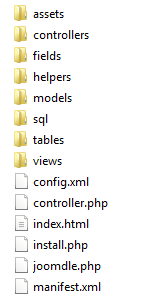
Have you checked from FTP, control panel, etc. if the folders and files are actually being installed? You should see components\com_joomdle\etc and administrator\components\com_joomdle\etc. I have attached the administrator main folder for joomdle.
You say that Joomdle does not show up in the component menu, do you mean the Extension Manager/Manage? If you type in Joomdle there, you should see 1 x Component, 2 x Modules, 5 x Plugins.
What happens if you enter this url in your browser your joomla path/administrator/index.php?option=com_joomdle ? This should bring up the Joomdle configuration panel.
There are many reasons why people have reported similar problems with Joomla / other components. A quick search of google shows:
- sometimes the browser cache remembers the old menu especially if using chrome. try firefox
- clear joomla cache
- are you using multiple languages, sometimes joomla gets confused. set the default front and back the same
- have you tried a manual install from a directory? have you tried that before and not cleared out that directory? if you sometimes joomla gets confused in this situation
- you can also check your permissions in joomla backend to ensure the id you are logging in with has access to the joomdle component
Have you checked from FTP, control panel, etc. if the folders and files are actually being installed? You should see components\com_joomdle\etc and administrator\components\com_joomdle\etc. I have attached the administrator main folder for joomdle.
The topic has been locked.
- Claudio
- Topic Author
- Offline
- Junior Member
-
Less
More
- Posts: 31
11 years 7 months ago #7
by Claudio
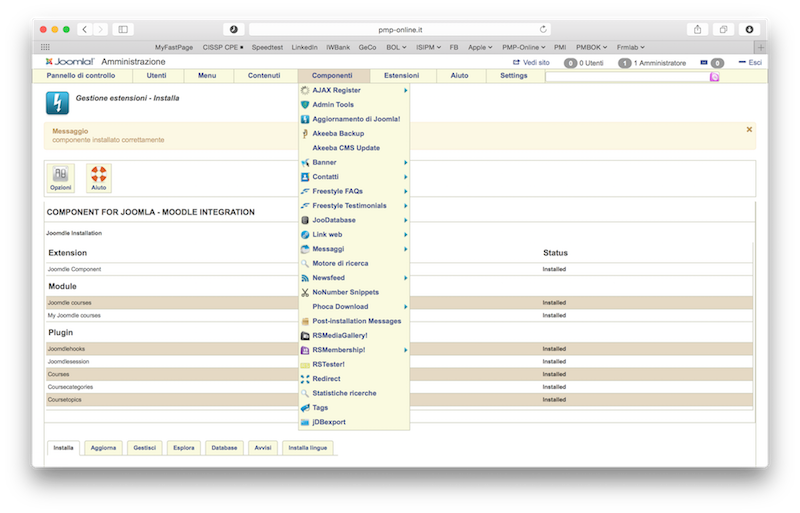
As you can see from this screen capture after installing joomdle the extensions menu do not include Joomdle. The installation screen says that the Joomdle component has been installed but searching for "joomdle" in the Extension Manager/Manage only find 2 x modules and 5 x plugin (no component)
If I enter the url www.pmp-online.it/j25/administrator/inde...p?option=com_joomdle i got
404 - Si è verificato un errore.
Componente non trovato
Torna al Pannello di controllo
Replied by Claudio on topic Joomdle not listed in component menu
Chris wrote: You say that Joomdle does not show up in the component menu, do you mean the Extension Manager/Manage? If you type in Joomdle there, you should see 1 x Component, 2 x Modules, 5 x Plugins.
As you can see from this screen capture after installing joomdle the extensions menu do not include Joomdle. The installation screen says that the Joomdle component has been installed but searching for "joomdle" in the Extension Manager/Manage only find 2 x modules and 5 x plugin (no component)
Chris wrote: What happens if you enter this url in your browser your joomla path/administrator/index.php?option=com_joomdle ? This should bring up the Joomdle configuration panel.
If I enter the url www.pmp-online.it/j25/administrator/inde...p?option=com_joomdle i got
404 - Si è verificato un errore.
Componente non trovato
Torna al Pannello di controllo
The topic has been locked.
- Claudio
- Topic Author
- Offline
- Junior Member
-
Less
More
- Posts: 31
11 years 7 months ago - 11 years 7 months ago #8
by Claudio
Replied by Claudio on topic Joomdle not listed in component menu
Again I was not able to upload an image
I press Add file, select the image from my computer
then press insert
then press Submit
Is it the right way to attach an image?
I tried with Safari and Firefox

I press Add file, select the image from my computer
then press insert
then press Submit
Is it the right way to attach an image?
I tried with Safari and Firefox
Last edit: 11 years 7 months ago by Claudio.
The topic has been locked.
- Chris
-
- Offline
- Moderator
-
11 years 7 months ago #9
by Chris
Replied by Chris on topic Joomdle not listed in component menu
Perhaps your file / attachment is too large.
You should definitely see 1 x component under extensions/manage. This suggests that the component was not installed and is supported by your 404 error.
Two things I can think of right now:
- I see you are using Italian language. Change both your Front end and backend to english and try installing again. As per my earlier post there are reported issues with non english installations of Joomla. Once installed change back.
- You do not have permissions set up correctly on your Joomla installation and thus you probably do not see the Joomdle component folders too.
You should definitely see 1 x component under extensions/manage. This suggests that the component was not installed and is supported by your 404 error.
Two things I can think of right now:
- I see you are using Italian language. Change both your Front end and backend to english and try installing again. As per my earlier post there are reported issues with non english installations of Joomla. Once installed change back.
- You do not have permissions set up correctly on your Joomla installation and thus you probably do not see the Joomdle component folders too.
The topic has been locked.
- Claudio
- Topic Author
- Offline
- Junior Member
-
Less
More
- Posts: 31
11 years 7 months ago - 11 years 7 months ago #10
by Claudio
File size has been reduced under 200K
and now it works
Replied by Claudio on topic Joomdle not listed in component menu
Chris wrote: Perhaps your file / attachment is too large.
File size has been reduced under 200K
and now it works
Last edit: 11 years 7 months ago by Claudio.
The topic has been locked.