
- Posts: 2
Joomdle 1.0 Installation
How to create the token for Joomdle
- Marc
- Topic Author
- Offline
- New Member
-

Less
More
10 years 11 months ago - 10 years 11 months ago #1
by Marc
How to create the token for Joomdle was created by Marc
Hi, I already installed Joomdle. But when I want to get the token in order to Web service works fine, I found that I have to install Moodle (and run it under this path: Site Administration->Plugins->Web services->Overview). This tutorial doesnt said how to do it, Can you tell me, How to install Moodle first?
Thanks in advance,
Marc Ovalle
Thanks in advance,
Marc Ovalle
Last edit: 10 years 11 months ago by Marc.
Please Log in or Create an account to join the conversation.
- Chris
-

- Offline
- Moderator
-

10 years 11 months ago - 10 years 11 months ago #2
by Chris
Replied by Chris on topic How to install Moodle
Hi Marc, I am a little confused by your statements. You discuss both the installation of Moodle and the Moodle configuration and plugins (ie Joomdle).
To be sure there is no confusion:
To be sure there is no confusion:
- Installation of Joomla and Moodle are independent. That said it is easier to install Moodle on the same domain as Joomla and ideally as a folder / directory below Joomla. For example if you install Joomla in the domain www.mydomain.com (in the public_html or www folder), then install moodle in the folder www.mydomain.com/xxxxxxx where xxxxxx is moodle, courses, classes, or whatever you want to call it.
- With regards to your comment "install Moodle (and run it under this path: Site Administration->Plugins->Web services->Overview)". This is related to the configuration / preparation of Moodle and the installation of Joomdle in Moodle. For these you can follow the installation instructions here www.joomdle.com/wiki/Installation
Last edit: 10 years 11 months ago by Chris.
Please Log in or Create an account to join the conversation.
- Marc
- Topic Author
- Offline
- New Member
-
Less
More
- Posts: 2
10 years 11 months ago - 10 years 11 months ago #3
by Marc
Replied by Marc on topic How to create the token?
Ok, my real question is: How to create the token?.... The instructions said go to: Site Administration->Plugins->Web services->Overview
BUT, I can not find this... Where is it ???... How can I get there, in order to create the token ???? (see image)
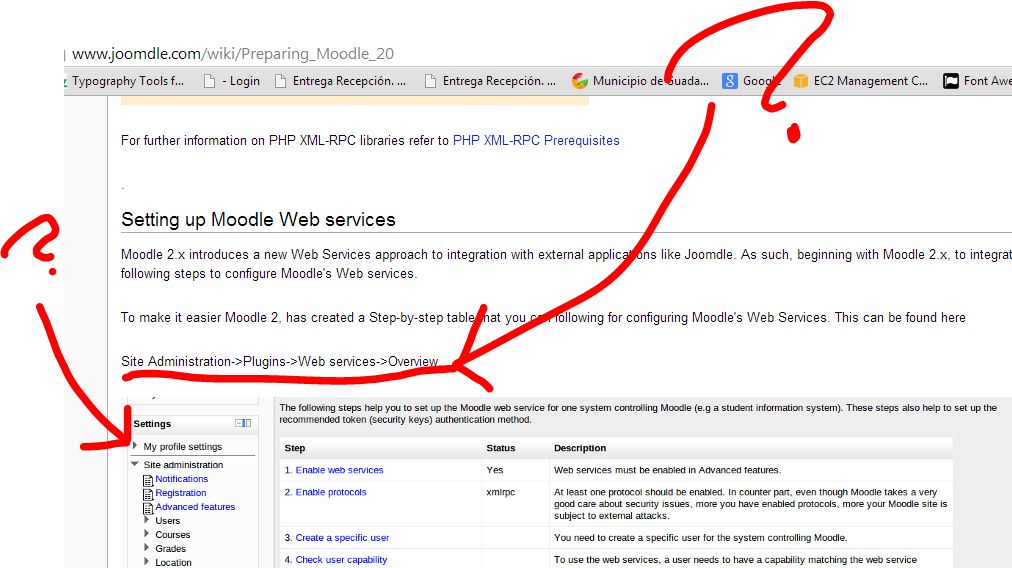
Thanks for your answer
Marc Ovalle
BUT, I can not find this... Where is it ???... How can I get there, in order to create the token ???? (see image)
Thanks for your answer
Marc Ovalle
Last edit: 10 years 11 months ago by Marc.
Please Log in or Create an account to join the conversation.
- Chris
-
- Offline
- Moderator
-
10 years 11 months ago #4
by Chris
Replied by Chris on topic How to create the token?
Yes that is correct. Site Administration/Plugins/Web Services/Overview.
If you are not seeing this, perhaps you are running a different version of Moodle and/or do not have access / permissions. Also, note the image in the Joomdle documentation does not show the full webpage as the information scrolls off the screen ie the webpage is too big for the monitor. You just need to scroll down.
If you are not seeing this, perhaps you are running a different version of Moodle and/or do not have access / permissions. Also, note the image in the Joomdle documentation does not show the full webpage as the information scrolls off the screen ie the webpage is too big for the monitor. You just need to scroll down.
Please Log in or Create an account to join the conversation.