
- Posts: 7
Joomdle 1.0 Installation
[Solved] Unenroll button not showing
- Simon J.
- Topic Author
- Offline
- New Member
-

Less
More
10 years 10 months ago - 10 years 10 months ago #1
by Simon J.
[Solved] Unenroll button not showing was created by Simon J.
Hi all,
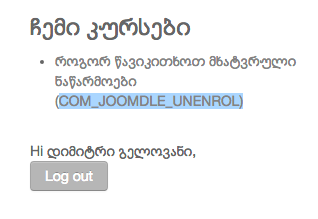
in My Courses module, Self Unenrol button is not showing correctly and is displaying (COM_JOOMDLE_UNENROL) message instead (See the screenshot). How can I fix it?
I am using Joomdle 1.0 with Moodle 2.8
in My Courses module, Self Unenrol button is not showing correctly and is displaying (COM_JOOMDLE_UNENROL) message instead (See the screenshot). How can I fix it?
I am using Joomdle 1.0 with Moodle 2.8
Last edit: 10 years 10 months ago by Antonio Durán.
The topic has been locked.
- Chris
-

- Offline
- Moderator
-

10 years 10 months ago #2
by Chris
Replied by Chris on topic Unenroll button not showing
Have you set up a language file for the module? If so, it is likely to be missing that value. If you have not set up a language file for the module you will need to do so as modules use their own language files instead of the main joomdle language file.
The topic has been locked.
- Simon J.
- Topic Author
- Offline
- New Member
-
Less
More
- Posts: 7
10 years 10 months ago #3
by Simon J.
Replied by Simon J. on topic Unenroll button not showing
Tried to figure out how to assign the language file to this module, but could not find any clues.
Any tips of how this should be done?
Any tips of how this should be done?
The topic has been locked.
- Chris
-
- Offline
- Moderator
-
10 years 10 months ago #4
by Chris
Replied by Chris on topic Unenroll button not showing
You do not need to 'assign' a language file as Joomla will take care of this.
If you have not already created a language file for your language, you can simple copy the English language file (/language/en-GB/en-GB.mod_joomdle_my_courses) to your language directory and rename it appropriately.
Then you can edit the parameters as you wish.
If you have not already created a language file for your language, you can simple copy the English language file (/language/en-GB/en-GB.mod_joomdle_my_courses) to your language directory and rename it appropriately.
Then you can edit the parameters as you wish.
The topic has been locked.
- Simon J.
- Topic Author
- Offline
- New Member
-
Less
More
- Posts: 7
10 years 10 months ago #5
by Simon J.
Replied by Simon J. on topic Unenroll button not showing
Great! Thank you! Added a file, and then added the value.
The topic has been locked.