
- Posts: 7
Joomdle 1.0 Installation
Topic thumbnails shown only for the joomla/moodle admin
- Simon J.
- Topic Author
- Offline
- New Member
-

Less
More
10 years 10 months ago - 10 years 10 months ago #1
by Simon J.
Topic thumbnails shown only for the joomla/moodle admin was created by Simon J.
Hi,
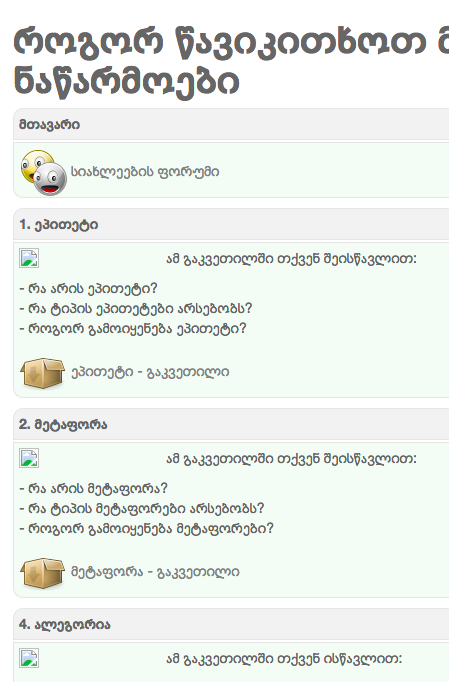
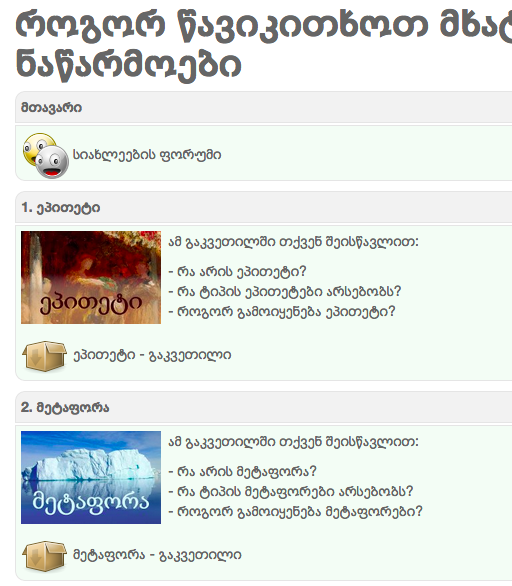
My course has a picture thumbnail in each topic. In Joomdle, in the Content module, they are shown only to the administrator user but not to the students.
Any ideas why this can be happening and how to fix it?
Joomla 3.4.3
Joomdle 1.0
Moodle 2.8
This is how a student sees it
My course has a picture thumbnail in each topic. In Joomdle, in the Content module, they are shown only to the administrator user but not to the students.
Any ideas why this can be happening and how to fix it?
Joomla 3.4.3
Joomdle 1.0
Moodle 2.8
This is how a student sees it
Last edit: 10 years 10 months ago by Simon J..
Please Log in or Create an account to join the conversation.
- Simon J.
- Topic Author
- Offline
- New Member
-
Less
More
- Posts: 7
10 years 10 months ago - 10 years 10 months ago #2
by Simon J.
Replied by Simon J. on topic Topic thumbnails shown only for the joomla/moodle admin
This is how admin sees it
Last edit: 10 years 10 months ago by Simon J..
Please Log in or Create an account to join the conversation.
- Antonio Durán
-

- Offline
- Moderator
-

Less
More
- Posts: 7929
10 years 10 months ago #3
by Antonio Durán
Replied by Antonio Durán on topic Topic thumbnails shown only for the joomla/moodle admin
You can check broken image links, to compare them to working ones.
Please Log in or Create an account to join the conversation.
- Simon J.
- Topic Author
- Offline
- New Member
-
Less
More
- Posts: 7
10 years 10 months ago #4
by Simon J.
Replied by Simon J. on topic Topic thumbnails shown only for the joomla/moodle admin
As I see, both working and the broken links have same URL
This is the URL of the working image
<img src=" igzaat.org/moodle//auth/joomdle/pluginfi...ction/16/epiteti.jpg " alt="" width="140" height="140" role="presentation" style="float:left; margin: 0 .5em 0 0;" class="img-responsive">
This is the URL of the broken one
<img src=" igzaat.org/moodle//auth/joomdle/pluginfi...ction/16/epiteti.jpg " alt="" width="140" height="140" role="presentation" style="float:left; margin: 0 .5em 0 0;" class="img-responsive">
This is the URL of the working image
<img src=" igzaat.org/moodle//auth/joomdle/pluginfi...ction/16/epiteti.jpg " alt="" width="140" height="140" role="presentation" style="float:left; margin: 0 .5em 0 0;" class="img-responsive">
This is the URL of the broken one
<img src=" igzaat.org/moodle//auth/joomdle/pluginfi...ction/16/epiteti.jpg " alt="" width="140" height="140" role="presentation" style="float:left; margin: 0 .5em 0 0;" class="img-responsive">
Please Log in or Create an account to join the conversation.
- Antonio Durán
-
- Offline
- Moderator
-
Less
More
- Posts: 7929
10 years 10 months ago #5
by Antonio Durán
Replied by Antonio Durán on topic Topic thumbnails shown only for the joomla/moodle admin
I see you have a double slash in your URL. I guess that's not the problem, but it is better to remove trailing slash in Joomla and Moodle URLs in Joomdle configuration.
As for the content: is it a label or is it section summary?
As for the content: is it a label or is it section summary?
Please Log in or Create an account to join the conversation.
- Simon J.
- Topic Author
- Offline
- New Member
-
Less
More
- Posts: 7
10 years 10 months ago #6
by Simon J.
Replied by Simon J. on topic Topic thumbnails shown only for the joomla/moodle admin
Thank you Antonio,
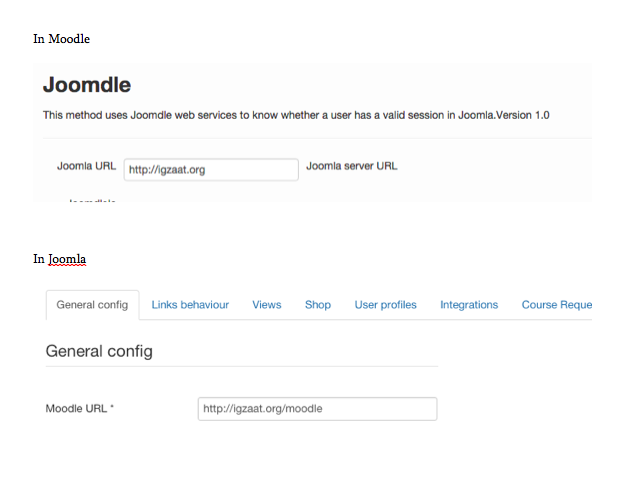
This is strange, as I do not have a trailing slash neither in Moodle nor in Joomla, or am I looking in a wrong place? See the attached.
As for the thumbs, in the example I gave they are the section summaries. Though, the behavior is exactly the same with the labels when shown through Joomdle topics.
This is strange, as I do not have a trailing slash neither in Moodle nor in Joomla, or am I looking in a wrong place? See the attached.
As for the thumbs, in the example I gave they are the section summaries. Though, the behavior is exactly the same with the labels when shown through Joomdle topics.
Please Log in or Create an account to join the conversation.
- Antonio Durán
-
- Offline
- Moderator
-
Less
More
- Posts: 7929
10 years 10 months ago #7
by Antonio Durán
Replied by Antonio Durán on topic Topic thumbnails shown only for the joomla/moodle admin
Yes, it is werid, as you have correctly set both URLs.
As for labels: I know last Joomdle version fixed a problem with labels in images, so you should upgrade.
I don't know if that will fix the issue wirh the section summaries, as I cannot test myself right now.
As for labels: I know last Joomdle version fixed a problem with labels in images, so you should upgrade.
I don't know if that will fix the issue wirh the section summaries, as I cannot test myself right now.
Please Log in or Create an account to join the conversation.