
- Posts: 17
Joomdle 1.0 Installation
Joomla/Moodle cannot connect to Moodle/Joomla
- TruckingHR
- Topic Author
- Offline
- New Member
-

Less
More
10 years 11 months ago - 10 years 11 months ago #1
by TruckingHR
Joomla/Moodle cannot connect to Moodle/Joomla was created by TruckingHR
Hello, I have just finished the installation instructions for Joomdle. The Joomla-side system check gives the following errors:
Joomla to Moodle HTTP connectivity Joomla cannot connect to Moodle
Moodle to Joomla HTTP connectivity Moodle cannot connect to Joomla
Joomdle Web Services Received empty response from Moodle
Research has taught me this is often related to a misconfigured url to the moodle site. However, I have verified the moodle url is valid. Thank you for advising me on how to address these problems.
Edit: In another post I read about a test used to verify if the server can make HTTP requests to itself. I added the following php to my localhost:8080/joomla directory:
<?php
echo file_get_contents ('http://localhost:8080/moodle');
?>
The result of this snippet was 'Failed to connect to localhost port 8080: connection refused'. Would this error accurately explain why the HTTP request from Joomla to Moodle is failing?
edit2: I have tried changing localhost:8080 to localhost:80, and now Joomla to Moodle HTTP connectivity is functional. Changing the moodle configuration to localhost:80/joomla failed to establish a connection with Joomla. I initially used port 8080 as the project is ran on a vagrant virtual box, which uses port forwarding to use 8080.

Joomla to Moodle HTTP connectivity Joomla cannot connect to Moodle
Moodle to Joomla HTTP connectivity Moodle cannot connect to Joomla
Joomdle Web Services Received empty response from Moodle
Research has taught me this is often related to a misconfigured url to the moodle site. However, I have verified the moodle url is valid. Thank you for advising me on how to address these problems.
Edit: In another post I read about a test used to verify if the server can make HTTP requests to itself. I added the following php to my localhost:8080/joomla directory:
<?php
echo file_get_contents ('http://localhost:8080/moodle');
?>
The result of this snippet was 'Failed to connect to localhost port 8080: connection refused'. Would this error accurately explain why the HTTP request from Joomla to Moodle is failing?
edit2: I have tried changing localhost:8080 to localhost:80, and now Joomla to Moodle HTTP connectivity is functional. Changing the moodle configuration to localhost:80/joomla failed to establish a connection with Joomla. I initially used port 8080 as the project is ran on a vagrant virtual box, which uses port forwarding to use 8080.
Last edit: 10 years 11 months ago by TruckingHR.
Please Log in or Create an account to join the conversation.
- Antonio Durán
-

- Offline
- Moderator
-

Less
More
- Posts: 7944
10 years 11 months ago #2
by Antonio Durán
Replied by Antonio Durán on topic Joomla/Moodle cannot connect to Moodle/Joomla
Hi.
> The result of this snippet was 'Failed to connect to localhost port 8080: connection refused'. Would this error accurately explain why the HTTP request from Joomla to Moodle is failing?
Yes. It says connection to localhost.8080 was refused, and the same is happening to Joomdle.
This can be caused by firewall, dns problems or other server-specific issues.
You say changing things to use port 80 made it work somewhat better. Can you show your current config and errors?
> The result of this snippet was 'Failed to connect to localhost port 8080: connection refused'. Would this error accurately explain why the HTTP request from Joomla to Moodle is failing?
Yes. It says connection to localhost.8080 was refused, and the same is happening to Joomdle.
This can be caused by firewall, dns problems or other server-specific issues.
You say changing things to use port 80 made it work somewhat better. Can you show your current config and errors?
Please Log in or Create an account to join the conversation.
- TruckingHR
- Topic Author
- Offline
- New Member
-
Less
More
- Posts: 17
10 years 11 months ago - 10 years 11 months ago #3
by TruckingHR
Replied by TruckingHR on topic Joomla/Moodle cannot connect to Moodle/Joomla
As you can see in the screenshot, I changed the configuration to use 'localhost' rather than 'localhost:8080', which is the forwarded port my virtual machine uses for http, so 'localhost:8080' works in a browser on the OS hosting the VM but running 'curl http://localhost/joomla' in the VM gives me a valid response.
Here is a screenshot of the current config and errors. Thanks
EDIT: You may notice the url to joomla is localhost/joomla/index.php. The error is not resolved if the '/index.php' is dropped.
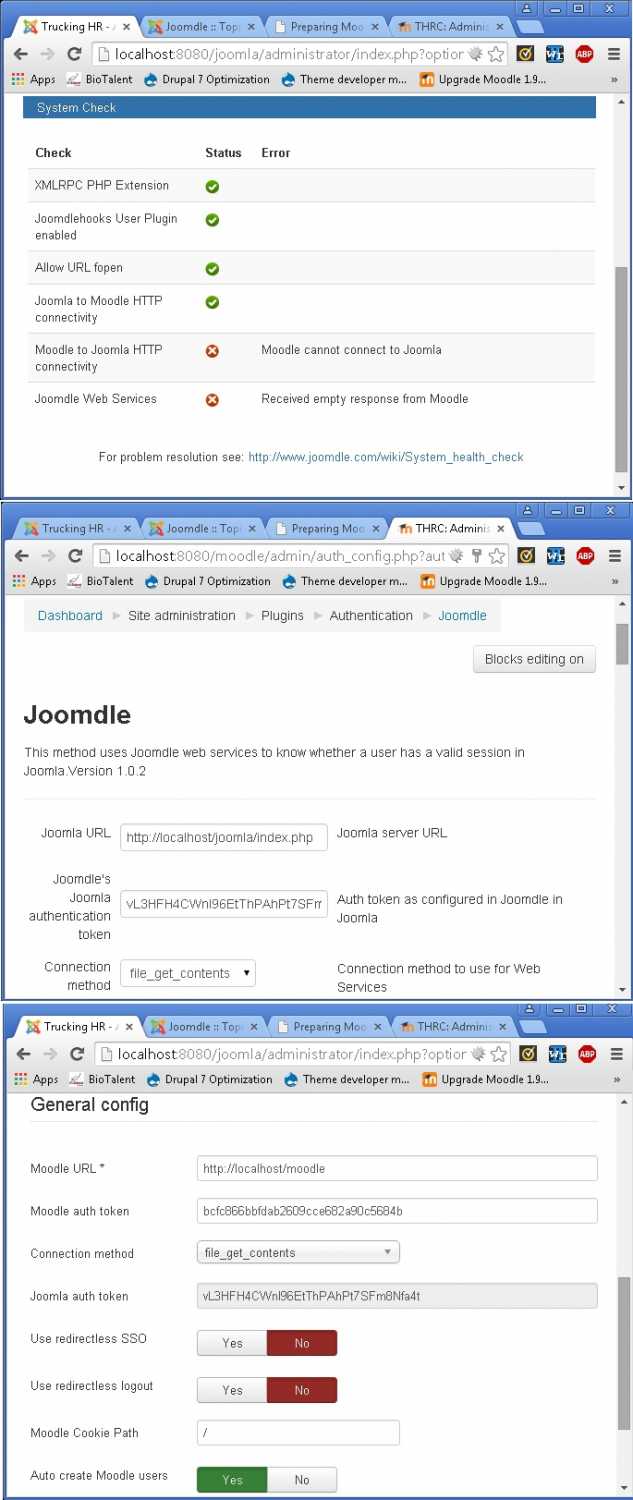
Here is a screenshot of the current config and errors. Thanks
EDIT: You may notice the url to joomla is localhost/joomla/index.php. The error is not resolved if the '/index.php' is dropped.
Last edit: 10 years 11 months ago by TruckingHR.
Please Log in or Create an account to join the conversation.
- Antonio Durán
-
- Offline
- Moderator
-
Less
More
- Posts: 7944
10 years 11 months ago #4
by Antonio Durán
Replied by Antonio Durán on topic Joomla/Moodle cannot connect to Moodle/Joomla
I don't know what you have done. From screenshots, I see you are still accessing Joomla and Moodle on port 8080.
You should change this to use 80 instead, not only change Joomdle configuration.
Also, you need to remove "/index.php".
You should change this to use 80 instead, not only change Joomdle configuration.
Also, you need to remove "/index.php".
Please Log in or Create an account to join the conversation.
- TruckingHR
- Topic Author
- Offline
- New Member
-
Less
More
- Posts: 17
10 years 11 months ago #5
by TruckingHR
Replied by TruckingHR on topic Joomla/Moodle cannot connect to Moodle/Joomla
I am accessing Joomla and Moodle on port 8080 through a web browser on the OS hosting the VM where Joomla and Moodle live. If I were to remove port fowarding on my virtual machine, the host OS would incorrectly attempt to access the files stored in it's local WAMP server.
However, inside the virtual machine 'curl localhost:80', 'curl localhost:80/joomla' & 'curl localhost:80/moodle' brings expected results. This is why the joomdle configuration references 'localhost:80'. Can you verify that by setting up port forwarding on my virtual machine I am causing a problem allowing Joomla and Moodle to communicate?
I have removed "/index.php" from the url in my configuration.
However, inside the virtual machine 'curl localhost:80', 'curl localhost:80/joomla' & 'curl localhost:80/moodle' brings expected results. This is why the joomdle configuration references 'localhost:80'. Can you verify that by setting up port forwarding on my virtual machine I am causing a problem allowing Joomla and Moodle to communicate?
I have removed "/index.php" from the url in my configuration.
Please Log in or Create an account to join the conversation.
- Antonio Durán
-
- Offline
- Moderator
-
Less
More
- Posts: 7944
10 years 11 months ago #6
by Antonio Durán
Replied by Antonio Durán on topic Joomla/Moodle cannot connect to Moodle/Joomla
Thanks for the info, I think I understand your setup now.
Port forwarding is not an issue, as it does no plays any role in Joomla to Moodle communication, as this is done inside the VM.
Do you get the same system check result when you remove "/index.php"?
Port forwarding is not an issue, as it does no plays any role in Joomla to Moodle communication, as this is done inside the VM.
Do you get the same system check result when you remove "/index.php"?
Please Log in or Create an account to join the conversation.
- TruckingHR
- Topic Author
- Offline
- New Member
-
Less
More
- Posts: 17
10 years 10 months ago #7
by TruckingHR
Replied by TruckingHR on topic Joomla/Moodle cannot connect to Moodle/Joomla
Yes, I get the same error if '/index.php' is removed. I am going to create a video demonstrating my installation process, if you could please give it a quick look (I will make it as brief as possible), it would be much appreciated.
Please Log in or Create an account to join the conversation.
- TruckingHR
- Topic Author
- Offline
- New Member
-
Less
More
- Posts: 17
10 years 10 months ago #8
by TruckingHR
Replied by TruckingHR on topic Joomla/Moodle cannot connect to Moodle/Joomla
Hi I narrated a 10 minute video on my installation process, can you pls view and tell me if something is going wrong? Thanks.
Please Log in or Create an account to join the conversation.
- Antonio Durán
-
- Offline
- Moderator
-
Less
More
- Posts: 7944
10 years 10 months ago #9
by Antonio Durán
Replied by Antonio Durán on topic Joomla/Moodle cannot connect to Moodle/Joomla
It seems everything is correct, but you can remove :80 as it is not needed.
I am thinking about a possible problem though:
Moodle must be configured in a specific URL. You can check this in config.php. If you installed through 8080, most probably it is set to use that URL.
As the web service uses 80, it fails.
You can check this using a browser inside the VM (you can use a text based one like links) and opening the Moodle site in :80. Although it is returning HTML it could be returning an error page (I cannot see it in the video).
I am thinking about a possible problem though:
Moodle must be configured in a specific URL. You can check this in config.php. If you installed through 8080, most probably it is set to use that URL.
As the web service uses 80, it fails.
You can check this using a browser inside the VM (you can use a text based one like links) and opening the Moodle site in :80. Although it is returning HTML it could be returning an error page (I cannot see it in the video).
Please Log in or Create an account to join the conversation.
- TruckingHR
- Topic Author
- Offline
- New Member
-
Less
More
- Posts: 17
10 years 10 months ago - 10 years 10 months ago #10
by TruckingHR
Replied by TruckingHR on topic Joomla/Moodle cannot connect to Moodle/Joomla
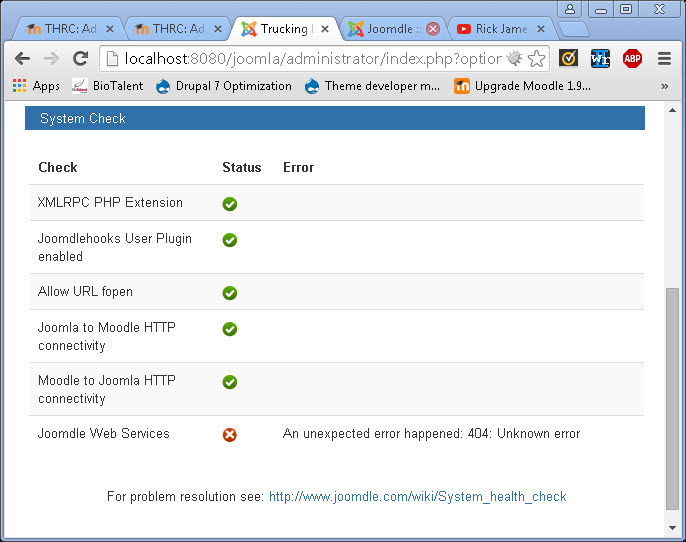
I was able to resolve part of this issue by updating my moodle/config.php. The setting $CFG->wwwroot = 'http://localhost:8080/moodle' was changed to 'http://localhost/moodle', and now Moodle to Joomla HTTP Connectivity works. Here is the outstanding error:
Last edit: 10 years 10 months ago by TruckingHR.
Please Log in or Create an account to join the conversation.