
- Posts: 7944
Joomdle 1.0 Installation
Can not acces joomla backend anymore Err 500
- Antonio Durán
-

- Offline
- Moderator
-

Less
More
10 years 7 months ago #11
by Antonio Durán
Replied by Antonio Durán on topic Can not acces joomla backend anymore Err 500
I don't know, what is what log errors are for.
To know if errors are being logges, you can add a syntax error in index.php file in Joomla, and load fronend. You should see the error in the browser.
Then, you should see the error in the logs. If you can't see it, it is not logging PHP errors.
To know if errors are being logges, you can add a syntax error in index.php file in Joomla, and load fronend. You should see the error in the browser.
Then, you should see the error in the logs. If you can't see it, it is not logging PHP errors.
Please Log in or Create an account to join the conversation.
- iq-guru
- Topic Author
- Offline
- Senior Member
-

Less
More
- Posts: 48
10 years 7 months ago #12
by iq-guru
Replied by iq-guru on topic Can not acces joomla backend anymore Err 500
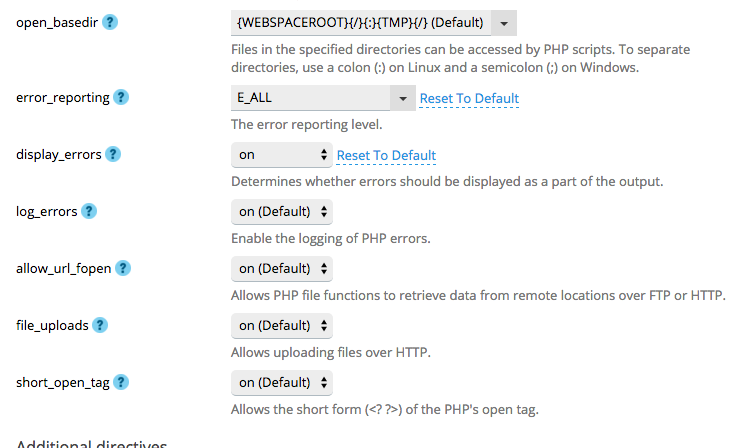
ok now double checked in the php configuration of this domain
changed the index.php file so that there was an error inside it. after editing the index.php file i could not access the frontend anymore -> server 500 error which shows that the syntax error was correct
ok then i corrected the index.php file so the frontend displayed correct again and tried to access the backend again.
error 500 like before.
now i checked the apache error and apache access and apache ssl access logs ot hte domain but unfortunately no error was shaown here
drive me nuts
changed the index.php file so that there was an error inside it. after editing the index.php file i could not access the frontend anymore -> server 500 error which shows that the syntax error was correct
ok then i corrected the index.php file so the frontend displayed correct again and tried to access the backend again.
error 500 like before.
now i checked the apache error and apache access and apache ssl access logs ot hte domain but unfortunately no error was shaown here
drive me nuts
Please Log in or Create an account to join the conversation.
- iq-guru
- Topic Author
- Offline
- Senior Member
-
Less
More
- Posts: 48
10 years 7 months ago #13
by iq-guru
Replied by iq-guru on topic Can not acces joomla backend anymore Err 500
Hi again,
so now i have a error message that points on a missing file
==> /var/www/vhosts/system/dev.iq-guru.com/logs/error_log <==
[Thu Jan 14 15:07:08.411112 2016] [fcgid:warn] [pid 7324] [client 87.230.108.20:59123] mod_fcgid: stderr: PHP Notice: Use of undefined constant DS - assumed 'DS' in /var/www/vhosts/iq-guru.com/subdomains/dev/httpdocs/plugins/user/coursegroups/coursegroups.php on line 11, referer: dev.iq-guru.com/administrator/
[Thu Jan 14 15:07:08.411251 2016] [fcgid:warn] [pid 7324] [client 87.230.108.20:59123] mod_fcgid: stderr: PHP Notice: Use of undefined constant DS - assumed 'DS' in /var/www/vhosts/iq-guru.com/subdomains/dev/httpdocs/plugins/user/coursegroups/coursegroups.php on line 11, referer: dev.iq-guru.com/administrator/
[Thu Jan 14 15:07:08.411297 2016] [fcgid:warn] [pid 7324] [client 87.230.108.20:59123] mod_fcgid: stderr: PHP Notice: Use of undefined constant DS - assumed 'DS' in /var/www/vhosts/iq-guru.com/subdomains/dev/httpdocs/plugins/user/coursegroups/coursegroups.php on line 11, referer: dev.iq-guru.com/administrator/
[Thu Jan 14 15:07:08.411338 2016] [fcgid:warn] [pid 7324] [client 87.230.108.20:59123] mod_fcgid: stderr: PHP Notice: Use of undefined constant DS - assumed 'DS' in /var/www/vhosts/iq-guru.com/subdomains/dev/httpdocs/plugins/user/coursegroups/coursegroups.php on line 11, referer: dev.iq-guru.com/administrator/
[Thu Jan 14 15:07:08.411377 2016] [fcgid:warn] [pid 7324] [client 87.230.108.20:59123] mod_fcgid: stderr: PHP Warning: require_once(/var/www/vhosts/iq-guru.com/subdomains/dev/httpdocsDScomponentsDScom_joomdleDShelpersDScontent.php): failed to open stream: No such file or directory in /var/www/vhosts/iq-guru.com/subdomains/dev/httpdocs/plugins/user/coursegroups/coursegroups.php on line 11, referer: dev.iq-guru.com/administrator/
[Thu Jan 14 15:07:08.411419 2016] [fcgid:warn] [pid 7324] [client 87.230.108.20:59123] mod_fcgid: stderr: PHP Fatal error: require_once(): Failed opening required '/var/www/vhosts/iq-guru.com/subdomains/dev/httpdocsDScomponentsDScom_joomdleDShelpersDScontent.php' (include_path='.:') in /var/www/vhosts/iq-guru.com/subdomains/dev/httpdocs/plugins/user/coursegroups/coursegroups.php on line 11, referer: dev.iq-guru.com/administrator/
Indeed this file is not available.
Any suggestions on that?
thanks a lot
cheers
carsten
so now i have a error message that points on a missing file
==> /var/www/vhosts/system/dev.iq-guru.com/logs/error_log <==
[Thu Jan 14 15:07:08.411112 2016] [fcgid:warn] [pid 7324] [client 87.230.108.20:59123] mod_fcgid: stderr: PHP Notice: Use of undefined constant DS - assumed 'DS' in /var/www/vhosts/iq-guru.com/subdomains/dev/httpdocs/plugins/user/coursegroups/coursegroups.php on line 11, referer: dev.iq-guru.com/administrator/
[Thu Jan 14 15:07:08.411251 2016] [fcgid:warn] [pid 7324] [client 87.230.108.20:59123] mod_fcgid: stderr: PHP Notice: Use of undefined constant DS - assumed 'DS' in /var/www/vhosts/iq-guru.com/subdomains/dev/httpdocs/plugins/user/coursegroups/coursegroups.php on line 11, referer: dev.iq-guru.com/administrator/
[Thu Jan 14 15:07:08.411297 2016] [fcgid:warn] [pid 7324] [client 87.230.108.20:59123] mod_fcgid: stderr: PHP Notice: Use of undefined constant DS - assumed 'DS' in /var/www/vhosts/iq-guru.com/subdomains/dev/httpdocs/plugins/user/coursegroups/coursegroups.php on line 11, referer: dev.iq-guru.com/administrator/
[Thu Jan 14 15:07:08.411338 2016] [fcgid:warn] [pid 7324] [client 87.230.108.20:59123] mod_fcgid: stderr: PHP Notice: Use of undefined constant DS - assumed 'DS' in /var/www/vhosts/iq-guru.com/subdomains/dev/httpdocs/plugins/user/coursegroups/coursegroups.php on line 11, referer: dev.iq-guru.com/administrator/
[Thu Jan 14 15:07:08.411377 2016] [fcgid:warn] [pid 7324] [client 87.230.108.20:59123] mod_fcgid: stderr: PHP Warning: require_once(/var/www/vhosts/iq-guru.com/subdomains/dev/httpdocsDScomponentsDScom_joomdleDShelpersDScontent.php): failed to open stream: No such file or directory in /var/www/vhosts/iq-guru.com/subdomains/dev/httpdocs/plugins/user/coursegroups/coursegroups.php on line 11, referer: dev.iq-guru.com/administrator/
[Thu Jan 14 15:07:08.411419 2016] [fcgid:warn] [pid 7324] [client 87.230.108.20:59123] mod_fcgid: stderr: PHP Fatal error: require_once(): Failed opening required '/var/www/vhosts/iq-guru.com/subdomains/dev/httpdocsDScomponentsDScom_joomdleDShelpersDScontent.php' (include_path='.:') in /var/www/vhosts/iq-guru.com/subdomains/dev/httpdocs/plugins/user/coursegroups/coursegroups.php on line 11, referer: dev.iq-guru.com/administrator/
Indeed this file is not available.
Any suggestions on that?
thanks a lot
cheers
carsten
Please Log in or Create an account to join the conversation.
- Antonio Durán
-
- Offline
- Moderator
-
Less
More
- Posts: 7944
10 years 7 months ago #14
by Antonio Durán
Replied by Antonio Durán on topic Can not acces joomla backend anymore Err 500
Hi.
We can see the problem now: the coursegroups user plugin.
It seems it is still using old DS constants, which don't work anymore. You should disable the plugin and everything should be fine. You can disable it directly in database, extensions table.
I will check this plugin over the weekend and release an upgraded version wiht this problem fixed.
We can see the problem now: the coursegroups user plugin.
It seems it is still using old DS constants, which don't work anymore. You should disable the plugin and everything should be fine. You can disable it directly in database, extensions table.
I will check this plugin over the weekend and release an upgraded version wiht this problem fixed.
Please Log in or Create an account to join the conversation.
- iq-guru
- Topic Author
- Offline
- Senior Member
-
Less
More
- Posts: 48
10 years 7 months ago #15
by iq-guru
Replied by iq-guru on topic Can not acces joomla backend anymore Err 500
Hi
Thank you antonio for helping me out. I disabled the module and now rhings work again!
Thanks for revieweing the module. Will you point out here if there is a solution available?
Have a great day!
Carsten
Thank you antonio for helping me out. I disabled the module and now rhings work again!
Thanks for revieweing the module. Will you point out here if there is a solution available?
Have a great day!
Carsten
Please Log in or Create an account to join the conversation.
- Antonio Durán
-
- Offline
- Moderator
-
Less
More
- Posts: 7944
10 years 7 months ago #16
by Antonio Durán
Replied by Antonio Durán on topic Can not acces joomla backend anymore Err 500
Hi Carsten.
I have now uploaded a new version of the package, with old constants.
Please try it and let me know if you have any issues.
I have now uploaded a new version of the package, with old constants.
Please try it and let me know if you have any issues.
Please Log in or Create an account to join the conversation.
- iq-guru
- Topic Author
- Offline
- Senior Member
-
Less
More
- Posts: 48
10 years 7 months ago #17
by iq-guru
Replied by iq-guru on topic Can not acces joomla backend anymore Err 500
Hi Antonio,
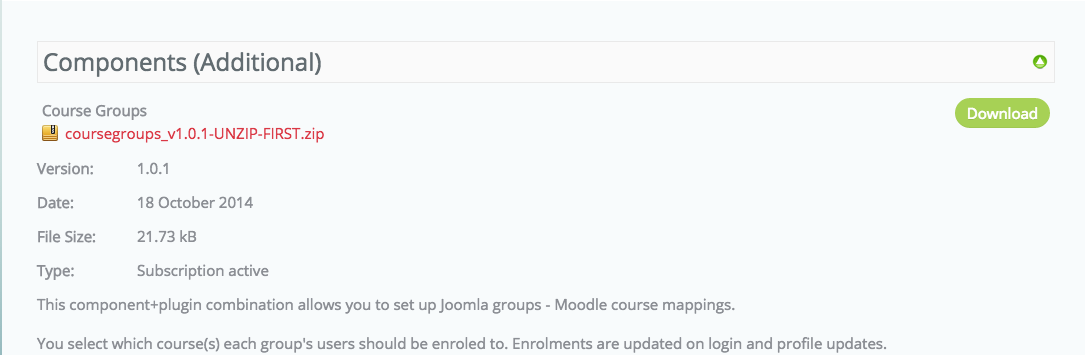
thanks for letting me know - just to go secure as the release date of the component is not updated (see screenshot) is that the right version i should install?
greets
carsten
thanks for letting me know - just to go secure as the release date of the component is not updated (see screenshot) is that the right version i should install?
greets
carsten
Please Log in or Create an account to join the conversation.
- Antonio Durán
-
- Offline
- Moderator
-
Less
More
- Posts: 7944
10 years 7 months ago #18
by Antonio Durán
Replied by Antonio Durán on topic Can not acces joomla backend anymore Err 500
Yes, it is just that Phoca download (that we use to manage downloads) does not change date when you update version.
Please Log in or Create an account to join the conversation.
- iq-guru
- Topic Author
- Offline
- Senior Member
-
Less
More
- Posts: 48
10 years 7 months ago #19
by iq-guru
Replied by iq-guru on topic Can not acces joomla backend anymore Err 500
Thanks antonio it seems to work now well
have a great day!
cheers
carsten
have a great day!
cheers
carsten
Please Log in or Create an account to join the conversation.