
- Posts: 48
Joomdle 1.0 Installation
Two different templates in Moodle and Joomdle possible?
- iq-guru
- Topic Author
- Offline
- Senior Member
-

Less
More
10 years 7 months ago #1
by iq-guru
Two different templates in Moodle and Joomdle possible? was created by iq-guru
Hi all,
as newby with moodle and joomdle it seems i get a little confused about the themes. As i read it is recommended to use the joomdle bootstrap template to show up joomdle as wraped within my joomla page. but in the description of the template there are several terms that e.g. the login module of moodle will not be visible anymore. so for my understanding this means that i can not login in the backend of my moodle installation via the respective url of this installation? (so i have to use the joomla login box instead)
as i´m not sure if everything that moodle has or can (eg. course administration, moodle administration) is integrated within joomdle to show in my joomla frontend. So i wanted to go secure to have a standard moodle template to access the site via its direct url and the bootstrap joomdle template to show my courses to my students in the frontend well wraped (integrated) with my yootheme joomla template?
So is there a way to achive this solution to use 2 templates depending on the url that accesses the installation?
And last ist there a way to change back the moodle template if something goes wrong or do i loose access to my installation forever as i can not login anymore?
Thanks in advance for a little help to understand the system.
Regards
carsten
as newby with moodle and joomdle it seems i get a little confused about the themes. As i read it is recommended to use the joomdle bootstrap template to show up joomdle as wraped within my joomla page. but in the description of the template there are several terms that e.g. the login module of moodle will not be visible anymore. so for my understanding this means that i can not login in the backend of my moodle installation via the respective url of this installation? (so i have to use the joomla login box instead)
as i´m not sure if everything that moodle has or can (eg. course administration, moodle administration) is integrated within joomdle to show in my joomla frontend. So i wanted to go secure to have a standard moodle template to access the site via its direct url and the bootstrap joomdle template to show my courses to my students in the frontend well wraped (integrated) with my yootheme joomla template?
So is there a way to achive this solution to use 2 templates depending on the url that accesses the installation?
And last ist there a way to change back the moodle template if something goes wrong or do i loose access to my installation forever as i can not login anymore?
Thanks in advance for a little help to understand the system.
Regards
carsten
Please Log in or Create an account to join the conversation.
- Antonio Durán
-

- Offline
- Moderator
-

Less
More
- Posts: 7944
10 years 7 months ago #2
by Antonio Durán
Replied by Antonio Durán on topic Two different templates in Moodle and Joomdle possible?
Hi.
> as i´m not sure if everything that moodle has or can (eg. course administration, moodle administration) is integrated within joomdle to show in my joomla frontend.
No, it is not.
> So is there a way to achive this solution to use 2 templates depending on the url that accesses the installation?
Yes. You can configure a Moodle template in Moodle, and then in Joomdle config in Joomla selecta different Moodle template to be used when calling Moodle from the wrapper.
> And last ist there a way to change back the moodle template if something goes wrong or do i loose access to my installation forever as i can not login anymore?
I don't know what you mean. You never loose access, as you can always log in using a direct login URL.
> as i´m not sure if everything that moodle has or can (eg. course administration, moodle administration) is integrated within joomdle to show in my joomla frontend.
No, it is not.
> So is there a way to achive this solution to use 2 templates depending on the url that accesses the installation?
Yes. You can configure a Moodle template in Moodle, and then in Joomdle config in Joomla selecta different Moodle template to be used when calling Moodle from the wrapper.
> And last ist there a way to change back the moodle template if something goes wrong or do i loose access to my installation forever as i can not login anymore?
I don't know what you mean. You never loose access, as you can always log in using a direct login URL.
Please Log in or Create an account to join the conversation.
- iq-guru
- Topic Author
- Offline
- Senior Member
-
Less
More
- Posts: 48
10 years 7 months ago #3
by iq-guru
Replied by iq-guru on topic Two different templates in Moodle and Joomdle possible?
Ok is there any help / tutorial / documentation available how to configure the template in joomdle?
I already configured joomdle to use the joomdleebs theme for the wrapper in my backend. But if i open a course this is displayed within the wrapper in the same template as if i call it via the moodle backend? So do i have to configure anything else to get rid of the moodle template ?
thanks again!
greets
carsten
I already configured joomdle to use the joomdleebs theme for the wrapper in my backend. But if i open a course this is displayed within the wrapper in the same template as if i call it via the moodle backend? So do i have to configure anything else to get rid of the moodle template ?
thanks again!
greets
carsten
Please Log in or Create an account to join the conversation.
- Antonio Durán
-
- Offline
- Moderator
-
Less
More
- Posts: 7944
10 years 7 months ago #4
by Antonio Durán
Replied by Antonio Durán on topic Two different templates in Moodle and Joomdle possible?
Check this:
www.joomdle.com/wiki/Installing_Joomdle_...omla#Links_behaviour
Where it talks about Moodle theme for wrapper.
www.joomdle.com/wiki/Installing_Joomdle_...omla#Links_behaviour
Where it talks about Moodle theme for wrapper.
Please Log in or Create an account to join the conversation.
- iq-guru
- Topic Author
- Offline
- Senior Member
-
Less
More
- Posts: 48
10 years 7 months ago #5
by iq-guru
Replied by iq-guru on topic Two different templates in Moodle and Joomdle possible?
Hi Again Antonio,
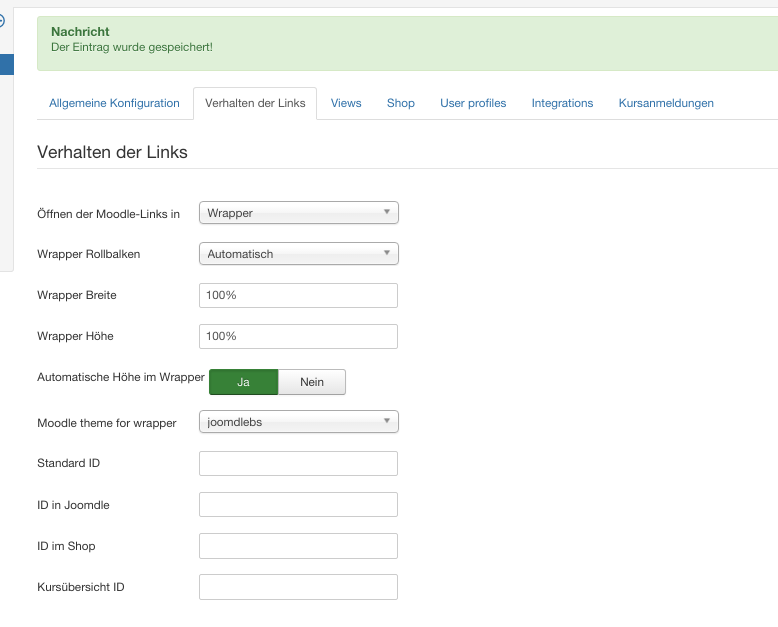
ok i double checked my config but it seems something does not work hand in hand. In Moodle i use the Lambda theme and in joomdle settings i chose joomdlebs (find screenshot of config attached). When i call a moodle course within the joomla wrapper it should for my understanding show up neutral so no logo, login box etc from the lambda theme should show up within the wrapper. This is not the fact as you can see in Screenshot (joomdle display).The same happens if i change to bootstrapbase or any other theme in the joomdle configuration.
FInaly i made a screenshot of my moodle backend view where the theme can be seen as it is if i call the moodle domain directly.
Both joomla and moodle are installed on the same domain if this is relevant.
So i think i missed something as the mentioned howto link does not cover this behavior.
Hope you can help me further.
Thanks a lot
cheers
carsten
ok i double checked my config but it seems something does not work hand in hand. In Moodle i use the Lambda theme and in joomdle settings i chose joomdlebs (find screenshot of config attached). When i call a moodle course within the joomla wrapper it should for my understanding show up neutral so no logo, login box etc from the lambda theme should show up within the wrapper. This is not the fact as you can see in Screenshot (joomdle display).The same happens if i change to bootstrapbase or any other theme in the joomdle configuration.
FInaly i made a screenshot of my moodle backend view where the theme can be seen as it is if i call the moodle domain directly.
Both joomla and moodle are installed on the same domain if this is relevant.
So i think i missed something as the mentioned howto link does not cover this behavior.
Hope you can help me further.
Thanks a lot
cheers
carsten
Please Log in or Create an account to join the conversation.
- Fernando Acedo
- Offline
- Elite Member
-

10 years 7 months ago #6
by Fernando Acedo
Replied by Fernando Acedo on topic Two different templates in Moodle and Joomdle possible?
JoomdleBS is created to run only using the Joomdle wrapper and that is the reason of the header, login and footer have been removed. Anyway you can login directly to moodle using JoomdleBS with the default login link: http://your_moodle_site/login
If you want to use two moodle themes, one for Joomdle and other different for moodle you can do it as Antonio explained. Both themes must be installed in moodle.
With the existing settings you should see the Lambda theme when enter to moodle directly if it is enabled as a default theme. And JoomdleBS only when used with Joomdle.
If you want to use two moodle themes, one for Joomdle and other different for moodle you can do it as Antonio explained. Both themes must be installed in moodle.
With the existing settings you should see the Lambda theme when enter to moodle directly if it is enabled as a default theme. And JoomdleBS only when used with Joomdle.
Please Log in or Create an account to join the conversation.
- Antonio Durán
-
- Offline
- Moderator
-
Less
More
- Posts: 7944
10 years 7 months ago #7
by Antonio Durán
Replied by Antonio Durán on topic Two different templates in Moodle and Joomdle possible?
Moodle caches templates, so you may not be able to see different templates if you use the same browser.
Open a different browser to test wrapper.
Open a different browser to test wrapper.
Please Log in or Create an account to join the conversation.
- iq-guru
- Topic Author
- Offline
- Senior Member
-
Less
More
- Posts: 48
10 years 7 months ago #8
by iq-guru
Replied by iq-guru on topic Two different templates in Moodle and Joomdle possible?
Thanks antonio,
i just changed computer and browser and still the same bahaviour. where is the cache of moodle located so to be sure i would delete it via ftp?
regards
carsten
i just changed computer and browser and still the same bahaviour. where is the cache of moodle located so to be sure i would delete it via ftp?
regards
carsten
Please Log in or Create an account to join the conversation.
- iq-guru
- Topic Author
- Offline
- Senior Member
-
Less
More
- Posts: 48
10 years 7 months ago #9
by iq-guru
Replied by iq-guru on topic Two different templates in Moodle and Joomdle possible?
Ok found the dev cache delete function in moodle but still same behavior - it does not change any templates.
Please Log in or Create an account to join the conversation.
- Antonio Durán
-
- Offline
- Moderator
-
Less
More
- Posts: 7944
10 years 7 months ago #10
by Antonio Durán
Replied by Antonio Durán on topic Two different templates in Moodle and Joomdle possible?
Did you enable the option in Moodle to change theme via URL? I just noticed it was not explained in doc, I have updated it now:
You will need to enable "Allow theme change by URL" in Moodle configuration, in Site Administration->Appearance->Themes->Theme settings
You will need to enable "Allow theme change by URL" in Moodle configuration, in Site Administration->Appearance->Themes->Theme settings
Please Log in or Create an account to join the conversation.