
- Posts: 31
Joomdle 1.0 Installation
problem wrapping course
- bf360
- Topic Author
- Offline
- Junior Member
-

Less
More
10 years 6 months ago - 10 years 6 months ago #1
by bf360
problem wrapping course was created by bf360
Hi to all! i have a problem (perhaps after upgrade to 1.0.3 but i not sure) to wrap the page course.
i wrap the moodle page course in my joomla site: i click on 'go to course', the beginning of the moodle page course appear for one second (i see the link to the forum course) and right after it desappears!
And so the joomla page is load but it is empty.
Reading some post here, i checked that the stile template set on the menu that have the course detail linked, have component area (attach image).
In particular i read this post www.joomdle.com/forum/installation/11768...on-not-working#18459 but the template i use have a content area...
I dont know when and how this function has stopped working.
Someone can help me?
thanks
with regards
Roberto
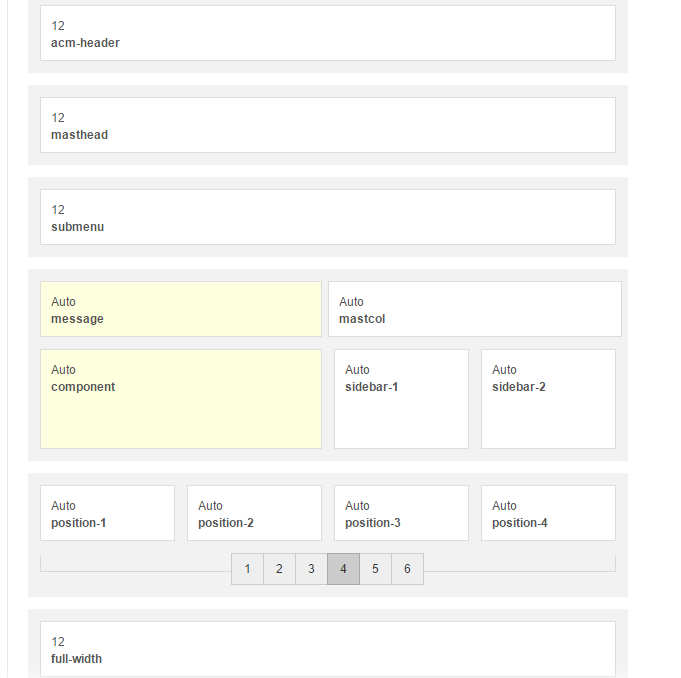
UPDATE: i've update joomdle from 1.0.3 to 1.0.5 (on joomla and auth_joomdle and enrol_joomdle on moodle) but issue remains
UPDATE2: i try to modify the style template of the menu linked to course detail module (to exclude a problem associated to the template) to 'protostar'. The page that include detail course module appear now with protostar style, i click on 'go to course' the course page is open with protostar style, but the course page desappears like i describe above.
i wrap the moodle page course in my joomla site: i click on 'go to course', the beginning of the moodle page course appear for one second (i see the link to the forum course) and right after it desappears!
And so the joomla page is load but it is empty.
Reading some post here, i checked that the stile template set on the menu that have the course detail linked, have component area (attach image).
In particular i read this post www.joomdle.com/forum/installation/11768...on-not-working#18459 but the template i use have a content area...
I dont know when and how this function has stopped working.
Someone can help me?
thanks
with regards
Roberto
UPDATE: i've update joomdle from 1.0.3 to 1.0.5 (on joomla and auth_joomdle and enrol_joomdle on moodle) but issue remains
UPDATE2: i try to modify the style template of the menu linked to course detail module (to exclude a problem associated to the template) to 'protostar'. The page that include detail course module appear now with protostar style, i click on 'go to course' the course page is open with protostar style, but the course page desappears like i describe above.
Last edit: 10 years 6 months ago by bf360.
Please Log in or Create an account to join the conversation.
- Antonio Durán
-

- Offline
- Moderator
-

Less
More
- Posts: 7945
10 years 6 months ago #2
by Antonio Durán
Replied by Antonio Durán on topic problem wrapping course
Are Joomla and Moodle on same domain? Check also that you are not using www and not-www address.
You can also disable wrapper autp-height to see if that changes behaviour, just to get more info.
You can also disable wrapper autp-height to see if that changes behaviour, just to get more info.
Please Log in or Create an account to join the conversation.
- bf360
- Topic Author
- Offline
- Junior Member
-
Less
More
- Posts: 31
10 years 6 months ago - 10 years 6 months ago #3
by bf360
Replied by bf360 on topic problem wrapping course
Hi Antonio! first thanks for your rapid reply  ...
...
Joomla and Moodle are in same domain and not problem with www and not-www (the integration was ok for long time).
I try to dislable wrapper auto-heigh yesterday (perhaps [strike]after[/strike] before update to 1.0.5) and not working; i try again now and it resolve issue!!!))) thank you very very much.
I resolve the issue in this way at the time...but, with no hurry, there is a way to restore the auto-heigh unless the issue?
...Joomla and Moodle are in same domain and not problem with www and not-www (the integration was ok for long time).
I try to dislable wrapper auto-heigh yesterday (perhaps [strike]after[/strike] before update to 1.0.5) and not working; i try again now and it resolve issue!!!
))) thank you very very much.I resolve the issue in this way at the time...but, with no hurry, there is a way to restore the auto-heigh unless the issue?
Last edit: 10 years 6 months ago by bf360.
Please Log in or Create an account to join the conversation.
- Antonio Durán
-
- Offline
- Moderator
-
Less
More
- Posts: 7945
10 years 6 months ago #4
by Antonio Durán
Replied by Antonio Durán on topic problem wrapping course
If auto-height is causing the problem, there must be some other problem happening. Usually auto-height does not work when domains are different (even from www to non-www) but in your case I don't know why it does not work 
Please Log in or Create an account to join the conversation.
- bf360
- Topic Author
- Offline
- Junior Member
-
Less
More
- Posts: 31
10 years 6 months ago #5
by bf360
Replied by bf360 on topic problem wrapping course
Hi! i did a mistake Antonio, caused by the hurry of yesterday to solve the problem...
Moodle is in a subdirectory of Joomla, but to inhibit direct access to moodle i use not-www address in "moodle url" field on joomdle and inhibit the public access using www.mydomain.xxx\moodledirectory.
There is a way to resolve the issue without modify this structure ?
Moodle is in a subdirectory of Joomla, but to inhibit direct access to moodle i use not-www address in "moodle url" field on joomdle and inhibit the public access using www.mydomain.xxx\moodledirectory.
There is a way to resolve the issue without modify this structure ?
Please Log in or Create an account to join the conversation.
- Antonio Durán
-
- Offline
- Moderator
-
Less
More
- Posts: 7945
10 years 6 months ago #6
by Antonio Durán
Replied by Antonio Durán on topic problem wrapping course
You cannot use a different domain in Joomla and Moodle for auto-height to work, so you will need to find a different way of preventing access.
Please Log in or Create an account to join the conversation.
- bf360
- Topic Author
- Offline
- Junior Member
-
Less
More
- Posts: 31
10 years 6 months ago #7
by bf360
Replied by bf360 on topic problem wrapping course
I ask this because before upgrading to 1.0.3 i sure that with this exact configuration auto-eight worked correctly
Please Log in or Create an account to join the conversation.
- Antonio Durán
-
- Offline
- Moderator
-
Less
More
- Posts: 7945
10 years 6 months ago #8
by Antonio Durán
Replied by Antonio Durán on topic problem wrapping course
I don't know how that could work.... there are no changes in wrapper code in recent versions, and auto-height never worked accross diferent domains.
Please Log in or Create an account to join the conversation.
- Chris
-

- Offline
- Moderator
-
10 years 6 months ago #9
by Chris
Replied by Chris on topic problem wrapping course
Hi there,
Do you have any url redirection in your htaccess file?
Do you have any url redirection in your htaccess file?
Please Log in or Create an account to join the conversation.
- bf360
- Topic Author
- Offline
- Junior Member
-
Less
More
- Posts: 31
10 years 6 months ago - 10 years 6 months ago #10
by bf360
Replied by bf360 on topic problem wrapping course
Hi Chris! in effect to stem a problem in December i remember that i search some solution that involves htaccess file. I dont remember if i do something on this file at the end...
This is my htaccess file
Do you see something of strange?
But i think that apache dont use htaccess because, although mod_rewrite is active, i have only htaccess.txt file on the root of public folder and not an .htaccess file
This is my htaccess file
Code:
##
# @package Joomla
# @copyright Copyright (C) 2005 - 2015 Open Source Matters. All rights reserved.
# @license GNU General Public License version 2 or later; see LICENSE.txt
##
##
# READ THIS COMPLETELY IF YOU CHOOSE TO USE THIS FILE!
#
# The line just below this section: 'Options +FollowSymLinks' may cause problems
# with some server configurations. It is required for use of mod_rewrite, but may already
# be set by your server administrator in a way that disallows changing it in
# your .htaccess file. If using it causes your server to error out, comment it out (add # to
# beginning of line), reload your site in your browser and test your sef url's. If they work,
# it has been set by your server administrator and you do not need it set here.
##
## No directory listings
IndexIgnore *
## Can be commented out if causes errors, see notes above.
Options +FollowSymlinks
Options -Indexes
## Mod_rewrite in use.
RewriteEngine On
## Begin - Rewrite rules to block out some common exploits.
# If you experience problems on your site block out the operations listed below
# This attempts to block the most common type of exploit `attempts` to Joomla!
#
# Block out any script trying to base64_encode data within the URL.
RewriteCond %{QUERY_STRING} base64_encode[^(]*\([^)]*\) [OR]
# Block out any script that includes a <script> tag in URL.
RewriteCond %{QUERY_STRING} (<|%3C)([^s]*s)+cript.*(>|%3E) [NC,OR]
# Block out any script trying to set a PHP GLOBALS variable via URL.
RewriteCond %{QUERY_STRING} GLOBALS(=|\[|\%[0-9A-Z]{0,2}) [OR]
# Block out any script trying to modify a _REQUEST variable via URL.
RewriteCond %{QUERY_STRING} _REQUEST(=|\[|\%[0-9A-Z]{0,2})
# Return 403 Forbidden header and show the content of the root homepage
RewriteRule .* index.php [F]
#
## End - Rewrite rules to block out some common exploits.
## Begin - Custom redirects
#
# If you need to redirect some pages, or set a canonical non-www to
# www redirect (or vice versa), place that code here. Ensure those
# redirects use the correct RewriteRule syntax and the [R=301,L] flags.
#
## End - Custom redirects
##
# Uncomment following line if your webserver's URL
# is not directly related to physical file paths.
# Update Your Joomla! Directory (just / for root).
##
# RewriteBase /
## Begin - Joomla! core SEF Section.
#
RewriteRule .* - [E=HTTP_AUTHORIZATION:%{HTTP:Authorization}]
#
# If the requested path and file is not /index.php and the request
# has not already been internally rewritten to the index.php script
RewriteCond %{REQUEST_URI} !^/index\.php
# and the requested path and file doesn't directly match a physical file
RewriteCond %{REQUEST_FILENAME} !-f
# and the requested path and file doesn't directly match a physical folder
RewriteCond %{REQUEST_FILENAME} !-d
# internally rewrite the request to the index.php script
RewriteRule .* index.php [L]
#
## End - Joomla! core SEF Section.
Do you see something of strange?
But i think that apache dont use htaccess because, although mod_rewrite is active, i have only htaccess.txt file on the root of public folder and not an .htaccess file
Last edit: 10 years 6 months ago by bf360.
Please Log in or Create an account to join the conversation.