
- Posts: 10
Joomdle 1.0 Installation
Moodle course as product with options
- Christoph Bohner
- Topic Author
- Offline
- New Member
-

Less
More
10 years 4 months ago #1
by Christoph Bohner
Moodle course as product with options was created by Christoph Bohner
Hello,
I have a problem & need some help.
I have joomdle successfully set up. I can sell & buy courses using my j2store at my website.
My problem is, that if I add some options to the product in the store and order that course I get an XMLRPC Error.
Is there something I can do?
Thank you!
I have a problem & need some help.
I have joomdle successfully set up. I can sell & buy courses using my j2store at my website.
My problem is, that if I add some options to the product in the store and order that course I get an XMLRPC Error.
Is there something I can do?
Thank you!
Please Log in or Create an account to join the conversation.
- Antonio Durán
-

- Offline
- Moderator
-

Less
More
- Posts: 7944
10 years 4 months ago #2
by Antonio Durán
Replied by Antonio Durán on topic Moodle course as product with options
You can enable debugging in Moodle to get more info about the problem.
Please Log in or Create an account to join the conversation.
- Christoph Bohner
- Topic Author
- Offline
- New Member
-
Less
More
- Posts: 10
10 years 4 months ago #3
by Christoph Bohner
Replied by Christoph Bohner on topic Moodle course as product with options
XML-RPC Error (23604497): Datensatz kann nicht in der Datenbanktabelle course_categories gefunden werden | DEBUG INFO: SELECT id,parent FROM {course_categories} WHERE id IS NULL [array ( )] | ERRORCODE: invalidrecord
XML-RPC Error (23604497): dataset could not be found in course_categories | DEBUG INFO: SELECT id,parent FROM {course_categories} WHERE id IS NULL [array ( )] | ERRORCODE: invalidrecord
That's the Error-Code with debugging enabled. But I still don't know what to do...
XML-RPC Error (23604497): dataset could not be found in course_categories | DEBUG INFO: SELECT id,parent FROM {course_categories} WHERE id IS NULL [array ( )] | ERRORCODE: invalidrecord
That's the Error-Code with debugging enabled. But I still don't know what to do...
Please Log in or Create an account to join the conversation.
- Antonio Durán
-
- Offline
- Moderator
-
Less
More
- Posts: 7944
10 years 4 months ago #4
by Antonio Durán
Replied by Antonio Durán on topic Moodle course as product with options
Thanks for the info.
Can you tell where/how do you add the options?
Can you tell where/how do you add the options?
Please Log in or Create an account to join the conversation.
- Christoph Bohner
- Topic Author
- Offline
- New Member
-
Less
More
- Posts: 10
10 years 4 months ago #5
by Christoph Bohner
Replied by Christoph Bohner on topic Moodle course as product with options
Thanks for your support!
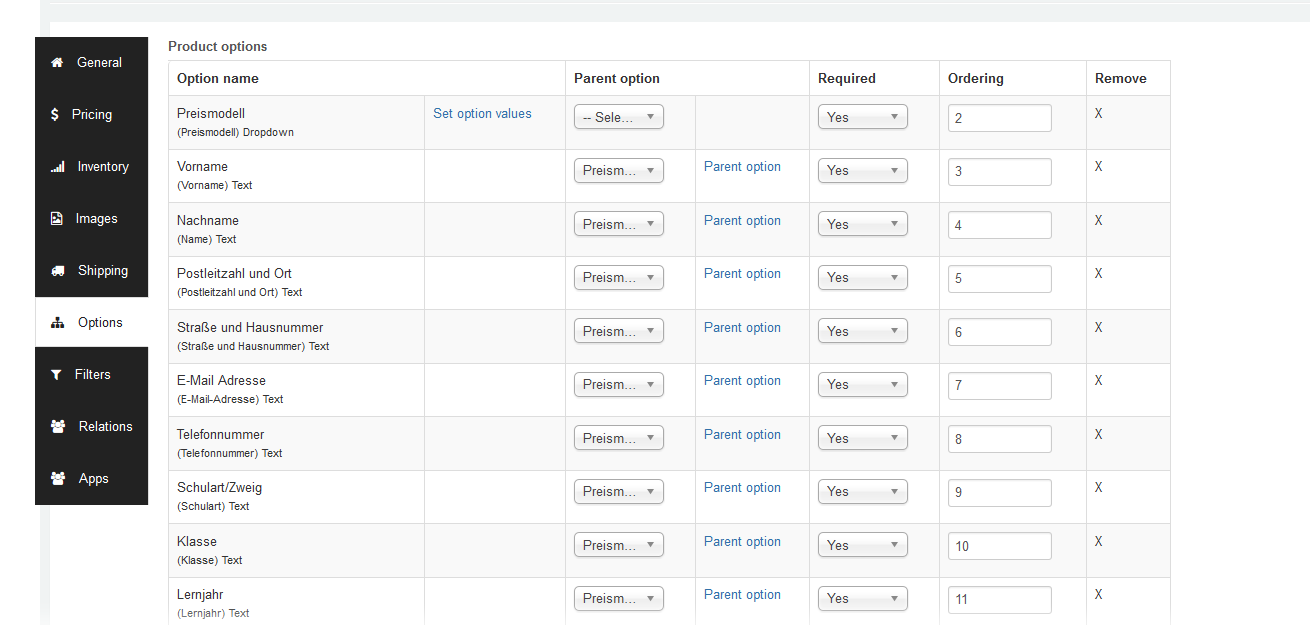
I create a course in moodle -> publish it in the joomdle component -> change the type of the shop article from "simple" to "configurable" -> add the options via j2store (I import them from another product)
Find a screenshot of the options in j2store attached
I create a course in moodle -> publish it in the joomdle component -> change the type of the shop article from "simple" to "configurable" -> add the options via j2store (I import them from another product)
Find a screenshot of the options in j2store attached
Please Log in or Create an account to join the conversation.
- Antonio Durán
-
- Offline
- Moderator
-
Less
More
- Posts: 7944
10 years 4 months ago #6
by Antonio Durán
Replied by Antonio Durán on topic Moodle course as product with options
Thanks for the info.
I tested locally and saw that when you add options to a product, J2store changes its sku, removing the Moodle course ID (that we save in sku).
So, it is normal that problems appear.
A solution for this is difficult... if J2store changes sku by itself there is not much we can do
Can you check if this happens to you too?
I tested locally and saw that when you add options to a product, J2store changes its sku, removing the Moodle course ID (that we save in sku).
So, it is normal that problems appear.
A solution for this is difficult... if J2store changes sku by itself there is not much we can do
Can you check if this happens to you too?
Please Log in or Create an account to join the conversation.
- Christoph Bohner
- Topic Author
- Offline
- New Member
-
Less
More
- Posts: 10
10 years 4 months ago #7
by Christoph Bohner
Replied by Christoph Bohner on topic Moodle course as product with options
Thank you very much for this information.
Do you see any reason not to just change back the SKU to the moodle course id?
J2Store changes it, if you change product type to configurable, but it's free to be changed again afterwards...
I tried it just once and it worked fine, so I think this solution works for me
Do you see any reason not to just change back the SKU to the moodle course id?
J2Store changes it, if you change product type to configurable, but it's free to be changed again afterwards...
I tried it just once and it worked fine, so I think this solution works for me
Please Log in or Create an account to join the conversation.
- Antonio Durán
-
- Offline
- Moderator
-
Less
More
- Posts: 7944
10 years 4 months ago #8
by Antonio Durán
Replied by Antonio Durán on topic Moodle course as product with options
Thanks for the info, we'll leave it as it is for now then.
If you want, you can contact J2Store support and inform them about this, to see if it is a bug in J2Store, or they do it for some reason.
If you want, you can contact J2Store support and inform them about this, to see if it is a bug in J2Store, or they do it for some reason.
Please Log in or Create an account to join the conversation.