
- Posts: 61
Joomdle 1.0 Installation
curl temporary file not found
- paurray
-
 Topic Author
- Offline
- Senior Member
-

Less
More
10 years 1 month ago #1
by paurray
curl temporary file not found was created by paurray
Hi Joomdle Team
I have Moodle/Joomdle/Joomla (Easy Social) working together. :woohoo:
The Joomdle system check shows green for every thing apart from:
“Moodle to Joomla HTTP connectivity: Moodle cannot connect to Joomla.”
When I activate the Joomdle hooks plugin and attempt to login
here:
www.finalbug.net/network
as e.g. Moodle123
I first get a white page with the message
“curl temporary file not found”
I am actually logged in I just have to change the url in my browser manually.
When I deactivate the Joomdle hooks plugin the login works as it used to before I installed Joomdle.
Stack Ideas (Easy Social Login) have looked at this and say it has nothing to do with their side of things.
My hoster are saying that the Server is set up correctly.
I also have Akeeba Admin Tools installed and have tried disabling it but the issues occurs exactly as outlined.
Pleas advise
thanks
Paul
I have Moodle/Joomdle/Joomla (Easy Social) working together. :woohoo:
The Joomdle system check shows green for every thing apart from:
“Moodle to Joomla HTTP connectivity: Moodle cannot connect to Joomla.”
When I activate the Joomdle hooks plugin and attempt to login
here:
www.finalbug.net/network
as e.g. Moodle123
I first get a white page with the message
“curl temporary file not found”
I am actually logged in I just have to change the url in my browser manually.
When I deactivate the Joomdle hooks plugin the login works as it used to before I installed Joomdle.
Stack Ideas (Easy Social Login) have looked at this and say it has nothing to do with their side of things.
My hoster are saying that the Server is set up correctly.
I also have Akeeba Admin Tools installed and have tried disabling it but the issues occurs exactly as outlined.
Pleas advise
thanks
Paul
Please Log in or Create an account to join the conversation.
- Antonio Durán
-

- Offline
- Moderator
-

Less
More
- Posts: 7945
10 years 1 month ago #2
by Antonio Durán
Replied by Antonio Durán on topic curl temporary file not found
Hi.
Try disabling redirect-less SSO in Joomdle config in Joomla.
Try disabling redirect-less SSO in Joomdle config in Joomla.
Please Log in or Create an account to join the conversation.
- paurray
-
Topic Author
- Offline
- Senior Member
-
Less
More
- Posts: 61
10 years 1 month ago - 10 years 1 month ago #3
by paurray
Replied by paurray on topic curl temporary file not found
Hi Antonio
Yes I saw that in the documentation and tried and it did not work.
Tired again and it worked. :pinch:
I can only guess that some of these changes do not come into effect immediately
My current problem involves logging into the back end with Akeeba Admin Tools:
Scenario 01:
Akeeba Admin Tools are activated.
Joomdle Hooks plugin is activated.
Then:
www.finalbug.net/administrator/index.php?MY SECRET ENTERANCE
Sends here:
www.finalbug.net/
i.e. it is trying to prevent a hacker hacking the site.
Scenario 02:
Akeeba Admin Tools are activated.
Joomdle Hooks plugin is deactivated.
www.finalbug.net/administrator/index.php?bruce
Gives me:
"You are a spammer, hacker or an otherwise bad person."
On the first attempt!!!
Auto-ban Repeat Offenders is set to Block after 4 attempts in 1 hour.
I am guessing here but I think this like the logout problem that Arlex from Stackideas attempted to help me with here:
***************************************************************************************************************************************
Hey Paul,
I've tried to troubleshoot on your site, it seems like Moodle auth override the Joomla logout function, you can take a look of my video here :
screencast.com/t/CANjfmoHS
By what I look at this, it keep redirection loop and skip the Joomla logout function and causing your logout function is not working.
Perhaps you can consult with their developer regarding this and see is it some of the configuration you not set correctly?
***************************************************************************************************************************************
I believe that there is something still misconfigured but have no idea what!
One more twist in this tale.
Logging out from Joomla now works but I am not automatically logged out of Moodle! :blink:
Does any of this ring a bell?
thanks
Paul
Yes I saw that in the documentation and tried and it did not work.
Tired again and it worked. :pinch:
I can only guess that some of these changes do not come into effect immediately
My current problem involves logging into the back end with Akeeba Admin Tools:
Scenario 01:
Akeeba Admin Tools are activated.
Joomdle Hooks plugin is activated.
Then:
www.finalbug.net/administrator/index.php?MY SECRET ENTERANCE
Sends here:
www.finalbug.net/
i.e. it is trying to prevent a hacker hacking the site.
Scenario 02:
Akeeba Admin Tools are activated.
Joomdle Hooks plugin is deactivated.
www.finalbug.net/administrator/index.php?bruce
Gives me:
"You are a spammer, hacker or an otherwise bad person."
On the first attempt!!!
Auto-ban Repeat Offenders is set to Block after 4 attempts in 1 hour.
I am guessing here but I think this like the logout problem that Arlex from Stackideas attempted to help me with here:
***************************************************************************************************************************************
Hey Paul,
I've tried to troubleshoot on your site, it seems like Moodle auth override the Joomla logout function, you can take a look of my video here :
screencast.com/t/CANjfmoHS
By what I look at this, it keep redirection loop and skip the Joomla logout function and causing your logout function is not working.
Perhaps you can consult with their developer regarding this and see is it some of the configuration you not set correctly?
***************************************************************************************************************************************
I believe that there is something still misconfigured but have no idea what!
One more twist in this tale.
Logging out from Joomla now works but I am not automatically logged out of Moodle! :blink:
Does any of this ring a bell?
thanks
Paul
Last edit: 10 years 1 month ago by paurray.
Please Log in or Create an account to join the conversation.
- paurray
-
Topic Author
- Offline
- Senior Member
-
Less
More
- Posts: 61
10 years 1 month ago #4
by paurray
Replied by paurray on topic curl temporary file not found
Possible further clue:
Log out from Moodle inside Joomdle inside Joomla throws the following error:
(Regardless of how " Use redirectless logout" is set. Also deactivating Akeeba Admin Tools has no effect)
403 - Forbidden Error
You are not allowed to access this address.
If the error persists, please contact the website webmaster.
If you are the webmaster of this site please log in to Cpanel and check the Error Logs. You will find the exact reason for this error there.
Common reasons for this error are:
Incorrect file/directory permissions: Below 644.
In order files to be read by the webserver, their permissions have to be equal or above 644. You can update file permissions with a FTP client or through cPanel's File Manager.
Restrictive Apache directives inside .htaccess file.
There are two Apache directives which can cause this error - 'Deny from' and 'Options -Indexes'.
PS
I asked site Ground about to investigate this and they said:
Log out from Moodle inside Joomdle inside Joomla throws the following error:
(Regardless of how " Use redirectless logout" is set. Also deactivating Akeeba Admin Tools has no effect)
403 - Forbidden Error
You are not allowed to access this address.
If the error persists, please contact the website webmaster.
If you are the webmaster of this site please log in to Cpanel and check the Error Logs. You will find the exact reason for this error there.
Common reasons for this error are:
Incorrect file/directory permissions: Below 644.
In order files to be read by the webserver, their permissions have to be equal or above 644. You can update file permissions with a FTP client or through cPanel's File Manager.
Restrictive Apache directives inside .htaccess file.
There are two Apache directives which can cause this error - 'Deny from' and 'Options -Indexes'.
PS
I asked site Ground about to investigate this and they said:
This is happening because the session is being destroyed at the time when the "Logout" button is being clicked. However, the visitor is not being redirected to " www.finalbug.net/network/login " and the access to the courses page is not allowed when you are logged out.
If you refresh the page when the 403 page appears, you will notice that you are being redirected to the login page. This should also happen when the user is being logged out.
Please Log in or Create an account to join the conversation.
- Antonio Durán
-
- Offline
- Moderator
-
Less
More
- Posts: 7945
10 years 1 month ago #5
by Antonio Durán
Replied by Antonio Durán on topic curl temporary file not found
Hi.
From the reply from your hosting provider, it seems that you have a redirection problem.
I guess you have redirect-less logout disabled also, right?
What's the URL for the courses page? If that URL is for members only, and you redirect there after logout, that will cause a problem.
You can try redirecting to some place else on logout.
You can also try disabling redirect to Joomla on logout, in Joomdle config in Moodle.
From the reply from your hosting provider, it seems that you have a redirection problem.
I guess you have redirect-less logout disabled also, right?
What's the URL for the courses page? If that URL is for members only, and you redirect there after logout, that will cause a problem.
You can try redirecting to some place else on logout.
You can also try disabling redirect to Joomla on logout, in Joomdle config in Moodle.
Please Log in or Create an account to join the conversation.
- paurray
-
Topic Author
- Offline
- Senior Member
-
Less
More
- Posts: 61
10 years 1 month ago - 10 years 1 month ago #6
by paurray
Replied by paurray on topic curl temporary file not found
Hi Antonio
I guess you have redirect-less logout disabled also, right? Correct.
Here:
Joomla / ▶︎Components / ▶︎ Joomdle ▶︎ Configuration / ▶︎ General config
Use redirectless logout is set to NO
What's the URL for the courses page?
This here:
www.finalbug.net/courses-home
I had it set to Registered users only and it did not work.
I have now set it to Public and sill does not work.
You can try redirecting to some place else on logout.
Please advise where can I do this?
You can also try disabling redirect to Joomla on logout, in Joomdle config in Moodle.
Going here:
Dashboard / ▶︎ Site administration / ▶︎ Plugins / ▶︎ Authentication / ▶︎ Manage authentication
And turning off “Redirect to Joomla on Moodle logout”
Results in the following:
No Error 403
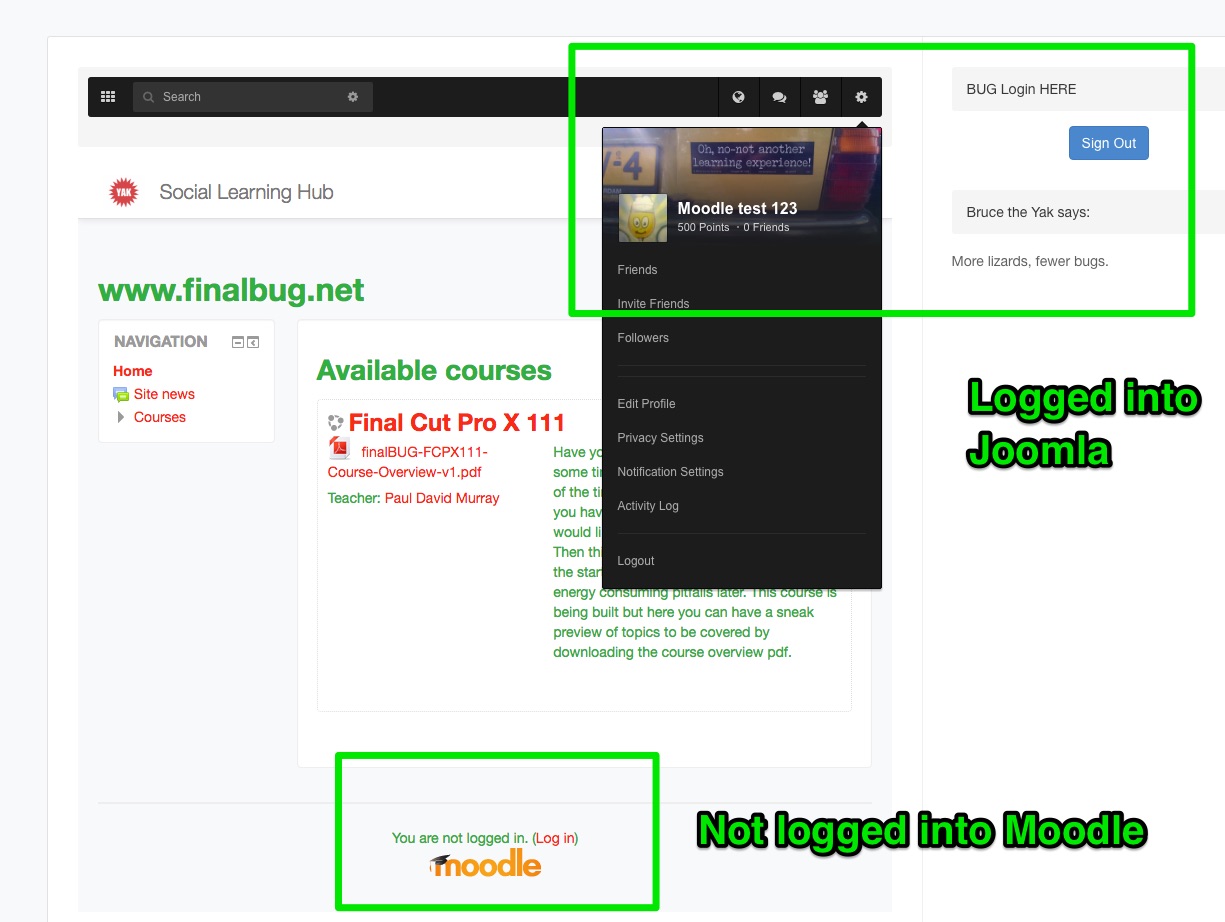
But am logged out of Moodle whilst still logged into Joomla
Please see screen shot :dry:
UPDATE:
And turning off/on “Redirect to Joomla on Moodle logout”
Makes no difference any more.
I can not log out.
Not with Joomdle/Moodle or Joomla/Easy Social!
I guess you have redirect-less logout disabled also, right? Correct.
Here:
Joomla / ▶︎Components / ▶︎ Joomdle ▶︎ Configuration / ▶︎ General config
Use redirectless logout is set to NO
What's the URL for the courses page?
This here:
www.finalbug.net/courses-home
I had it set to Registered users only and it did not work.
I have now set it to Public and sill does not work.
You can try redirecting to some place else on logout.
Please advise where can I do this?
You can also try disabling redirect to Joomla on logout, in Joomdle config in Moodle.
Going here:
Dashboard / ▶︎ Site administration / ▶︎ Plugins / ▶︎ Authentication / ▶︎ Manage authentication
And turning off “Redirect to Joomla on Moodle logout”
Results in the following:
No Error 403
But am logged out of Moodle whilst still logged into Joomla
Please see screen shot :dry:
UPDATE:
And turning off/on “Redirect to Joomla on Moodle logout”
Makes no difference any more.
I can not log out.
Not with Joomdle/Moodle or Joomla/Easy Social!
Last edit: 10 years 1 month ago by paurray. Reason: update
Please Log in or Create an account to join the conversation.
- paurray
-
Topic Author
- Offline
- Senior Member
-
Less
More
- Posts: 61
10 years 1 month ago #7
by paurray
Replied by paurray on topic curl temporary file not found
Hi Antonio
Here is the current state of play.
As you suspected there was a problem at the Akeeba Admin Tools end.
I had white listing switched on and this messed up some stuff.
I have since switched it off.
HERE IS MY TESTING:
***********************************************************************************
Scenario 01A -1B:
Use redirectless SSO is switched off and Admin tools switched ON.
1A) Joomla:
Login in Joomla : Logged in to Moodle as well.
Logout Joomla: Works but still logged in in Moodle.
Logging out of Moodle gives a 403
But after a refresh I am logged out!
1B) Moodle:
Login in Moodle : Logged in to Moodle and Joomla. BUT users Mixed up!!!
Logging out of Moodle gives a 403
But after a refresh I am logged out!
Scenario 01C -1D:
Use redirectless SSO is switched off and Admin tools switched OFF.
1C) Joomla and Admin tools NOT active:
Login in Joomla : Logged in to Moodle as well.
Logout Joomla: Works but still logged in in Moodle.
Logging out of Moodle gives a 403
But after a refresh I am logged out!
1D) Moodle and Admin tools NOT active:
Login in Moodle : Logged in to Moodle BUT NOT Joomla
Logging out of Moodle gives a 403
But after a refresh I am logged out!
Scenario 02A -2B:
Use redirectless SSO is switched ON and Admin tools switched ON.
2A) Joomla:
Login in Joomla : Not Logged in to Moodle.
Gives a “The temporary file isn't there for CURL!”
Which Akeeba think is possibly a Joomdle thing!?!
Changing my current URL from e.g:
www.finalbug.net/courses-home
to:
www.finalbug.net
And I am logged into Joomla only!
Logout: Works for Joomla. No error message!
2B) Moodle:
Login in Moodle : Not Logged in to Joomla.
Logging out of Moodle gives me a 403 error.
Scenario 02C -2D: Use redirectless SSO is switched ON and Admin tools switched OFF.
2C) Joomla and Admin tools NOT active::
Login in Joomla : Not Logged in to Moodle.
Gives a “The temporary file isn't there for CURL!”
Which Akeeba think is possibly a Joomdle thing!?!
Changing my current URL from e.g:
www.finalbug.net/courses-home
to:
www.finalbug.net
And I am logged into Joomla only!
Logout: Works for Joomla. No error message!
2D) Moodle and Admin tools NOT active:
Login in Moodle : Logged in to Moodle BUT NOT Joomla
Logging out of Moodle gives a 403
But after a refresh I am logged out!
END OF TESTING
***********************************************************************************
The only thing that I can deduce from the testing is that in the case of 2A and 2C it makes no difference if Akeeba is switched on or off.
I am sorry if this is long winded and information overload.
But I really need to get this to work.
thanks for your patience
Paul
Here is the current state of play.
As you suspected there was a problem at the Akeeba Admin Tools end.
Hi Paul, The whitelist feature does not work well with dynamic IP addresses, it requires too much maintenance when the addresses change.
I had white listing switched on and this messed up some stuff.
I have since switched it off.
Hi Akeeba, This has been driving me nuts for weeks.
I believe that you have found the problem.
When I go to Basic Protection Features I see an item called “Allow administrator access only to IPs in Whitelist”
I have set this to No.
With Admin tools activated I can now login and out of the back end normally!!!
I have tested one last thing…
Logging in in the front end:
www.finalbug.net/network/login
And I am finding that when I have a thing called “ Use redirectless SSO” set to Yes in the Joomdle config here:
www.finalbug.net/administrator/index.php...w=config&layout=edit
I get the following error: “The temporary file isn't there for CURL!”
I can do a refresh and am logged in.
Further I am finding that when I have “ Use redirectless SSO” set to No in the Joomdle.”
Both Login and Log Out work almost perfectly.
I suspect that I can get them to work perfectly if I can switch on “ Use redirectless SSO” set to No in the Joomdle.”
Do you have any idea what this “The temporary file isn't there for CURL!” error is about?
Do you think it could be caused by Admin Tools?
I really do not know anything about the Joomdle bridge. Judging purely from the title, “Use redirectless SSO” sounds like something that allows you to use "pretty" URLS without Apache's mod_redirect. If you have mod_redirect available to you and enabled in your .htaccess file, you really don't need that.
I asked Davide about the “The temporary file isn't there for CURL!” message, he thinks it is a custom error message from the extension, so it does not tell us much. Admin Tools could be blocking it, you can check the Security Exceptions log for a clue. I do not know what it it looking for or where it is looking, so I can't tell you for sure.
Hi Dale
I guess I could have been more specific about this
SSO = Joomdle provides Single Sign On (SSO) between Joomla and Moodle.
If I understand this correctly the idea is this:
Login in Joomla or Moodle then you are logged in in both.
Logout of Joomla or Moodle then you are logged out of both.
I have done extensive tests and can confirm your suspicions.
As of now I am finding nothing that points towards Akeeba Admin Tools.
thanks again
Paul
HERE IS MY TESTING:
***********************************************************************************
Scenario 01A -1B:
Use redirectless SSO is switched off and Admin tools switched ON.
1A) Joomla:
Login in Joomla : Logged in to Moodle as well.
Logout Joomla: Works but still logged in in Moodle.
Logging out of Moodle gives a 403
But after a refresh I am logged out!
1B) Moodle:
Login in Moodle : Logged in to Moodle and Joomla. BUT users Mixed up!!!
Logging out of Moodle gives a 403
But after a refresh I am logged out!
Scenario 01C -1D:
Use redirectless SSO is switched off and Admin tools switched OFF.
1C) Joomla and Admin tools NOT active:
Login in Joomla : Logged in to Moodle as well.
Logout Joomla: Works but still logged in in Moodle.
Logging out of Moodle gives a 403
But after a refresh I am logged out!
1D) Moodle and Admin tools NOT active:
Login in Moodle : Logged in to Moodle BUT NOT Joomla
Logging out of Moodle gives a 403
But after a refresh I am logged out!
Scenario 02A -2B:
Use redirectless SSO is switched ON and Admin tools switched ON.
2A) Joomla:
Login in Joomla : Not Logged in to Moodle.
Gives a “The temporary file isn't there for CURL!”
Which Akeeba think is possibly a Joomdle thing!?!
Changing my current URL from e.g:
www.finalbug.net/courses-home
to:
www.finalbug.net
And I am logged into Joomla only!
Logout: Works for Joomla. No error message!
2B) Moodle:
Login in Moodle : Not Logged in to Joomla.
Logging out of Moodle gives me a 403 error.
Scenario 02C -2D: Use redirectless SSO is switched ON and Admin tools switched OFF.
2C) Joomla and Admin tools NOT active::
Login in Joomla : Not Logged in to Moodle.
Gives a “The temporary file isn't there for CURL!”
Which Akeeba think is possibly a Joomdle thing!?!
Changing my current URL from e.g:
www.finalbug.net/courses-home
to:
www.finalbug.net
And I am logged into Joomla only!
Logout: Works for Joomla. No error message!
2D) Moodle and Admin tools NOT active:
Login in Moodle : Logged in to Moodle BUT NOT Joomla
Logging out of Moodle gives a 403
But after a refresh I am logged out!
END OF TESTING
***********************************************************************************
The only thing that I can deduce from the testing is that in the case of 2A and 2C it makes no difference if Akeeba is switched on or off.
I am sorry if this is long winded and information overload.
But I really need to get this to work.
thanks for your patience
Paul
Please Log in or Create an account to join the conversation.
- Antonio Durán
-
- Offline
- Moderator
-
Less
More
- Posts: 7945
10 years 1 month ago #8
by Antonio Durán
Replied by Antonio Durán on topic curl temporary file not found
I just created a new account at your site, and tried to log in: I could not log in to Joomla, even after disabling Joomdle plugins, so it seems you have a different problem there.
Please Log in or Create an account to join the conversation.
- paurray
-
Topic Author
- Offline
- Senior Member
-
Less
More
- Posts: 61
10 years 1 month ago #9
by paurray
Replied by paurray on topic curl temporary file not found
Hi Antonio
I will test this now.
And report back.
best
Paul
I will test this now.
And report back.
best
Paul
Please Log in or Create an account to join the conversation.
- paurray
-
Topic Author
- Offline
- Senior Member
-
Less
More
- Posts: 61
10 years 1 month ago #10
by paurray
Replied by paurray on topic curl temporary file not found
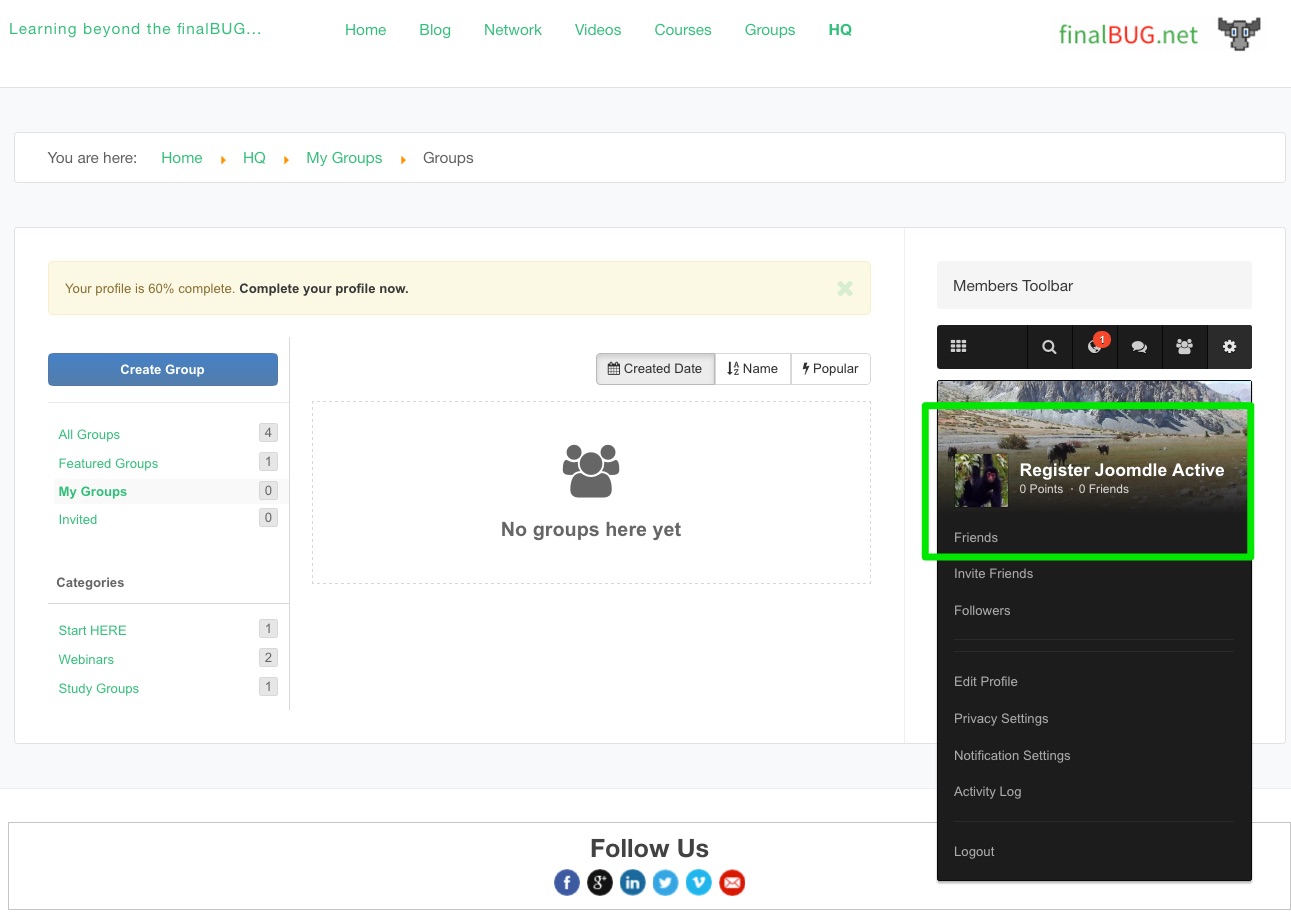
I can only guess that we are doing something different but I was able to create a user and login just now!?
a) Joomdle plugins were switched on all the time.
b) I created a user in Easy Social in the back end.
(*Note - Admins are not allowed to login in the front end)
called him "RegTest" password the same as the name all written small!
c) I needed to approve in the Easy Social back end
d) Logged in in the front end!
:dry:
a) Joomdle plugins were switched on all the time.
b) I created a user in Easy Social in the back end.
(*Note - Admins are not allowed to login in the front end)
called him "RegTest" password the same as the name all written small!
c) I needed to approve in the Easy Social back end
d) Logged in in the front end!
:dry:
Please Log in or Create an account to join the conversation.