
- Posts: 7945
Joomdle 1.0 Installation
curl temporary file not found
- Antonio Durán
-

- Offline
- Moderator
-

Less
More
10 years 1 month ago #11
by Antonio Durán
Replied by Antonio Durán on topic curl temporary file not found
I created account in backend, and did not activate it in easysocial.
I tried to access easysocial backend, but i got:
Error
You are not authorised to view this resource.
I tried to access easysocial backend, but i got:
Error
You are not authorised to view this resource.
Please Log in or Create an account to join the conversation.
- paurray
-
 Topic Author
- Offline
- Senior Member
-

Less
More
- Posts: 61
10 years 1 month ago #12
by paurray
Replied by paurray on topic curl temporary file not found
OK maybe this is partly my mistake :ohmy:
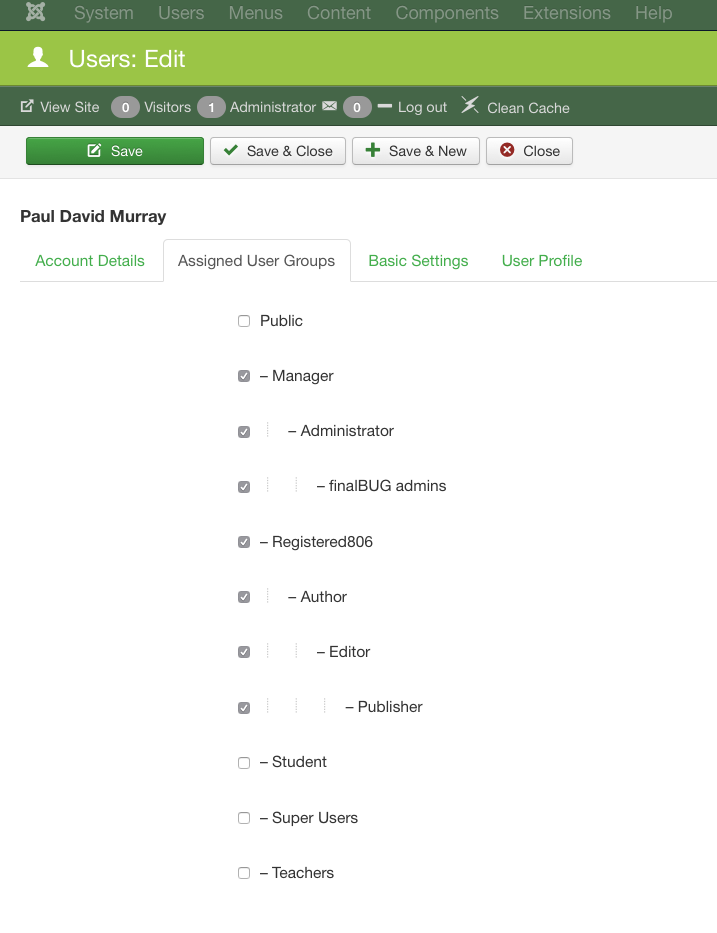
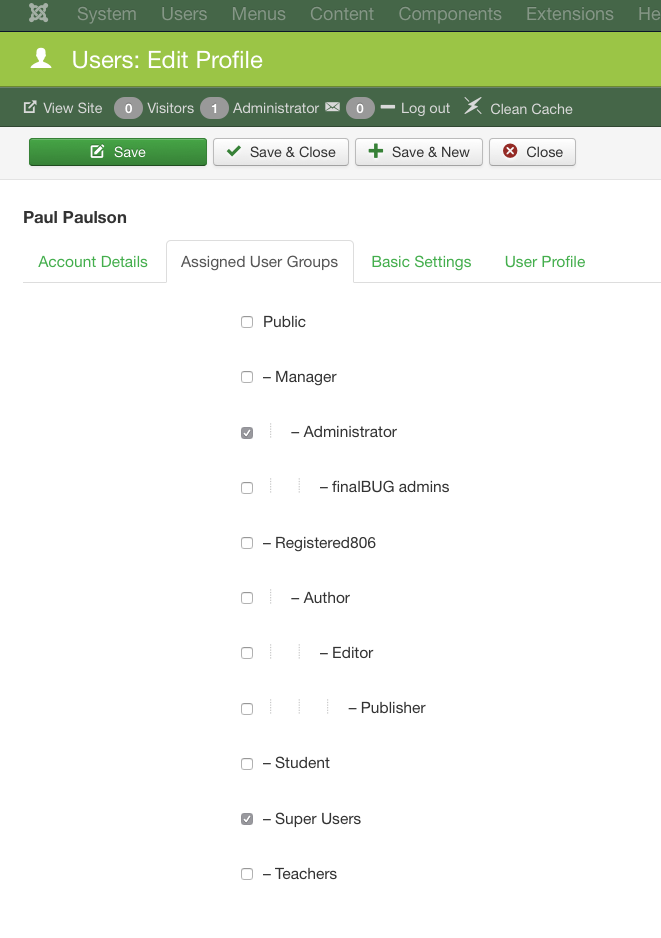
I am sending you login details for another user per email.
The same one I used and the one that worked for me.
If I understand what is going on here it is as follows:
The user I sent you per email already has all kinds of rights (blog poster number 1.)
Buttttttt is not allowed to log in, in the front end. (screen shot 01)
This is handled by Admin Tools.
The user I am sending you now (per email) has less rigthts.
And is allowed to login in the front end.
Also I can get to the ES plugin in the back end with this second user I am now sending you.
Again this is complicated but part of the Akeeba Admin tools security is about:
Not having blog poster number 1 logging in at the front end!
It is also posible that this is part of the problem.
I am not going to pretend that I understand all of this.
Frankly I find it very confusing :blink:
It would be great to even find a lead... :woohoo:
I am sending you login details for another user per email.
The same one I used and the one that worked for me.
If I understand what is going on here it is as follows:
The user I sent you per email already has all kinds of rights (blog poster number 1.)
Buttttttt is not allowed to log in, in the front end. (screen shot 01)
This is handled by Admin Tools.
The user I am sending you now (per email) has less rigthts.
And is allowed to login in the front end.
Also I can get to the ES plugin in the back end with this second user I am now sending you.
Again this is complicated but part of the Akeeba Admin tools security is about:
Not having blog poster number 1 logging in at the front end!
It is also posible that this is part of the problem.
I am not going to pretend that I understand all of this.
Frankly I find it very confusing :blink:
It would be great to even find a lead... :woohoo:
Please Log in or Create an account to join the conversation.
- paurray
-
Topic Author
- Offline
- Senior Member
-
Less
More
- Posts: 61
10 years 1 month ago #13
by paurray
Replied by paurray on topic curl temporary file not found
Thanks Antonio
I am checking with Akeeba again
kind regards
Paul
I am checking with Akeeba again
kind regards
Paul
Please Log in or Create an account to join the conversation.
- paurray
-
Topic Author
- Offline
- Senior Member
-
Less
More
- Posts: 61
10 years 1 month ago #14
by paurray
Replied by paurray on topic curl temporary file not found
Hi Antonio
I can not stress enough how amazing Akeeba were in supporting me.
********************************************************************************************************
STEP 01 : Seems to be mission critical
********************************************************************************************************
I believe that the first break through was this here:
Applying exceptions as follows in the following fields “Allow direct access, including .php files, to these directories”
moodle
courses-home
these are the directories in question:
www.finalbug.net/moodle/
www.finalbug.net/courses-home
The instructions are here:
www.akeebabackup.com/documentation/admin...rver-protection.html
Things got better but there were still “curl errors”
********************************************************************************************************
Again from Akeeba:
Looking at your .htaccess configuration, I think that the cURL request is blocked because you are blocking specific user agents.
Can you please try to disable such feature and try again?
I set ”specific user agents" set it to NO and saved the file.
www.akeebabackup.com/documentation/admin.../htaccess-maker.html
As far as can make out this makes no difference as far as I can see and I have since set it back to yes.
********************************************************************************************************
We tried:
Server protection
Backend protection: NO
Frontend protection: NO
As far as can make out this makes no difference as far as I can see and I have since set it back to yes.
********************************************************************************************************
STEP 02 : Seems to be mission critical
********************************************************************************************************
Protect against common file injection attacks
Set to “No”
If switched off seems to mess things up at the very latest when I log out!!!
Instructions are here:
www.akeebabackup.com/documentation/admin.../htaccess-maker.html
I have left this switched off.
********************************************************************************************************
State of play!!!
********************************************************************************************************
As of now Akeeba are advising me to switch off .htaccess completly!
Which is a pity as it kind of takes the Pro out of Akeeba Admin Tools Pro!!!
********************************************************************************************************
As of now there are only 3 things NOT working!!!
When I dumb down the Akeeba Admin .htaccess file…
********************************************************************************************************
FYI I have set SSO to NO booth in Joomdle in Joomla and in the Joomdle plugin in Moodle!
1) If I log out of the Joomla I do not log out of Moodle in Joomla automatically.
2) If I attempt to log out of Moodle before logging out of Joomla I get sent here:
www.finalbug.net/moodle/auth/joomdle/lan..._user=0&wantsurl=%2F
And get a message saying that the page is not working!
3) If I enter a wrong password either in Joomla or Moodle in Joomla
I get a white page!!!
********************************************************************************************************
As of now there are ALSO pretty much the same 3 things NOT working!!!
When I replace the Akeeba Admin .htaccess file…
********************************************************************************************************
1) If I log out of the Joomla I do not log out of Moodle in Joomla automatically.
2) I get redirected to the home page and am still logged in.
3) If I enter a wrong password either in Joomla get redirected to the home page.
********************************************************************************************************
With respect to point 3 in all fairness this happens also when I disable the Joomdle hooks so I will double check with stack ideas and see if this is a problem at their end?
********************************************************************************************************
Please Note:
Also with respect to this second scenario where I disable the Akeeba Admin .htaccess file and enable the normal Joomla file!!!
Only users created in Joomla can log in and not ones created in Moodle!!!
********************************************************************************************************
I have made great progress thanks to Akeeba.
But have the feeling that I have taken this all a step to far.
I would be very grateful if you could pick up the ball and tell me how to get this working.
I am not seeing much difference when I use a standard .htaccess file rather than the Akeeba Admin one.
Thus I would really like to get this to work with the Akeeba Admin .htaccess file
One last thing.
I have been testing all of this for going on 3 hours now and cpanel says the following:
Reports 5797 Account executions.
What ever is going it appears that something is stuck in a loop some where?
please advise
Paul
I can not stress enough how amazing Akeeba were in supporting me.
********************************************************************************************************
STEP 01 : Seems to be mission critical
********************************************************************************************************
I believe that the first break through was this here:
Applying exceptions as follows in the following fields “Allow direct access, including .php files, to these directories”
moodle
courses-home
these are the directories in question:
www.finalbug.net/moodle/
www.finalbug.net/courses-home
The instructions are here:
www.akeebabackup.com/documentation/admin...rver-protection.html
Things got better but there were still “curl errors”
********************************************************************************************************
Again from Akeeba:
Looking at your .htaccess configuration, I think that the cURL request is blocked because you are blocking specific user agents.
Can you please try to disable such feature and try again?
I set ”specific user agents" set it to NO and saved the file.
www.akeebabackup.com/documentation/admin.../htaccess-maker.html
As far as can make out this makes no difference as far as I can see and I have since set it back to yes.
********************************************************************************************************
We tried:
Server protection
Backend protection: NO
Frontend protection: NO
As far as can make out this makes no difference as far as I can see and I have since set it back to yes.
********************************************************************************************************
STEP 02 : Seems to be mission critical
********************************************************************************************************
Protect against common file injection attacks
Set to “No”
If switched off seems to mess things up at the very latest when I log out!!!
Instructions are here:
www.akeebabackup.com/documentation/admin.../htaccess-maker.html
I have left this switched off.
********************************************************************************************************
State of play!!!
********************************************************************************************************
As of now Akeeba are advising me to switch off .htaccess completly!
Which is a pity as it kind of takes the Pro out of Akeeba Admin Tools Pro!!!
********************************************************************************************************
As of now there are only 3 things NOT working!!!
When I dumb down the Akeeba Admin .htaccess file…
********************************************************************************************************
FYI I have set SSO to NO booth in Joomdle in Joomla and in the Joomdle plugin in Moodle!
1) If I log out of the Joomla I do not log out of Moodle in Joomla automatically.
2) If I attempt to log out of Moodle before logging out of Joomla I get sent here:
www.finalbug.net/moodle/auth/joomdle/lan..._user=0&wantsurl=%2F
And get a message saying that the page is not working!
3) If I enter a wrong password either in Joomla or Moodle in Joomla
I get a white page!!!
********************************************************************************************************
As of now there are ALSO pretty much the same 3 things NOT working!!!
When I replace the Akeeba Admin .htaccess file…
********************************************************************************************************
1) If I log out of the Joomla I do not log out of Moodle in Joomla automatically.
2) I get redirected to the home page and am still logged in.
3) If I enter a wrong password either in Joomla get redirected to the home page.
********************************************************************************************************
With respect to point 3 in all fairness this happens also when I disable the Joomdle hooks so I will double check with stack ideas and see if this is a problem at their end?
********************************************************************************************************
Please Note:
Also with respect to this second scenario where I disable the Akeeba Admin .htaccess file and enable the normal Joomla file!!!
Only users created in Joomla can log in and not ones created in Moodle!!!
********************************************************************************************************
I have made great progress thanks to Akeeba.
But have the feeling that I have taken this all a step to far.
I would be very grateful if you could pick up the ball and tell me how to get this working.
I am not seeing much difference when I use a standard .htaccess file rather than the Akeeba Admin one.
Thus I would really like to get this to work with the Akeeba Admin .htaccess file
One last thing.
I have been testing all of this for going on 3 hours now and cpanel says the following:
Reports 5797 Account executions.
What ever is going it appears that something is stuck in a loop some where?
please advise
Paul
Please Log in or Create an account to join the conversation.
- Antonio Durán
-
- Offline
- Moderator
-
Less
More
- Posts: 7945
10 years 1 month ago #15
by Antonio Durán
Replied by Antonio Durán on topic curl temporary file not found
Hi Paul.
I checked your logout problem, and found that it was caused by a change in Joomla 3.6 that we had missed: they changed "remember me" cookie, so we need to update Joomdle code to work with that.
I have done it at your site, and changes will also be including in next release.
After the changes, logout from Joomla and Moodle is working fine in my tests. Please test and let me know if you notice any issues.
I don't know how you have left htaccess configuration now, but if you want you can try enabling back options, one at a time, and test each time. One thing is sure: with some change you removed the 403 error given when trying to access joomdle logout php scrtipts.
> Only users created in Joomla can log in and not ones created in Moodle!!!
Did you select Joomdle as their auth method when creating them?
I don't know what the cpanel message means, sorry.
I checked your logout problem, and found that it was caused by a change in Joomla 3.6 that we had missed: they changed "remember me" cookie, so we need to update Joomdle code to work with that.
I have done it at your site, and changes will also be including in next release.
After the changes, logout from Joomla and Moodle is working fine in my tests. Please test and let me know if you notice any issues.
I don't know how you have left htaccess configuration now, but if you want you can try enabling back options, one at a time, and test each time. One thing is sure: with some change you removed the 403 error given when trying to access joomdle logout php scrtipts.
> Only users created in Joomla can log in and not ones created in Moodle!!!
Did you select Joomdle as their auth method when creating them?
I don't know what the cpanel message means, sorry.
Please Log in or Create an account to join the conversation.
- paurray
-
Topic Author
- Offline
- Senior Member
-
Less
More
- Posts: 61
10 years 1 month ago #16
by paurray
Replied by paurray on topic curl temporary file not found
Hi Antonio
OK it looks as if things are finally beginning to fall into place. :woohoo:
If I understand what you are saying correctly problem 1 & 2 are the same problem.
i.e. my chances of getting things working with Akeeba Admin as they instructed me are good.
Does this also solve problem 3???
Somehow a wrong login seems to be also working now?!?!?
With respect to the users created in Moodle.
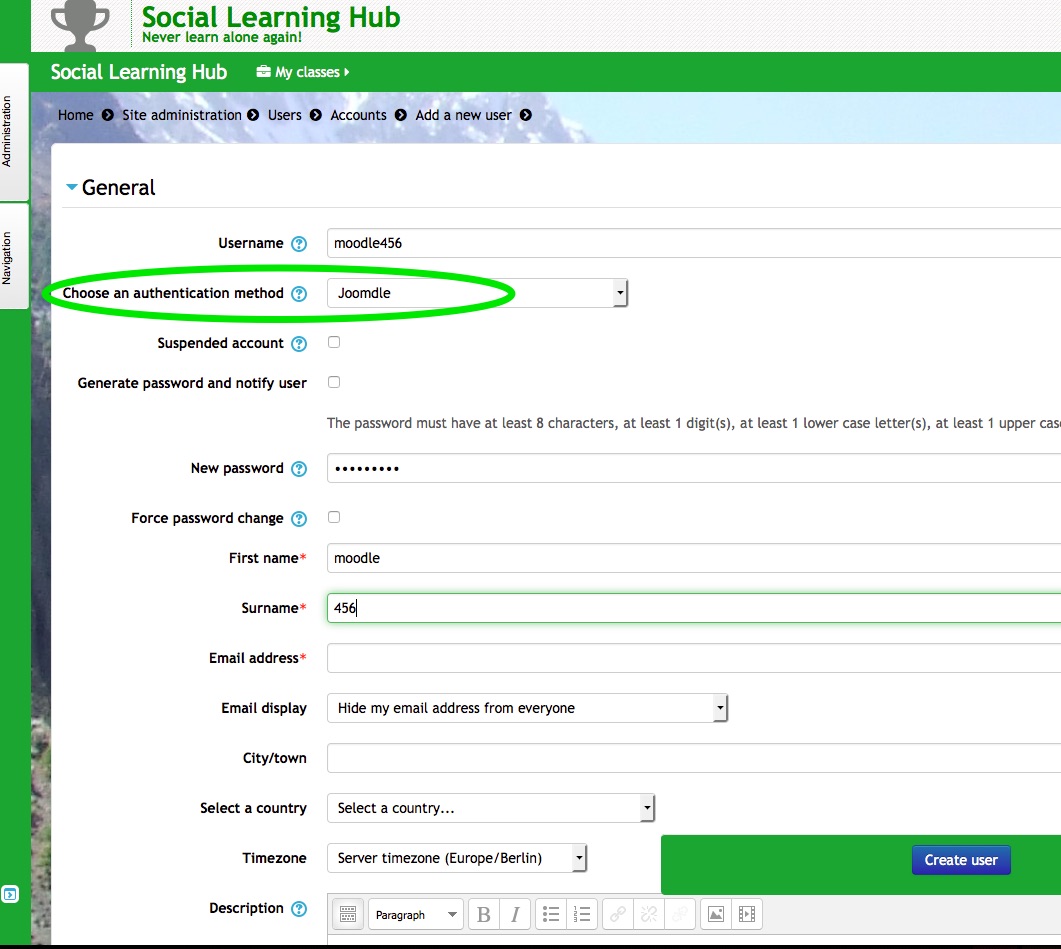
I just created a new test user user called moodle456
Please see screen shot.
I confirm that I can not log in with him.
This is weird as this used to work!?!
Remember moodle123?
I am sending you an email with moodle456 password.
But you could probably take an educated guess at it
best
Paul
OK it looks as if things are finally beginning to fall into place. :woohoo:
I checked your logout problem, and found that it was caused by a change in Joomla 3.6 that we had missed: they changed "remember me" cookie, so we need to update Joomdle code to work with that.
I have done it at your site, and changes will also be including in next release.
After the changes, logout from Joomla and Moodle is working fine in my tests. Please test and let me know if you notice any issues.
If I understand what you are saying correctly problem 1 & 2 are the same problem.
i.e. my chances of getting things working with Akeeba Admin as they instructed me are good.
Does this also solve problem 3???
Somehow a wrong login seems to be also working now?!?!?
With respect to the users created in Moodle.
I just created a new test user user called moodle456
Please see screen shot.
I confirm that I can not log in with him.
This is weird as this used to work!?!
Remember moodle123?
I am sending you an email with moodle456 password.
But you could probably take an educated guess at it
best
Paul
Please Log in or Create an account to join the conversation.
- Antonio Durán
-
- Offline
- Moderator
-
Less
More
- Posts: 7945
10 years 1 month ago #17
by Antonio Durán
Replied by Antonio Durán on topic curl temporary file not found
The problem seems to be that you have a wrong configuration in Users section in Joomla.
In Options, there is: New User Registration Group
You have set it to public. It should be set to Registered. If you change it, new users should be added to that group, and be able to log in.
I added the moodle456 user to the registered group, and I could log in fine.
In Options, there is: New User Registration Group
You have set it to public. It should be set to Registered. If you change it, new users should be added to that group, and be able to log in.
I added the moodle456 user to the registered group, and I could log in fine.
Please Log in or Create an account to join the conversation.
- paurray
-
Topic Author
- Offline
- Senior Member
-
Less
More
- Posts: 61
10 years 4 weeks ago #18
by paurray
Replied by paurray on topic curl temporary file not found
Hi Antonio
It was a long and twisted road but things seem to be working perfectly now.
Thank you for your support on this.
best
Paul
It was a long and twisted road but things seem to be working perfectly now.
Thank you for your support on this.
best
Paul
Please Log in or Create an account to join the conversation.
- Antonio Durán
-
- Offline
- Moderator
-
Less
More
- Posts: 7945
10 years 4 weeks ago #19
by Antonio Durán
Replied by Antonio Durán on topic curl temporary file not found
Great, I am glad we could help.
Please Log in or Create an account to join the conversation.