
- Posts: 61
Joomdle 1.0 Installation
Getting Joomdle & Hika Shop working together?
- paurray
-
 Topic Author
- Offline
- Senior Member
-

Less
More
9 years 6 months ago - 9 years 6 months ago #1
by paurray
Getting Joomdle & Hika Shop working together? was created by paurray
Hi Antonio
Reading the documentation in your wiki
"First you need to ensure that the one you choose is working for normal products."
I am using Hika Shop and have tested extensively and it works!
If I go here:
www.finalbug.net/courses-fcpx-and-related-post-production-tools
I see three courses listed.
Sample 01: 3D Titles in FCPX (No Guest Access)
Sample 02: Resolve 11 Edit (Guest access)
Sample 03: FCPX NOT Pro (No Guest Access)
NONE ENROLLED GUEST NOT LOGGED:
Obviously attempting to access Sample 01 & Sample 03 whilst not logged in…
Gives me the following: Guests cannot access this course. Please log in. "Continue."
Pressing "Continue" takes me here:
www.finalbug.net/network-final-cut-pro-p...essionals/login-here
Which is great…
NONE ENROLLED LOGGED IN:
Now if I login and go back to the page:
And attempt to access for example the course Sample 01 whilst logged in….
Gives me the following: Guests cannot access this course. Please log in. Continue.
Which makes no sense as I am logged in!
ENROLLED LOGGED IN:
Next up I go to the Hika Shop Component:
I press add to cart and am taken to the check out:
I press Finish and am told that the purchase went through....
My test user gets 3 eamils. 2 from Hika Shop & 1 from Joomdle.
Having purchased the course that returning to the course (Sample 01) in Moodle in Joomdle!
And attempt to access for example the course Sample 01 whilst logged and having bought the course.
Gives me the following: Guests cannot access this course. Please log in. Continue.
thanks
Paul
PS: At the Joomdle end I have the following:
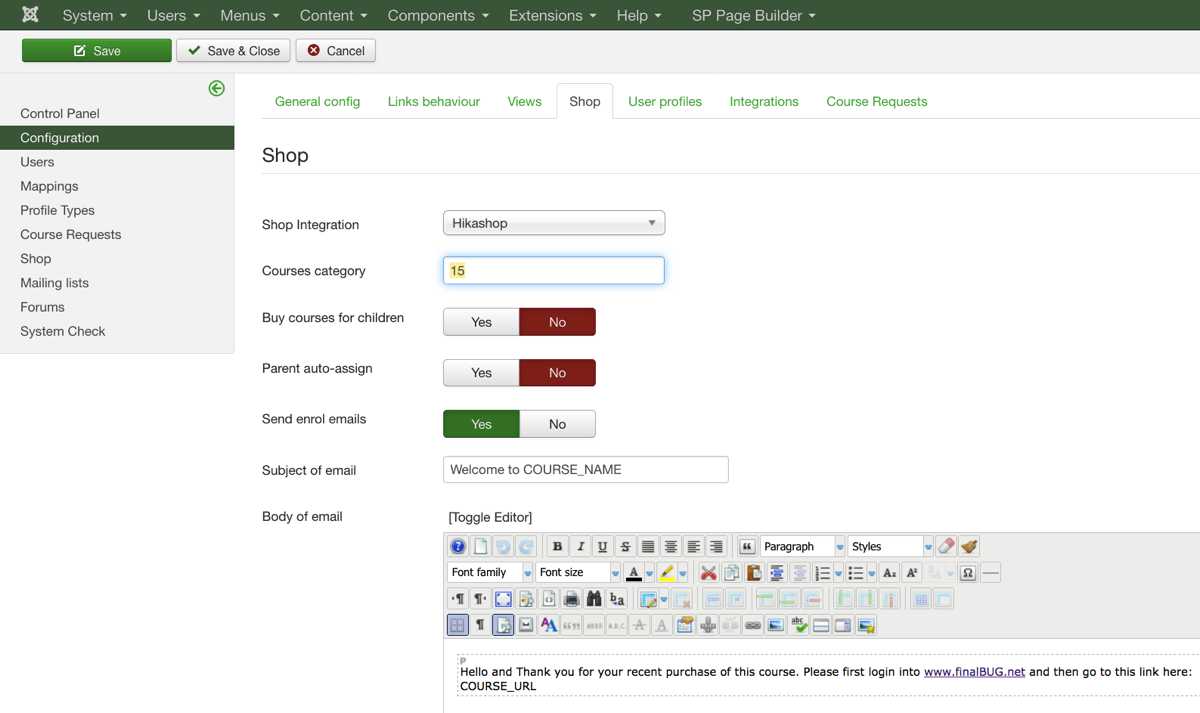
1) Activated Hika Shop integration
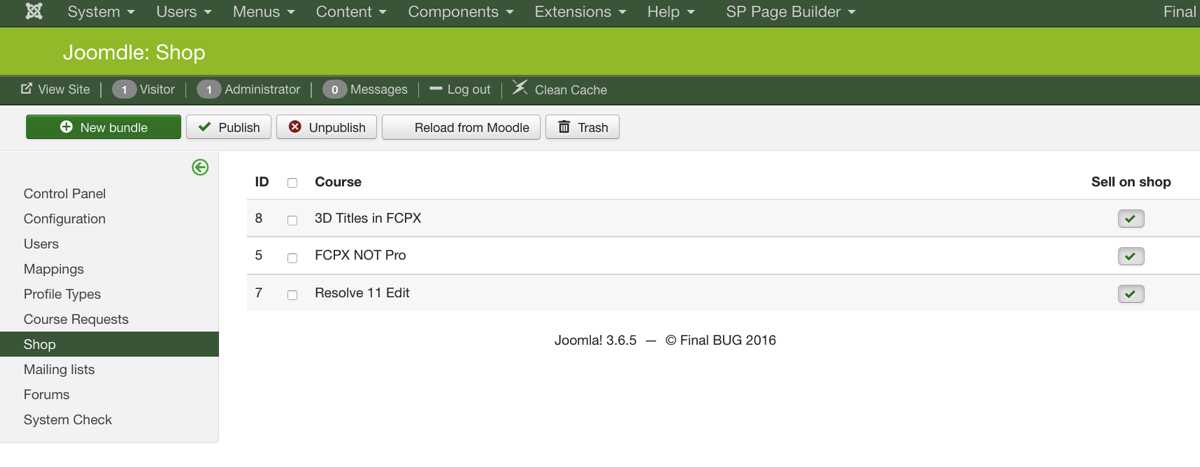
2) Published 3 sample courses
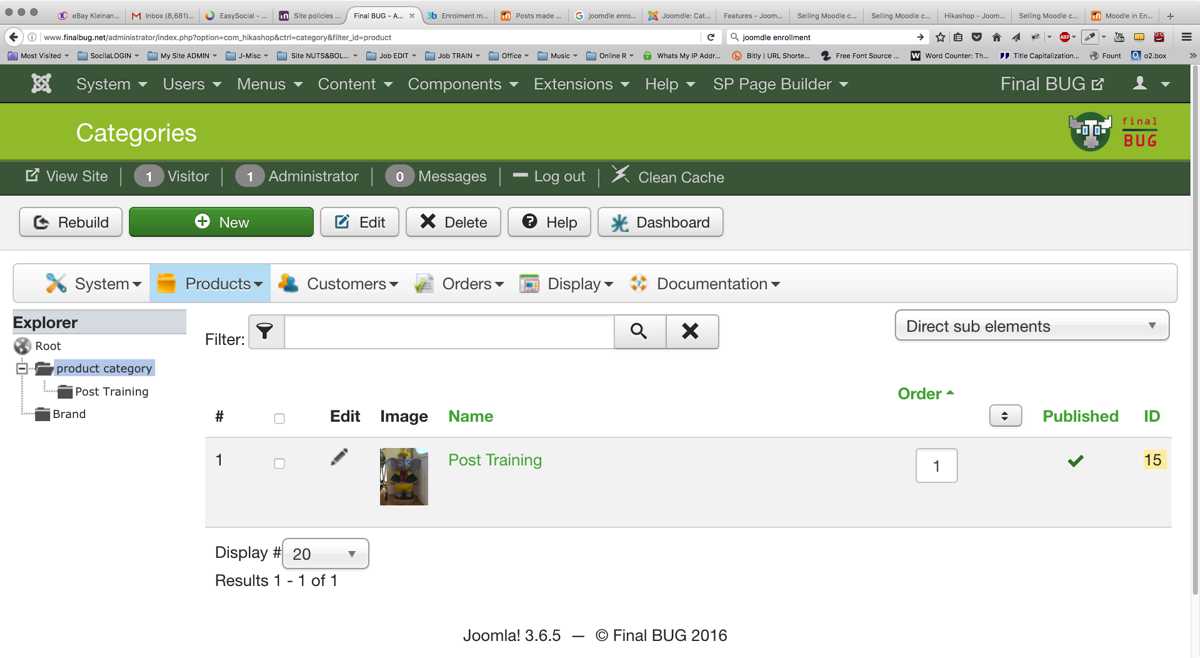
3) Made sure that the Category has the same number in Joomdle & Hika
Reading the documentation in your wiki
"First you need to ensure that the one you choose is working for normal products."
I am using Hika Shop and have tested extensively and it works!
If I go here:
www.finalbug.net/courses-fcpx-and-related-post-production-tools
I see three courses listed.
Sample 01: 3D Titles in FCPX (No Guest Access)
Sample 02: Resolve 11 Edit (Guest access)
Sample 03: FCPX NOT Pro (No Guest Access)
NONE ENROLLED GUEST NOT LOGGED:
Obviously attempting to access Sample 01 & Sample 03 whilst not logged in…
Gives me the following: Guests cannot access this course. Please log in. "Continue."
Pressing "Continue" takes me here:
www.finalbug.net/network-final-cut-pro-p...essionals/login-here
Which is great…
NONE ENROLLED LOGGED IN:
Now if I login and go back to the page:
And attempt to access for example the course Sample 01 whilst logged in….
Gives me the following: Guests cannot access this course. Please log in. Continue.
Which makes no sense as I am logged in!
- Please advise what have I not configured so that this happens?
- I would have expected to be directed to the shop at this point?
- Have I missed a step?
ENROLLED LOGGED IN:
Next up I go to the Hika Shop Component:
I press add to cart and am taken to the check out:
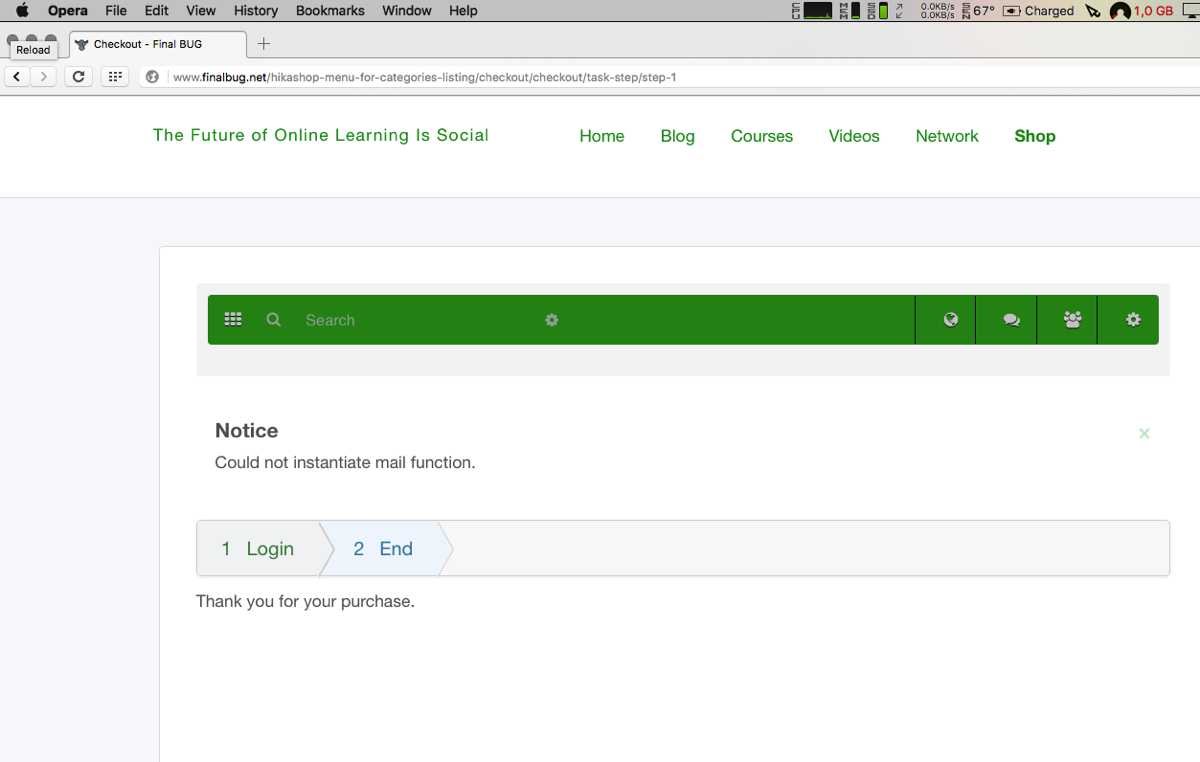
I press Finish and am told that the purchase went through....
My test user gets 3 eamils. 2 from Hika Shop & 1 from Joomdle.
- Your order No. B3H0 is now confirmed at MY WEBSITE
- Your order No. B3H0 is now created at MY WEBSITE
- Welcome to 3D Titles in FCPX
Having purchased the course that returning to the course (Sample 01) in Moodle in Joomdle!
And attempt to access for example the course Sample 01 whilst logged and having bought the course.
Gives me the following: Guests cannot access this course. Please log in. Continue.
- Which makes no sense as I am logged and having bought the course?
- Have I missed a step?
thanks
Paul
PS: At the Joomdle end I have the following:
1) Activated Hika Shop integration
2) Published 3 sample courses
3) Made sure that the Category has the same number in Joomdle & Hika
Last edit: 9 years 6 months ago by paurray.
Please Log in or Create an account to join the conversation.
- paurray
-
Topic Author
- Offline
- Senior Member
-
Less
More
- Posts: 61
9 years 6 months ago - 9 years 6 months ago #2
by paurray
Replied by paurray on topic Getting Joomdle & Hika Shop working together?
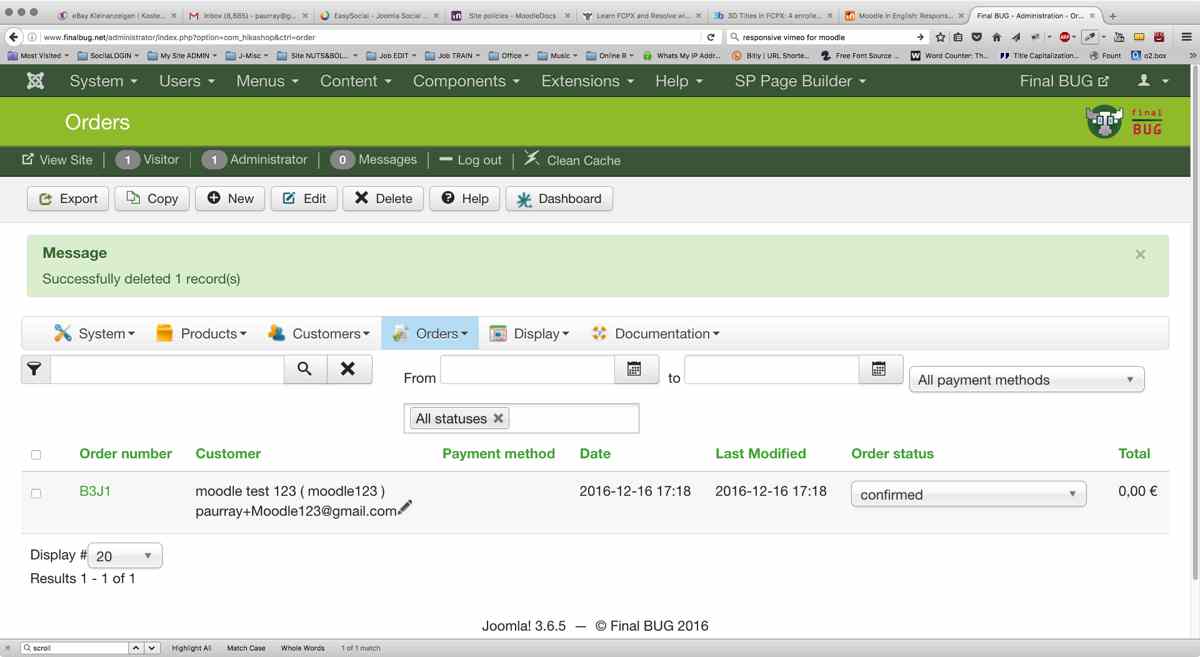
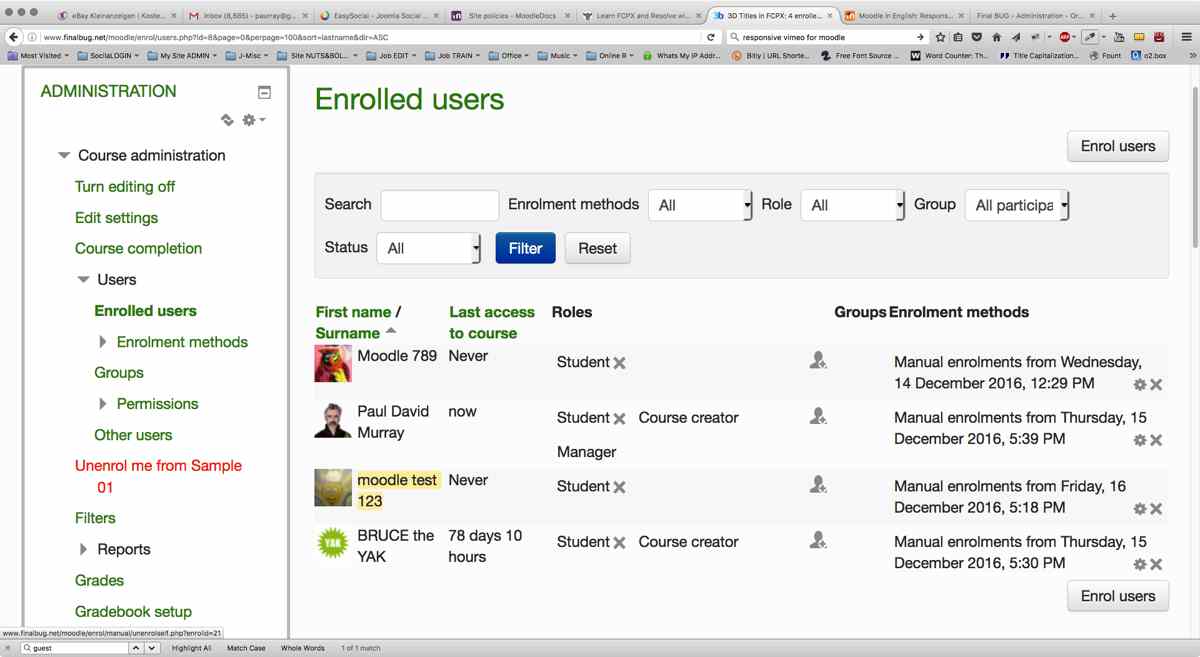
In the mean time I can confirm that my test users shows up in the Hika Orders section and in the Moodle Enrolled Section!!!
4) Hika Orders
5) Moodle Enrolled
4) Hika Orders
5) Moodle Enrolled
Last edit: 9 years 6 months ago by paurray.
Please Log in or Create an account to join the conversation.
- Antonio Durán
-

- Offline
- Moderator
-

Less
More
- Posts: 7929
9 years 6 months ago #3
by Antonio Durán
Replied by Antonio Durán on topic Getting Joomdle & Hika Shop working together?
Hi.
If you get the message that guests can not enrol, it's weird that you are really logged. If you want, send the test credentials you are using to antonio at joomdle dot com and I will try to take a look at it soon, in case I can spot something.
If you get the message that guests can not enrol, it's weird that you are really logged. If you want, send the test credentials you are using to antonio at joomdle dot com and I will try to take a look at it soon, in case I can spot something.
Please Log in or Create an account to join the conversation.
- paurray
-
Topic Author
- Offline
- Senior Member
-
Less
More
- Posts: 61
9 years 5 months ago - 9 years 5 months ago #4
by paurray
Replied by paurray on topic Getting Joomdle & Hika Shop working together?
Antonio guided me through this in a series of emails so In case this helps any one else...
I will try to explain as best as I can and if I make any mistakes perhaps Antonio can correct me.
In my case I am using Easy Social & Moodle/Joomdle & the “Joomdle User Check Plugin”
www.joomdle.com/download/category/27-plugins-additional
This plugin will run before user registration, checking:
- That username format is valid for Moodle (no spaces, no caps...)
- That username/email are not yet registered in Moodle
I assume that the logic is similar for Community Builder & Co.
The thing is you could have everything technically working perfectly with:
- System health check
- With your Single Sign-On (and off)
- Your shop could work perfectly (in my case Hika Shop)
And yet you might not be able to purchase courses as for e.g. user “Moodle(=)123” with password “Moodle(=)123”
It is not as if you are going to get any error messages or anything...
It will just appear not to work. :dry:
I would suggest first doing an idiot check if you have not done so already.
Using a really easy user name & password all letters & lower case and see if this works. e.g. “abcdefgh”
Assuming this works & something like “Moodle(=)123” with password “Moodle(=)123” does not work:
- Check whether you might need to install the “Joomdle User Check Plugin” and have it configured correctly.
- Check your user name rules for Moodle
- Check your user name rules for your Social component of choice.
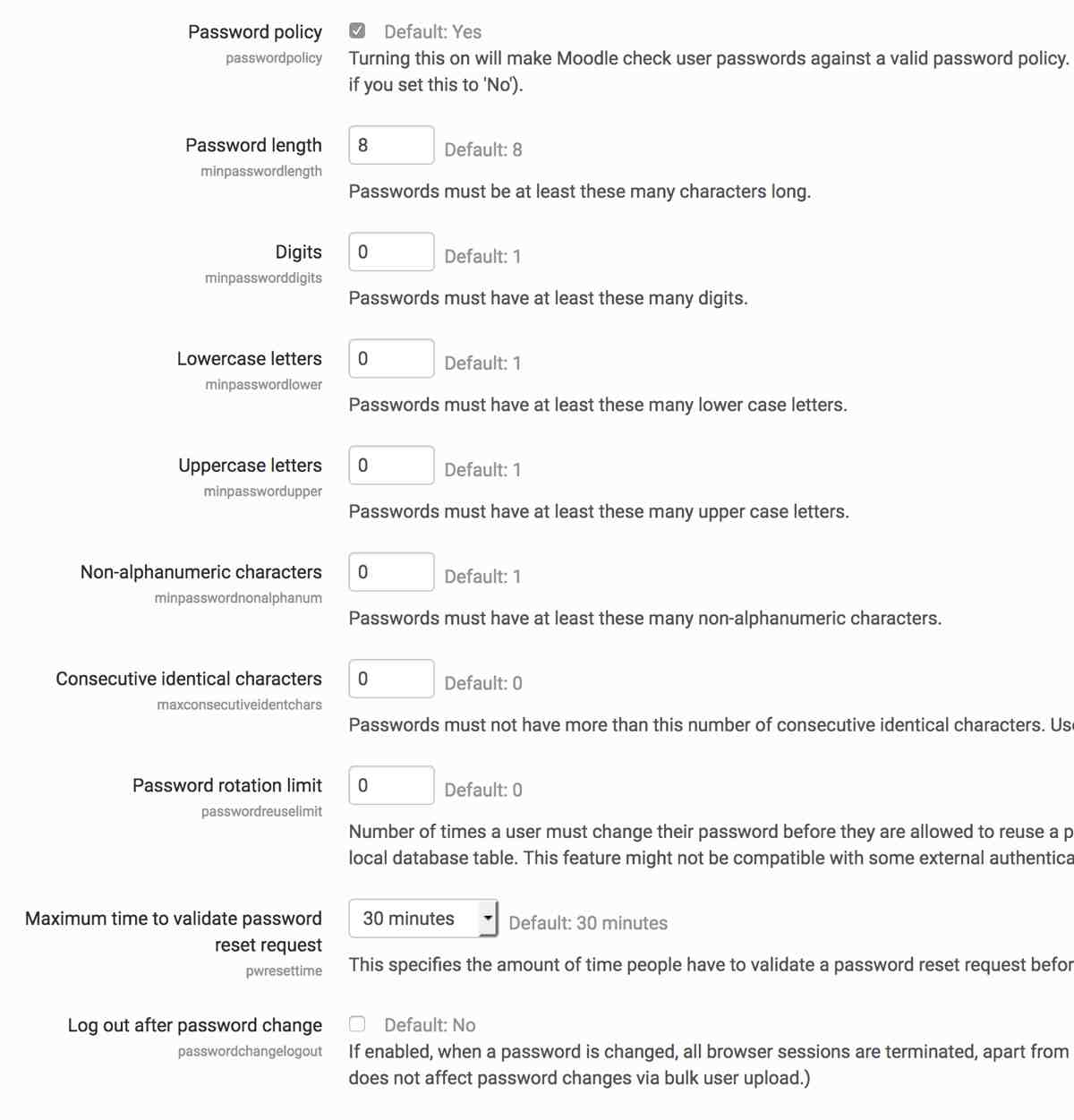
In Moodle here: Home / ▶︎ Site administration / ▶︎ Security
I set every thing as set in the first screen shot.
And in ES here: Components / ▶︎ Easy Social / ▶︎ Profile Types / ▶︎ “My Active Profile” / ▶︎ Custom Fields / ▶︎ Password
I set every thing as set in the second screen shot.
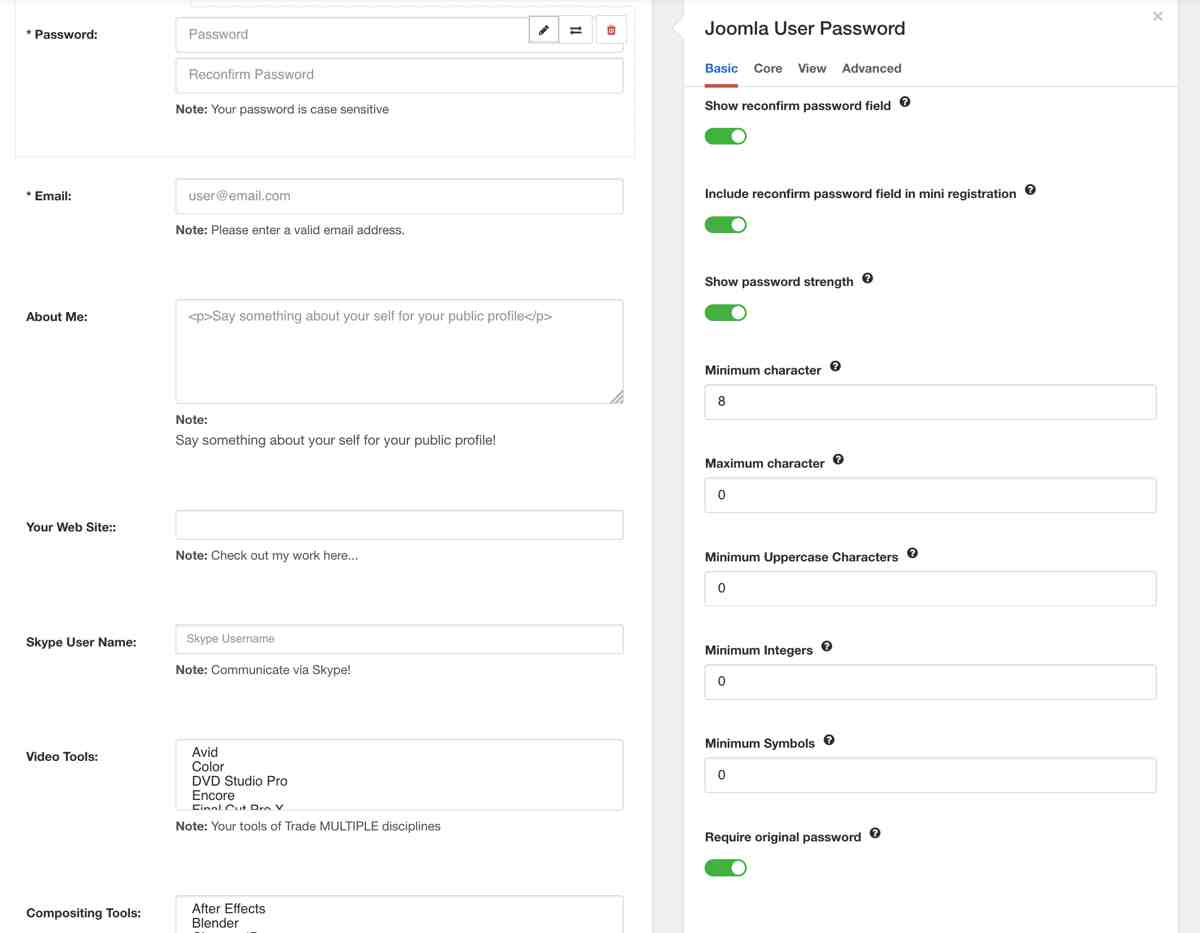
- You need to look out for the edit button. (Pencil Symbol) :whistle:
- Which you only see when you hover over the top right hand side of the password window.
- Once in editing mode you go to “Joomla User Password/Basic” and see the setting as shown in the second screen shot.
I confirm that as of now I can log in and buy courses via Hika shop with pretty much any user name password combo.
Although this was a painful learning experience I am glad that I went through it before launching my shop.
If I had only tested with user “abcdefgh” with password “abcdefgh” I might have though that every thing worked 100% !!!
But I probably would have run into problems at some point later down the road. :blink:
Speaking of running into problems further down the road I also use Akeeba Admin Tools on my site.
This means that even if my user name & password rules are not so strict…
I have a very powerful security component that stops hackers/user from being naughty in 100 different ways
Tanks to Antonio I managed to get to the bottom of this! :woohoo:
I will try to explain as best as I can and if I make any mistakes perhaps Antonio can correct me.
In my case I am using Easy Social & Moodle/Joomdle & the “Joomdle User Check Plugin”
www.joomdle.com/download/category/27-plugins-additional
This plugin will run before user registration, checking:
- That username format is valid for Moodle (no spaces, no caps...)
- That username/email are not yet registered in Moodle
I assume that the logic is similar for Community Builder & Co.
The thing is you could have everything technically working perfectly with:
- System health check
- With your Single Sign-On (and off)
- Your shop could work perfectly (in my case Hika Shop)
And yet you might not be able to purchase courses as for e.g. user “Moodle(=)123” with password “Moodle(=)123”
It is not as if you are going to get any error messages or anything...
It will just appear not to work. :dry:
I would suggest first doing an idiot check if you have not done so already.
Using a really easy user name & password all letters & lower case and see if this works. e.g. “abcdefgh”
Assuming this works & something like “Moodle(=)123” with password “Moodle(=)123” does not work:
- Check whether you might need to install the “Joomdle User Check Plugin” and have it configured correctly.
- Check your user name rules for Moodle
- Check your user name rules for your Social component of choice.
In Moodle here: Home / ▶︎ Site administration / ▶︎ Security
I set every thing as set in the first screen shot.
And in ES here: Components / ▶︎ Easy Social / ▶︎ Profile Types / ▶︎ “My Active Profile” / ▶︎ Custom Fields / ▶︎ Password
I set every thing as set in the second screen shot.
- You need to look out for the edit button. (Pencil Symbol) :whistle:
- Which you only see when you hover over the top right hand side of the password window.
- Once in editing mode you go to “Joomla User Password/Basic” and see the setting as shown in the second screen shot.
I confirm that as of now I can log in and buy courses via Hika shop with pretty much any user name password combo.
Although this was a painful learning experience I am glad that I went through it before launching my shop.
If I had only tested with user “abcdefgh” with password “abcdefgh” I might have though that every thing worked 100% !!!
But I probably would have run into problems at some point later down the road. :blink:
Speaking of running into problems further down the road I also use Akeeba Admin Tools on my site.
This means that even if my user name & password rules are not so strict…
I have a very powerful security component that stops hackers/user from being naughty in 100 different ways
Tanks to Antonio I managed to get to the bottom of this! :woohoo:
Last edit: 9 years 5 months ago by paurray.
Please Log in or Create an account to join the conversation.
- paurray
-
Topic Author
- Offline
- Senior Member
-
Less
More
- Posts: 61
9 years 5 months ago #5
by paurray
Replied by paurray on topic Getting Joomdle & Hika Shop working together?
ps and this is how I have the “Joomdle User Check Plugin” set up!!!
I set every thing as set in the third screen shot.
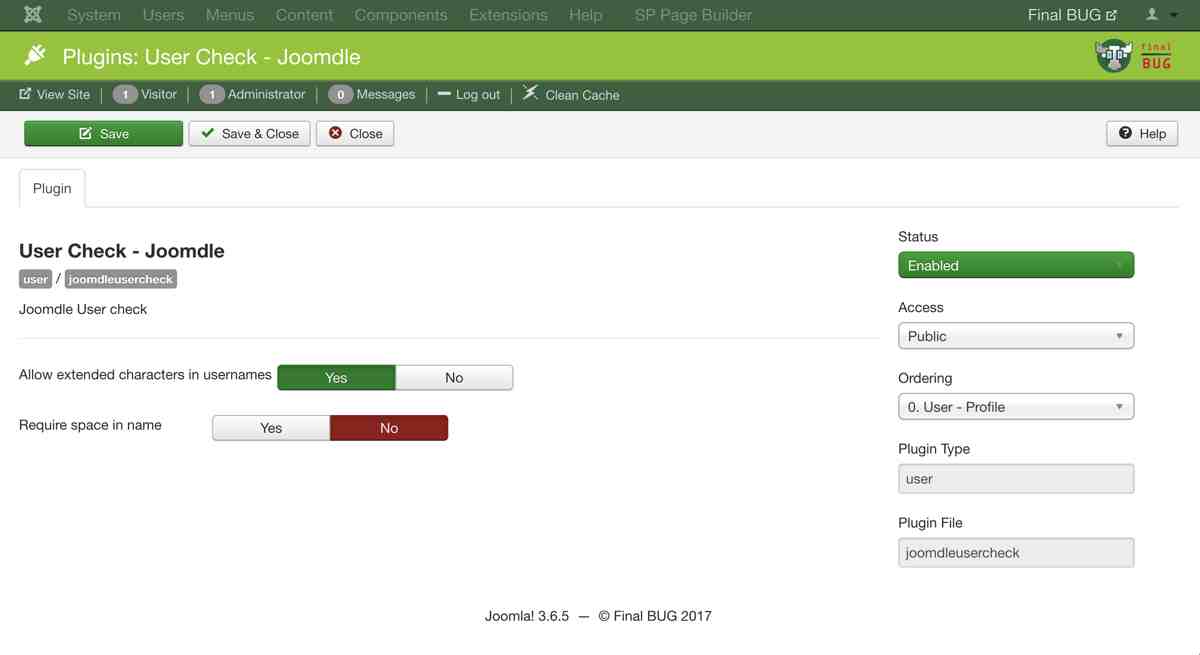
I set every thing as set in the third screen shot.
Please Log in or Create an account to join the conversation.
- Antonio Durán
-
- Offline
- Moderator
-
Less
More
- Posts: 7929
9 years 5 months ago #6
by Antonio Durán
Replied by Antonio Durán on topic Getting Joomdle & Hika Shop working together?
Thanks for sharing your experience.
Please Log in or Create an account to join the conversation.