
- Posts: 10
Joomdle 1.0 Installation
System Health Check Error
- arvardhan
-
 Topic Author
- Offline
- New Member
-

Less
More
8 years 9 months ago #1
by arvardhan
System Health Check Error was created by arvardhan
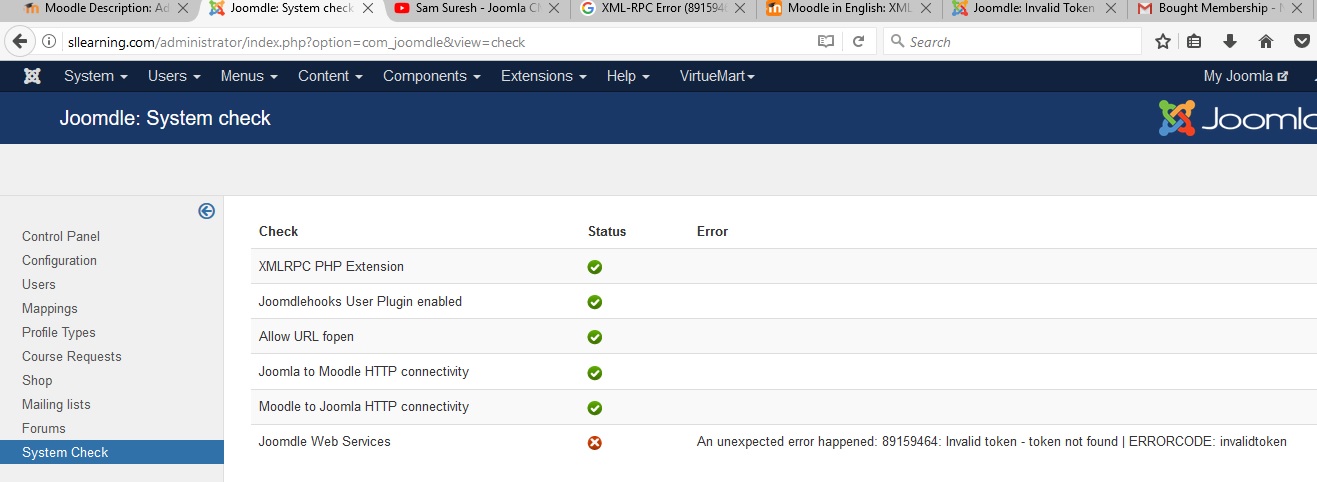
I am getting this error on Joomla end :-
XML-RPC Error (89159464): Invalid token - token not found | ERRORCODE: invalidtoken
Here is the System Health Check Status
XML-RPC Error (89159464): Invalid token - token not found | ERRORCODE: invalidtoken
Here is the System Health Check Status
Please Log in or Create an account to join the conversation.
- Antonio Durán
-

- Offline
- Moderator
-

Less
More
- Posts: 7929
8 years 9 months ago #2
by Antonio Durán
Replied by Antonio Durán on topic System Health Check Error
Hi.
Did you enter Moodle token in Joomdle config in Joomla?
You can check how to do it here: www.joomdle.com/wiki/Installing_Joomdle_...oomla#General_config
In the Moodle auth token config option, you must enter the token that you get from Moodle:
www.joomdle.com/wiki/Preparing_Moodle_20...dle_config_in_Joomla
Did you enter Moodle token in Joomdle config in Joomla?
You can check how to do it here: www.joomdle.com/wiki/Installing_Joomdle_...oomla#General_config
In the Moodle auth token config option, you must enter the token that you get from Moodle:
www.joomdle.com/wiki/Preparing_Moodle_20...dle_config_in_Joomla
Please Log in or Create an account to join the conversation.
- arvardhan
-
Topic Author
- Offline
- New Member
-
Less
More
- Posts: 10
8 years 9 months ago #3
by arvardhan
Replied by arvardhan on topic System Health Check Error
Hi Antonio,
I git all green for System check. Attaching the screenshot.
Now I would like to sync moodle with joomla entirely. I want my moodle to appear in wraper. I want social activities to be very strong.
Please help
I git all green for System check. Attaching the screenshot.
Now I would like to sync moodle with joomla entirely. I want my moodle to appear in wraper. I want social activities to be very strong.
Please help

Please Log in or Create an account to join the conversation.
- Antonio Durán
-
- Offline
- Moderator
-
Less
More
- Posts: 7929
8 years 9 months ago #4
by Antonio Durán
Replied by Antonio Durán on topic System Health Check Error
Great.
> I want my moodle to appear in wraper.
You can create a menu item of type Joomdle wrapper for that, and you can also have one menu item of "my courses" type, which will link to Moodle courses in the wrapper.
> I want social activities to be very strong.
What social component are you using? You should check Easysocial/Jomsocial integration documentation at:
www.joomdle.com/wiki/3rd_Party_Integration
There you can see all the ways you can integrate Joomdle with the social components.
> I want my moodle to appear in wraper.
You can create a menu item of type Joomdle wrapper for that, and you can also have one menu item of "my courses" type, which will link to Moodle courses in the wrapper.
> I want social activities to be very strong.
What social component are you using? You should check Easysocial/Jomsocial integration documentation at:
www.joomdle.com/wiki/3rd_Party_Integration
There you can see all the ways you can integrate Joomdle with the social components.
Please Log in or Create an account to join the conversation.