
Joomdle 1.0 Installation
Enrolment Key Message
- Tim
-
 Topic Author
- Offline
- Senior Member
-

Less
More
8 years 9 months ago #1
by Tim
Enrolment Key Message was created by Tim
I have a strange problem I can't solve.
Moodle and Joomla are running on the same domain. I can create a new user and SSO is working just fine.
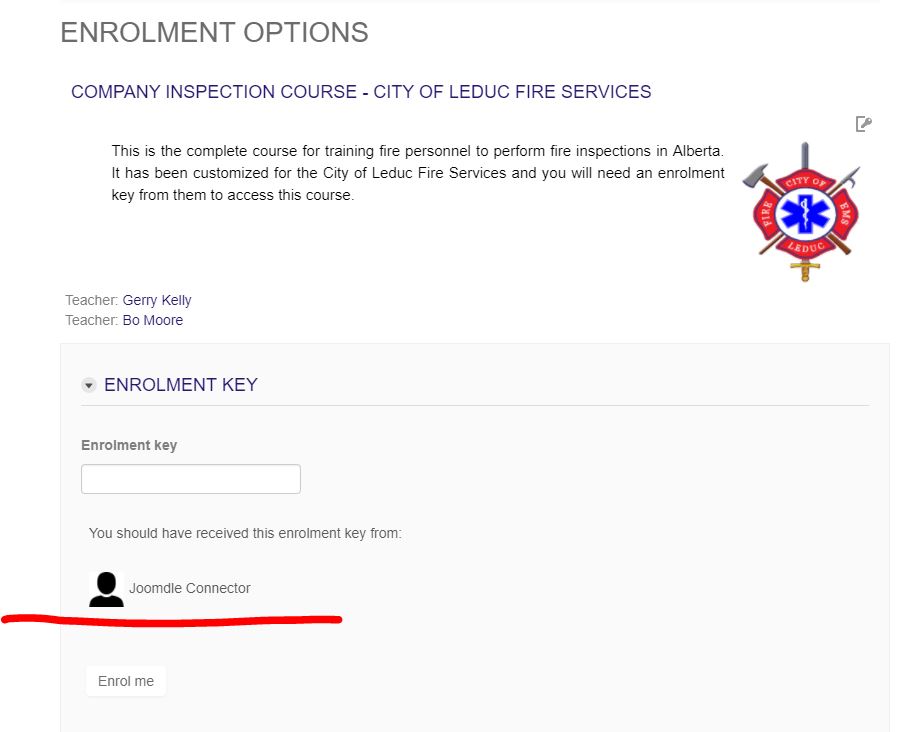
Once logged in I click to go to a course and enrol using a key. The course appears fine and the enrolment key field is there to use, however under that field the message "You should have received this enrolment key from: Joomdle Connector".
"Joomdle Connector" is the name of the Moodle user account I created during set-up for accessing Joomla. For the life of me I cannot remember why this was necessary, nor can I find where the instructions are to do so, so maybe something has changed.
Why is this Moodle user the one being listed on all courses as the person to get the enrolment key from? What am I missing and how can I change this? I realize I can simply rename this account "Your Teacher or Course Contact" to make the message make sense to students, but would really like to understand what is going on here.
Tim
Moodle and Joomla are running on the same domain. I can create a new user and SSO is working just fine.
Once logged in I click to go to a course and enrol using a key. The course appears fine and the enrolment key field is there to use, however under that field the message "You should have received this enrolment key from: Joomdle Connector".
"Joomdle Connector" is the name of the Moodle user account I created during set-up for accessing Joomla. For the life of me I cannot remember why this was necessary, nor can I find where the instructions are to do so, so maybe something has changed.
Why is this Moodle user the one being listed on all courses as the person to get the enrolment key from? What am I missing and how can I change this? I realize I can simply rename this account "Your Teacher or Course Contact" to make the message make sense to students, but would really like to understand what is going on here.
Tim
Please Log in or Create an account to join the conversation.
- Antonio Durán
-

- Offline
- Moderator
-

Less
More
- Posts: 7954
8 years 9 months ago #2
by Antonio Durán
Replied by Antonio Durán on topic Enrolment Key Message
Hi Tim.
> "Joomdle Connector" is the name of the Moodle user account I created during set-up for accessing Joomla. For the life of me I cannot remember why this was necessary, nor can I find where the instructions are to do so, so maybe something has changed.
This is needed for web services. You cannot see in the docs anymore, because in newer versions, this process is done automatically.
I have not worked much with enrolment keys, so I had to take a look at Moodle and its code to get me started.
From what I could see, when you set up signup enrolment method, you can select the sender for the welcome message, and you selected the keyholder.
Looking at the code, when this option is selected, the email shown will be the first enroled user found with enrol/self:holdkey capability.
So, in your case, I guess that:
- Joomdle connector user is enroled in the course
- Somehow, he has enrol/self:holdkey capability
As it is the first user found, his email is used.
> "Joomdle Connector" is the name of the Moodle user account I created during set-up for accessing Joomla. For the life of me I cannot remember why this was necessary, nor can I find where the instructions are to do so, so maybe something has changed.
This is needed for web services. You cannot see in the docs anymore, because in newer versions, this process is done automatically.
I have not worked much with enrolment keys, so I had to take a look at Moodle and its code to get me started.
From what I could see, when you set up signup enrolment method, you can select the sender for the welcome message, and you selected the keyholder.
Looking at the code, when this option is selected, the email shown will be the first enroled user found with enrol/self:holdkey capability.
So, in your case, I guess that:
- Joomdle connector user is enroled in the course
- Somehow, he has enrol/self:holdkey capability
As it is the first user found, his email is used.
Please Log in or Create an account to join the conversation.
- Tim
-
Topic Author
- Offline
- Senior Member
-
8 years 9 months ago #3
by Tim
Replied by Tim on topic Enrolment Key Message
That's really helpful and here is some more on what I found.
I looked and "Joomdle Connector" was not enrolled in the course, but then I noticed a menu link under "users" that reads "Other Users".
In that area the heading is:
The following users are not enrolled in this course but do have roles, inherited or assigned within it.
There I found Joomdle Connector with the role "WS (Assigned at site level).
The Keyholder Role is a new one to mean and I found this documentation on it for 3.3 (which I have yet to update to) - docs.moodle.org/34/en/Keyholder_role
I next looked into the WS role and found it was allowed to "Appear as the self enrolment key holder".
It seems to me that I can switch this to "not set" and solve my issue - but I thought I'd check with you first to make sure this won't break any Joomdle functioning.
I looked and "Joomdle Connector" was not enrolled in the course, but then I noticed a menu link under "users" that reads "Other Users".
In that area the heading is:
The following users are not enrolled in this course but do have roles, inherited or assigned within it.
There I found Joomdle Connector with the role "WS (Assigned at site level).
The Keyholder Role is a new one to mean and I found this documentation on it for 3.3 (which I have yet to update to) - docs.moodle.org/34/en/Keyholder_role
I next looked into the WS role and found it was allowed to "Appear as the self enrolment key holder".
It seems to me that I can switch this to "not set" and solve my issue - but I thought I'd check with you first to make sure this won't break any Joomdle functioning.

Please Log in or Create an account to join the conversation.
- Antonio Durán
-
- Offline
- Moderator
-
Less
More
- Posts: 7954
8 years 9 months ago - 8 years 9 months ago #4
by Antonio Durán
Replied by Antonio Durán on topic Enrolment Key Message
Hi TIm.
I don't know why your WS role has this enabled... as you did it manually maybe you checked it without noticing, or somehow it was enabled when they added this capability....
Anyway, as you say, you can safely switch it to not set and that should help with your problem.
Happy new year!
I don't know why your WS role has this enabled... as you did it manually maybe you checked it without noticing, or somehow it was enabled when they added this capability....
Anyway, as you say, you can safely switch it to not set and that should help with your problem.
Happy new year!
Last edit: 8 years 9 months ago by Antonio Durán.
Please Log in or Create an account to join the conversation.