
- Posts: 17
[Solved] User not created in moodle successfully
- Terence
- Topic Author
- Offline
- New Member
-

Less
More
15 years 10 months ago - 15 years 10 months ago #1
by Terence
[Solved] User not created in moodle successfully was created by Terence
Hi
I have set up my moodle, joomla, joomdle website, registered a test user and enrolled in a course through the joomdle category view. When I try to enter the course, it asks me to supply more registration info.
The user is logged in moodle as " "(a space for a username).
Can someone help me please?
I have set up my moodle, joomla, joomdle website, registered a test user and enrolled in a course through the joomdle category view. When I try to enter the course, it asks me to supply more registration info.
The user is logged in moodle as " "(a space for a username).
Can someone help me please?
Last edit: 15 years 10 months ago by Antonio Durán.
The topic has been locked.
- Antonio Durán
-

- Offline
- Moderator
-

Less
More
- Posts: 7954
15 years 10 months ago #2
by Antonio Durán
Replied by Antonio Durán on topic Re: User does not create in moodle successfully
Hi.
Is system check showing all ok?
Did you define any additional data source?
Is system check showing all ok?
Did you define any additional data source?
The topic has been locked.
- Terence
- Topic Author
- Offline
- New Member
-
Less
More
- Posts: 17
15 years 10 months ago #3
by Terence
Replied by Terence on topic Re: User does not create in moodle successfully
System check shows ok.
I have the krawtwerks template installed and VirtueMart.
I have the krawtwerks template installed and VirtueMart.
The topic has been locked.
- Antonio Durán
-
- Offline
- Moderator
-
Less
More
- Posts: 7954
15 years 10 months ago #4
by Antonio Durán
Replied by Antonio Durán on topic Re: User does not create in moodle successfully
What I asked is if you define an additional data source in joomdle config.
The topic has been locked.
- Terence
- Topic Author
- Offline
- New Member
-
Less
More
- Posts: 17
15 years 10 months ago - 15 years 10 months ago #5
by Terence
Replied by Terence on topic Re: User does not create in moodle successfully
Sorry for the late reply.
Yes. I've set it to VirtueMart. Must it be open?
I found another error when I enable the user in the joomla user manager: Username and password do not match
Yes. I've set it to VirtueMart. Must it be open?
I found another error when I enable the user in the joomla user manager: Username and password do not match
Last edit: 15 years 10 months ago by Terence.
The topic has been locked.
- shekar
-

- Offline
- Senior Member
-

Less
More
- Posts: 70
15 years 10 months ago - 15 years 10 months ago #6
by shekar
Replied by shekar on topic Re: User does not create in moodle successfully
Hi,
Below are the MOODLE required fields, if you map these fields in Joomdle, New user wont get the "Please tell us more about yourself" message @Moodle.
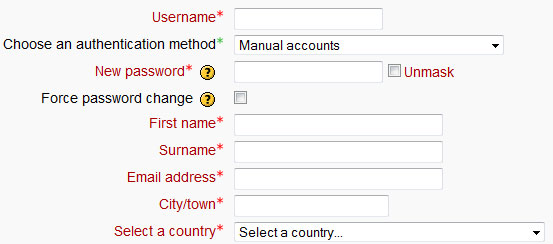
Example:
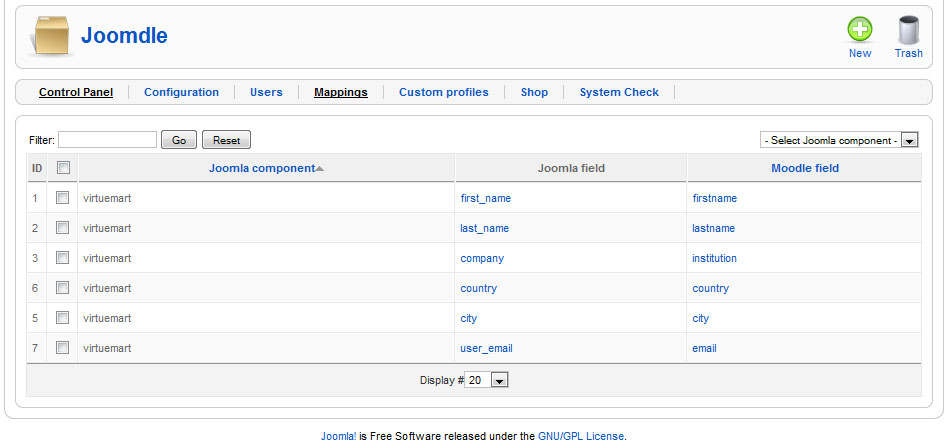
Below are the MOODLE required fields, if you map these fields in Joomdle, New user wont get the "Please tell us more about yourself" message @Moodle.
Example:
[ For new user Registration I am using VM Register page]
index.php?option=com_virtuemart&page=shop.registration
Last edit: 15 years 10 months ago by shekar.
The topic has been locked.
- Terence
- Topic Author
- Offline
- New Member
-
Less
More
- Posts: 17
15 years 10 months ago #7
by Terence
Replied by Terence on topic Re: User does not create in moodle successfully
Does this change the register info required at joomla? I created mappings and it still asks me the extra info.
The topic has been locked.
- Antonio Durán
-
- Offline
- Moderator
-
Less
More
- Posts: 7954
15 years 10 months ago #8
by Antonio Durán
Replied by Antonio Durán on topic Re: User does not create in moodle successfully
When you are required for extra info, which mandatory fields are blank?
The topic has been locked.
- Terence
- Topic Author
- Offline
- New Member
-
Less
More
- Posts: 17
15 years 10 months ago - 15 years 10 months ago #9
by Terence
Replied by Terence on topic Re: User does not create in moodle successfully
Here is a screen print
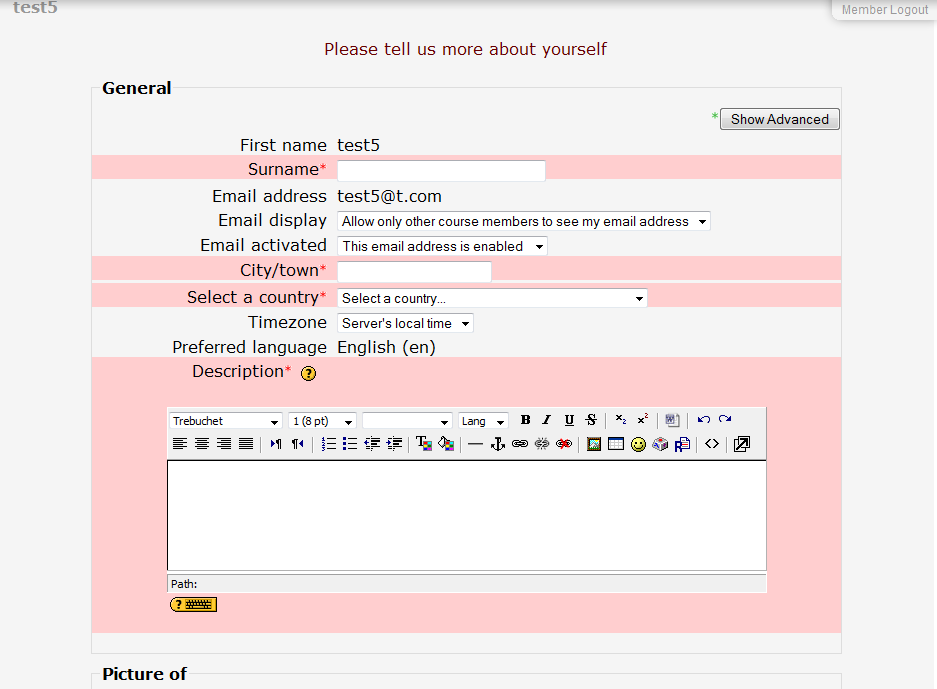
I am only using VM as a course preview.
I am only using VM as a course preview.
Last edit: 15 years 10 months ago by Terence.
The topic has been locked.
- Antonio Durán
-
- Offline
- Moderator
-
Less
More
- Posts: 7954
15 years 10 months ago #10
by Antonio Durán
Replied by Antonio Durán on topic Re: User does not create in moodle successfully
The thing here is:
1) Moodle needs some data filled or it will show this screen
2) For joomdle to be able to pass the info to Moodle, the user has to have that info in Joomla (in your case Virtuemart)
So, check your user and see if it has in VM:
- surname
- city
- country
1) Moodle needs some data filled or it will show this screen
2) For joomdle to be able to pass the info to Moodle, the user has to have that info in Joomla (in your case Virtuemart)
So, check your user and see if it has in VM:
- surname
- city
- country
The topic has been locked.