
- Posts: 7
[Solved] XX replacing name
- Philip
- Topic Author
- Offline
- New Member
-

Less
More
15 years 6 months ago - 15 years 5 months ago #1
by Philip
[Solved] XX replacing name was created by Philip
I have managed to hook things together and it all seems to be working well.
Joomla 1.5 / Moodle 2
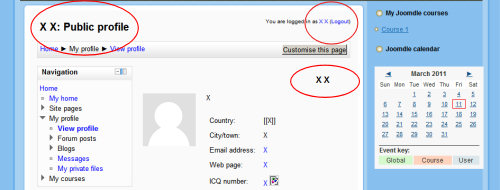
Attached is a picture of a moodle screen within Joomla which is typical of a problem I have not yet found the answer to.
All the users in moodle seem to have had their name replaced by XX
Is it possible to change this and a link to the connected documentation might save me hours.
Thanks in anticipation
Philip
Joomla 1.5 / Moodle 2
Attached is a picture of a moodle screen within Joomla which is typical of a problem I have not yet found the answer to.
All the users in moodle seem to have had their name replaced by XX
Is it possible to change this and a link to the connected documentation might save me hours.
Thanks in anticipation
Philip
Last edit: 15 years 5 months ago by Antonio Durán.
The topic has been locked.
- Antonio Durán
-

- Offline
- Moderator
-

Less
More
- Posts: 7944
15 years 6 months ago #2
by Antonio Durán
Replied by Antonio Durán on topic Re: XX replacing name
Hi.
Don't know why you are getting that behaviour. I guess it only happens for Joomdle users right?
Did you set any additional data source?
Don't know why you are getting that behaviour. I guess it only happens for Joomdle users right?
Did you set any additional data source?
The topic has been locked.
- Philip
- Topic Author
- Offline
- New Member
-
Less
More
- Posts: 7
15 years 5 months ago #3
by Philip
Replied by Philip on topic Re: XX replacing name
Hi Antonio,
Thank you for the response.
The users were uploaded from a data file to Moodle, then I used Joomdle to sync them.
When imported they had a full set of names and e-mail addresses in Moodle. After Syncing these were all tranferred to Joomla/Joomdle and in the Moodle DB all were replaced by an X.
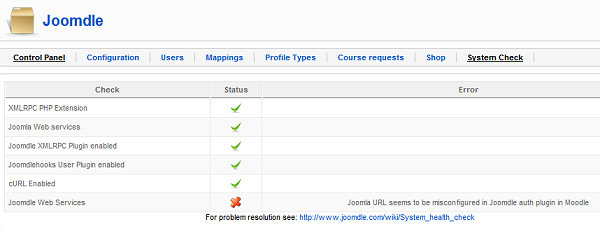
In fishing around, I think I may have found a potential problem, if not a solution. The Joomoodle "System check reveals that "Joomla URL seems to be misconfigured in Joomdle auth plugin in Moodle". (joomla check.jpg attached)
I am busy experimenting however on my test server,
Joomla http://hpserver/moojoo/Joomla
Moodle http://hpserver/moojoo/moodle
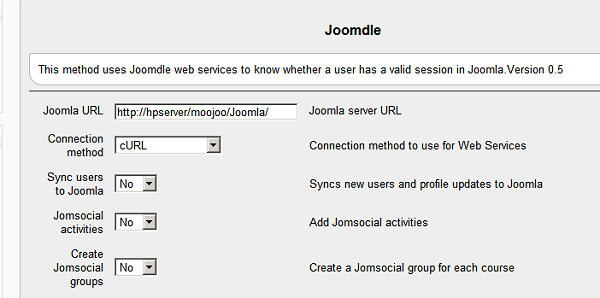
Moodle setting page (moodle_settings.jpg
I am just going through the docs again to see if I can find what I have done wrong.
Hints welcome
Thank you for the response.
The users were uploaded from a data file to Moodle, then I used Joomdle to sync them.
When imported they had a full set of names and e-mail addresses in Moodle. After Syncing these were all tranferred to Joomla/Joomdle and in the Moodle DB all were replaced by an X.
In fishing around, I think I may have found a potential problem, if not a solution. The Joomoodle "System check reveals that "Joomla URL seems to be misconfigured in Joomdle auth plugin in Moodle". (joomla check.jpg attached)
I am busy experimenting however on my test server,
Joomla http://hpserver/moojoo/Joomla
Moodle http://hpserver/moojoo/moodle
Moodle setting page (moodle_settings.jpg
I am just going through the docs again to see if I can find what I have done wrong.
Hints welcome
The topic has been locked.
- Antonio Durán
-
- Offline
- Moderator
-
Less
More
- Posts: 7944
15 years 5 months ago #4
by Antonio Durán
Replied by Antonio Durán on topic Re: XX replacing name
Hi.
It is clear that your problems come because you started using Joomdle without making sure everything was working.
As Joomla web services don't work, moodle info will be written with bad values.
You need to make system check clear before starting to use any joomdle functions.
It is clear that your problems come because you started using Joomdle without making sure everything was working.
As Joomla web services don't work, moodle info will be written with bad values.
You need to make system check clear before starting to use any joomdle functions.
The topic has been locked.
- D N
- Offline
- Junior Member
-

Less
More
- Posts: 23
15 years 5 months ago #5
by D N
Replied by D N on topic Re: XX replacing name
Check your Joomla url in Moodle auth plugin. Depending on your server configs you may have to add www or some other minor change.
The topic has been locked.
- Philip
- Topic Author
- Offline
- New Member
-
Less
More
- Posts: 7
15 years 5 months ago - 15 years 5 months ago #6
by Philip
Replied by Philip on topic Re: XX replacing name
I decided to start again so deleted everything, software and DB and reinstalled again from the Zips.
Moodle 2.0.1
Joomla 1.5.22
Joomdle 0.5
I have exactly the same problem with the system check. It is telling me that the Joomla URL is misconfigured in the Joomdle Auth Plugin.
I do not think it is, and to check I have copied the URL from the Joomdle auth plugin in moodle and pasted it into my browser and up pops the front page.
I have tried the three following versions of the url.
1. http://hpserver/moojoo/Joomla/index.php
2. http://hpserver/moojoo/Joomla/
3. http://hpserver/moojoo/Joomla
edit note the above urls all begin with http:// (not showing)
If I run (in Moodle) Home/ ► Site administration/ ► Development/ ► Web service test client
* / ► moodle_user_create_users (using the token)
Then it seems to create the user perfectly.
If I then use the Joomla/Joomdle user screen to add the users to Joomla/Joomdle it does.
At this point when I check back in the moodle db I see that all the fields chanve changed to an "X" except the username and password.
My server is a test server connected to my home network and generally accessed by the url http://hpserver/ ie. there is no www (if I do type www a browser goes hunting on the web).
Is there something in the checking system of the Joomdle web services that is looking for something that my type of url is not supplying? As mentioned above the url works perfectly for a browser and in their own right Joomla and moodle seem to behave perfectly as has every other system I have used in the past.
Moodle 2.0.1
Joomla 1.5.22
Joomdle 0.5
I have exactly the same problem with the system check. It is telling me that the Joomla URL is misconfigured in the Joomdle Auth Plugin.
I do not think it is, and to check I have copied the URL from the Joomdle auth plugin in moodle and pasted it into my browser and up pops the front page.
I have tried the three following versions of the url.
1. http://hpserver/moojoo/Joomla/index.php
2. http://hpserver/moojoo/Joomla/
3. http://hpserver/moojoo/Joomla
edit note the above urls all begin with http:// (not showing)
If I run (in Moodle) Home/ ► Site administration/ ► Development/ ► Web service test client
* / ► moodle_user_create_users (using the token)
Then it seems to create the user perfectly.
If I then use the Joomla/Joomdle user screen to add the users to Joomla/Joomdle it does.
At this point when I check back in the moodle db I see that all the fields chanve changed to an "X" except the username and password.
My server is a test server connected to my home network and generally accessed by the url http://hpserver/ ie. there is no www (if I do type www a browser goes hunting on the web).
Is there something in the checking system of the Joomdle web services that is looking for something that my type of url is not supplying? As mentioned above the url works perfectly for a browser and in their own right Joomla and moodle seem to behave perfectly as has every other system I have used in the past.
Last edit: 15 years 5 months ago by Philip. Reason: correction
The topic has been locked.
- Philip
- Topic Author
- Offline
- New Member
-
Less
More
- Posts: 7
15 years 5 months ago #7
by Philip
Replied by Philip on topic Re: XX replacing name
PLease note that the URLs in the above message are not displaying properly, however when you point at them you can see the address. When clicked on my system (home network) they work. If you click them they should fail.
The topic has been locked.
- Antonio Durán
-
- Offline
- Moderator
-
Less
More
- Posts: 7944
15 years 5 months ago #8
by Antonio Durán
Replied by Antonio Durán on topic Re: XX replacing name
I am thinking this may have to do with some special config in your servers.
I explain: Joomdle is set to control access to Joomla web services based on IP restriction. If the IP address your server is using to communicate is not the public one, you may receive this error.
To check if this is the issue, open /plugins/xmlrpc/joomdle.php
In check_origin function, add:
return true;
Just before:
return ($request_ip == $moodle_ip);
I explain: Joomdle is set to control access to Joomla web services based on IP restriction. If the IP address your server is using to communicate is not the public one, you may receive this error.
To check if this is the issue, open /plugins/xmlrpc/joomdle.php
In check_origin function, add:
return true;
Just before:
return ($request_ip == $moodle_ip);
The topic has been locked.
- Philip
- Topic Author
- Offline
- New Member
-
Less
More
- Posts: 7
15 years 5 months ago #9
by Philip
Replied by Philip on topic Re: XX replacing name
That seems to have done the trick. Now when I add Joomla users to Moodle via the user part of Joomdle, the names are being transferred.
My Ip address on the server is a 192.168.---.--- type. As you can tell from the urls published earlier I have probably not got it quite set up like a true web server as it has no proper domain just a name.
Thank you very much for your time.
Philip
My Ip address on the server is a 192.168.---.--- type. As you can tell from the urls published earlier I have probably not got it quite set up like a true web server as it has no proper domain just a name.
Thank you very much for your time.
Philip
The topic has been locked.