
- Posts: 4
Joomla URL seems to be misconfigured in Joomdle auth plugin
- Jan W
- Topic Author
- Offline
- New Member
-

Less
More
15 years 4 months ago #1
by Jan W
Joomla URL seems to be misconfigured in Joomdle auth plugin was created by Jan W
I am trying to find a solution to this. I have read the forums but all I see is the problem. Has anyone found a solution?
I am using Moodle 2.0.3 (Build: 20110505) and Joomla 1.5.15
Honestly I have been trying to get this answered for a while
Has ANYONE gotten the answer??
Thanks
I am using Moodle 2.0.3 (Build: 20110505) and Joomla 1.5.15
Honestly I have been trying to get this answered for a while
Has ANYONE gotten the answer??
Thanks
Please Log in or Create an account to join the conversation.
- Chris
-

- Offline
- Moderator
-

15 years 4 months ago #2
by Chris
Replied by Chris on topic Re: Joomla URL seems to be misconfigured in Joomdle auth plugin
This message is as it says. It has a problem connecting because of the URL. In your case it is the defined URL in Moodle where as most of the reported problems here are the opposite.
You can see the recommended solution in the 4th from bottom ...
www.joomdle.com/wiki/System_health_check
- make sure you have http:// on both sides, no / at the end, etc.
- make sure you use the domain name that is resolved by your DNS
You can see the recommended solution in the 4th from bottom ...
www.joomdle.com/wiki/System_health_check
- make sure you have http:// on both sides, no / at the end, etc.
- make sure you use the domain name that is resolved by your DNS
Please Log in or Create an account to join the conversation.
- Antonio Durán
-

- Offline
- Moderator
-
Less
More
- Posts: 7954
15 years 4 months ago #3
by Antonio Durán
Replied by Antonio Durán on topic Re: Joomla URL seems to be misconfigured in Joomdle auth plugin
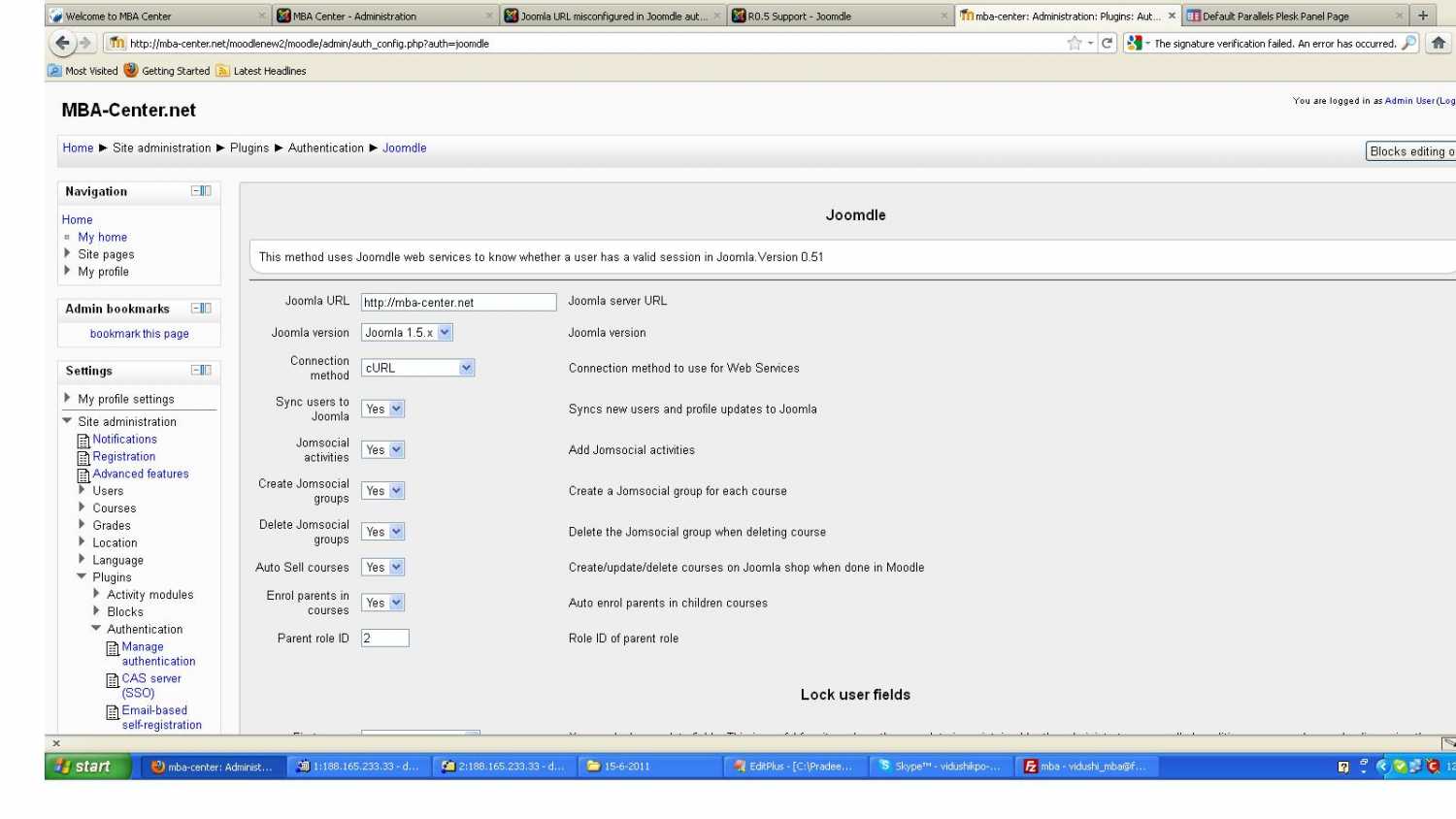
Verify that you have http:// in front, copy and paste the address again just in case...
Also, make sure you are using R0.52, which has improved error reporting.
Also, make sure you are using R0.52, which has improved error reporting.
Please Log in or Create an account to join the conversation.
- Jan W
- Topic Author
- Offline
- New Member
-
Less
More
- Posts: 4
15 years 4 months ago #4
by Jan W
Replied by Jan W on topic Re: Joomla URL seems to be misconfigured in Joomdle auth plugin
Thank you for your responses.
I think I am having a "clash of the titans" though. My site is hosted by bravenet.com and I registered with godaddy. I asked for DNS and they sent me to godaddy who sent me to bravenet sooo.
Is there anything else like a software glitch within the RO.52 - there is no reason it should not be working.
I think I am having a "clash of the titans" though. My site is hosted by bravenet.com and I registered with godaddy. I asked for DNS and they sent me to godaddy who sent me to bravenet sooo.
Is there anything else like a software glitch within the RO.52 - there is no reason it should not be working.
Please Log in or Create an account to join the conversation.
- Antonio Durán
-
- Offline
- Moderator
-
Less
More
- Posts: 7954
15 years 4 months ago #5
by Antonio Durán
Replied by Antonio Durán on topic Re: Joomla URL seems to be misconfigured in Joomdle auth plugin
Are you using curl or file_get_contents?
If curl, try the other (especially in moodle side)
If curl, try the other (especially in moodle side)
Please Log in or Create an account to join the conversation.
- Chris
-
- Offline
- Moderator
-
15 years 4 months ago #6
by Chris
Replied by Chris on topic Re: Joomla URL seems to be misconfigured in Joomdle auth plugin
'Normally' you would use Godaddy to register and than enter new DNS in the godaddy configuration panel for that specific domain. If so, than it should be on the bravenet side - assuming your problem is network related. If Godaddy is your DNS than it could be either.
For example: Joomdle.com is registered at godaddy but the DNS is managed by the hosting company. So any network related issues are with the hosting company rather than godaddy.
For example: Joomdle.com is registered at godaddy but the DNS is managed by the hosting company. So any network related issues are with the hosting company rather than godaddy.
Please Log in or Create an account to join the conversation.
- kunal
- Offline
- New Member
-
Less
More
- Posts: 3
15 years 4 months ago #7
by kunal
Replied by kunal on topic Re: Joomla URL seems to be misconfigured in Joomdle auth plugin
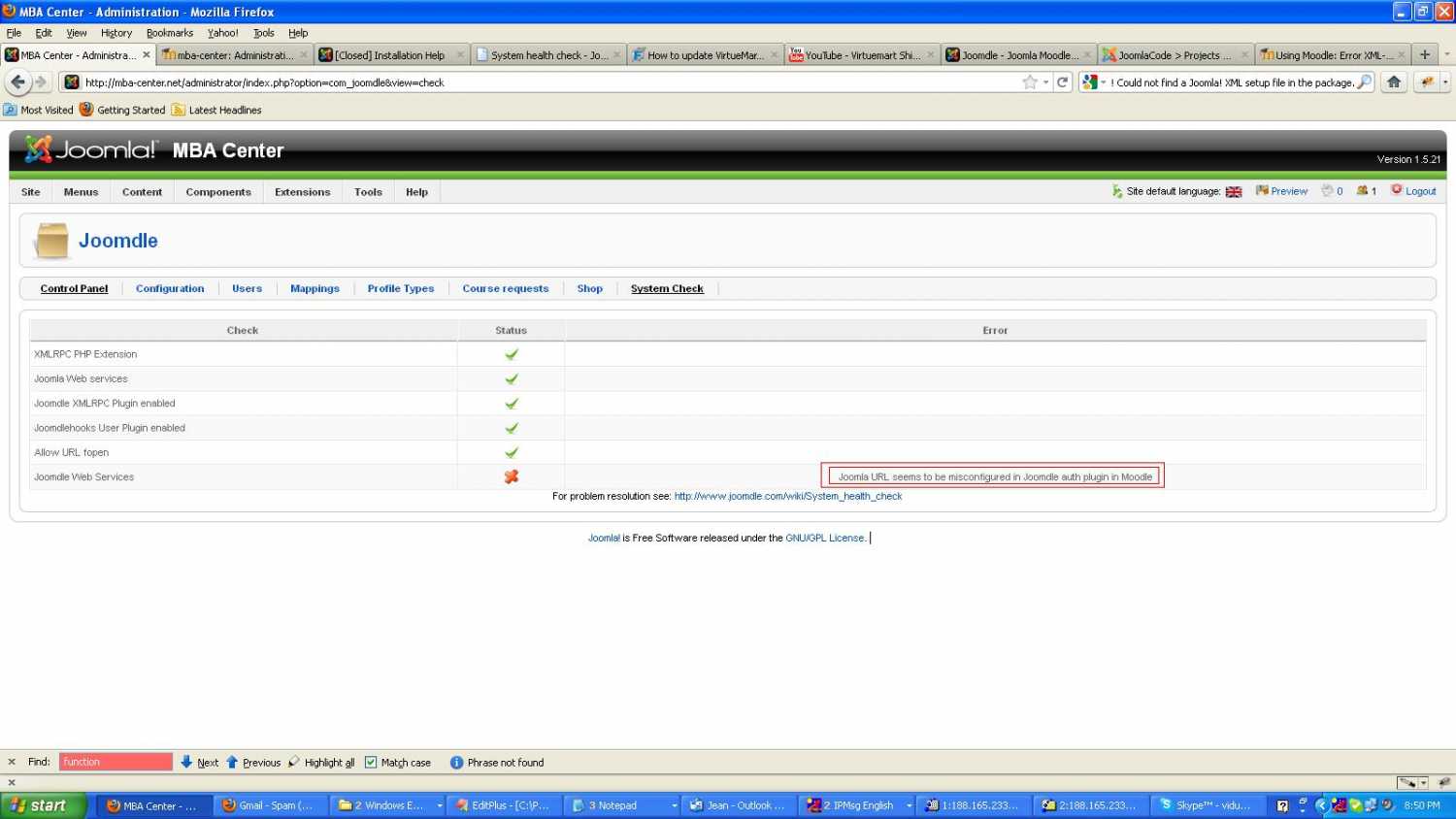
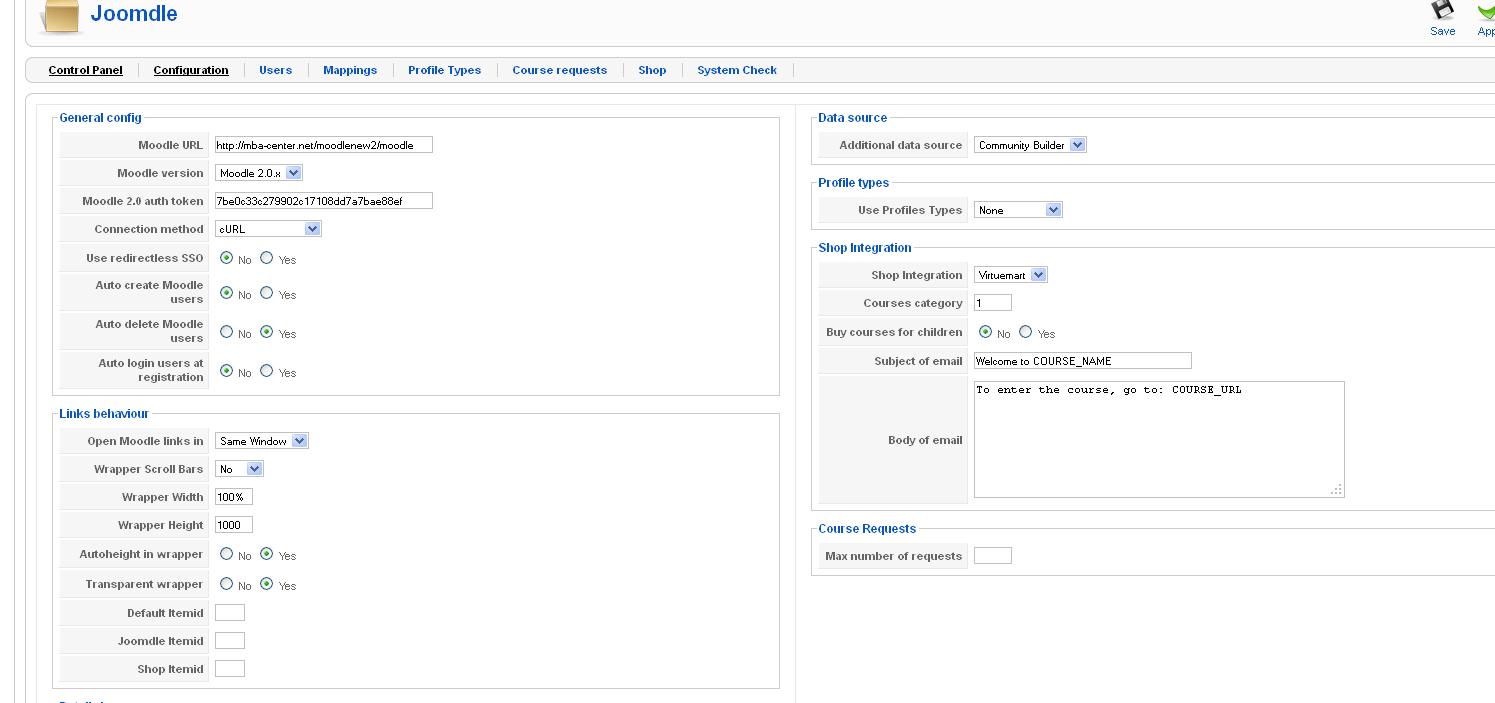
hi, still i m totally confuse about moodle integrate with joomdle before 2 days same error happend "Joomla URL seems to be misconfigured in Joomdle auth plugin in Moodle "
what i do plz help me ................
what i do plz help me ................
Please Log in or Create an account to join the conversation.
- Jan W
- Topic Author
- Offline
- New Member
-
Less
More
- Posts: 4
15 years 4 months ago #8
by Jan W
Replied by Jan W on topic Re: Joomla URL seems to be misconfigured in Joomdle auth plugin
Strange though. I followed all recommendations nothing has changed as far as the error message.
I did notice that users from moodle do show up on the Joomla side but not on the Moodle side.
Can I move on with this error msg?
I did notice that users from moodle do show up on the Joomla side but not on the Moodle side.
Can I move on with this error msg?
Please Log in or Create an account to join the conversation.
- Antonio Durán
-
- Offline
- Moderator
-
Less
More
- Posts: 7954
15 years 4 months ago #9
by Antonio Durán
Replied by Antonio Durán on topic Re: Joomla URL seems to be misconfigured in Joomdle auth plugin
No, you need to fi it because Moodle -> Joomla connection is not working right.
Visit yoursite.com/xmlrpc/index.php
To see what you get. You should receive an xml document with an error.
If you see any PHP errors, that is a problem.
Visit yoursite.com/xmlrpc/index.php
To see what you get. You should receive an xml document with an error.
If you see any PHP errors, that is a problem.
Please Log in or Create an account to join the conversation.
- Jan W
- Topic Author
- Offline
- New Member
-
Less
More
- Posts: 4
15 years 4 months ago #10
by Jan W
Replied by Jan W on topic Re: Joomla URL seems to be misconfigured in Joomdle auth plugin
Thank you Antonio,
Here's what I got
<methodResponse><fault><value><struct><member><name>faultCode</name><value><int>105</int></value></member><member><name>faultString</name><value><string>XML error: Invalid document end at line 1, column 1</string></value></member></struct></value></fault></methodResponse>
Here's what I got
<methodResponse><fault><value><struct><member><name>faultCode</name><value><int>105</int></value></member><member><name>faultString</name><value><string>XML error: Invalid document end at line 1, column 1</string></value></member></struct></value></fault></methodResponse>
Please Log in or Create an account to join the conversation.