
- Posts: 14
[Solved] Wrapper Width Not Changing Appearance
- max bittle
- Topic Author
- Offline
- New Member
-

Less
More
15 years 2 months ago - 15 years 1 month ago #1
by max bittle
[Solved] Wrapper Width Not Changing Appearance was created by max bittle
Hello,
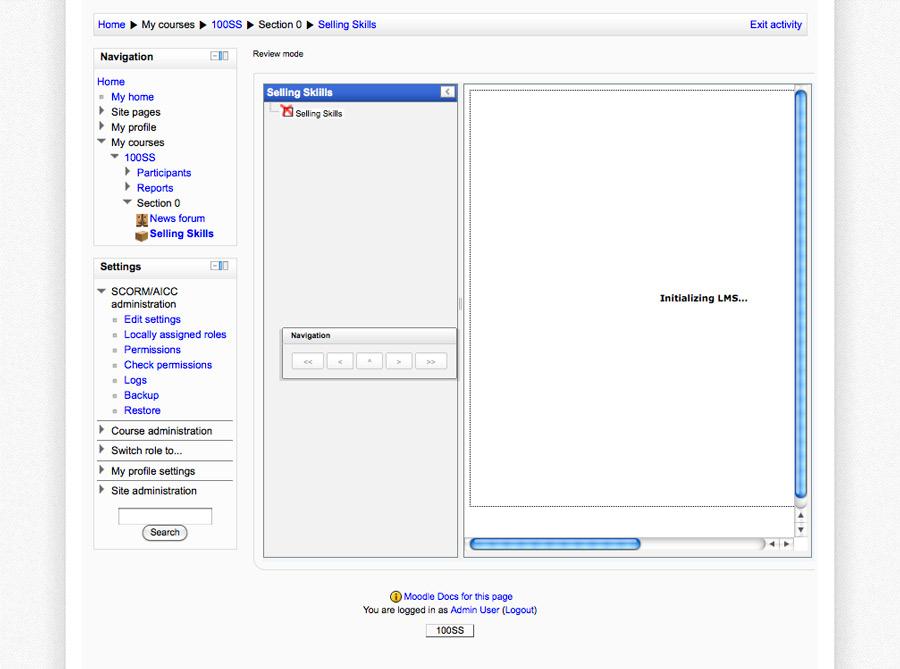
I'm trying to wrap moodle into my existing theme using joomdle. However, I can't get the size to go down, it just seems stuck at 100% for the width. I've changed it, but with no success. I've attached a screenshot of my site. I'm basically just trying to get it so that there isn't a need to scroll left to right. I just want to shrink that part of the moodle course down.
Thanks in advance for the help,
Max
I'm trying to wrap moodle into my existing theme using joomdle. However, I can't get the size to go down, it just seems stuck at 100% for the width. I've changed it, but with no success. I've attached a screenshot of my site. I'm basically just trying to get it so that there isn't a need to scroll left to right. I just want to shrink that part of the moodle course down.
Thanks in advance for the help,
Max
Last edit: 15 years 1 month ago by Antonio Durán.
Please Log in or Create an account to join the conversation.
- Chris
-

- Offline
- Moderator
-

15 years 2 months ago #2
by Chris
Replied by Chris on topic Re: Wrapper Width Not Changing Appearance
Hi there,
What you are showing is a scroll bar generated from your Moodle course. I gather you have a flash based course. If my observations are correct, you would need to change your course content display to avoid this, OR
Alternatively, it may be possible to adjust your joomla template width such that the additional space taken up (left and right) "adds on" to the Moodle width rather than squeezing the moodle width into Joomla. I hope this makes sense??
Also, you don't show your entire screen so it's difficult to see how you have wrapped it nor where your moodle starts / stops. Therefore, the above solutions may not be applicable.
What you are showing is a scroll bar generated from your Moodle course. I gather you have a flash based course. If my observations are correct, you would need to change your course content display to avoid this, OR
Alternatively, it may be possible to adjust your joomla template width such that the additional space taken up (left and right) "adds on" to the Moodle width rather than squeezing the moodle width into Joomla. I hope this makes sense??
Also, you don't show your entire screen so it's difficult to see how you have wrapped it nor where your moodle starts / stops. Therefore, the above solutions may not be applicable.
Please Log in or Create an account to join the conversation.
- Fluffy
- Offline
- New Member
-
Less
More
- Posts: 16
15 years 1 month ago #3
by Fluffy
Replied by Fluffy on topic Re: Wrapper Width Not Changing Appearance
Hello!
I am having a similar problem with my website. I notice that there is a set minimum width that the Moodle frame will compress before it won't compress anymore.
If you visit my Moodle page, you can see what I mean: missmoeller.com/school
Just shrink the browser window, and you'll see at a certain point it stops compressing.
Unfortunately, this results in a lot of the information (from the right side of the Moodle frame) being cut-off inside my wrapper in Joomla.
As can be seen here:
www.missmoeller.com/index.php?option=com...ourse&id=2&Itemid=72
Joomla Site: missmoeller.com
Moodle Site: missmoeller.com/school
I would ideally like to try to make the Moodle frame integrate as "seamlessly" into the Joomla page's wrapper as possible, so I would prefer to avoid having scroll bars. (And I will be editing the theme of my Moodle page to match my Joomla theme.)
So my question is, does anyone know of a way to change the set minimum width that the Moodle frame will compress, so that I can compress it further, and can thus have less of the layout cut-off in the wrapper (and can avoid the scroll bars)?
(Alternately, does anyone know of a Moodle theme that already allows a better compression, or uses up less space?)
Thank you so much to anyone who can offer me assistance. I really appreciate it. I'm nearly finished with the site, and this thing is just throwing me a bit.
I am having a similar problem with my website. I notice that there is a set minimum width that the Moodle frame will compress before it won't compress anymore.
If you visit my Moodle page, you can see what I mean: missmoeller.com/school
Just shrink the browser window, and you'll see at a certain point it stops compressing.
Unfortunately, this results in a lot of the information (from the right side of the Moodle frame) being cut-off inside my wrapper in Joomla.
As can be seen here:
www.missmoeller.com/index.php?option=com...ourse&id=2&Itemid=72
Joomla Site: missmoeller.com
Moodle Site: missmoeller.com/school
I would ideally like to try to make the Moodle frame integrate as "seamlessly" into the Joomla page's wrapper as possible, so I would prefer to avoid having scroll bars. (And I will be editing the theme of my Moodle page to match my Joomla theme.)
So my question is, does anyone know of a way to change the set minimum width that the Moodle frame will compress, so that I can compress it further, and can thus have less of the layout cut-off in the wrapper (and can avoid the scroll bars)?
(Alternately, does anyone know of a Moodle theme that already allows a better compression, or uses up less space?)
Thank you so much to anyone who can offer me assistance. I really appreciate it. I'm nearly finished with the site, and this thing is just throwing me a bit.
Please Log in or Create an account to join the conversation.
- Antonio Durán
-

- Offline
- Moderator
-
Less
More
- Posts: 7944
15 years 1 month ago #4
by Antonio Durán
Replied by Antonio Durán on topic Re: Wrapper Width Not Changing Appearance
I see the wrapper fine, but I have not logged in, so I only see main page.
In general, what you can do to make full moodle appear is:
- don't show any left/right joomla modules, so wrapper has full width
- construct moodle pages so that they only have blocks at left or roght, not both, so that page width is smaller.
I will be happy to hear if other users have other approaches.
In general, what you can do to make full moodle appear is:
- don't show any left/right joomla modules, so wrapper has full width
- construct moodle pages so that they only have blocks at left or roght, not both, so that page width is smaller.
I will be happy to hear if other users have other approaches.
Please Log in or Create an account to join the conversation.
- Fluffy
- Offline
- New Member
-
Less
More
- Posts: 16
15 years 1 month ago #5
by Fluffy
Replied by Fluffy on topic Re: Wrapper Width Not Changing Appearance
Hey antonio,
I got everything up and running now with help from your suggestions! Thank you so much again!
I got everything up and running now with help from your suggestions! Thank you so much again!
Please Log in or Create an account to join the conversation.