
- Posts: 10
[Closed] again: "empty response from Moodle"
- ralph
- Topic Author
- Offline
- New Member
-

Less
More
14 years 6 months ago - 14 years 6 months ago #1
by ralph
[Closed] again: "empty response from Moodle" was created by ralph
Hi,
I know that this has been discussed here several times, but I have to come back to the error message "empty response from Moodle". My local configuration with xampp is running fine, but installing Joomdle at server side I receive the message. I understand, this is mostly coming from a misconfigured moodle URL in joomdle configuration. That is not the reason here!
What is interesting: I can configure joomdle on the server to access my local moodle installation via Dyndns without getting the error message.
I contacted my hoster and he told me, there is nothing locked on his side. Looking to possible htaccess restrictions, I can find htaccess files only in the dirs:
joomla/dmdocuments, joomla/moodle/lib, joomla/administrator/components/com_akkeba/backup, joomla/moodle/mod/wiki/ewiki/fragments
Could anyone of these cause the connection problem? (As you see moodle is a subdir of joomla)
One difference I see: on the server I have additional php.ini files to get xmlrpc running:
extension_dir = /usr/local/lib/php_modules/5-STABLE
extension = xmlrpc.so
Any other ideas?
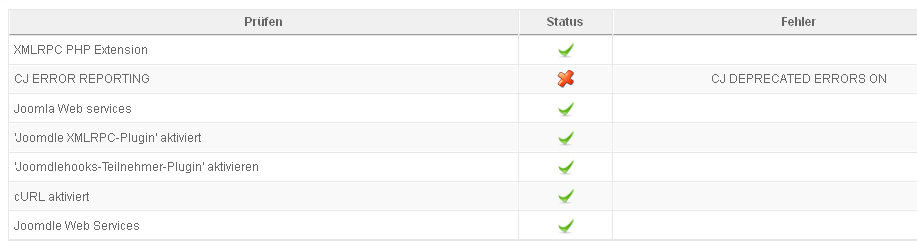
Another question concerning the "CJ DEPRECATED ERRORS ON" message: My server php version is 5.2.13 (local 5.2. As far as I know deprecated errors came up with php version 5.3. Locally I work with "error_reporting = E_ALL & ~E_NOTICE" without getting errors.
I tried with to change the error-reporting to E_Error (=1), phpinfo in joomla gives me the according information, but the error remains.
My configuration: joomla 1.5.25, moodle 1.9.16, joomdle 0.7
EDIT:
After reading "how to get a detailed error report" - not the best title for this issue - I resolved the main problem. I copied my php.ini to the subfolder moodle/mnet/xmlrpc and got a green checkmark immediately in the health check for Joomdle Web Services.
Still looking to the deprecated error message ...
I know that this has been discussed here several times, but I have to come back to the error message "empty response from Moodle". My local configuration with xampp is running fine, but installing Joomdle at server side I receive the message. I understand, this is mostly coming from a misconfigured moodle URL in joomdle configuration. That is not the reason here!
What is interesting: I can configure joomdle on the server to access my local moodle installation via Dyndns without getting the error message.
I contacted my hoster and he told me, there is nothing locked on his side. Looking to possible htaccess restrictions, I can find htaccess files only in the dirs:
joomla/dmdocuments, joomla/moodle/lib, joomla/administrator/components/com_akkeba/backup, joomla/moodle/mod/wiki/ewiki/fragments
Could anyone of these cause the connection problem? (As you see moodle is a subdir of joomla)
One difference I see: on the server I have additional php.ini files to get xmlrpc running:
extension_dir = /usr/local/lib/php_modules/5-STABLE
extension = xmlrpc.so
Any other ideas?
Another question concerning the "CJ DEPRECATED ERRORS ON" message: My server php version is 5.2.13 (local 5.2.
As far as I know deprecated errors came up with php version 5.3. Locally I work with "error_reporting = E_ALL & ~E_NOTICE" without getting errors.I tried with to change the error-reporting to E_Error (=1), phpinfo in joomla gives me the according information, but the error remains.
My configuration: joomla 1.5.25, moodle 1.9.16, joomdle 0.7
EDIT:
After reading "how to get a detailed error report" - not the best title for this issue - I resolved the main problem. I copied my php.ini to the subfolder moodle/mnet/xmlrpc and got a green checkmark immediately in the health check for Joomdle Web Services.
Still looking to the deprecated error message ...
Last edit: 14 years 6 months ago by Chris.
Please Log in or Create an account to join the conversation.
- Antonio Durán
-

- Offline
- Moderator
-

Less
More
- Posts: 7944
14 years 6 months ago #2
by Antonio Durán
Replied by Antonio Durán on topic Re: again: "empty response from Moodle"
Hi.
Thanks for sharing your solution.
As for the deprecated error message, you can ignore it if everything else is green. It seems there are false positives in this check.
Thanks for sharing your solution.
As for the deprecated error message, you can ignore it if everything else is green. It seems there are false positives in this check.
Please Log in or Create an account to join the conversation.
- ralph
- Topic Author
- Offline
- New Member
-
Less
More
- Posts: 10
14 years 6 months ago - 14 years 6 months ago #3
by ralph
Replied by ralph on topic Re: again: "empty response from Moodle"
Hi Antonio,
Everything else is green, I ignored the message, but now I have a strange situation and dont know if is related to the error message.
Logging in a Joomdle user to moodle, this gives me a blank page - nothing happens.
Logging in a Joomdle user to Joomla, the URL mysite.com/moodle/auth/joomdle/land.php?username=yakin&token=aa11fa8ad0646de3a6027c496ec5d5e3&use_wrapper=0&create_user=0&wantsurl=http%3A%2F%2Fsfe3e.de%2F is generated, the page is empty. No link to Moodle is working.
Any idea if this is coming from the message configuration or if perhaps the php.ini should be copied to even more folders?
The health check at least doesn't help here.
If you want I send you access to my page per mail.
Thanks a lot for your help!
EDIT:
I figured that out a bit. I copied my php.ini (with the xmlrpc reference) also to the /moodle/auth/joomdle folder.
Result: Now everything is fine coming from tho Joomla side. Login works, links to moodle as well.
From the Moodle side the problem remains: Logging in to Moodle gives me a blank screen with the mysite.com//moodle/login/index.php in the tab URL.
Logging out from moodle (coming from Joomla) gives me a blank page with /moodle/login/logout.php?sesskey=Fdb3zp7Bk4 in the tab URL.
So, for me this seems to be an authentification issue inside Moodle. As far as I see, then configuration in Moodle fits all requirements of the Wiki and the same config is running on my local installation.
Greetings
Ralph
Everything else is green, I ignored the message, but now I have a strange situation and dont know if is related to the error message.
Logging in a Joomdle user to moodle, this gives me a blank page - nothing happens.
Logging in a Joomdle user to Joomla, the URL mysite.com/moodle/auth/joomdle/land.php?username=yakin&token=aa11fa8ad0646de3a6027c496ec5d5e3&use_wrapper=0&create_user=0&wantsurl=http%3A%2F%2Fsfe3e.de%2F is generated, the page is empty. No link to Moodle is working.
Any idea if this is coming from the message configuration or if perhaps the php.ini should be copied to even more folders?
The health check at least doesn't help here.
If you want I send you access to my page per mail.
Thanks a lot for your help!
EDIT:
I figured that out a bit. I copied my php.ini (with the xmlrpc reference) also to the /moodle/auth/joomdle folder.
Result: Now everything is fine coming from tho Joomla side. Login works, links to moodle as well.
From the Moodle side the problem remains: Logging in to Moodle gives me a blank screen with the mysite.com//moodle/login/index.php in the tab URL.
Logging out from moodle (coming from Joomla) gives me a blank page with /moodle/login/logout.php?sesskey=Fdb3zp7Bk4 in the tab URL.
So, for me this seems to be an authentification issue inside Moodle. As far as I see, then configuration in Moodle fits all requirements of the Wiki and the same config is running on my local installation.
Greetings
Ralph
Last edit: 14 years 6 months ago by ralph.
Please Log in or Create an account to join the conversation.
- Antonio Durán
-
- Offline
- Moderator
-
Less
More
- Posts: 7944
14 years 6 months ago #4
by Antonio Durán
Replied by Antonio Durán on topic Re: again: "empty response from Moodle"
Hi.
Empty page usually means fatal error.
As in your first problem, it may be solved by putting php.ini file in the right location, assuming is the same problem.
So, try putting php.ini in login folder too....
Also you can check server logs for any hints.
Empty page usually means fatal error.
As in your first problem, it may be solved by putting php.ini file in the right location, assuming is the same problem.
So, try putting php.ini in login folder too....
Also you can check server logs for any hints.
Please Log in or Create an account to join the conversation.
- ralph
- Topic Author
- Offline
- New Member
-
Less
More
- Posts: 10
14 years 6 months ago - 14 years 6 months ago #5
by ralph
Replied by ralph on topic Re: again: "empty response from Moodle"
Hi,
Success! Php.ini in the moodle login folder resolved the issue. :laugh:
Let me summarise, perhaps someone can use this experience: All problems came from the xmlrpc availability. Xmlrpc came with a php.ini file, containing “extension = xmlrpc.so “ and extension_dir information.
This file is now within the following folders (not sure if it is really needed everywhere):
/joomla
/joomla/administrator
/joomla/moodle
/joomla/moodle/admin
/joomla/moodle/mnet/xmlrpc
/joomla/moodle/login
/joomla/moodle/auth/joomdle
Green light for “XMLRPC PHP Extension” in the health-check does not necessarily mean, that xmlrpc is available for all Joomdle functionality.
Configuration: PHP 5.2.13, Joomla 1.5.25, Moodle 1.9.16, Joomdle 0.7
One minor issue: If you select the mycourses menu type and “COM_JOOMDLE_GROUP_BY_CATEGORY = Yes” as parameter, in the result view the course categories come in an unordered list (not in the moodle sequence).
Success! Php.ini in the moodle login folder resolved the issue.
:laugh:Let me summarise, perhaps someone can use this experience: All problems came from the xmlrpc availability. Xmlrpc came with a php.ini file, containing “extension = xmlrpc.so “ and extension_dir information.
This file is now within the following folders (not sure if it is really needed everywhere):
/joomla
/joomla/administrator
/joomla/moodle
/joomla/moodle/admin
/joomla/moodle/mnet/xmlrpc
/joomla/moodle/login
/joomla/moodle/auth/joomdle
Green light for “XMLRPC PHP Extension” in the health-check does not necessarily mean, that xmlrpc is available for all Joomdle functionality.
Configuration: PHP 5.2.13, Joomla 1.5.25, Moodle 1.9.16, Joomdle 0.7
One minor issue: If you select the mycourses menu type and “COM_JOOMDLE_GROUP_BY_CATEGORY = Yes” as parameter, in the result view the course categories come in an unordered list (not in the moodle sequence).
Last edit: 14 years 6 months ago by ralph.
Please Log in or Create an account to join the conversation.
- Antonio Durán
-
- Offline
- Moderator
-
Less
More
- Posts: 7944
14 years 6 months ago #6
by Antonio Durán
Replied by Antonio Durán on topic Re: again: "empty response from Moodle"
Hi there.
Thanks for providing the list, I will put it in the wiki in case anyone else can use it.
Thank you also for the bug report, will look into fixing it for next release.
Thanks for providing the list, I will put it in the wiki in case anyone else can use it.
Thank you also for the bug report, will look into fixing it for next release.
Please Log in or Create an account to join the conversation.