
- Posts: 6
[Solved] Installation issues
- Frits Jongbloets
- Topic Author
- Offline
- New Member
-

Less
More
14 years 5 months ago - 14 years 5 months ago #1
by Frits Jongbloets
[Solved] Installation issues was created by Frits Jongbloets
Hi, I'm new to Moodle, not to Joomla. This is the first time I try to connect the two. I think I followed your installation instructions carefully but now I'm stuck. Both Moodle and Joomla give messages but I do not know how to solve these issues.
Joomla 2.5.1 site (sorry, not 2.5.2, I'm working in a development area without proper domain settings, this seems to prevent upgrading), Moodle 2.2. Dutch language, Joomdle 7.
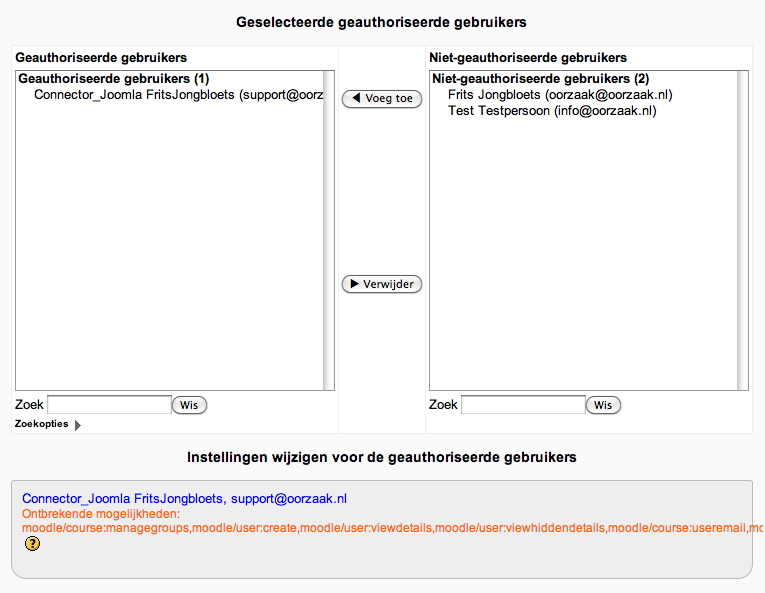
In Moodle, when viewing the users which are assigned to the web service, there's a message that some options are missing. As I have Moodle in the Dutch language the word "options" may not be the correct word in English. So I've added a screenshot. And below you'll see a list of the missing options as the list is only partly visible on the screenshot.
I do not know how to add these missing options.
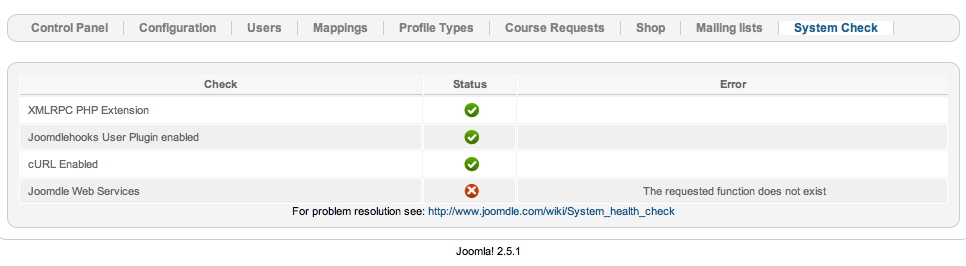
Then in Joomla, the System Check of Joomdle gives this error: Joomdle Web Services: The requested function does not exist. I also added a screenshot of this message.
I hope someone can help me out on this.
Kind regards, Frits
Joomla 2.5.1 site (sorry, not 2.5.2, I'm working in a development area without proper domain settings, this seems to prevent upgrading), Moodle 2.2. Dutch language, Joomdle 7.
In Moodle, when viewing the users which are assigned to the web service, there's a message that some options are missing. As I have Moodle in the Dutch language the word "options" may not be the correct word in English. So I've added a screenshot. And below you'll see a list of the missing options as the list is only partly visible on the screenshot.
I do not know how to add these missing options.
Ontbrekende mogelijkheden:
moodle/course:managegroups,
moodle/user:create,
moodle/user:viewdetails,
moodle/user:viewhiddendetails,
moodle/course:useremail,
moodle/user:update,
moodle/site:accessallgroups,
moodle/user:delete,
moodle/site:viewparticipants,
moodle/course:viewparticipants,
moodle/role:review,
moodle/course:enrolreview,
moodle/role:assign,
moodle/course:view,
moodle/course:update,
moodle/course:viewhiddencourses,
moodle/course:create,
moodle/course:visibility,
moodle/site:sendmessage,
moodle/notes:manage,
enrol/manual:enrol
Then in Joomla, the System Check of Joomdle gives this error: Joomdle Web Services: The requested function does not exist. I also added a screenshot of this message.
I hope someone can help me out on this.
Kind regards, Frits
Last edit: 14 years 5 months ago by Chris.
Please Log in or Create an account to join the conversation.
- Chris
-

- Offline
- Moderator
-

14 years 5 months ago #2
by Chris
Replied by Chris on topic Re: Installation issues
It would appear as though you have missed this step "Add functions to service" found about 2/3 of the way down this page
www.joomdle.com/wiki/Installing_Joomdle_in_Moodle_2
www.joomdle.com/wiki/Installing_Joomdle_in_Moodle_2
Please Log in or Create an account to join the conversation.
- Frits Jongbloets
- Topic Author
- Offline
- New Member
-
Less
More
- Posts: 6
14 years 5 months ago #3
by Frits Jongbloets
Replied by Frits Jongbloets on topic Re: Installation issues
Hi Chis, thanks for your reply.
I did add functions during the installation, however on visiting this panel again I noticed that at that time I only installed the core functions, not the Joomdle functions. So I added these. Now in the Add Functions panel there are no more functions left to add.
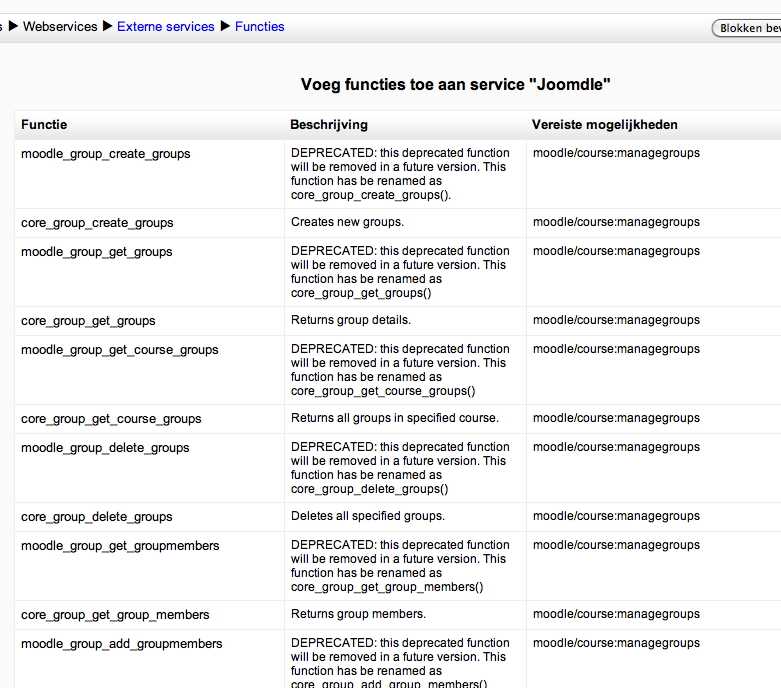
However, the message in Moodle still remains. So I took a closer look at the list of functions which are added. Now I noticed that (a) there are lots of functions marked as Deprecated and (b) in the list there is a column which is called something like 'requested functions' (as I've said, I'm working in Dutch language so I do not know the English words). See new screenshot.
The functions which are referred to in this column, correspond with the list of missing functions in my first posting. So it seems to me that on an other level these functions are not available, and because of this it is not possible to add them.
Could this be a correct analysis and if so, how can I fix this?
Kind regards, Frits
I did add functions during the installation, however on visiting this panel again I noticed that at that time I only installed the core functions, not the Joomdle functions. So I added these. Now in the Add Functions panel there are no more functions left to add.
However, the message in Moodle still remains. So I took a closer look at the list of functions which are added. Now I noticed that (a) there are lots of functions marked as Deprecated and (b) in the list there is a column which is called something like 'requested functions' (as I've said, I'm working in Dutch language so I do not know the English words). See new screenshot.
The functions which are referred to in this column, correspond with the list of missing functions in my first posting. So it seems to me that on an other level these functions are not available, and because of this it is not possible to add them.
Could this be a correct analysis and if so, how can I fix this?
Kind regards, Frits
Please Log in or Create an account to join the conversation.
- Frits Jongbloets
- Topic Author
- Offline
- New Member
-
Less
More
- Posts: 6
14 years 5 months ago - 14 years 5 months ago #4
by Frits Jongbloets
Replied by Frits Jongbloets on topic Re: Installation issues
Just a little bump... anyone who can help?
Edit:
Sorry for bumping. It's solved now.
I created a specific user for Joomdle as stated in the manual. I just discovered that this user did not have appropriate rights. I gave it admin rights and it works fine now.
Frits
Edit:
Sorry for bumping. It's solved now.
I created a specific user for Joomdle as stated in the manual. I just discovered that this user did not have appropriate rights. I gave it admin rights and it works fine now.
Frits
Last edit: 14 years 5 months ago by Frits Jongbloets.
Please Log in or Create an account to join the conversation.