
- Posts: 16
Empty error when adding moodle courses to VM2
- sac
- Topic Author
- Offline
- New Member
-

Less
More
14 years 7 months ago - 14 years 7 months ago #1
by sac
Empty error when adding moodle courses to VM2 was created by sac
Joomla 2.5.2
- Joomdle 0.7
- VirtueMart 2.0.2
- Jomsocial 2.4.2
- JSPT 3.4.767
Moodle 2.2.1+ (Build: 20120223)
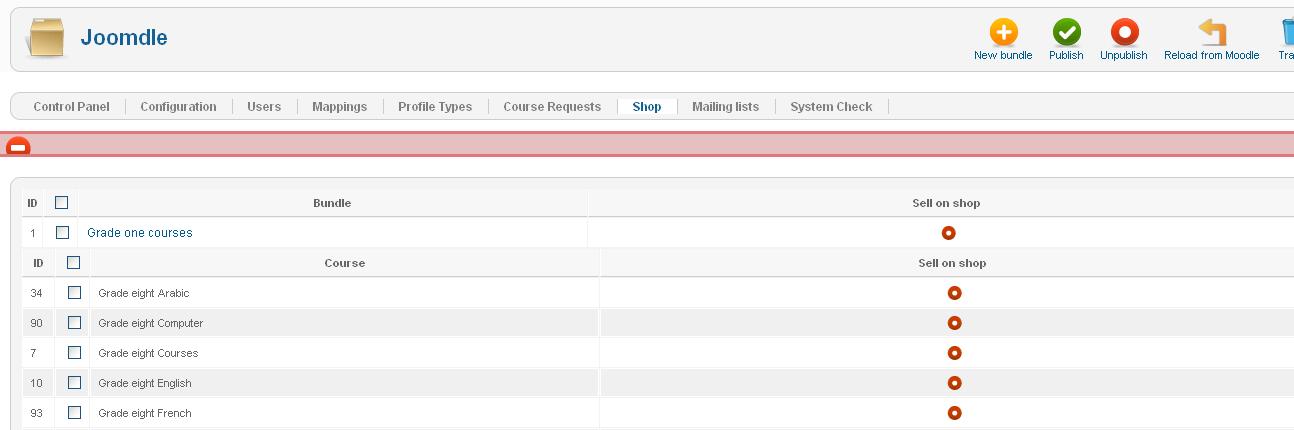
Hi guys, I have joomdle shop integration set to "VirtueMart 2", courses category set to "1" and buy courses for children set to "Yes". I have created a category in VirtueMart called "courses" (cagtegory ID is "1") and the shop view in joomdle shows all courses I have in moodle but when I try to publish any course, I get an empty error like in the picture below. I tried to create a bundle and publish it and I get the same error. Please help!
- Joomdle 0.7
- VirtueMart 2.0.2
- Jomsocial 2.4.2
- JSPT 3.4.767
Moodle 2.2.1+ (Build: 20120223)
Hi guys, I have joomdle shop integration set to "VirtueMart 2", courses category set to "1" and buy courses for children set to "Yes". I have created a category in VirtueMart called "courses" (cagtegory ID is "1") and the shop view in joomdle shows all courses I have in moodle but when I try to publish any course, I get an empty error like in the picture below. I tried to create a bundle and publish it and I get the same error. Please help!
Last edit: 14 years 7 months ago by sac.
Please Log in or Create an account to join the conversation.
- Antonio Durán
-

- Offline
- Moderator
-

Less
More
- Posts: 7954
14 years 7 months ago #2
by Antonio Durán
Replied by Antonio Durán on topic Re: Empty error when adding moodle courses to VM2
VM2 integration is not working in current release. It worked in 1.9.8RC2i, but they changed almost all code in 2.0, so we are still working on it.
Please Log in or Create an account to join the conversation.
- sac
- Topic Author
- Offline
- New Member
-
Less
More
- Posts: 16
14 years 7 months ago #3
by sac
Replied by sac on topic Re: Empty error when adding moodle courses to VM2
Thanks Antonio, so this means that with my current setup I can only choose Hikashop, right?
Please Log in or Create an account to join the conversation.
- Antonio Durán
-
- Offline
- Moderator
-
Less
More
- Posts: 7954
14 years 7 months ago #4
by Antonio Durán
Replied by Antonio Durán on topic Re: Empty error when adding moodle courses to VM2
Yes. Hopefully VM2 code will get more stable and we will manage to get a good integration in the future.
Please Log in or Create an account to join the conversation.
- sac
- Topic Author
- Offline
- New Member
-
Less
More
- Posts: 16
14 years 6 months ago #5
by sac
Replied by sac on topic Re: Empty error when adding moodle courses to VM2
Any news on VM2 code stability and integration with joomdle?
Please Log in or Create an account to join the conversation.
- Antonio Durán
-
- Offline
- Moderator
-
Less
More
- Posts: 7954
14 years 6 months ago #6
by Antonio Durán
Replied by Antonio Durán on topic Re: Empty error when adding moodle courses to VM2
It seems current code (will be R0.8 soon) works fine with VM 2.0.2.
If you want a test package, drop me an email at antonio@joomdle.com
If you want a test package, drop me an email at antonio@joomdle.com
Please Log in or Create an account to join the conversation.