
- Posts: 67
After enrolment, courses don't appear on "My Courses"
- David Parker
- Topic Author
- Offline
- Senior Member
-

Less
More
14 years 2 months ago #1
by David Parker
After enrolment, courses don't appear on "My Courses" was created by David Parker
Joomla 1.5.25
Moodle 2.0
Joomdle .8
Tienda .9
All green except for "E_DEPRECATED errors are enabled in your PHP configuration".
After checkout, users are not enrolled in courses and courses don't appear on "My Courses".
If i check "USERS" in Joomlde, the users are added to: Joomla Account Moodle Account Joomdle User.
I've checked the joomdle configuration, it seems okay, however I don't see where to set it as "default".
Thanks
Moodle 2.0
Joomdle .8
Tienda .9
All green except for "E_DEPRECATED errors are enabled in your PHP configuration".
After checkout, users are not enrolled in courses and courses don't appear on "My Courses".
If i check "USERS" in Joomlde, the users are added to: Joomla Account Moodle Account Joomdle User.
I've checked the joomdle configuration, it seems okay, however I don't see where to set it as "default".
Thanks
Please Log in or Create an account to join the conversation.
- David Parker
- Topic Author
- Offline
- Senior Member
-
Less
More
- Posts: 67
14 years 2 months ago - 14 years 2 months ago #2
by David Parker
Replied by David Parker on topic Re: After enrolment, courses don't appear on "My Courses"
System Health Check is all green check marks.
Still, users are not enrolled in courses and course don't appear in "My Courses"
Also, I setup a joomla 2.5 test site (same moodle20 site). The error is similar but slightly different. After checking out, I see the link to the course, but it leads to error 404 page not found.
Still, users are not enrolled in courses and course don't appear in "My Courses"
Also, I setup a joomla 2.5 test site (same moodle20 site). The error is similar but slightly different. After checking out, I see the link to the course, but it leads to error 404 page not found.
Last edit: 14 years 2 months ago by David Parker.
Please Log in or Create an account to join the conversation.
- Antonio Durán
-

- Offline
- Moderator
-

Less
More
- Posts: 7945
14 years 2 months ago #3
by Antonio Durán
Replied by Antonio Durán on topic Re: After enrolment, courses don't appear on "My Courses"
Did you left enabled the manual enrol method in the course? It's required.
As for the 404: that's a different issue. What's the URL?
As for the 404: that's a different issue. What's the URL?
Please Log in or Create an account to join the conversation.
- David Parker
- Topic Author
- Offline
- Senior Member
-
Less
More
- Posts: 67
14 years 2 months ago #4
by David Parker
Replied by David Parker on topic Re: After enrolment, courses don't appear on "My Courses"
Hi Antonio, thank you for your help.
I checked under Site administration >Plugins > Enrolments> Manual enrolment = yes
Just to recap, I have had two sites (a Joomla 1.5 and Joomla 2.5) accessing a single moodle 2.0 installation.
This is probably wrong and not intentional. I disabled the joomla 2.5.
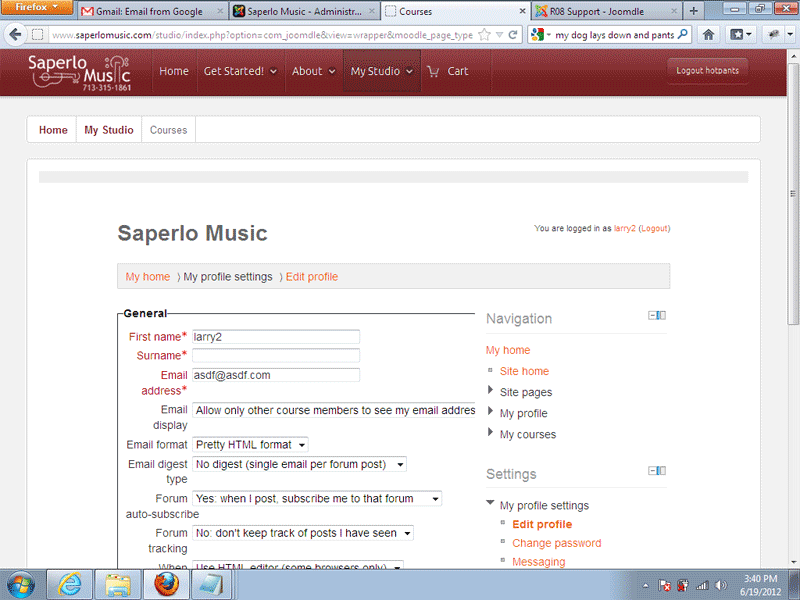
After that adjustment, The joomla 1.5 site now lands on the "Edit profile". I've had this error before when i first changed host. I thought I had fixed it, it's possible I never did. I've included a pic.
Thanks
I checked under Site administration >Plugins > Enrolments> Manual enrolment = yes
Just to recap, I have had two sites (a Joomla 1.5 and Joomla 2.5) accessing a single moodle 2.0 installation.
This is probably wrong and not intentional. I disabled the joomla 2.5.
After that adjustment, The joomla 1.5 site now lands on the "Edit profile". I've had this error before when i first changed host. I thought I had fixed it, it's possible I never did. I've included a pic.
Thanks
Please Log in or Create an account to join the conversation.
- Chris
-

- Offline
- Moderator
-
14 years 2 months ago #5
by Chris
Replied by Chris on topic Re: After enrolment, courses don't appear on "My Courses"
Just to ensure, the problem that you are trying to resolve now is the landing to the edit profile details?
Assuming that is correct, where is the student profile details coming from? Jomsocial? CB? VM?, etc
Assuming that is correct, where is the student profile details coming from? Jomsocial? CB? VM?, etc
Please Log in or Create an account to join the conversation.
- David Parker
- Topic Author
- Offline
- Senior Member
-
Less
More
- Posts: 67
14 years 2 months ago - 14 years 2 months ago #6
by David Parker
Replied by David Parker on topic Re: After enrolment, courses don't appear on "My Courses"
Hi Chris and yes the problem is landing on the edit profile details.
I have tienda .9 installed.
In Joomdle configuration:
Data Source = Tienda
Profiles Types= none
Shop Integration= Tienda
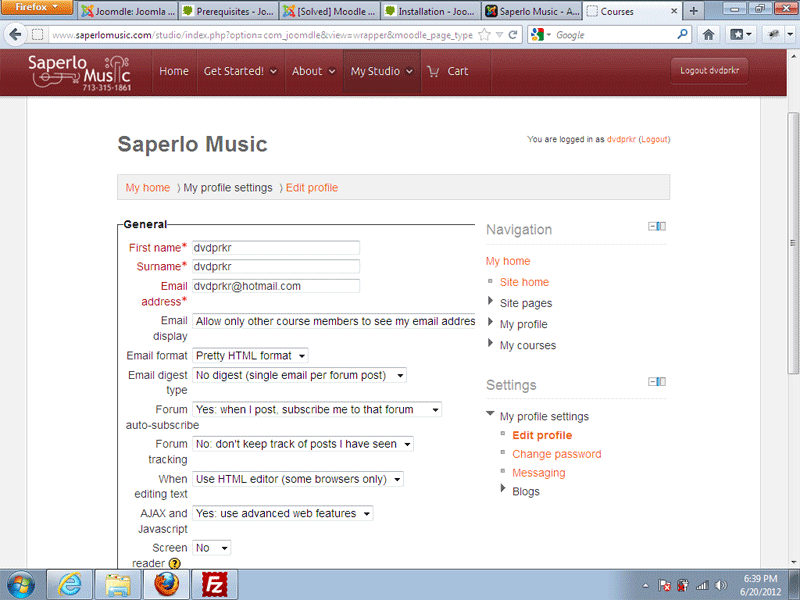
I have mapped most fields, still the same problem. I've attached another pic
I have tienda .9 installed.
In Joomdle configuration:
Data Source = Tienda
Profiles Types= none
Shop Integration= Tienda
I have mapped most fields, still the same problem. I've attached another pic
Last edit: 14 years 2 months ago by David Parker.
Please Log in or Create an account to join the conversation.
- David Parker
- Topic Author
- Offline
- Senior Member
-
Less
More
- Posts: 67
14 years 2 months ago - 14 years 2 months ago #7
by David Parker
All check marks are green.
Still have not resolved this issue.
This seems to a problem only with new users to my site.
After creating a new account:
They get the "edit profile" page when selecting a course from My Courses.
If they scroll to the bottom of the profile page, They can choose "upgrade profile" then it works.
If the user logs out after landing on the edit profile page and then log back in, it works. The user can then select the course and view it normally.
data mapping is set to Tienda.
I've mapped all the necessary fields fields from Joomla to Moodle.
This has to be an easy fix. What is going on?
Replied by David Parker on topic Re: After enrolment, courses don't appear on "My Courses"
All check marks are green.
Still have not resolved this issue.
This seems to a problem only with new users to my site.
After creating a new account:
They get the "edit profile" page when selecting a course from My Courses.
If they scroll to the bottom of the profile page, They can choose "upgrade profile" then it works.
If the user logs out after landing on the edit profile page and then log back in, it works. The user can then select the course and view it normally.
data mapping is set to Tienda.
I've mapped all the necessary fields fields from Joomla to Moodle.
This has to be an easy fix. What is going on?
Last edit: 14 years 2 months ago by David Parker.
Please Log in or Create an account to join the conversation.
- David Parker
- Topic Author
- Offline
- Senior Member
-
Less
More
- Posts: 67
14 years 2 months ago #8
by David Parker
Replied by David Parker on topic Re: After enrolment, courses don't appear on "My Courses"
Finally figured it out:
Administration ► Plugins ► Authentication ► Manage authentication
I need www before my url in the Joomla server URL.

Administration ► Plugins ► Authentication ► Manage authentication
I need www before my url in the Joomla server URL.
Please Log in or Create an account to join the conversation.