
- Posts: 8
[Closed] J3.2 Joomdle Content Plugin - Page not displayed
- Akir
- Topic Author
- Offline
- New Member
-

Less
More
12 years 9 months ago - 12 years 9 months ago #1
by Akir
[Closed] J3.2 Joomdle Content Plugin - Page not displayed was created by Akir
Error J3.2
Insert in body article text: {joomdlecourse id=1}
Page is not displayed if the plugin is enabled.
If the plugin is disabled, the page is displayed.
Insert in body article text: {joomdlecourse id=1}
Page is not displayed if the plugin is enabled.
If the plugin is disabled, the page is displayed.
Last edit: 12 years 9 months ago by Chris.
Please Log in or Create an account to join the conversation.
- Antonio Durán
-

- Offline
- Moderator
-

Less
More
- Posts: 7942
12 years 9 months ago #2
by Antonio Durán
Replied by Antonio Durán on topic J3.2: Joomdle Course Content Plugin - Page is not displayed
Thanks for the info.
To fix it, edit plugins/content/joomdle_content_course/joomdle_content_course.php, function onContentPrepare.
Replace:
By:
To fix it, edit plugins/content/joomdle_content_course/joomdle_content_course.php, function onContentPrepare.
Replace:
Code:
$pluginParams = new JParameter( $plugin->params );
Code:
$pluginParams = $this->params;
Please Log in or Create an account to join the conversation.
- Akir
- Topic Author
- Offline
- New Member
-
Less
More
- Posts: 8
12 years 9 months ago #3
by Akir
Replied by Akir on topic J3.2: Joomdle Course Content Plugin - Page is not displayed
After making the changes: XML-RPC Error (404): Unknown error
Please Log in or Create an account to join the conversation.
- Antonio Durán
-
- Offline
- Moderator
-
Less
More
- Posts: 7942
12 years 9 months ago #4
by Antonio Durán
Replied by Antonio Durán on topic J3.2: Joomdle Course Content Plugin - Page is not displayed
Usually course id=1 does not exist. Try another one.
Anyway, to get more info about the error, enable debugging on Moodle.
Anyway, to get more info about the error, enable debugging on Moodle.
Please Log in or Create an account to join the conversation.
- Akir
- Topic Author
- Offline
- New Member
-
Less
More
- Posts: 8
12 years 9 months ago #5
by Akir
Replied by Akir on topic J3.2: Joomdle Course Content Plugin - Page is not displayed
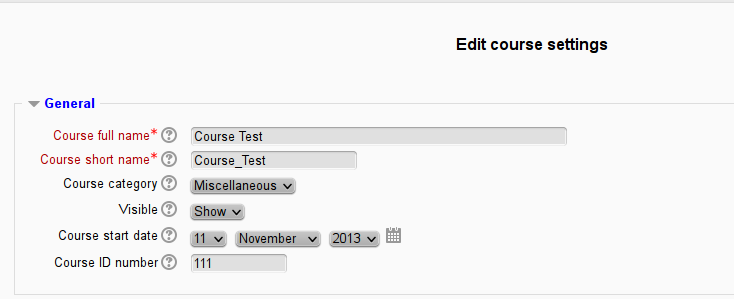
Insert in body article text: {joomdlecourse id=111}
Result page:
XML-RPC Error (28260048): Invalid response value detected | DEBUG INFO: Error in response - Missing following required key in a single structure: remoteid | ERRORCODE: invalidresponse
Result page:
XML-RPC Error (28260048): Invalid response value detected | DEBUG INFO: Error in response - Missing following required key in a single structure: remoteid | ERRORCODE: invalidresponse
Please Log in or Create an account to join the conversation.
- Antonio Durán
-
- Offline
- Moderator
-
Less
More
- Posts: 7942
12 years 9 months ago #6
by Antonio Durán
Replied by Antonio Durán on topic J3.2: Joomdle Course Content Plugin - Page is not displayed
That is not the ID you need to use. It is the database course ID (the one you see in the address bar when you are in a course in Moodle)
Please Log in or Create an account to join the conversation.
- Akir
- Topic Author
- Offline
- New Member
-
Less
More
- Posts: 8
12 years 9 months ago #7
by Akir
Replied by Akir on topic J3.2: Joomdle Course Content Plugin - Page is not displayed
It works for me. Thanks.
Please Log in or Create an account to join the conversation.