
- Posts: 11
Help - broke configuration page!!
- Emma Richardson
- Topic Author
- Offline
- New Member
-

Less
More
12 years 9 months ago - 12 years 9 months ago #1
by Emma Richardson

I had everything working great. On Joomla 3.2 and Joomdle .94. Moodle and Joomla are talking, SSO login is working. But for some reason I was not getting the profile fields to come across. Then I did something bad apparently. I enabled the User Profile extension in Joomla. I then selected that as an additional data source in the Joomdle Profile area. I think somewhere towards the bottom of that page, there was another drop down box where I had to select something, I wasn't sure what and so I selected JomSocial.
That created an error and now I cannot get the Config page to load properly and it will not let me change anything. I just get a page of existing field entries until the Profile part and at the bottom of that is the following error:
Table 'joomla.jml_community_profiles' doesn't exist SQL=SELECT p.id, p.name, pt.id as profiletype_id from jml_community_profiles as p LEFT JOIN jml_joomdle_profiletypes AS pt ON p.id = pt.profiletype_id ORDER BY name LIMIT 0, 1000
I tried to uninstall and reinstall but the Joomdle component does not actually pull up in the Extensions manager - only the modules do. I tried to go to the database to see if I could find the settings there and remove them so I could just set up from scratch but all the Joomdle tables there are empty.
On the Joomdle Control Panel page, I get the following message as well: Profile types integration enabled, but no profiles selected to create in Moodle
Please, can someone help? I have attached a screenshot of the bottom of the config page - no Save button at the top so I cannot update anything.
Help - broke configuration page!! was created by Emma Richardson
I had everything working great. On Joomla 3.2 and Joomdle .94. Moodle and Joomla are talking, SSO login is working. But for some reason I was not getting the profile fields to come across. Then I did something bad apparently. I enabled the User Profile extension in Joomla. I then selected that as an additional data source in the Joomdle Profile area. I think somewhere towards the bottom of that page, there was another drop down box where I had to select something, I wasn't sure what and so I selected JomSocial.
That created an error and now I cannot get the Config page to load properly and it will not let me change anything. I just get a page of existing field entries until the Profile part and at the bottom of that is the following error:
Table 'joomla.jml_community_profiles' doesn't exist SQL=SELECT p.id, p.name, pt.id as profiletype_id from jml_community_profiles as p LEFT JOIN jml_joomdle_profiletypes AS pt ON p.id = pt.profiletype_id ORDER BY name LIMIT 0, 1000
I tried to uninstall and reinstall but the Joomdle component does not actually pull up in the Extensions manager - only the modules do. I tried to go to the database to see if I could find the settings there and remove them so I could just set up from scratch but all the Joomdle tables there are empty.
On the Joomdle Control Panel page, I get the following message as well: Profile types integration enabled, but no profiles selected to create in Moodle
Please, can someone help? I have attached a screenshot of the bottom of the config page - no Save button at the top so I cannot update anything.
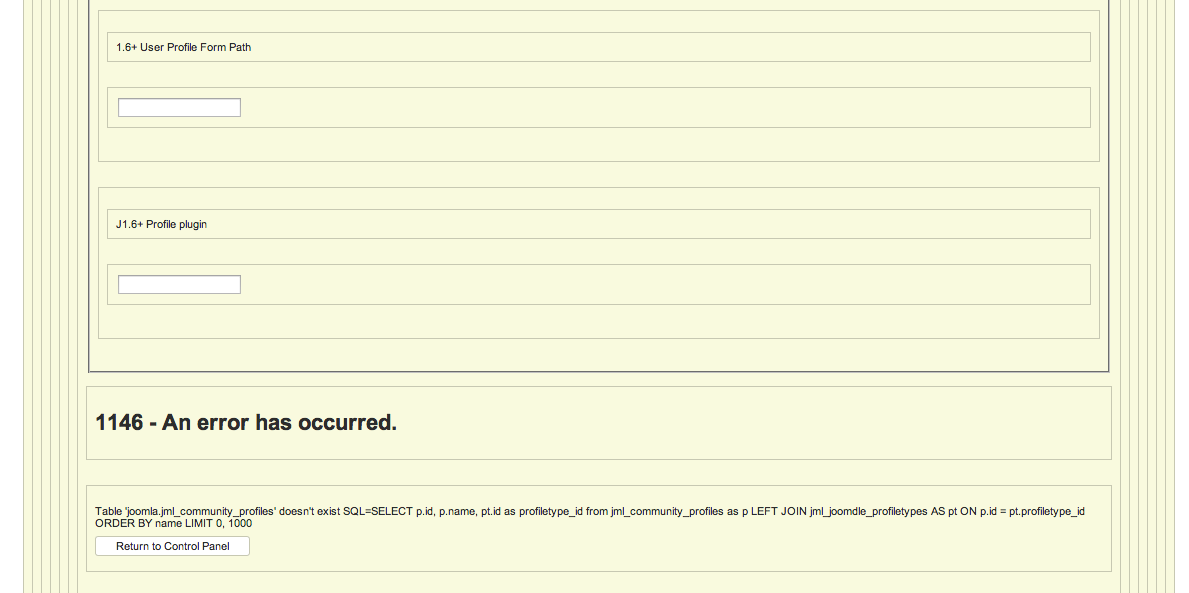
Last edit: 12 years 9 months ago by Emma Richardson.
Please Log in or Create an account to join the conversation.
- Emma Richardson
- Topic Author
- Offline
- New Member
-
Less
More
- Posts: 11
12 years 9 months ago #2
by Emma Richardson
Replied by Emma Richardson on topic Help - broke configuration page!!
Well, I was able to figure it out. If someone else has the same issue, this was how I resolved this:
Found the com_joomdle row in the extensions table in the database.
Removed the two entries in the params area that had caused this. (For me, it was the combination of User Profile 1.6 in Additional Data Source and JomSocial from use profile types). I just removed the entries, not the parameters.
Saved and now Configuration page loads. Not sure what I will do about the profile stuff but at least I am functional again.
Found the com_joomdle row in the extensions table in the database.
Removed the two entries in the params area that had caused this. (For me, it was the combination of User Profile 1.6 in Additional Data Source and JomSocial from use profile types). I just removed the entries, not the parameters.
Saved and now Configuration page loads. Not sure what I will do about the profile stuff but at least I am functional again.
Please Log in or Create an account to join the conversation.
- Antonio Durán
-

- Offline
- Moderator
-

Less
More
- Posts: 7945
12 years 9 months ago #3
by Antonio Durán
Replied by Antonio Durán on topic Help - broke configuration page!!
Good to know that you fixed it. The way you did it is the same I would have used.
Please Log in or Create an account to join the conversation.
- chipman
- Offline
- New Member
-
Less
More
- Posts: 1
12 years 8 months ago - 12 years 8 months ago #4
by chipman
Replied by chipman on topic Help - broke configuration page!!
Hi
I have the same problem but do not understand what I have to delete
The value that I have in the parameters field is
{"MOODLE_URL":"http:\/\/www.cvirtual.cincentro.org","moodle_version":20,"auth_token":"013e213be05d86f1358f618a1e0eb3a6","connection_method":"curl","internal_ip":"","redirectless_sso":1,"redirectless_logout":1,"cookie_path":"\/","auto_create_users":0,"auto_delete_users":1,"linkstarget":"wrapper","scrolling":"no","width":"100%","height":"1000","autoheight":1,"default_itemid":"","joomdle_itemid":"","shop_itemid":"","courseview_itemid":"","free_courses_button":"enrol","paid_courses_button":"buy","goto_course_button":"moodle","show_detail_category":1,"show_detail_summary":1,"show_detail_language":0,"show_detail_startdate":1,"show_detail_enroldates":0,"show_detail_enrolperiod":0,"show_detail_topicsnumber":1,"show_detail_cost":1,"show_contents_link":1,"show_top\u00eccs_link":1,"show_grading_system_link":0,"show_teachers_link":0,"topics_show_numbers":1,"coursecategory_show_category_info":1,"coursecategory_show_buttons":0,"course_show_numbers":1,"course_show_summary":0,"use_page_view":1,"use_kunena_forums":0,"coursesabc_show_buttons":0,"show_back_links":0,"shop_integration":"no","courses_category":"0","buy_for_children":0,"enrol_email_subject":"Welcome to COURSE_NAME","enrol_email_text":"To enter the course, go to: COURSE_URL","send_bundle_emails":0,"additional_data_source":"joomla16","j16_form_path":"","j16_profile_plugin":"","mailing_list_integration":"no","applications_max":"","show_detail_application_motivation":"no","show_detail_application_experience":"no","joomlagroups_teachers":"1","joomlagroups_students":"1","user_points":"no","use_profiletypes":"jomsocial","children_profiletype":"0","use_pdf_integration":0,"courses_forum_category":0,"jomsocial_groups_category":1,"tags":null}
What should I delete? How should be ?
I have installed joomla 3.2, moodle 2.6 and 0.94 joomdle, all on CentOS 6.4
Regards
I have the same problem but do not understand what I have to delete
The value that I have in the parameters field is
{"MOODLE_URL":"http:\/\/www.cvirtual.cincentro.org","moodle_version":20,"auth_token":"013e213be05d86f1358f618a1e0eb3a6","connection_method":"curl","internal_ip":"","redirectless_sso":1,"redirectless_logout":1,"cookie_path":"\/","auto_create_users":0,"auto_delete_users":1,"linkstarget":"wrapper","scrolling":"no","width":"100%","height":"1000","autoheight":1,"default_itemid":"","joomdle_itemid":"","shop_itemid":"","courseview_itemid":"","free_courses_button":"enrol","paid_courses_button":"buy","goto_course_button":"moodle","show_detail_category":1,"show_detail_summary":1,"show_detail_language":0,"show_detail_startdate":1,"show_detail_enroldates":0,"show_detail_enrolperiod":0,"show_detail_topicsnumber":1,"show_detail_cost":1,"show_contents_link":1,"show_top\u00eccs_link":1,"show_grading_system_link":0,"show_teachers_link":0,"topics_show_numbers":1,"coursecategory_show_category_info":1,"coursecategory_show_buttons":0,"course_show_numbers":1,"course_show_summary":0,"use_page_view":1,"use_kunena_forums":0,"coursesabc_show_buttons":0,"show_back_links":0,"shop_integration":"no","courses_category":"0","buy_for_children":0,"enrol_email_subject":"Welcome to COURSE_NAME","enrol_email_text":"To enter the course, go to: COURSE_URL","send_bundle_emails":0,"additional_data_source":"joomla16","j16_form_path":"","j16_profile_plugin":"","mailing_list_integration":"no","applications_max":"","show_detail_application_motivation":"no","show_detail_application_experience":"no","joomlagroups_teachers":"1","joomlagroups_students":"1","user_points":"no","use_profiletypes":"jomsocial","children_profiletype":"0","use_pdf_integration":0,"courses_forum_category":0,"jomsocial_groups_category":1,"tags":null}
What should I delete? How should be ?
I have installed joomla 3.2, moodle 2.6 and 0.94 joomdle, all on CentOS 6.4
Regards
Last edit: 12 years 8 months ago by chipman.
Please Log in or Create an account to join the conversation.
- Emma Richardson
- Topic Author
- Offline
- New Member
-
Less
More
- Posts: 11
12 years 8 months ago #5
by Emma Richardson
Replied by Emma Richardson on topic Help - broke configuration page!!
Delete the joomla16 after "additional_data_source": and then delete jomsocial after "use_profiletypes":
In both cases, leave the quotation marks, just take out the text.
This seems to happen when you have a conflict between your datasource and your profile type entries.
In both cases, leave the quotation marks, just take out the text.
This seems to happen when you have a conflict between your datasource and your profile type entries.
Please Log in or Create an account to join the conversation.
- Antonio Durán
-
- Offline
- Moderator
-
Less
More
- Posts: 7945
12 years 8 months ago #6
by Antonio Durán
Replied by Antonio Durán on topic Help - broke configuration page!!
This really happens when you select a source that you have not installed: for example, you select Jomsocial for profile types, but you don't have jomsocial installed. Joomdle will try to fetch the info, and fail when calling Jomsocial functions.
I will try to fix this in next release, so the problem does not happen even if you select a non installed source.
I will try to fix this in next release, so the problem does not happen even if you select a non installed source.
Please Log in or Create an account to join the conversation.