
- Posts: 58
Joomdle not enrolling students after purchase.
- Jocelyn Garner
-
 Topic Author
- Offline
- Senior Member
-

Less
More
12 years 6 months ago #1
by Jocelyn Garner
Joomdle not enrolling students after purchase. was created by Jocelyn Garner
I noticed that Joe is using PayPal to accept payments. I've just encountered a PayPal-specific issue: when Leslie accepts payments via Credit Card, her students get properly enrolled in Moodle. But the last 2 PayPal payers were not enrolled. I'm wondering whether this might be a PayPal-specific issue. The last two people also were purchasing bundles.
Where might we look to determine if there's a kink in the works specifically with PayPal?
Toolie
- Course is in the right category as configured in Joomdle -- YES
- Manual enrolment plugin is enabled in course -- YES
- Joomdle shop integration plugin (joomdlehikashop, ...) is installed and enabled -- YES, HikaShop
- Order is being confirmed in shop -- YES
Where might we look to determine if there's a kink in the works specifically with PayPal?
Toolie
Please Log in or Create an account to join the conversation.
- Antonio Durán
-

- Offline
- Moderator
-

Less
More
- Posts: 7944
12 years 6 months ago #2
by Antonio Durán
Replied by Antonio Durán on topic Joomdle not enrolling students after purchase.
Hi Jocelyn.
I have moved your post to a new topic, as I don't think the problems are related (for Joe, no payment methods worked).
The first thing I would do to try to track the problem is go the the shop backend, and set the order to created and back to confirmed again, and see if that triggers enrolment.
If it does, maybe there is some problem when the code is executed after paypal "payment complete" message. You could try checking the apapche error.log in case you see something gthere.
I have moved your post to a new topic, as I don't think the problems are related (for Joe, no payment methods worked).
The first thing I would do to try to track the problem is go the the shop backend, and set the order to created and back to confirmed again, and see if that triggers enrolment.
If it does, maybe there is some problem when the code is executed after paypal "payment complete" message. You could try checking the apapche error.log in case you see something gthere.
Please Log in or Create an account to join the conversation.
- Jocelyn Garner
-
Topic Author
- Offline
- Senior Member
-
Less
More
- Posts: 58
12 years 6 months ago #3
by Jocelyn Garner
Replied by Jocelyn Garner on topic Joomdle not enrolling students after purchase.
I tried purchasing one of Leslie's bundles myself through PayPal, and received the HikaShop emails, but no Joomdle email with the course starting link. When I logged in as Admin, I saw the following, one for each course:


Before I saw your reply here, I clicked the edit icon and then saved it, and it enabled me as a student, but I still did not receive the outgoing Joomdle invitation email.
Does this change your recommendation to try changing from confirmed to created and back? It seems to me that HikaShop is getting the word back from PayPal that payment is complete. I can confirm that the money left my account.
Thoughts?
Toolie
Before I saw your reply here, I clicked the edit icon and then saved it, and it enabled me as a student, but I still did not receive the outgoing Joomdle invitation email.
Does this change your recommendation to try changing from confirmed to created and back? It seems to me that HikaShop is getting the word back from PayPal that payment is complete. I can confirm that the money left my account.
Thoughts?
Toolie
Please Log in or Create an account to join the conversation.
- Antonio Durán
-
- Offline
- Moderator
-
Less
More
- Posts: 7944
12 years 6 months ago #4
by Antonio Durán
Replied by Antonio Durán on topic Joomdle not enrolling students after purchase.
Joomdle sends email on order confirmation, it does nothing when you enrol using moodle directly.
I would still do the check, although it seems Joomdle is indeed making the enrolments, although for some reason they appear greyed out.
As for emails: did you enable "Send bundle emails" option in joomdle configuration?
I would still do the check, although it seems Joomdle is indeed making the enrolments, although for some reason they appear greyed out.
As for emails: did you enable "Send bundle emails" option in joomdle configuration?
Please Log in or Create an account to join the conversation.
- Jocelyn Garner
-
Topic Author
- Offline
- Senior Member
-
Less
More
- Posts: 58
12 years 5 months ago #5
by Jocelyn Garner
Replied by Jocelyn Garner on topic Joomdle not enrolling students after purchase.
Yes, Send Bundle Emails has been enabled all along.
Students are not able to access their courses until we manually change their status, so no, the enrolments are not complete (hence the grey, I guess).
Leslie is losing patience. Not having this work automatically defeats the purpose of setting up online learning. Do we need to hire you to troubleshoot this thoroughly?
Toolie
Students are not able to access their courses until we manually change their status, so no, the enrolments are not complete (hence the grey, I guess).
Leslie is losing patience. Not having this work automatically defeats the purpose of setting up online learning. Do we need to hire you to troubleshoot this thoroughly?
Toolie
Please Log in or Create an account to join the conversation.
- Antonio Durán
-
- Offline
- Moderator
-
Less
More
- Posts: 7944
12 years 5 months ago #6
by Antonio Durán
Replied by Antonio Durán on topic Joomdle not enrolling students after purchase.
Hi Jocelyn.
> Do we need to hire you to troubleshoot this thoroughly?
Well, that is up to you/Leslie. If you want me to work on it, I'll guess you'll need to do it.
> Students are not able to access their courses until we manually change their status, so no, the enrolments are not complete (hence the grey, I guess).
Well, it seems enrolments are created (albeit disabled for some reason), as if not, not even grey ones would appear.
> Do we need to hire you to troubleshoot this thoroughly?
Well, that is up to you/Leslie. If you want me to work on it, I'll guess you'll need to do it.
> Students are not able to access their courses until we manually change their status, so no, the enrolments are not complete (hence the grey, I guess).
Well, it seems enrolments are created (albeit disabled for some reason), as if not, not even grey ones would appear.
Please Log in or Create an account to join the conversation.
- Jocelyn Garner
-
Topic Author
- Offline
- Senior Member
-
Less
More
- Posts: 58
12 years 4 months ago #7
by Jocelyn Garner
As far as our students are concerned, their registration did not go through. The fact that enrolments are greyed out means it's not working, Antonio, and we need this fixed.
Leslie is ready to shut the whole thing down. As one last effort, we want you to troubleshoot the site and figure out why it is not working. Please see my Private Message for details.
Toolie
Replied by Jocelyn Garner on topic Joomdle not enrolling students after purchase.
> Students are not able to access their courses until we manually change their status, so no, the enrolments are not complete (hence the grey, I guess).
Well, it seems enrolments are created (albeit disabled for some reason), as if not, not even grey ones would appear.
As far as our students are concerned, their registration did not go through. The fact that enrolments are greyed out means it's not working, Antonio, and we need this fixed.
Leslie is ready to shut the whole thing down. As one last effort, we want you to troubleshoot the site and figure out why it is not working. Please see my Private Message for details.
Toolie
Please Log in or Create an account to join the conversation.
- Nabil Asif
- Offline
- New Member
-

Less
More
- Posts: 10
12 years 4 months ago #8
by Nabil Asif
Replied by Nabil Asif on topic Joomdle not enrolling students after purchase.
Hi Jocelyn,
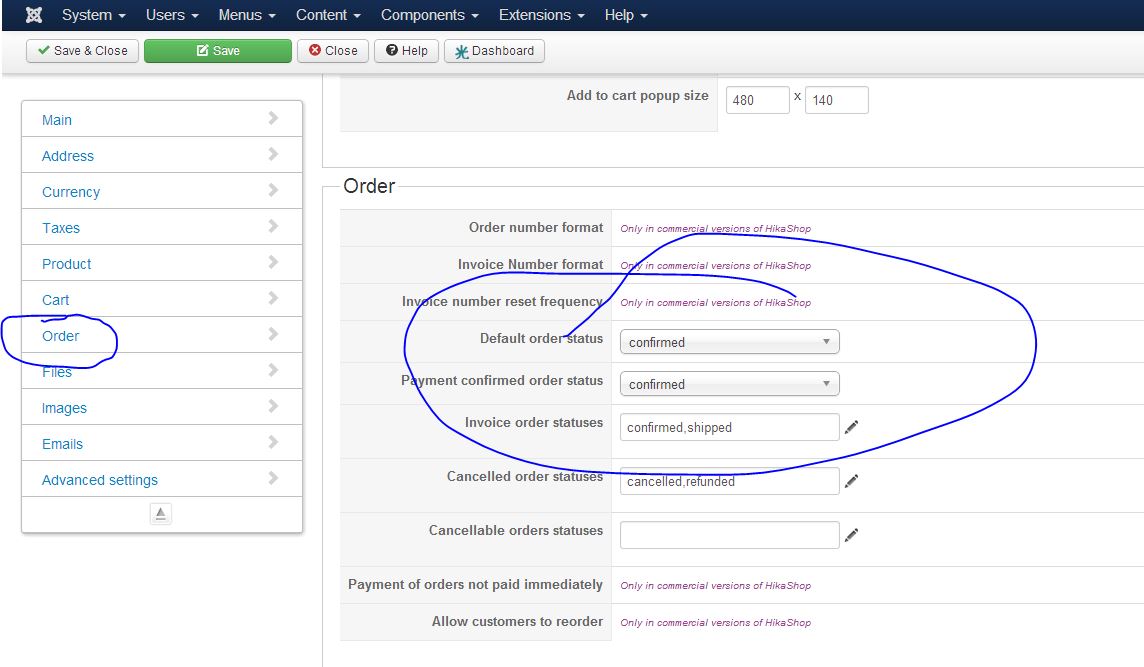
I recently implemented Hikashop as part of my installation (as virtuamart doesn't yet work with joomla v3) and I had the same issue to begin with but found a simple fix. You said that the Order is being confirmed in shop. But is the default order status set to confirm when you go to system > configuration? It started working for me when I changed this setting. See attached image.
Nabil
I recently implemented Hikashop as part of my installation (as virtuamart doesn't yet work with joomla v3) and I had the same issue to begin with but found a simple fix. You said that the Order is being confirmed in shop. But is the default order status set to confirm when you go to system > configuration? It started working for me when I changed this setting. See attached image.
Nabil
Please Log in or Create an account to join the conversation.
- Jocelyn Garner
-
Topic Author
- Offline
- Senior Member
-
Less
More
- Posts: 58
12 years 4 months ago #9
by Jocelyn Garner
Replied by Jocelyn Garner on topic Joomdle not enrolling students after purchase.
No I did not have it set as shown, but I did just go change it. I then tried enrolling in my $1 test course (paid actual $$ using PayPal), and alas, I still get the greyed-out, incomplete enrollment.

Do you use PayPal? We offer both PayPal and Authorize.net SIM as payment methods.
Thoughts?
Toolie
Do you use PayPal? We offer both PayPal and Authorize.net SIM as payment methods.
Thoughts?
Toolie
Please Log in or Create an account to join the conversation.
- Nabil Asif
- Offline
- New Member
-
Less
More
- Posts: 10
12 years 4 months ago #10
by Nabil Asif
Replied by Nabil Asif on topic Joomdle not enrolling students after purchase.
Ohh that's a shame. Yes I'm using Paypal. Your Moodle looks a little old, what version are you on? I'm on Moodle 2.4.6+, Joomdle 0.94 and Joomla 3.23. And both sales of single courses and bundles work fine for me.
Happy have a look over if you like, though no where as experienced as Antonio.
Happy have a look over if you like, though no where as experienced as Antonio.
Please Log in or Create an account to join the conversation.