
- Posts: 19
Joomla URL seems to be misconfigured in Joomdle auth plugin
- professional it solutions
- Topic Author
- Offline
- New Member
-

Less
More
13 years 6 months ago - 13 years 6 months ago #1
by professional it solutions
Joomla URL seems to be misconfigured in Joomdle auth plugin was created by professional it solutions
Hi
I have Joomla 1.5.26, Moodle 1.9.10 & Joomdle R0.9.
In Joomla Joomdle's "Health check" showing the following status:
XMLRPC PHP Extension : Green
PHP error reporting : Green
Joomla Web services : Green
Joomdle XMLRPC Plugin enabled : Green
Joomdlehooks User Plugin enabled : Green
cURL Enabled : Green
Joomdle Web Services : Red Joomla URL seems to be misconfigured in Joomdle auth plugin in Moodle
Besides that in my site ( www.indusacademics.com ) I can see the Moodle's 'Course list' & 'User List'.
I have set " www.indusacademics.com " in Moodle's Administration ► Users ► Authentication ► Joomdle ► Joomla URL
What else parameters i've to check in Moodle?
Thank you in advance!
shikhar
I have Joomla 1.5.26, Moodle 1.9.10 & Joomdle R0.9.
In Joomla Joomdle's "Health check" showing the following status:
XMLRPC PHP Extension : Green
PHP error reporting : Green
Joomla Web services : Green
Joomdle XMLRPC Plugin enabled : Green
Joomdlehooks User Plugin enabled : Green
cURL Enabled : Green
Joomdle Web Services : Red Joomla URL seems to be misconfigured in Joomdle auth plugin in Moodle
Besides that in my site ( www.indusacademics.com ) I can see the Moodle's 'Course list' & 'User List'.
I have set " www.indusacademics.com " in Moodle's Administration ► Users ► Authentication ► Joomdle ► Joomla URL
What else parameters i've to check in Moodle?
Thank you in advance!
shikhar
Last edit: 13 years 6 months ago by professional it solutions.
Please Log in or Create an account to join the conversation.
- Chris
-

- Offline
- Moderator
-

13 years 6 months ago #2
by Chris
Replied by Chris on topic Joomla URL seems to be misconfigured in Joomdle auth plugin
Please Log in or Create an account to join the conversation.
- professional it solutions
- Topic Author
- Offline
- New Member
-
Less
More
- Posts: 19
13 years 6 months ago #3
by professional it solutions
Replied by professional it solutions on topic Joomla URL seems to be misconfigured in Joomdle auth plugin
Hi,
Thanks for replying.
I've already refered www.joomdle.com/wiki/System_health_check...uth_plugin_in_Moodle along with www.joomdle.com/wiki/Preparing_Moodle_19 .
None works.
Besides of this I am able to see the Moodle's users in Joomla but unable to login in moodle using Joomla login panel.
shikhar
Thanks for replying.
I've already refered www.joomdle.com/wiki/System_health_check...uth_plugin_in_Moodle along with www.joomdle.com/wiki/Preparing_Moodle_19 .
None works.
Besides of this I am able to see the Moodle's users in Joomla but unable to login in moodle using Joomla login panel.
shikhar
Please Log in or Create an account to join the conversation.
- Chris
-
- Offline
- Moderator
-
13 years 6 months ago #4
by Chris
Replied by Chris on topic Joomla URL seems to be misconfigured in Joomdle auth plugin
From your above post you have set the urls the way the wiki has defined it. Either that or your have not typed in above the way you have entered it. Ie http etc. Also, the error message says moodle url which mean joomla can see moodle which is consistent with the fact that you can see course info.
Joomdle login is different again. Worry about the error message first because if this cannot be resolved you will always have problems.
Joomdle login is different again. Worry about the error message first because if this cannot be resolved you will always have problems.
Please Log in or Create an account to join the conversation.
- professional it solutions
- Topic Author
- Offline
- New Member
-
Less
More
- Posts: 19
13 years 6 months ago - 13 years 6 months ago #5
by professional it solutions
Replied by professional it solutions on topic Joomla URL seems to be misconfigured in Joomdle auth plugin
Hi,
Yes, you are right i should focus on the prime problem.
Please note I've typed & set the following URLs:
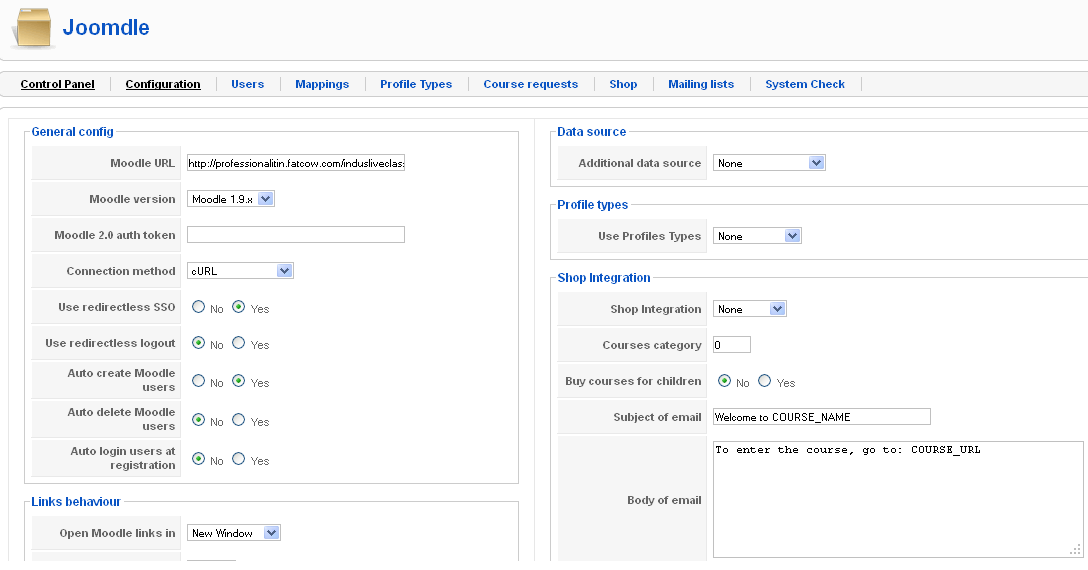
In Joomla's Joomdle configuration : professionalitin.fatcow.com/indusliveclasses (pls refer joomla2.png)
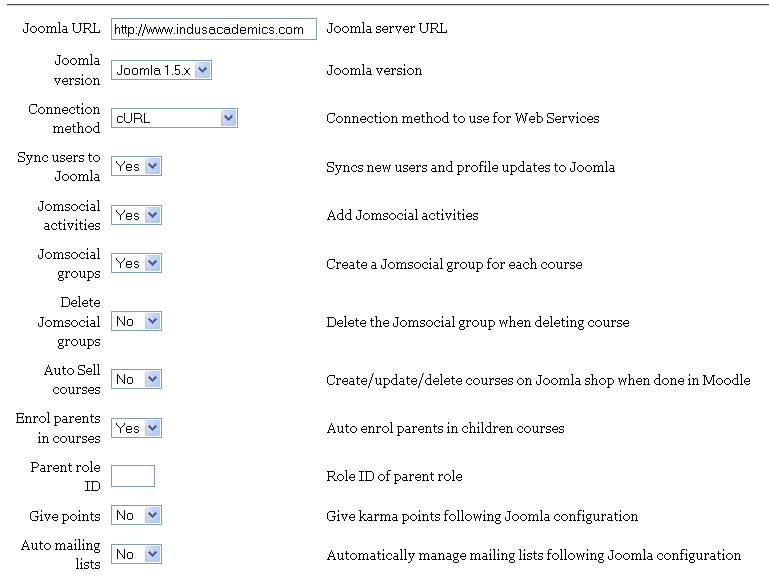
In Moodle's Joomdle plugin : www.indusacademics.com (pls refer moodle2.png)
Please guide me how to resolve :
Joomdle Web Services : Red Joomla URL seems to be misconfigured in Joomdle auth plugin in Moodle
shikhar
Yes, you are right i should focus on the prime problem.
Please note I've typed & set the following URLs:
In Joomla's Joomdle configuration : professionalitin.fatcow.com/indusliveclasses (pls refer joomla2.png)
In Moodle's Joomdle plugin : www.indusacademics.com (pls refer moodle2.png)
Please guide me how to resolve :
Joomdle Web Services : Red Joomla URL seems to be misconfigured in Joomdle auth plugin in Moodle
shikhar
Last edit: 13 years 6 months ago by professional it solutions.
Please Log in or Create an account to join the conversation.
- professional it solutions
- Topic Author
- Offline
- New Member
-
Less
More
- Posts: 19
13 years 6 months ago - 13 years 6 months ago #6
by professional it solutions
Replied by professional it solutions on topic Joomla URL seems to be misconfigured in Joomdle auth plugin
Hi,
As "register_globals" was "ON" Moodle notify us to place it "OFF". After place it Off our Joomdle's health check is showing following messages:
"Warning: strncmp() expects parameter 1 to be string, array given in /hermes/waloraweb082/b166/moo.professionalitin/indusacademics/administrator/components/com_joomdle/helpers/content.php on line 1309
Warning: substr() expects parameter 1 to be string, array given in /hermes/waloraweb082/b166/moo.professionalitin/indusacademics/administrator/components/com_joomdle/helpers/content.php on line 1312 "
and
"Joomdle Web Services : X : Source IP not allowed"
Please note we've set 0.0.0.0/0 in Moodle's "XML-RPC hosts list".
shikhar
As "register_globals" was "ON" Moodle notify us to place it "OFF". After place it Off our Joomdle's health check is showing following messages:
"Warning: strncmp() expects parameter 1 to be string, array given in /hermes/waloraweb082/b166/moo.professionalitin/indusacademics/administrator/components/com_joomdle/helpers/content.php on line 1309
Warning: substr() expects parameter 1 to be string, array given in /hermes/waloraweb082/b166/moo.professionalitin/indusacademics/administrator/components/com_joomdle/helpers/content.php on line 1312 "
and
"Joomdle Web Services : X : Source IP not allowed"
Please note we've set 0.0.0.0/0 in Moodle's "XML-RPC hosts list".
shikhar
Last edit: 13 years 6 months ago by professional it solutions. Reason: improvement in status
Please Log in or Create an account to join the conversation.
- Chris
-
- Offline
- Moderator
-
13 years 6 months ago #7
by Chris
Replied by Chris on topic Joomla URL seems to be misconfigured in Joomdle auth plugin
Not sure why you are getting that error message. Perhaps because your moodle is older and there has been many updates to Joomdle since 1.9. Regardless you should only be using 0.0.0.0 tactically to determine you internal IP address. However, I see from your previous post that you are actually using two different domains rather than one domain as most people do. This can be a cause for "additional" problems depending on how your are hosting them. Especially if they are on physically different servers. I believe your are on the same physical server saving some problem but still potentially causing some conflict.
Since your problem is that Moodle cannot talk with Joomla, I would check that
- both domains have xmlrpc support
- both domains allow external domains to use xmlrpc
- there are no routers or anything else in the middle blocking he connections (ie firewalls, etc.)
- determine the internal IP address of the servers. The public IP address is 65.254.248.192 and it is unlikely that this will be your internal IP address. You may be able to see the internal IP address in your whm or cpanel.
Finally, I clicked through to your two domains. The link to your moodle does not work. Neither does the link that Antonio gave you to test in your other thread. I also see that your side is under construction. Perhaps there is "stuff" going on there too causing the problems.
I have locked the other thread as there is not much point in posting the same information in two locations.
Since your problem is that Moodle cannot talk with Joomla, I would check that
- both domains have xmlrpc support
- both domains allow external domains to use xmlrpc
- there are no routers or anything else in the middle blocking he connections (ie firewalls, etc.)
- determine the internal IP address of the servers. The public IP address is 65.254.248.192 and it is unlikely that this will be your internal IP address. You may be able to see the internal IP address in your whm or cpanel.
Finally, I clicked through to your two domains. The link to your moodle does not work. Neither does the link that Antonio gave you to test in your other thread. I also see that your side is under construction. Perhaps there is "stuff" going on there too causing the problems.
I have locked the other thread as there is not much point in posting the same information in two locations.
Please Log in or Create an account to join the conversation.
- professional it solutions
- Topic Author
- Offline
- New Member
-
Less
More
- Posts: 19
13 years 6 months ago #8
by professional it solutions
Replied by professional it solutions on topic Joomla URL seems to be misconfigured in Joomdle auth plugin
Hi,
I've installed Moodle & Joomla on same physical server savings and both have following paths & domains:
professionalitin.fatcow.com/indusacademics : pointed on domain www.indusacademics.com
professionalitin.fatcow.com/indusliveclasses : does't have any domain pointing
Instead of that
- our server have xmlrpc support
- our server allow external domains to use xmlrpc
- there is no routers or anything else in the middle blocking he connections.
Currently we are focused on the Joomla-Moodle bridging hence our website is pending.
Please help to resolve the issue.
shikhar
I've installed Moodle & Joomla on same physical server savings and both have following paths & domains:
professionalitin.fatcow.com/indusacademics : pointed on domain www.indusacademics.com
professionalitin.fatcow.com/indusliveclasses : does't have any domain pointing
Instead of that
- our server have xmlrpc support
- our server allow external domains to use xmlrpc
- there is no routers or anything else in the middle blocking he connections.
Currently we are focused on the Joomla-Moodle bridging hence our website is pending.
Please help to resolve the issue.
shikhar
Please Log in or Create an account to join the conversation.
- Chris
-
- Offline
- Moderator
-
13 years 6 months ago - 13 years 6 months ago #9
by Chris
Replied by Chris on topic Joomla URL seems to be misconfigured in Joomdle auth plugin
As you can see we have been trying to help. I believe there must be a connection problem somewhere along the way. This is something you will need to check. Personally, I would wait for your other domain to resolve before you continue as this just adds further complications. Also, as I have mentioned previously, your second path above, is having problems. It is best to get all the domains and paths working before moving on to the integration.
Last edit: 13 years 6 months ago by Chris.
Please Log in or Create an account to join the conversation.
- professional it solutions
- Topic Author
- Offline
- New Member
-
Less
More
- Posts: 19
13 years 5 months ago - 13 years 5 months ago #10
by professional it solutions
Replied by professional it solutions on topic Joomla URL seems to be misconfigured in Joomdle auth plugin
Hi Chris,
Now you can check our domain and path are enabled and working.
I concentrate on following warnings as these are still occurring in joomla:
Warning: strncmp() expects parameter 1 to be string, array given in /hermes/waloraweb082/b166/moo.professionalitin/indusacademics/administrator/components/com_joomdle/helpers/content.php on line 1309
Warning: substr() expects parameter 1 to be string, array given in /hermes/waloraweb082/b166/moo.professionalitin/indusacademics/administrator/components/com_joomdle/helpers/content.php on line 1312
To overcome from these warnings, please confirm if the following is the right way:-
I followed the ...professionalitin/indusacademics/administrator/components/com_joomdle/helpers/content.php and changed the following code written at line#1309:
if (strncmp ($response, 'XML-RPC Error (1): Access Denied', 32) == 0) with $response [ ' test_data ' ] [ ' faultString ' ]
and code written at line#1312:
$system[3] = JText::_ ('CJ IP NOT ALLOWED') . substr ( $response, 32 ); replaced with $system[3] = JText::_ ('CJ IP NOT ALLOWED') . substr ( $response [ ' test_data ' ] [ ' faultString ' ] , 32 );
After these changes the "Warnings" has been removed from Joomdle's "Health check" and the "Joomdle Web Services" status changed to "Source IP not allowed: 65.254.224.37". Also note that I've set 65.254.248.192/32 in Moodle's XML-RPC Host list.
Now the code has been replaced with actual codes. Please confirm if I've done the right things.
Thanks
shikhar
Now you can check our domain and path are enabled and working.
I concentrate on following warnings as these are still occurring in joomla:
Warning: strncmp() expects parameter 1 to be string, array given in /hermes/waloraweb082/b166/moo.professionalitin/indusacademics/administrator/components/com_joomdle/helpers/content.php on line 1309
Warning: substr() expects parameter 1 to be string, array given in /hermes/waloraweb082/b166/moo.professionalitin/indusacademics/administrator/components/com_joomdle/helpers/content.php on line 1312
To overcome from these warnings, please confirm if the following is the right way:-
I followed the ...professionalitin/indusacademics/administrator/components/com_joomdle/helpers/content.php and changed the following code written at line#1309:
if (strncmp ($response, 'XML-RPC Error (1): Access Denied', 32) == 0) with $response [ ' test_data ' ] [ ' faultString ' ]
and code written at line#1312:
$system[3] = JText::_ ('CJ IP NOT ALLOWED') . substr ( $response, 32 ); replaced with $system[3] = JText::_ ('CJ IP NOT ALLOWED') . substr ( $response [ ' test_data ' ] [ ' faultString ' ] , 32 );
After these changes the "Warnings" has been removed from Joomdle's "Health check" and the "Joomdle Web Services" status changed to "Source IP not allowed: 65.254.224.37". Also note that I've set 65.254.248.192/32 in Moodle's XML-RPC Host list.
Now the code has been replaced with actual codes. Please confirm if I've done the right things.
Thanks
shikhar
Last edit: 13 years 5 months ago by professional it solutions.
Please Log in or Create an account to join the conversation.