
- Posts: 7
Quiz as in Demo site (no registration -direct access to quiz
- tgoajeniean
- Topic Author
- Offline
- New Member
-

Less
More
13 years 5 months ago #1
by tgoajeniean
Quiz as in Demo site (no registration -direct access to quiz was created by tgoajeniean
Hi,
I have a site about regional languages. I would like to have a quiz for non-registred users in my Joomla site.
Therefore I installed Moodle and Joomdle.
If i use the Joomdle course module I can see the content of my course. So I think the Joomla-Moodle connection works well.
1) I would like to have a quiz as on the homepage of the Joomdle demo site. What modules and setting are you using?
2) Next to that I would like some more quizes for registered users. Most of the registered users are using JFBconnect to register to my site.
I have a site about regional languages. I would like to have a quiz for non-registred users in my Joomla site.
Therefore I installed Moodle and Joomdle.
If i use the Joomdle course module I can see the content of my course. So I think the Joomla-Moodle connection works well.
1) I would like to have a quiz as on the homepage of the Joomdle demo site. What modules and setting are you using?
2) Next to that I would like some more quizes for registered users. Most of the registered users are using JFBconnect to register to my site.
Please Log in or Create an account to join the conversation.
- Chris
-

- Offline
- Moderator
-

13 years 5 months ago #2
by Chris
Replied by Chris on topic Quiz as in Demo site (no registration -direct access to quiz
There is a quiz module as part of the Joomdle installation package called mod_randomquestion. You just need to install that and configure to your needs. At the moment, the module only allows for the number of questions and the question category. This module was developed to demonstrate a possible Moodle integration point and to get feedback on its usefulness. So perhaps, you can suggest areas for improvement.
With regards to your point 2, joomdle does not support JFBconnect. I understand somebody else has used it before OK but you will want to try it out first to make sure.
With regards to your point 2, joomdle does not support JFBconnect. I understand somebody else has used it before OK but you will want to try it out first to make sure.
Please Log in or Create an account to join the conversation.
- tgoajeniean
- Topic Author
- Offline
- New Member
-
Less
More
- Posts: 7
13 years 5 months ago #3
by tgoajeniean
Replied by tgoajeniean on topic Quiz as in Demo site (no registration -direct access to quiz
1) Ok, thanks, I installed the module. It looks fine, altough te layout is a bit mixed-up. Since that quiz will be the most-important reason for my joomla moodle integration i will be glad to give feedback. Is there a possibility to have a list of top-quizers?
I tought dat JFBconnect creates normal users in Joomla.I see them all in my standard joomla usermanagement. So why doesn't it work? It could give me a first step in the good direction.
I tought dat JFBconnect creates normal users in Joomla.I see them all in my standard joomla usermanagement. So why doesn't it work? It could give me a first step in the good direction.
Please Log in or Create an account to join the conversation.
- Chris
-
- Offline
- Moderator
-
13 years 5 months ago #4
by Chris
Replied by Chris on topic Quiz as in Demo site (no registration -direct access to quiz
JFBconnect creates normal joomla users yes. It is the SSO that may be the problem. JFBConnect is a commercial application and we do not have it to see if there are any issues with calling the Joomdle SSO APIs. Ie If you want your users to connect with Moodle when they log into Joomla, there needs to be a call to Joomdle's SSO plugin. So far we know Joomla's native, CB, Jomsocial, VM, and Hikashop's login modules work well.
Thus once you setup you will need to test the FBConnect. Alternatively, you can send a copy of the extension to development@joomdle.com and we can make a quick test.
For the module layout, you can define your own css as it is really template specific. The normal module class suffix is supported.
Thus once you setup you will need to test the FBConnect. Alternatively, you can send a copy of the extension to development@joomdle.com and we can make a quick test.
For the module layout, you can define your own css as it is really template specific. The normal module class suffix is supported.
Please Log in or Create an account to join the conversation.
- tgoajeniean
- Topic Author
- Offline
- New Member
-
Less
More
- Posts: 7
13 years 5 months ago #5
by tgoajeniean
Replied by tgoajeniean on topic Quiz as in Demo site (no registration -direct access to quiz
Hi,
Thanks for your answer, I sent a support question to JFBConnect and i will send a copy for testing purposes since I think JFBConnect is widely used.
Concerning the module, I have 2 more questions.
It would be nice to have a link from the quiz to the whole course in a wrapper.
Imagesize should be adapted to the the module width.
Thanks!
Thanks for your answer, I sent a support question to JFBConnect and i will send a copy for testing purposes since I think JFBConnect is widely used.
Concerning the module, I have 2 more questions.
It would be nice to have a link from the quiz to the whole course in a wrapper.
Imagesize should be adapted to the the module width.
Thanks!
Please Log in or Create an account to join the conversation.
- tgoajeniean
- Topic Author
- Offline
- New Member
-
Less
More
- Posts: 7
13 years 5 months ago #6
by tgoajeniean
Replied by tgoajeniean on topic Quiz as in Demo site (no registration -direct access to quiz
Hi,
I received folowing explanation from JFBConnect support:
Title: JFBConnect and Joomdle
Message: I'm not sure exactly how Joomdle's authentication works. I can tell you how JFBConnect works though. The problem with integrating into other systems is generally that JFBConnect doesn't have a username and password for the user that is authenticating. All we have is a 'token' from Facebook that says user "John Smith" successfully logged in. We then tell Joomla to log that user in. We do trigger all of the standard Joomla User and authentication plugins and those plugins shouldn't need to see a username or password, they should just take a JUser object and trust that that user has successfully logged into Joomla and do whatever the extension needs to do to log the user in.
If Joomdle requires a username and password to log the user into the Moodle system, then that's not going to work with JFBConnect. One test you can try, that is unrelated to JFBConnect, is simply enable the Gmail - Authentication plugin that comes with Joomla. Test to see if that properly logs you into Joomdle. If not, that means that Joomdle is expecting a username and password (or they have specific integration with the Gmail Authentication plugin).
I went through their integration documentation, but couldn't find any documentation about calling their SSO API. If there is something they can point us to, we'd gladly look into it further. We'd also have no problem providing a developers copy of JFBConnect to them.
Hope that helps get you started on investigating things.
I received folowing explanation from JFBConnect support:
Title: JFBConnect and Joomdle
Message: I'm not sure exactly how Joomdle's authentication works. I can tell you how JFBConnect works though. The problem with integrating into other systems is generally that JFBConnect doesn't have a username and password for the user that is authenticating. All we have is a 'token' from Facebook that says user "John Smith" successfully logged in. We then tell Joomla to log that user in. We do trigger all of the standard Joomla User and authentication plugins and those plugins shouldn't need to see a username or password, they should just take a JUser object and trust that that user has successfully logged into Joomla and do whatever the extension needs to do to log the user in.
If Joomdle requires a username and password to log the user into the Moodle system, then that's not going to work with JFBConnect. One test you can try, that is unrelated to JFBConnect, is simply enable the Gmail - Authentication plugin that comes with Joomla. Test to see if that properly logs you into Joomdle. If not, that means that Joomdle is expecting a username and password (or they have specific integration with the Gmail Authentication plugin).
I went through their integration documentation, but couldn't find any documentation about calling their SSO API. If there is something they can point us to, we'd gladly look into it further. We'd also have no problem providing a developers copy of JFBConnect to them.
Hope that helps get you started on investigating things.
Please Log in or Create an account to join the conversation.
- Chris
-
- Offline
- Moderator
-
13 years 5 months ago #7
by Chris
Replied by Chris on topic Quiz as in Demo site (no registration -direct access to quiz
As per email. I have send off an email to Sourcecoast for a developers copy of the software so we can do a quick test.
Regards
Regards
Please Log in or Create an account to join the conversation.
- tgoajeniean
- Topic Author
- Offline
- New Member
-
Less
More
- Posts: 7
13 years 5 months ago #8
by tgoajeniean
Hi, I installed the randomquestionmodule, basicly is this what I need. I still have some remarks. I made a screenshot of what I see on my site:
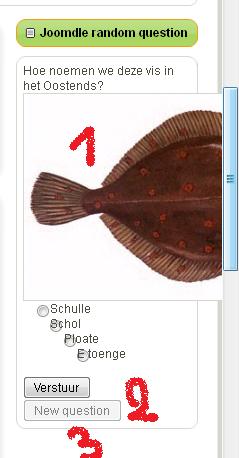
Nbr: 1: It would be nice if images size was adapted to the module with.
Nbr 2: Language problem: "Verstuur" means "send" and the translation is accapted. But for "Next question" there is no dutch translation.
Nbr 3: It would be nice to have a link to the complete e-learning module where the question comes from.
I'am not a Joomla expert, so can you please give me hints on how to resolve this problems.
Replied by tgoajeniean on topic Quiz as in Demo site (no registration -direct access to quiz
Chris wrote: There is a quiz module as part of the Joomdle installation package called mod_randomquestion. You just need to install that and configure to your needs. At the moment, the module only allows for the number of questions and the question category. This module was developed to demonstrate a possible Moodle integration point and to get feedback on its usefulness. So perhaps, you can suggest areas for improvement.
Hi, I installed the randomquestionmodule, basicly is this what I need. I still have some remarks. I made a screenshot of what I see on my site:
Nbr: 1: It would be nice if images size was adapted to the module with.
Nbr 2: Language problem: "Verstuur" means "send" and the translation is accapted. But for "Next question" there is no dutch translation.
Nbr 3: It would be nice to have a link to the complete e-learning module where the question comes from.
I'am not a Joomla expert, so can you please give me hints on how to resolve this problems.
Please Log in or Create an account to join the conversation.
- Chris
-
- Offline
- Moderator
-
13 years 5 months ago #9
by Chris
Replied by Chris on topic Quiz as in Demo site (no registration -direct access to quiz
1. Should be in your module css file (or module class suffix)
2. We do not maintain the language files outside of English and Spanish. The rest are donated to us. So I would look at the English Language file and then find the same in the Dutch equivalent to ensure it is there and with the correct string.
3. Agreed. This is not there. We can record this as a new feature request.
2. We do not maintain the language files outside of English and Spanish. The rest are donated to us. So I would look at the English Language file and then find the same in the Dutch equivalent to ensure it is there and with the correct string.
3. Agreed. This is not there. We can record this as a new feature request.
Please Log in or Create an account to join the conversation.
- tgoajeniean
- Topic Author
- Offline
- New Member
-
Less
More
- Posts: 7
13 years 5 months ago #10
by tgoajeniean
Replied by tgoajeniean on topic Quiz as in Demo site (no registration -direct access to quiz
OK thanks.
1. I've spent hours on finding how to adapt the css to have the image in de quiz on 100%. I looked arround but didn't find a solution. Could you perhaps help me out on this.
2. I found the languagefile and adapted it so it's in dutch. This problem seems to be resolved. Thanks
1. I've spent hours on finding how to adapt the css to have the image in de quiz on 100%. I looked arround but didn't find a solution. Could you perhaps help me out on this.
2. I found the languagefile and adapted it so it's in dutch. This problem seems to be resolved. Thanks
Please Log in or Create an account to join the conversation.