
[Solved] Web Service Error "Function not exist"
- Thiago Alves
- Topic Author
- Offline
- Junior Member
-

Less
More
13 years 5 months ago - 13 years 4 months ago #1
by Thiago Alves
[Solved] Web Service Error "Function not exist" was created by Thiago Alves
Gentlemen,
I'm not able to install Joomdle 0.9 for Joomla 2.5 in Moodle 2.2.7.
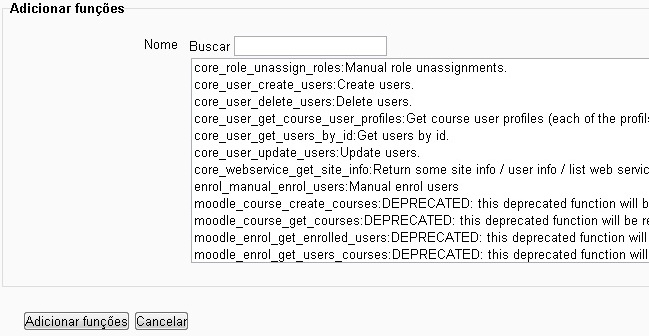
I did everything correctly as www.joomdle.com/wiki/Main_Page tutorial, but when it comes at last, I can not install Joomdle functions in Moodle, as you can see in the picture above.
She simply does not load functions Joomdle (see attached image)
And the roles installed without the time spent was free. I identified the file "joomdle / db / service.php" is what keeps functions, moodle should install automatically.
Excuse my ignorance, I tried this option to install the "root / admin / index.php" (notification-alerts) but there is no option to install.
Does anyone know how to manually install Joomdle functions in moodle?
Thank you!
I'm not able to install Joomdle 0.9 for Joomla 2.5 in Moodle 2.2.7.
I did everything correctly as www.joomdle.com/wiki/Main_Page tutorial, but when it comes at last, I can not install Joomdle functions in Moodle, as you can see in the picture above.
She simply does not load functions Joomdle (see attached image)
And the roles installed without the time spent was free. I identified the file "joomdle / db / service.php" is what keeps functions, moodle should install automatically.
Excuse my ignorance, I tried this option to install the "root / admin / index.php" (notification-alerts) but there is no option to install.
Does anyone know how to manually install Joomdle functions in moodle?
Thank you!

Last edit: 13 years 4 months ago by Antonio Durán.
The topic has been locked.
- Chris
-

- Offline
- Moderator
-

13 years 5 months ago #2
by Chris
Replied by Chris on topic Web Service Error "Function not exist"
As long as you put the joomdle auth files in the correct moodle folder and then visit moodle's notifications page, the functions will be available for you to add.
1) check you unzipped the joomdle auth into the correct moodle folder
2) visit notifications
3) continue with installation as per the joomdle wiki
Thus far there has never been an occurrence where somebody needed to install the Joomdle functions manually.
1) check you unzipped the joomdle auth into the correct moodle folder
2) visit notifications
3) continue with installation as per the joomdle wiki
Thus far there has never been an occurrence where somebody needed to install the Joomdle functions manually.
The topic has been locked.
- Thiago Alves
- Topic Author
- Offline
- Junior Member
-
13 years 5 months ago - 13 years 5 months ago #3
by Thiago Alves
Replied by Thiago Alves on topic Web Service Error "Function not exist"
Here are all the files in the folder as you can see auth:
apogeuead.tk/auth/joomdle/
Usually also the error_log file inside the folder auth / joomdle /
He says there is no folder "require_once ('.. /.. / Mod / certificate / lib.php');" required at line 04 of file certificate_view.php.
That the problem?
Sorry for the poor english, I'm using a translator.
graciously
Usually also the error_log file inside the folder auth / joomdle /
He says there is no folder "require_once ('.. /.. / Mod / certificate / lib.php');" required at line 04 of file certificate_view.php.
That the problem?
Sorry for the poor english, I'm using a translator.
graciously

Last edit: 13 years 5 months ago by Thiago Alves.
The topic has been locked.
- Antonio Durán
-

- Offline
- Moderator
-
Less
More
- Posts: 7936
13 years 5 months ago #4
by Antonio Durán
Replied by Antonio Durán on topic Web Service Error "Function not exist"
When you put the files, did moodle prompted you to upgrade? That is needed for the functions to show.
The topic has been locked.
- Thiago Alves
- Topic Author
- Offline
- Junior Member
-
13 years 5 months ago #5
by Thiago Alves
Replied by Thiago Alves on topic Web Service Error "Function not exist"
No, moodle does not make the upgrade. Its perform the upgrade manually?
The topic has been locked.
- Antonio Durán
-
- Offline
- Moderator
-
Less
More
- Posts: 7936
13 years 5 months ago #6
by Antonio Durán
Replied by Antonio Durán on topic Web Service Error "Function not exist"
No, once you put joomdle files in place and open moodle as an admin, you should see the message telling them to upgrade.
The topic has been locked.
- Thiago Alves
- Topic Author
- Offline
- Junior Member
-
13 years 5 months ago #7
by Thiago Alves
Replied by Thiago Alves on topic Web Service Error "Function not exist"
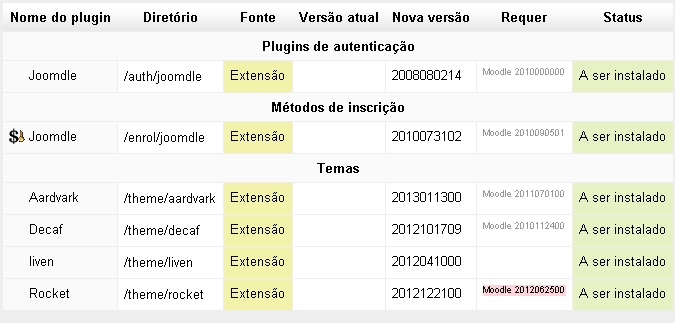
When you access as an administrator, it shows the attached image.
The plugin has been enabled in the Settings menu. Follow the step by step described in the wiki.
How do I install joomdle in moodle?
The plugin has been enabled in the Settings menu. Follow the step by step described in the wiki.
How do I install joomdle in moodle?
The topic has been locked.
- Thiago Alves
- Topic Author
- Offline
- Junior Member
-
13 years 5 months ago #8
by Thiago Alves
Replied by Thiago Alves on topic Web Service Error "Function not exist"
Does this version of Moodle is incompatible with the Joomdle?
The topic has been locked.
- Antonio Durán
-
- Offline
- Moderator
-
Less
More
- Posts: 7936
13 years 4 months ago #9
by Antonio Durán
Replied by Antonio Durán on topic Web Service Error "Function not exist"
You need to click "upgrade" on that window so things get installed (right now all say "to be installed")
The topic has been locked.
- Thiago Alves
- Topic Author
- Offline
- Junior Member
-
13 years 4 months ago - 13 years 4 months ago #10
by Thiago Alves
Replied by Thiago Alves on topic Web Service Error "Function not exist" (solved)
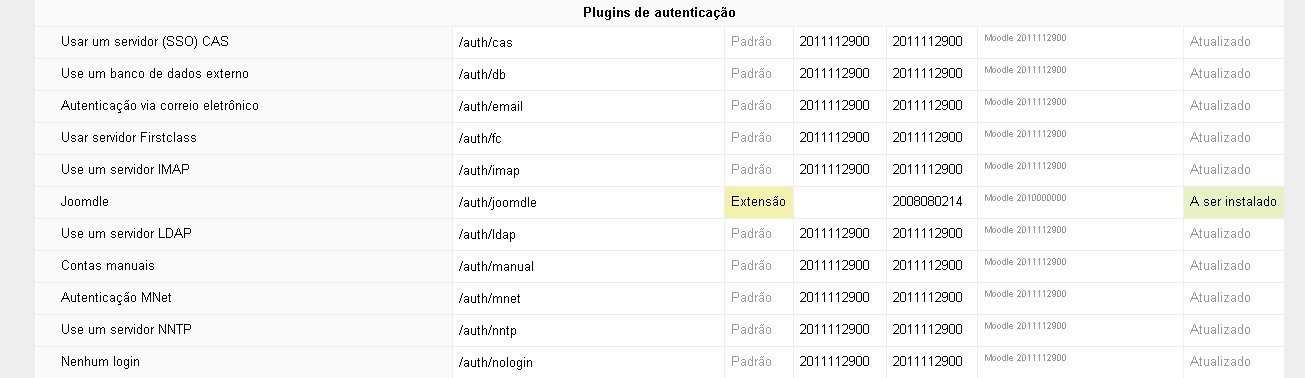
There is no option to install or upgrade Joomdle this screen.
Funny, that everything is activated and the plugin is not installed.
Please help me.
Funny, that everything is activated and the plugin is not installed.
Please help me.
Last edit: 13 years 4 months ago by Thiago Alves.
The topic has been locked.