
- Posts: 4
Wrapper Location
- infonology
- Topic Author
- Offline
- New Member
-

Less
More
13 years 3 months ago #1
by infonology
Wrapper Location was created by infonology
Hi,
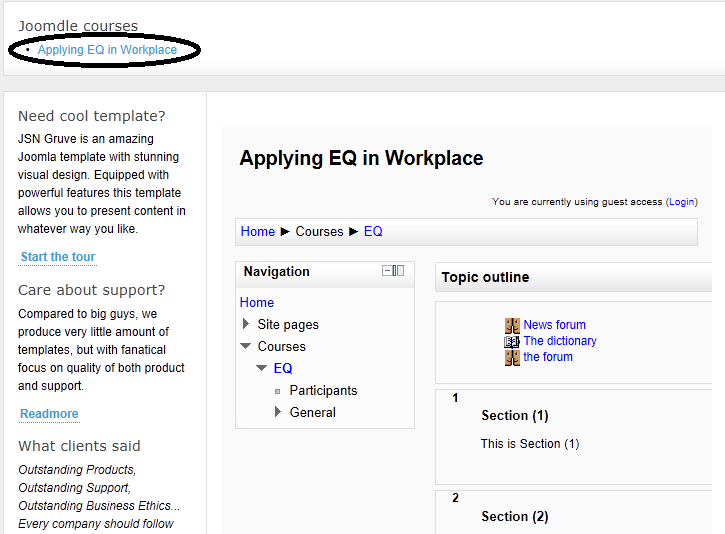
My course link is at the top of the main page, when I open the link, it inserts the course into the content position of the same page (see the image), I want open it in a new page (another article, with the same template, but not a popup) Is this configurable?
Or at least, can I specify the location of the wrapper on a page?
Thanks,
Paul
My course link is at the top of the main page, when I open the link, it inserts the course into the content position of the same page (see the image), I want open it in a new page (another article, with the same template, but not a popup) Is this configurable?
Or at least, can I specify the location of the wrapper on a page?
Thanks,
Paul
Please Log in or Create an account to join the conversation.
- Chris
-

- Offline
- Moderator
-

13 years 3 months ago #2
by Chris
Replied by Chris on topic Wrapper Location
Hi there,
I am not quite sure what you mean by open another article. When displaying the Moodle course, articles (com_content) are not used in anyway. Instead you are opening a view of the com_joomdle component.
If you would like to play with the look and feel of the page, you can use any of your standard template module positions to be displayed along with the Moodle content.
When you say new page but not a popup, I assume you mean to replace the current page being displayed. If so, this is just a matter of your configuration settings in your menu item.
You can also set the item id, in the joomdle configuration, if you wish.
I am not quite sure what you mean by open another article. When displaying the Moodle course, articles (com_content) are not used in anyway. Instead you are opening a view of the com_joomdle component.
If you would like to play with the look and feel of the page, you can use any of your standard template module positions to be displayed along with the Moodle content.
When you say new page but not a popup, I assume you mean to replace the current page being displayed. If so, this is just a matter of your configuration settings in your menu item.
You can also set the item id, in the joomdle configuration, if you wish.
Please Log in or Create an account to join the conversation.
- infonology
- Topic Author
- Offline
- New Member
-
Less
More
- Posts: 4
13 years 3 months ago #3
by infonology
Replied by infonology on topic Wrapper Location
Chris,
Thanks for your reply, please see attached ppt, that is what I want to do.
Paul
Thanks for your reply, please see attached ppt, that is what I want to do.
Paul
Please Log in or Create an account to join the conversation.
- Chris
-
- Offline
- Moderator
-
13 years 3 months ago - 13 years 3 months ago #4
by Chris
Replied by Chris on topic Wrapper Location
I assume you mean you want to show the course like the 3 page in the ppt rather than the 2nd page?
If so, all you need to do is not publish the Joomla modules on the course page. This is a Joomla function not a Joomdle one. You can do this in your "Extensions / Module Manager" section of the Joomla backend. Just find those modules and publish them only on the pages required not all the pages / menu items (or not the Joomdle menu items).
Also in the Joomdle configuration page you can set the item id that you wish to use.
Note: I have deleted your other post as it is the same question.
If so, all you need to do is not publish the Joomla modules on the course page. This is a Joomla function not a Joomdle one. You can do this in your "Extensions / Module Manager" section of the Joomla backend. Just find those modules and publish them only on the pages required not all the pages / menu items (or not the Joomdle menu items).
Also in the Joomdle configuration page you can set the item id that you wish to use.
Note: I have deleted your other post as it is the same question.
Last edit: 13 years 3 months ago by Chris.
Please Log in or Create an account to join the conversation.