
- Posts: 11
Student not enrolled in Moodle: Hikashop order confirmed
- Ric Morte`
- Topic Author
- Offline
- New Member
-

Less
More
13 years 4 months ago #1
by Ric Morte`
Student not enrolled in Moodle: Hikashop order confirmed was created by Ric Morte`
Moodle: 2.4.3 (build 20130318)
Joomla: 2.5.11
Joomdle: 0.91 for Joomla 2.5
Moodle set up with Joomdle (Site Administration --> Plugins --> Enrolment --> Joomdle):
All green ticks
Joomdle:
Can anyone help?
Thanks,
Ric
Joomla: 2.5.11
Joomdle: 0.91 for Joomla 2.5
- Hikashop set up and configured for PayPal Sandbox
- Manually-created products in Hikashop can be purchased and paid for via PayPal. Order status is confirmed on return (in fact this particular implementation is a clone of a live site where products are purchased for real via Hikashop - the difference being that in this test instance Hikashop has been reconfigured to use the Sandbox).
- Allow Joomdle Enrolments = yes
- Enrol cost: £5.99
- Currency: BGP
- Default Role: Student
- Enrolment period: 86400 seconds (1 day)
- I started off with a preconfigured test course in Moodle
- Course Category: Miscellaneous
- Category Id Number: manually set to 13 after checking value in Hikashop
- Course set to Category = Miscellaneous
- Course ID number set to 2 after checking value in Hikashop
- Installed Joomdle component / plugins / modules
- All plugins enabled except "System - Tienda" (not used)
- Note: System - Joomdlehikashop IS enabled.
- Moodle URL confirmed correct
- Moodle Version: Moodle 2.x
- Auth Token confirmed same as Moodle
- Connection Method: cURL
All green ticks
Joomdle:
- Additional Data Source: Hikashop
- Shop Integration: Hikashop
- Courses Category: 13
- Component --> Hikashop --> Categories --> Create Category for Moodle Products
- Get Category ID=13 and update Moodle Category with same ID
- Product (Test Course) does not appear in Hikashop under Category for ID=13
- Test course appears and after failing to enrol student in the Test Course:
- reloaded from Moodle
- Unpublished
- Republished
- Product now appears as Hikashop product under the correct category
- Attempt test purchase: PayPal completes, order confirmed, student not enrolled.
- Set Order Status = Created and back to = Confirmed
- Still no enrolled user in Moodle Course
- Created 2nd course in Moodle
- Added Joomdle Payment with new unique price to Course and set 1st in list
- Course appears in Hikashop product - BUT NO PRICE
- Manually added price to Hikashop Product
- Test purchase against new course. Order completes, no enrolment
Can anyone help?
Thanks,
Ric
Please Log in or Create an account to join the conversation.
- Antonio Durán
-

- Offline
- Moderator
-

Less
More
- Posts: 7945
13 years 4 months ago #2
by Antonio Durán
Replied by Antonio Durán on topic Student not enrolled in Moodle: Hikashop order confirmed
Hi.
I see you have done quite some testing...
Only thing you don't mention is if manual enrolments are enabled for the course in Moodle.
Also:
> Get Category ID=13 and update Moodle Category with same ID
This has nothing to do with moodle categories. This is only the hikashop product category where course products are placed..
> Course ID number set to 2 after checking value in Hikashop
You don't need to change anything in moodle. Course ID is the database ID of the moodle course (the id you see in the url when you go to a course in moodle)
If manual enrolments are enabled, I would just edit the joomdlehikashop plugin and try to debug it, as there is not much else you can try.
Ah, also check that "buy courses for children" is disabled.
I see you have done quite some testing...
Only thing you don't mention is if manual enrolments are enabled for the course in Moodle.
Also:
> Get Category ID=13 and update Moodle Category with same ID
This has nothing to do with moodle categories. This is only the hikashop product category where course products are placed..
> Course ID number set to 2 after checking value in Hikashop
You don't need to change anything in moodle. Course ID is the database ID of the moodle course (the id you see in the url when you go to a course in moodle)
If manual enrolments are enabled, I would just edit the joomdlehikashop plugin and try to debug it, as there is not much else you can try.
Ah, also check that "buy courses for children" is disabled.
Please Log in or Create an account to join the conversation.
- Ric Morte`
- Topic Author
- Offline
- New Member
-
Less
More
- Posts: 11
13 years 4 months ago #3
by Ric Morte`
Replied by Ric Morte` on topic Student not enrolled in Moodle: Hikashop order confirmed
Hi Antonio,
Thank you for replying.
Yes, manual enrolment is enabled for both courses.
Yes the Category ID =13 is the ID in Hikashop. That ID was then added to Moodle.
I am away from home attending a wedding (not my own!) but will try your suggestion regarding "buy courses for children". The other thing that occurred to me was that during testing I had purchased multiple units of a course rather than just 1 - so I will need to revisit that too.
I'll let you know how I get on. So far the hybrid Joomla/Moodle is looking very good indeed.
Regards,
Ric
Thank you for replying.
Yes, manual enrolment is enabled for both courses.
Yes the Category ID =13 is the ID in Hikashop. That ID was then added to Moodle.
I am away from home attending a wedding (not my own!) but will try your suggestion regarding "buy courses for children". The other thing that occurred to me was that during testing I had purchased multiple units of a course rather than just 1 - so I will need to revisit that too.
I'll let you know how I get on. So far the hybrid Joomla/Moodle is looking very good indeed.
Regards,
Ric
Please Log in or Create an account to join the conversation.
- Ric Morte`
- Topic Author
- Offline
- New Member
-
Less
More
- Posts: 11
13 years 4 months ago #4
by Ric Morte`
Replied by Ric Morte` on topic Student not enrolled in Moodle: Hikashop order confirmed
Hi Again,
The problem was indeed with "buy courses for children". I had selected this because it represented the most likely scenario for selling courses. However, I have set up Hikashop Registration to have custom fields for children and the T&Cs forbid purchases by minors so that base is already pretty much covered.
Some observations:
In the enrolment methiod for courses the duration seems to be "forgotten". For tyesting I have set the duration = 1 day by checking the enable box. On revisiting the screen the checkbox is unchecked bu the value of 1 is still displayed. I would have expected the checkbox to have remained checked after saving. The value IS savwed because the duration of 1 day appears in Joomla --> Courses.
When a user is enrolled in Moodle having paid through Joomla/Hikashop, the enrolment method is given as "Manual." The previous screen - listing all enrolment methods for a course - shows all enrolments to be manula and 0 for Joomdle? I take this as an artefact of Joomdlen utilising the manula enrolment method (thereby requiring "manual enrolments" also to be assigned to a course). Is that the behaviour you would expect?
In addition there is no start and end date for the enrolment. The summary screen (for all enrolled students) shows the start time at 12:00. The detail screen accessed via the edit icon) shows commencement at 00:00. If I compare this with Moodle's own PayPal plugin, that showed exact start and end dates and indeed these were enforced.
When multiple quantities of a course are purchased in Hikashop, the enrolment proceeds as if for a quantity=1. I cannot test this further because a quantity=1 does not set any start or end dates; checking for multiple durations is not therefore possible. But it would be nice to know if this is a bug or an intended design. There are implications for Hikashop quantities therefore.
Finally (phew!) a user created via Hikashop payments does not have the City and County (aka State) transferred across despite having "Additional data source" = Hikashop in Joomdle configuration. Documentation seems to indicate billing information should be transferred.
I feel today, despite being away from my own PC, much progress has been made and I'm grateful for you thinking about the problems I encountered previously. I'd be very happy to hear your comments on recent findings.
Best wishes,
Ric
The problem was indeed with "buy courses for children". I had selected this because it represented the most likely scenario for selling courses. However, I have set up Hikashop Registration to have custom fields for children and the T&Cs forbid purchases by minors so that base is already pretty much covered.
Some observations:
In the enrolment methiod for courses the duration seems to be "forgotten". For tyesting I have set the duration = 1 day by checking the enable box. On revisiting the screen the checkbox is unchecked bu the value of 1 is still displayed. I would have expected the checkbox to have remained checked after saving. The value IS savwed because the duration of 1 day appears in Joomla --> Courses.
When a user is enrolled in Moodle having paid through Joomla/Hikashop, the enrolment method is given as "Manual." The previous screen - listing all enrolment methods for a course - shows all enrolments to be manula and 0 for Joomdle? I take this as an artefact of Joomdlen utilising the manula enrolment method (thereby requiring "manual enrolments" also to be assigned to a course). Is that the behaviour you would expect?
In addition there is no start and end date for the enrolment. The summary screen (for all enrolled students) shows the start time at 12:00. The detail screen accessed via the edit icon) shows commencement at 00:00. If I compare this with Moodle's own PayPal plugin, that showed exact start and end dates and indeed these were enforced.
When multiple quantities of a course are purchased in Hikashop, the enrolment proceeds as if for a quantity=1. I cannot test this further because a quantity=1 does not set any start or end dates; checking for multiple durations is not therefore possible. But it would be nice to know if this is a bug or an intended design. There are implications for Hikashop quantities therefore.
Finally (phew!) a user created via Hikashop payments does not have the City and County (aka State) transferred across despite having "Additional data source" = Hikashop in Joomdle configuration. Documentation seems to indicate billing information should be transferred.
I feel today, despite being away from my own PC, much progress has been made and I'm grateful for you thinking about the problems I encountered previously. I'd be very happy to hear your comments on recent findings.
Best wishes,
Ric
Please Log in or Create an account to join the conversation.
- Antonio Durán
-
- Offline
- Moderator
-
Less
More
- Posts: 7945
13 years 4 months ago #5
by Antonio Durán
Replied by Antonio Durán on topic Student not enrolled in Moodle: Hikashop order confirmed
As you say, Joomdle use "manual" enrolment method to enrol users.
As for enrol times: I don't really know. As you say it always put 12AM but I never received any quesitons regarding this.
It seems it's normal behaviour of manual enrolments: if you enrol a user manually at any time, it still puts 12AM.
> When multiple quantities of a course are purchased in Hikashop
You cannot buy multiple instances for one person. Joomdle does not let you "save enrolments for later", so if you buy a course, you get enroled in the moment, and that's it.
City/Country: did you create the mappings?
As for enrol times: I don't really know. As you say it always put 12AM but I never received any quesitons regarding this.
It seems it's normal behaviour of manual enrolments: if you enrol a user manually at any time, it still puts 12AM.
> When multiple quantities of a course are purchased in Hikashop
You cannot buy multiple instances for one person. Joomdle does not let you "save enrolments for later", so if you buy a course, you get enroled in the moment, and that's it.
City/Country: did you create the mappings?
Please Log in or Create an account to join the conversation.
- Ric Morte`
- Topic Author
- Offline
- New Member
-
Less
More
- Posts: 11
13 years 4 months ago - 13 years 4 months ago #6
by Ric Morte`
Replied by Ric Morte` on topic Student not enrolled in Moodle: Hikashop order confirmed
Back home now and able to test more fully...
I think one of the problems is that there were too many registrations, one on top of another, during testing. I have reset the enrolments, deleted users in both Moodle and Joomla and started afresh.
I also did the mappings - forgot those! My apologies.
Interestingly the first enrolment via Hikashop created an entry in Moodle. All the emails from Hikashop came through as well as a welcome from Joomdle. In Moodle the duration (start end end times) was also written to the database for the first time. However - and this is important - the start and end times (more specifically the end time) is written ONLY if the same duration is set up in manual enrolment; setting a duration in the Joomdle enrolment method is not enough. That's a pity - it would be nice if Joomdle passed the end-time parameter - but in the absence of that functionality, Manual and Joomdle enrolment methods HAVE to be identical at individual course level at least in respect of duration. NB: what I did not test is whether the Joomdle duration can be left unset; i.e., whether the only parameter that matters is the one set in Manual enrolment..
As discussed, the times default to 12:00 am which means that a user could potentially fall one day short of a full duration (by contrast Moodle's PayPal plugin uses the exact time of registration as the start and calculates correctly from there). But 12:00 is the default for manual payments and all I have to do is add one day to the advertised duration to avoid short-changing. More than happy with that.
One of the problems with Moodle's own PayPal plugin was that a user could not re-order a course after expiry. I did ask on the Moodle forum why that was so but obtained no reply. Tomorrow I will test a re-order (after the expiry of the 1-day test duration) to see if the Joomdle approach fares better. (If you know that this IS possible or ought to be possible I'd like to hear from you as it will determine the way in which courses can be sold - and also structured - and I have to get that framework structured correctly from the beginning).
In Hikashop I can set the product maximum to 1 to avoid multiple quantities. But I notice that on your demo site multiple purchases are indeed possible:
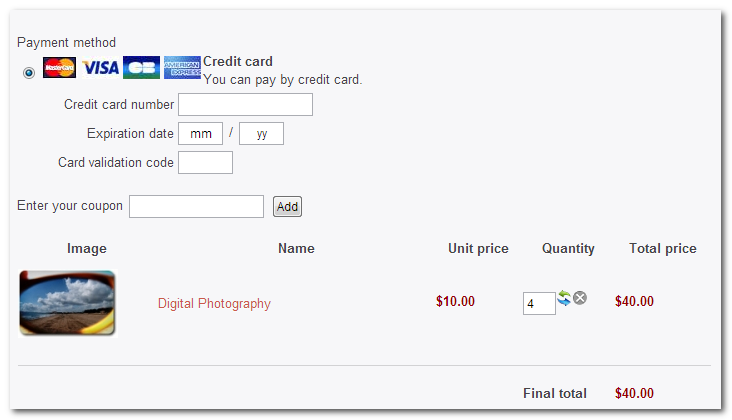
Was this intentional or an oversight?
Thanks for all the help so far.
Ric
I think one of the problems is that there were too many registrations, one on top of another, during testing. I have reset the enrolments, deleted users in both Moodle and Joomla and started afresh.
I also did the mappings - forgot those! My apologies.
Interestingly the first enrolment via Hikashop created an entry in Moodle. All the emails from Hikashop came through as well as a welcome from Joomdle. In Moodle the duration (start end end times) was also written to the database for the first time. However - and this is important - the start and end times (more specifically the end time) is written ONLY if the same duration is set up in manual enrolment; setting a duration in the Joomdle enrolment method is not enough. That's a pity - it would be nice if Joomdle passed the end-time parameter - but in the absence of that functionality, Manual and Joomdle enrolment methods HAVE to be identical at individual course level at least in respect of duration. NB: what I did not test is whether the Joomdle duration can be left unset; i.e., whether the only parameter that matters is the one set in Manual enrolment..
As discussed, the times default to 12:00 am which means that a user could potentially fall one day short of a full duration (by contrast Moodle's PayPal plugin uses the exact time of registration as the start and calculates correctly from there). But 12:00 is the default for manual payments and all I have to do is add one day to the advertised duration to avoid short-changing. More than happy with that.
One of the problems with Moodle's own PayPal plugin was that a user could not re-order a course after expiry. I did ask on the Moodle forum why that was so but obtained no reply. Tomorrow I will test a re-order (after the expiry of the 1-day test duration) to see if the Joomdle approach fares better. (If you know that this IS possible or ought to be possible I'd like to hear from you as it will determine the way in which courses can be sold - and also structured - and I have to get that framework structured correctly from the beginning).
In Hikashop I can set the product maximum to 1 to avoid multiple quantities. But I notice that on your demo site multiple purchases are indeed possible:
Was this intentional or an oversight?
Thanks for all the help so far.
Ric
Last edit: 13 years 4 months ago by Ric Morte`.
Please Log in or Create an account to join the conversation.
- Antonio Durán
-
- Offline
- Moderator
-
Less
More
- Posts: 7945
13 years 4 months ago #7
by Antonio Durán
Replied by Antonio Durán on topic Student not enrolled in Moodle: Hikashop order confirmed
As you say, the only param that matter is the manual one, as it's the manual enrolment method which is used.
You should be able to re-purchase a course, but I don't think I have tested that myself, so please do and let us know.
As for the demo: you are right, that's an oversight, as we should have the product max at 1 as you suggest.
You should be able to re-purchase a course, but I don't think I have tested that myself, so please do and let us know.
As for the demo: you are right, that's an oversight, as we should have the product max at 1 as you suggest.
Please Log in or Create an account to join the conversation.
- Ric Morte`
- Topic Author
- Offline
- New Member
-
Less
More
- Posts: 11
13 years 3 months ago - 13 years 3 months ago #8
by Ric Morte`
There is simply no entry in the Moodle table of enrolled users. There ought to be a 2nd entry with the start and end dates when PayPal payment completes.
From the perspective of Hikashop everything completes satisfactorily: User receives order created email; PayPal returns OK; the site screen provides the "Thank you for your purchase" screen confirmation; User receives confirmation email and that's it. If the user goes to the course there is only the option to pay again (which is to be expected if there is no entry in the enrolments table in Moodle)
There have been several instances of similar behaviour in Moodle itself using the PayPal plugin:
moodle.org/mod/forum/discuss.php?d=207179
and my own recent post:
moodle.org/mod/forum/discuss.php?d=228115
Noth instances show the "You can not enrol yourself in this course." message - presumably this still occurs but simply discared in the Joomdle situation?
I raised this issue on the Moodle forum but received no replies.
The PayPal plugin appears flawed in a number of instances (including the "Repeated Transaction" error - see moodle.org/mod/forum/discuss.php?d=228008 ) hence my interest in Joomdle (as well as the fact that Hikashop integration provides a customer with an order history etc).
The problem may relate to this item in tracker: tracker.moodle.org/browse/MDL-32387
Antonio, any suggestions?
Thanks,
Ric
Replied by Ric Morte` on topic Student not enrolled in Moodle: Hikashop order confirmed
I have tested re-enrolment this morning and it is definitely the case that users cannot re-enrol (or an organisation purchase a course for another member of staff, etc) without creating a new account.Antonio Durán wrote: ...
You should be able to re-purchase a course, but I don't think I have tested that myself, so please do and let us know.
There is simply no entry in the Moodle table of enrolled users. There ought to be a 2nd entry with the start and end dates when PayPal payment completes.
From the perspective of Hikashop everything completes satisfactorily: User receives order created email; PayPal returns OK; the site screen provides the "Thank you for your purchase" screen confirmation; User receives confirmation email and that's it. If the user goes to the course there is only the option to pay again (which is to be expected if there is no entry in the enrolments table in Moodle)
There have been several instances of similar behaviour in Moodle itself using the PayPal plugin:
moodle.org/mod/forum/discuss.php?d=207179
and my own recent post:
moodle.org/mod/forum/discuss.php?d=228115
Noth instances show the "You can not enrol yourself in this course." message - presumably this still occurs but simply discared in the Joomdle situation?
I raised this issue on the Moodle forum but received no replies.
The PayPal plugin appears flawed in a number of instances (including the "Repeated Transaction" error - see moodle.org/mod/forum/discuss.php?d=228008 ) hence my interest in Joomdle (as well as the fact that Hikashop integration provides a customer with an order history etc).
The problem may relate to this item in tracker: tracker.moodle.org/browse/MDL-32387
Antonio, any suggestions?
Thanks,
Ric
Last edit: 13 years 3 months ago by Ric Morte`.
Please Log in or Create an account to join the conversation.
- Chris
-

- Offline
- Moderator
-
13 years 3 months ago - 13 years 3 months ago #9
by Chris
Replied by Chris on topic Student not enrolled in Moodle: Hikashop order confirmed
One option, not perfect and not 100% secure, would be to have a no limit end date. Instead control the users access via Payplans or similar. When the purchase is made they receive a subscription. When that subscription expires they are removed access to all Joomla related menu items. When they renew their subscription, their access is now granted for the subscription duration.
The flaw is if the user knows what urls to type to get to moodle then he/she can bypass the Joomla side. That said, if you remove moodle login, then you should be safe.
I am not sure if this is possible, so this is next comment is really for Antonio....if we use Payplans or similar can we trigger a change of date in the course enrollment since the moodle course allows for it?
The flaw is if the user knows what urls to type to get to moodle then he/she can bypass the Joomla side. That said, if you remove moodle login, then you should be safe.
I am not sure if this is possible, so this is next comment is really for Antonio....if we use Payplans or similar can we trigger a change of date in the course enrollment since the moodle course allows for it?
Last edit: 13 years 3 months ago by Chris.
Please Log in or Create an account to join the conversation.
- Ric Morte`
- Topic Author
- Offline
- New Member
-
Less
More
- Posts: 11
13 years 3 months ago #10
by Ric Morte`
Replied by Ric Morte` on topic Student not enrolled in Moodle: Hikashop order confirmed
Hi and thanks for the reply Chris,
I noticed that the PayPal issue is supposed to have ben fixed in Moodle 2.5. As soon as I get some time I will upgrade a development site to 2.5 and see if we fare any better.
Cheers,
Ric
I noticed that the PayPal issue is supposed to have ben fixed in Moodle 2.5. As soon as I get some time I will upgrade a development site to 2.5 and see if we fare any better.
Cheers,
Ric
Please Log in or Create an account to join the conversation.