
- Posts: 4
Getting error XML-RPC Error (404): Unknown error
- Shoaib
- Topic Author
- Offline
- New Member
-

Less
More
13 years 1 month ago - 13 years 1 month ago #1
by Shoaib
Getting error XML-RPC Error (404): Unknown error was created by Shoaib
Hi,
I am new to joomdle and moodle. I Installed joomdle and moodle and followed the steps as listed here
www.joomdle.com/wiki/Preparing_Moodle_20
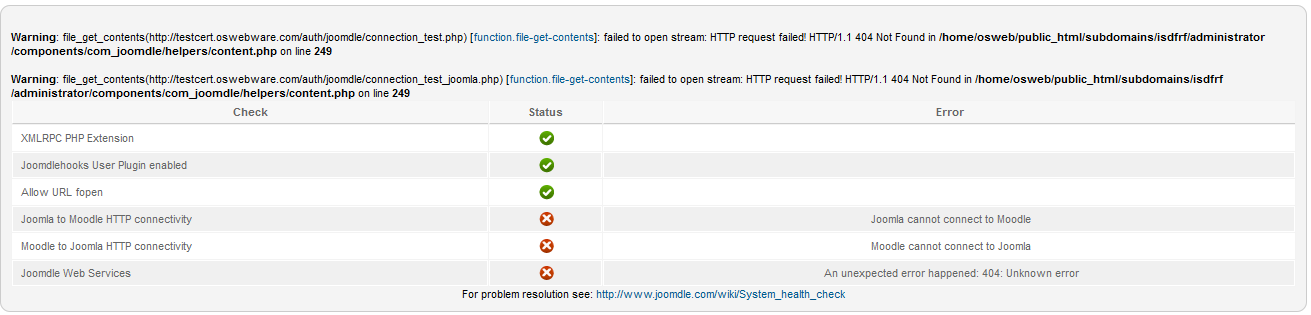
But in System Check am getting some errors ( Please Check the attachment )
When I clicked users tab I get this error " XML-RPC Error (404): Unknown error "
Joomdle version - 0.92
Joomla version - 2.5.11
Moodle version - 2.5 +
PHP version - 5.3.23
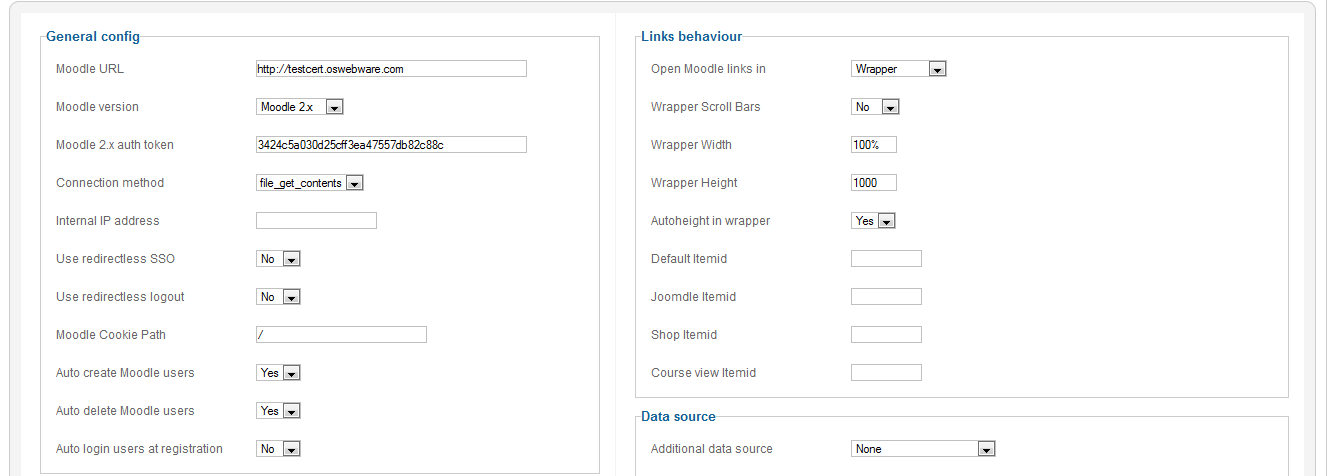
See my configuration in 2nd attachment (config.png)
Regards,
Shoaib
I am new to joomdle and moodle. I Installed joomdle and moodle and followed the steps as listed here
www.joomdle.com/wiki/Preparing_Moodle_20
But in System Check am getting some errors ( Please Check the attachment )
When I clicked users tab I get this error " XML-RPC Error (404): Unknown error "
Joomdle version - 0.92
Joomla version - 2.5.11
Moodle version - 2.5 +
PHP version - 5.3.23
See my configuration in 2nd attachment (config.png)
Regards,
Shoaib
Last edit: 13 years 1 month ago by Shoaib.
Please Log in or Create an account to join the conversation.
- Chris
-

- Offline
- Moderator
-

13 years 1 month ago #2
by Chris
Replied by Chris on topic Getting error XML-RPC Error (404): Unknown error
It looks like your server has not installed / enabled support for file_get_contents. Try CURL instead. If both do not work you will need to get your hosting to company to install and or configure these php libraries.
Please Log in or Create an account to join the conversation.
- Shoaib
- Topic Author
- Offline
- New Member
-
Less
More
- Posts: 4
13 years 1 month ago #3
by Shoaib
Replied by Shoaib on topic Getting error XML-RPC Error (404): Unknown error
Hi,
Thanks for your reply.
I tried using Curl but that too was not working.
I made a request to host provider to install / enable file_get_contents. They need some extra information which I have no idea about it.
1) What account is showing the problem?
2) Is the connection being made using a standard port (80, 443) or some non-standard port?
Could you please provide the steps required to reproduce the problem?
Regards,
Shoaib
Thanks for your reply.
I tried using Curl but that too was not working.
I made a request to host provider to install / enable file_get_contents. They need some extra information which I have no idea about it.
1) What account is showing the problem?
2) Is the connection being made using a standard port (80, 443) or some non-standard port?
Could you please provide the steps required to reproduce the problem?
Regards,
Shoaib
Please Log in or Create an account to join the conversation.
- Chris
-
- Offline
- Moderator
-
13 years 1 month ago #4
by Chris
Replied by Chris on topic Getting error XML-RPC Error (404): Unknown error
Port information is not specified and thus it is the normal ports. As for your first question, this will be down to your hosting details and nothing to do with Joomla, Joomdle or Moodle.
With regards to reproducing the problem. This is something you will need to do as you are the one experiencing the problem.
Personally, I would just ask your hosting company to enable file_get_contents and curl. With that you can retry.
With regards to reproducing the problem. This is something you will need to do as you are the one experiencing the problem.
Personally, I would just ask your hosting company to enable file_get_contents and curl. With that you can retry.
Please Log in or Create an account to join the conversation.
- Antonio Durán
-

- Offline
- Moderator
-
Less
More
- Posts: 7936
13 years 1 month ago #5
by Antonio Durán
Replied by Antonio Durán on topic Getting error XML-RPC Error (404): Unknown error
file_get_contents is installed, as it gives the error of not managing to get the test file.
Maybe you have not installed joomdle properly on moodle.
Maybe you have not installed joomdle properly on moodle.
Please Log in or Create an account to join the conversation.