
- Posts: 29
Tips & Tricks
Please do NOT use this section of the forum to request help if Joomdle does not work for you in some particular way. Your post will be deleted.
Please do NOT use this section of the forum to request help if Joomdle does not work for you in some particular way. Your post will be deleted.
Joomla Wrapper content blocked - ERR_BLOCKED_BY_RESPONSE
- rbi
- Topic Author
- Offline
- Junior Member
-

Less
More
5 months 3 weeks ago #1
by rbi
Joomla Wrapper content blocked - ERR_BLOCKED_BY_RESPONSE was created by rbi
Hi,
I am using Joomdle for the first time. I created a menu "Moodle wrapper". The content is blanked. Debugging with F12 chrome, I see all css and scripts. But also and indication that [mymoodle.subdomain] is blocked, [mymoodle.subdomain] does not authorized connexion, [mymoodle.subdomain] and error code ERR_BLOCKED_BY_RESPONSE.
The Moodle sub domain works, I can launch it from a Joomla menu item specifying the URL. The Joomdle system check is operational and users are synchronized.
I use Admin tools, with the sub-domain declared.
The moddle sub-domain files are under a root folder at the same level than the Joomla main folders (administration, components, [moodle-root-folder]).
What can be the cause ?
THanks
I am using Joomdle for the first time. I created a menu "Moodle wrapper". The content is blanked. Debugging with F12 chrome, I see all css and scripts. But also and indication that [mymoodle.subdomain] is blocked, [mymoodle.subdomain] does not authorized connexion, [mymoodle.subdomain] and error code ERR_BLOCKED_BY_RESPONSE.
The Moodle sub domain works, I can launch it from a Joomla menu item specifying the URL. The Joomdle system check is operational and users are synchronized.
I use Admin tools, with the sub-domain declared.
The moddle sub-domain files are under a root folder at the same level than the Joomla main folders (administration, components, [moodle-root-folder]).
What can be the cause ?
THanks
Please Log in or Create an account to join the conversation.
- Antonio Durán
-

- Offline
- Moderator
-

Less
More
- Posts: 7944
5 months 2 weeks ago #2
by Antonio Durán
Replied by Antonio Durán on topic Joomla Wrapper content blocked - ERR_BLOCKED_BY_RESPONSE
Hi.
I think you need to enable Allow frame embedding in Moodle configuration, under HTTP security.
Also please note that it is harder to get the Joomdle wrapper working across different domains (like you do with a moodle subdomain). It will need additional steps on Moodle side, and it does not always work.
If possibe, I recommend you to move Moodle to a subfolder instead.
Or try first the subdomain with the additional steps first, and keep it if works as expected.
Here's a link to the old docs for this:
www.joomdle.com/wiki/Installing_Joomdle_...omla#Links_behaviour
I will fix the 3.x docs, as I see they are not complete now on this point.
I think you need to enable Allow frame embedding in Moodle configuration, under HTTP security.
Also please note that it is harder to get the Joomdle wrapper working across different domains (like you do with a moodle subdomain). It will need additional steps on Moodle side, and it does not always work.
If possibe, I recommend you to move Moodle to a subfolder instead.
Or try first the subdomain with the additional steps first, and keep it if works as expected.
Here's a link to the old docs for this:
www.joomdle.com/wiki/Installing_Joomdle_...omla#Links_behaviour
I will fix the 3.x docs, as I see they are not complete now on this point.
Please Log in or Create an account to join the conversation.
- rbi
- Topic Author
- Offline
- Junior Member
-
Less
More
- Posts: 29
5 months 2 weeks ago #3
by rbi
Replied by rbi on topic Joomla Wrapper content blocked - ERR_BLOCKED_BY_RESPONSE
I've just enabled Allow frame embedding in Moodle configuration. I see the content showing up for 1/2 second and it goes away leaving blank. ON chrome F12 debug windows all the code is there without error.
For info, my joomla config has no cookie setup.
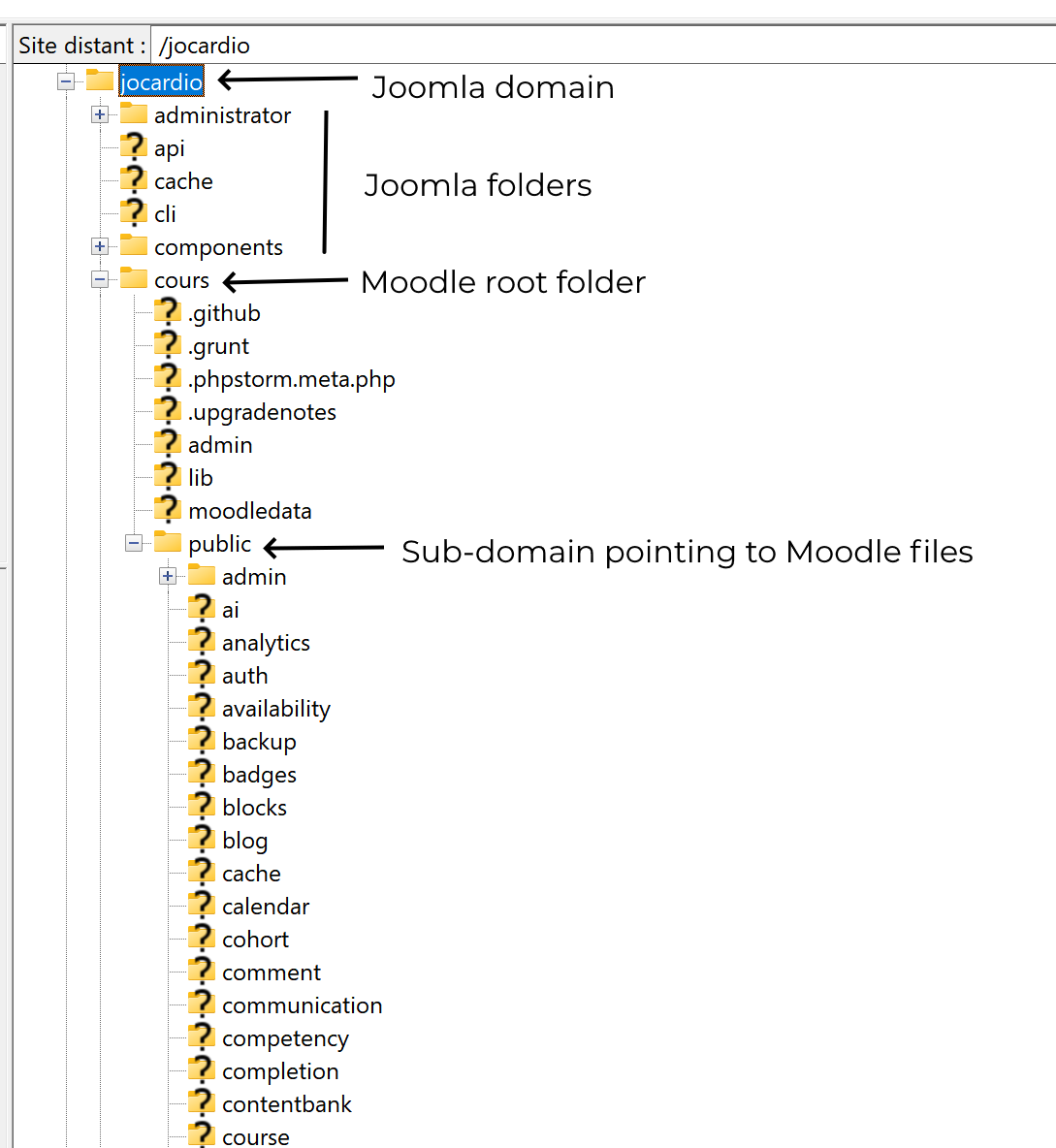
You say "I recommend you to move Moodle to a subfolder instead.". Not sure I understand beacuse that it what I have. I created a sub-somain for Moodle thinking is was necessary. The sub-domain points to a sub-folder of the main domain where Joomla resides. Is it possible to have Moodle in a Joomla sub-folder and trigger it? Is there an architecture drawing showing this? Attached what I did and that I can change.
For info, my joomla config has no cookie setup.
You say "I recommend you to move Moodle to a subfolder instead.". Not sure I understand beacuse that it what I have. I created a sub-somain for Moodle thinking is was necessary. The sub-domain points to a sub-folder of the main domain where Joomla resides. Is it possible to have Moodle in a Joomla sub-folder and trigger it? Is there an architecture drawing showing this? Attached what I did and that I can change.
Please Log in or Create an account to join the conversation.
- rbi
- Topic Author
- Offline
- Junior Member
-
Less
More
- Posts: 29
5 months 2 weeks ago #4
by rbi
Replied by rbi on topic Joomla Wrapper content blocked - ERR_BLOCKED_BY_RESPONSE
with the architecture
Please Log in or Create an account to join the conversation.
- Antonio Durán
-
- Offline
- Moderator
-
Less
More
- Posts: 7944
5 months 2 weeks ago #5
by Antonio Durán
Replied by Antonio Durán on topic Joomla Wrapper content blocked - ERR_BLOCKED_BY_RESPONSE
Yes, Moodle can be used in a subfolder, here are the docs I followed to get it working:
docs.moodle.org/501/en/Upgrading#Moodle_in_a_subfolder
The end goal is to have site.com/mymoodle instead of mymoodle.site.com, so that you have both Joomla and Moodle on the same domain.
docs.moodle.org/501/en/Upgrading#Moodle_in_a_subfolder
The end goal is to have site.com/mymoodle instead of mymoodle.site.com, so that you have both Joomla and Moodle on the same domain.
Please Log in or Create an account to join the conversation.
- rbi
- Topic Author
- Offline
- Junior Member
-
Less
More
- Posts: 29
5 months 2 weeks ago #6
by rbi
Replied by rbi on topic Joomla Wrapper content blocked - ERR_BLOCKED_BY_RESPONSE
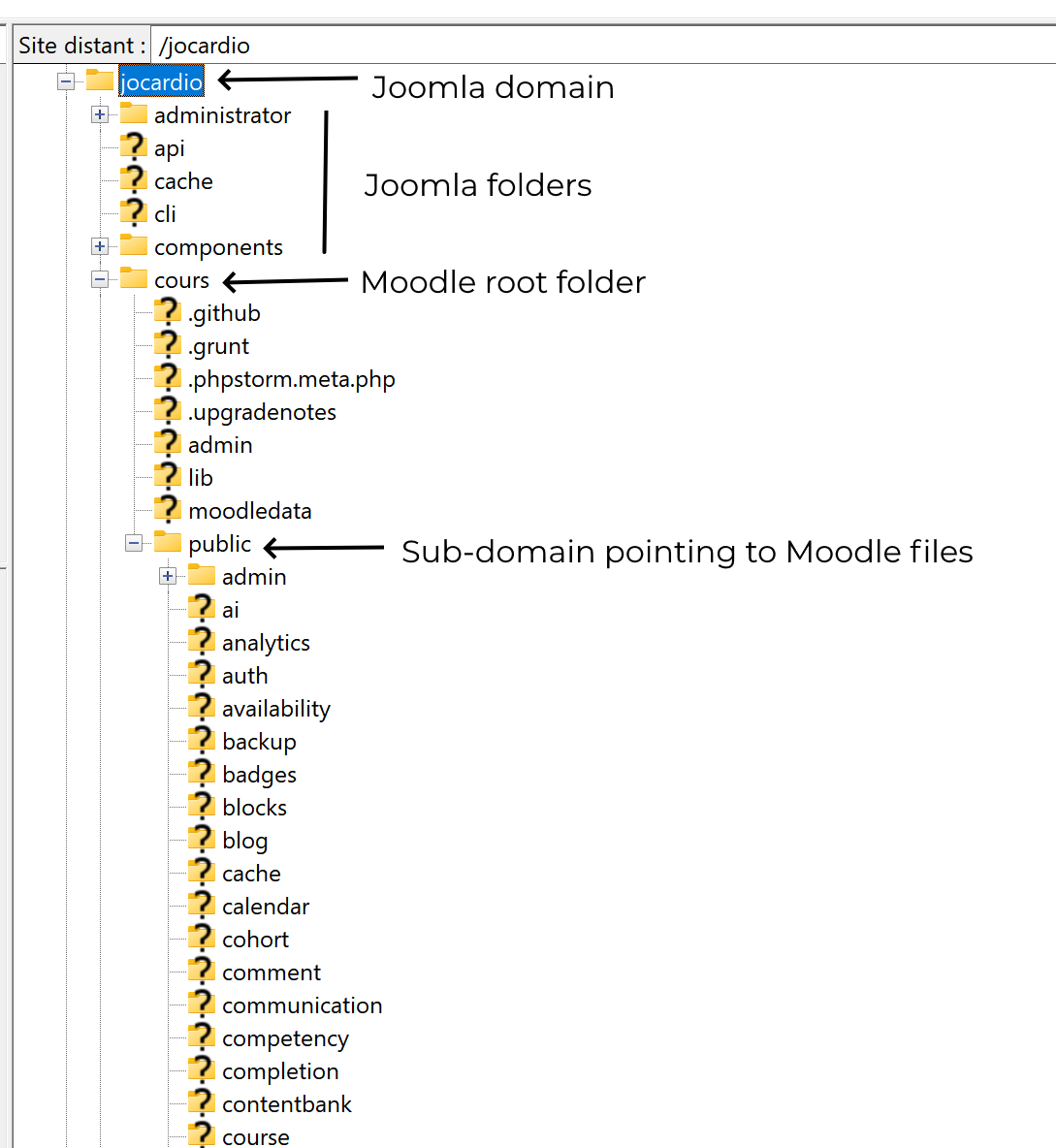
I read the doc but I do not understand where are the joomla top folders with respect to the top moodle folders. What do I need to change in the folder structure show on the image I attach here ?
Please Log in or Create an account to join the conversation.
- Antonio Durán
-
- Offline
- Moderator
-
Less
More
- Posts: 7944
5 months 2 weeks ago #7
by Antonio Durán
Replied by Antonio Durán on topic Joomla Wrapper content blocked - ERR_BLOCKED_BY_RESPONSE
Well, your setup is a bit different.
You are serving Joomla directly from jocardio, which I assume is the name of the account.
In that case, Moodle should be below it, out of jocardio, but I don't know if you can do that in your host.
The subdomain works because you have it pointing to public, so the rest is below.
If it is too much hassle, you may want to try the cross-domain option first, but you'll need to follow the instructions in the link I shared, and the one that it points to:
www.joomdle.com/wiki/Crossdomain_Wrapper_Autoheight
It has been a while since I tested it on a real scenario, so I am not sure it if will work with all the new themes stuff.
You are serving Joomla directly from jocardio, which I assume is the name of the account.
In that case, Moodle should be below it, out of jocardio, but I don't know if you can do that in your host.
The subdomain works because you have it pointing to public, so the rest is below.
If it is too much hassle, you may want to try the cross-domain option first, but you'll need to follow the instructions in the link I shared, and the one that it points to:
www.joomdle.com/wiki/Crossdomain_Wrapper_Autoheight
It has been a while since I tested it on a real scenario, so I am not sure it if will work with all the new themes stuff.
Please Log in or Create an account to join the conversation.
- rbi
- Topic Author
- Offline
- Junior Member
-
Less
More
- Posts: 29
5 months 2 weeks ago #8
by rbi
Replied by rbi on topic Joomla Wrapper content blocked - ERR_BLOCKED_BY_RESPONSE
First, thanks for your support.
It is not much hassle, I can move below it out of jocardio. That's fine.
Then, once I move it reconfiguring config.php of moodle, shall I use a subdomain to point there, or sub-domain is not needed ?
It is not much hassle, I can move below it out of jocardio. That's fine.
Then, once I move it reconfiguring config.php of moodle, shall I use a subdomain to point there, or sub-domain is not needed ?
Please Log in or Create an account to join the conversation.
- Antonio Durán
-
- Offline
- Moderator
-
Less
More
- Posts: 7944
5 months 2 weeks ago #9
by Antonio Durán
Replied by Antonio Durán on topic Joomla Wrapper content blocked - ERR_BLOCKED_BY_RESPONSE
Ok, so I think you would need to do:
cd jocardio
cd ..
mkdir -p sites/
mv jocardio/cours sites
ln -s sites/cours/public jocardio/cours
Then, change the URL in Moodle's config.php, to point to yoursite.com/cours instead of moodlesubdomain.yoursite.com
Then you would not use any subdomains, Moodle will be at at yoursite.com/cours
cd jocardio
cd ..
mkdir -p sites/
mv jocardio/cours sites
ln -s sites/cours/public jocardio/cours
Then, change the URL in Moodle's config.php, to point to yoursite.com/cours instead of moodlesubdomain.yoursite.com
Then you would not use any subdomains, Moodle will be at at yoursite.com/cours
Please Log in or Create an account to join the conversation.
- rbi
- Topic Author
- Offline
- Junior Member
-
Less
More
- Posts: 29
5 months 2 weeks ago #10
by rbi
Replied by rbi on topic Joomla Wrapper content blocked - ERR_BLOCKED_BY_RESPONSE
I did your sugestion with a simplication by only executing the ln -s. In effect, my jocardio/ and cours/ are already at the root of htdocs. I already have:
/
/jocardio
/cours
So what I did is only the following:
ln -s cours/public jocardio/cours
and modified config.php
$CFG->wwwroot = 'yoursite.com/cours';
I did not change $CFG->dataroot because I did no move of folders.
I also redirected the subdomain to point somewhere else.
I renamed the .htaccess also to ensure not side impact.
It does not work, I get a 403 forbidden when doing yoursite.com/cours
/
/jocardio
/cours
So what I did is only the following:
ln -s cours/public jocardio/cours
and modified config.php
$CFG->wwwroot = 'yoursite.com/cours';
I did not change $CFG->dataroot because I did no move of folders.
I also redirected the subdomain to point somewhere else.
I renamed the .htaccess also to ensure not side impact.
It does not work, I get a 403 forbidden when doing yoursite.com/cours
Please Log in or Create an account to join the conversation.