
Download Access
- Web Buster UK Ltd
-
 Topic Author
- Offline
- Elite Member
-

Less
More
6 months 1 week ago - 6 months 1 week ago #11
by Web Buster UK Ltd
Replied by Web Buster UK Ltd on topic Download Access
Thanks Antonio, did what you suggested. Joomdle System Check all green.
We map custom CB profile fields to several fields in Moodle including firstname, lastname, institution. When editing the user in CB, all those fields became empty in Moodle.
Edit: Disabling Joomdle User Plugin doesn't seem to stop that either.
We map custom CB profile fields to several fields in Moodle including firstname, lastname, institution. When editing the user in CB, all those fields became empty in Moodle.
Edit: Disabling Joomdle User Plugin doesn't seem to stop that either.
Last edit: 6 months 1 week ago by Web Buster UK Ltd.
Please Log in or Create an account to join the conversation.
- Antonio Durán
-

- Offline
- Moderator
-

Less
More
- Posts: 7944
6 months 1 week ago #12
by Antonio Durán
Replied by Antonio Durán on topic Download Access
I tested again in another site and this is working fine for me.
If you are getting blank values, it usually means there's some error in the output sent from Joomla to Moodle.
If you want, email me access and I will take a quick look. If that's not possible, let me know and I will post some instructions so you can test.
If you are getting blank values, it usually means there's some error in the output sent from Joomla to Moodle.
If you want, email me access and I will take a quick look. If that's not possible, let me know and I will post some instructions so you can test.
Please Log in or Create an account to join the conversation.
- Web Buster UK Ltd
-
Topic Author
- Offline
- Elite Member
-
6 months 6 days ago #13
by Web Buster UK Ltd
Replied by Web Buster UK Ltd on topic Download Access
Thanks Antonio we've sent you an email. Really sorry to have to trouble you.
Please Log in or Create an account to join the conversation.
- Antonio Durán
-
- Offline
- Moderator
-
Less
More
- Posts: 7944
6 months 6 days ago #14
by Antonio Durán
Replied by Antonio Durán on topic Download Access
I replied.... No trouble at all, it is great to have users willing to test things out, thank you!
Please Log in or Create an account to join the conversation.
- Web Buster UK Ltd
-
Topic Author
- Offline
- Elite Member
-
6 months 6 days ago #15
by Web Buster UK Ltd
Replied by Web Buster UK Ltd on topic Download Access
Only the fields set under "Mappings" are being cleared from Moodle, the password and avatar are synced correctly.
Please Log in or Create an account to join the conversation.
- Web Buster UK Ltd
-
Topic Author
- Offline
- Elite Member
-
6 months 1 day ago - 6 months 1 day ago #16
by Web Buster UK Ltd
Replied by Web Buster UK Ltd on topic Download Access
Hi
The links on My Courses are not working; it may be because we use a model box. For now, please can you add a parameter option to disable the link?
Thank you.
Also, our courses are in categories. Would it be possible to add a tick box that shows them with the Catagory and you click, and it expands to show the courses in that category. Currently, they are just in one lost list of about 6 pages.
Thank you.
The links on My Courses are not working; it may be because we use a model box. For now, please can you add a parameter option to disable the link?
Thank you.
Also, our courses are in categories. Would it be possible to add a tick box that shows them with the Catagory and you click, and it expands to show the courses in that category. Currently, they are just in one lost list of about 6 pages.
Thank you.
Last edit: 6 months 1 day ago by Web Buster UK Ltd.
Please Log in or Create an account to join the conversation.
- Antonio Durán
-
- Offline
- Moderator
-
Less
More
- Posts: 7944
6 months 1 hour ago - 6 months 50 minutes ago #17
by Antonio Durán
Replied by Antonio Durán on topic Download Access
> Currently, they are just in one lost list of about 6 pages.
Do you mean that users are enrolled in so many courses?
I was going to test at your site to try to understand the link issue, but I noticed that your settings are not working as expected: the filter by category won't work with nested categories at the moment, so no courses were shown.
In your specific case, I think you can change it to exclude the Games category instead of excluding the rest, and it should work.
I will look into adding support for subcategories, but I think it will need changes to the Moodle side, so it won't be fast.
Do you mean that users are enrolled in so many courses?
I was going to test at your site to try to understand the link issue, but I noticed that your settings are not working as expected: the filter by category won't work with nested categories at the moment, so no courses were shown.
In your specific case, I think you can change it to exclude the Games category instead of excluding the rest, and it should work.
I will look into adding support for subcategories, but I think it will need changes to the Moodle side, so it won't be fast.
Last edit: 6 months 50 minutes ago by Antonio Durán.
Please Log in or Create an account to join the conversation.
- Antonio Durán
-
- Offline
- Moderator
-
Less
More
- Posts: 7944
5 months 4 weeks ago #18
by Antonio Durán
Replied by Antonio Durán on topic Download Access
I just uploaded a new version of CB Mycourses adding options to group by category and to use collapsible categories. Please test and let me know how it works for you.
Please Log in or Create an account to join the conversation.
- Web Buster UK Ltd
-
Topic Author
- Offline
- Elite Member
-
5 months 4 weeks ago #19
by Web Buster UK Ltd
Replied by Web Buster UK Ltd on topic Download Access
Hi
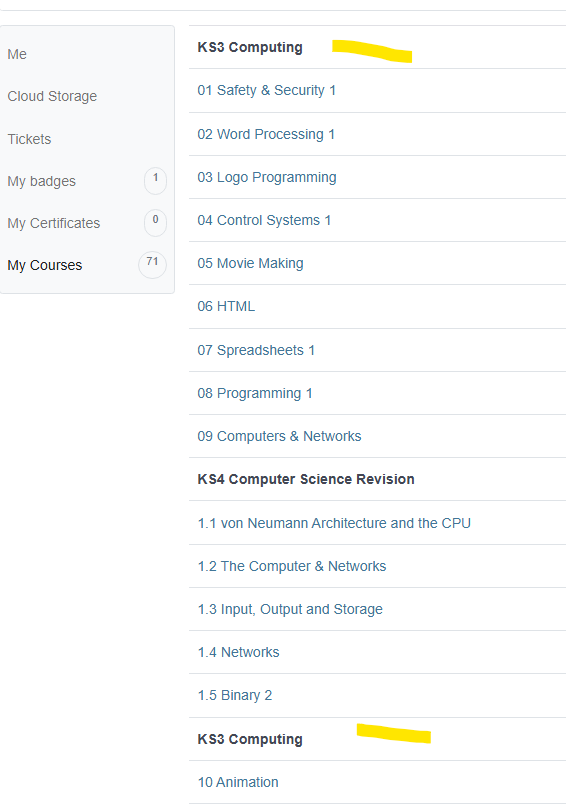
It looks ok but for some reason, I get KS3 Computing twice. I will send you a screenshot.
The headings would be good if they were collapsible, so you could click on KS3 Computing to reveal the courses (Collapsed is the default), which prevents even a long list from being shown.
Finally, as we have problems with links, these links do not work for the Moodle course. Can you add an option to remove the hyperlink so it just shows the list of courses?
It looks ok but for some reason, I get KS3 Computing twice. I will send you a screenshot.
The headings would be good if they were collapsible, so you could click on KS3 Computing to reveal the courses (Collapsed is the default), which prevents even a long list from being shown.
Finally, as we have problems with links, these links do not work for the Moodle course. Can you add an option to remove the hyperlink so it just shows the list of courses?
Please Log in or Create an account to join the conversation.
- Antonio Durán
-
- Offline
- Moderator
-
Less
More
- Posts: 7944
5 months 4 weeks ago #20
by Antonio Durán
Replied by Antonio Durán on topic Download Access
Thank you for your feedback.
> The headings would be good if they were collapsible, so you could click on KS3 Computing to reveal the courses (Collapsed is the default), which prevents even a long list from being shown.
I already added a collapsible option for that, I see that you didn't enable it.
I have uploaded a new version now, with some fixes, and and a change: when collapsible categories is used, it will paginate categories instead of courses, as I guess that is what you are looking for.
I also added an option to disable course links as requested.
Please test and let let me know.
> The headings would be good if they were collapsible, so you could click on KS3 Computing to reveal the courses (Collapsed is the default), which prevents even a long list from being shown.
I already added a collapsible option for that, I see that you didn't enable it.
I have uploaded a new version now, with some fixes, and and a change: when collapsible categories is used, it will paginate categories instead of courses, as I guess that is what you are looking for.
I also added an option to disable course links as requested.
Please test and let let me know.
Please Log in or Create an account to join the conversation.