
- Posts: 7
Joomdle 1.0 Installation
Joomlde Web Services - Joomla System Health Check
- Chris
- Topic Author
- Offline
- New Member
-

Less
More
11 years 8 months ago #1
by Chris
Joomlde Web Services - Joomla System Health Check was created by Chris
Hi,
I have followed all instructions in the setup guide but when running the system health check in Joomla I receive the error on the Joomdle web services:
An unexpected error happened: 28194976: Method "joomdle_system_check" does not exist | ERRORCODE:
Note that the check Moodle to Joomla HTTP connectivity fails, because Joomla is proteceted behind an Apache login. When we disable the security, this check passes but I am wondering if Moodle needs to connect to Joomla for the above Web services check to pass?
I must also state that the Moodle and Joomla are running on different servers with different domains.
When i output the URL of the moodle server request It shows as:
mymoodledomain.com/subfolder/webservice/...xxxxxxxxxxxx&lang=en
When I run this URL directly in the browser with the correct token i get:
faultCode630faultStringUnable to read request
and finally when i run this URL on my Joomla domain : myJoomladomain.com/subfolder/index.php?o...server&format=xmlrpc
I get : XML-RPC Error (1): Invalid token:
Any ideas? I have confirmed the service was setup properly in moodle along with the correct tokens, and has access to all joomdle_ functions.
Thanks
Chris
I have followed all instructions in the setup guide but when running the system health check in Joomla I receive the error on the Joomdle web services:
An unexpected error happened: 28194976: Method "joomdle_system_check" does not exist | ERRORCODE:
Note that the check Moodle to Joomla HTTP connectivity fails, because Joomla is proteceted behind an Apache login. When we disable the security, this check passes but I am wondering if Moodle needs to connect to Joomla for the above Web services check to pass?
I must also state that the Moodle and Joomla are running on different servers with different domains.
When i output the URL of the moodle server request It shows as:
mymoodledomain.com/subfolder/webservice/...xxxxxxxxxxxx&lang=en
When I run this URL directly in the browser with the correct token i get:
faultCode630faultStringUnable to read request
and finally when i run this URL on my Joomla domain : myJoomladomain.com/subfolder/index.php?o...server&format=xmlrpc
I get : XML-RPC Error (1): Invalid token:
Any ideas? I have confirmed the service was setup properly in moodle along with the correct tokens, and has access to all joomdle_ functions.
Thanks
Chris
Please Log in or Create an account to join the conversation.
- Antonio Durán
-

- Offline
- Moderator
-

Less
More
- Posts: 7954
11 years 8 months ago #2
by Antonio Durán
Replied by Antonio Durán on topic Joomlde Web Services - Joomla System Health Check
Hi.
> I have confirmed the service was setup properly in moodle along with the correct tokens, and has access to all joomdle_ functions.
It does not seem so, as it fails with:
Method "joomdle_system_check" does not exist
Go to the service in Moodle and make sure you added all Joomdle functions.
> I have confirmed the service was setup properly in moodle along with the correct tokens, and has access to all joomdle_ functions.
It does not seem so, as it fails with:
Method "joomdle_system_check" does not exist
Go to the service in Moodle and make sure you added all Joomdle functions.
Please Log in or Create an account to join the conversation.
- Chris
- Topic Author
- Offline
- New Member
-
Less
More
- Posts: 7
11 years 7 months ago #3
by Chris
Replied by Chris on topic Joomlde Web Services - Joomla System Health Check
Hello,
I have confirmed that these functions have been added to the service as seen in attached screenshot.
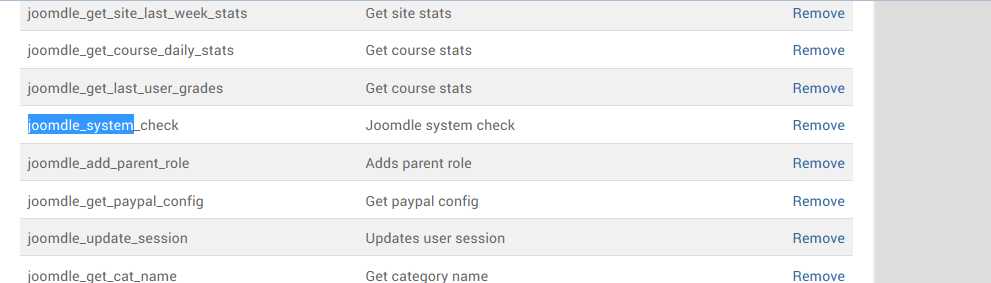
and you can see when searching for Joomdle functions none appear as they have all been added

I did notice that the service was not Enabled. So I enabled it but the error is still the same.
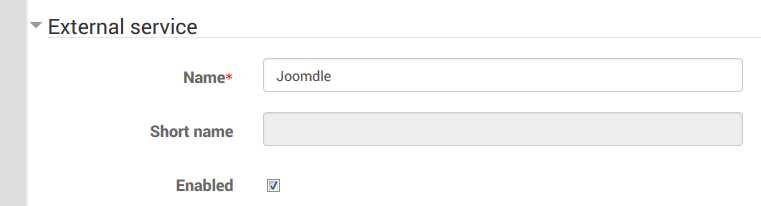
Also, will the Joomdle Web services check still pass if Moodle cannot talk to Joomla (this isbecause of a protected login to Joomla which will be removed later).
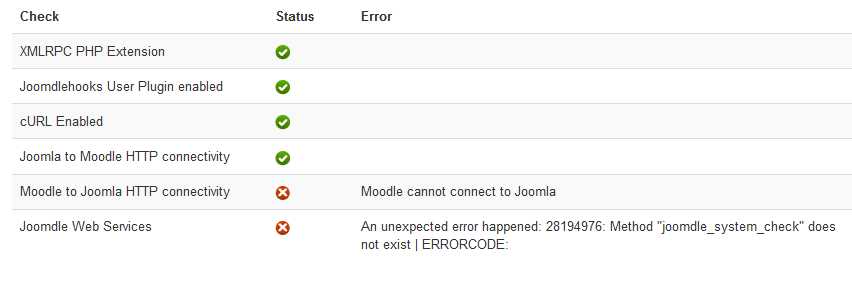
Any other ideas on how to troubleshoot this problem?
I have confirmed that these functions have been added to the service as seen in attached screenshot.
and you can see when searching for Joomdle functions none appear as they have all been added
I did notice that the service was not Enabled. So I enabled it but the error is still the same.
Also, will the Joomdle Web services check still pass if Moodle cannot talk to Joomla (this isbecause of a protected login to Joomla which will be removed later).
Any other ideas on how to troubleshoot this problem?
Please Log in or Create an account to join the conversation.
- Antonio Durán
-
- Offline
- Moderator
-
Less
More
- Posts: 7954
11 years 7 months ago #4
by Antonio Durán
Replied by Antonio Durán on topic Joomlde Web Services - Joomla System Health Check
I have never seen that. You should try just re-creating the service and token in Moodle, and adding all moodle funcionts again.
> Also, will the Joomdle Web services check still pass if Moodle cannot talk to Joomla (this isbecause of a protected login to Joomla which will be removed later).
No, it won't. If Moodle cannot connect to Moodle, it can not talk to it. But that would show a different error. You need to fix moodle side first.
> Also, will the Joomdle Web services check still pass if Moodle cannot talk to Joomla (this isbecause of a protected login to Joomla which will be removed later).
No, it won't. If Moodle cannot connect to Moodle, it can not talk to it. But that would show a different error. You need to fix moodle side first.
Please Log in or Create an account to join the conversation.
- Chris
- Topic Author
- Offline
- New Member
-
Less
More
- Posts: 7
11 years 7 months ago #5
by Chris
Replied by Chris on topic Joomlde Web Services - Joomla System Health Check
Hello Antonio,
I have solved the first error. The service was not setup correctly.
However, i am still getting a red X on the : Joomdle Web Services
The error is: Joomla URL seems to be misconfigured in Joomdle auth plugin in Moodle
Moodle and Joomla are running on separate domains, each under a subfolder. Could this be the cause of the issue?
Joomla site: www.joomlasite.ca/intranet
Moodle site: www.moodlesite.ca/eLearn
in the Moodle Joomdle plugin i have the Joomla URL set exactly as above, same for the Moodle URL in Joomla config settings.
any ideas what the problem could be.
I also notice that when i Run : www.joomlasite.ca/intranet/index.php?opt...server&format=xmlrpc
i get the message: XML-RPC Error (1): Invalid token:
does this provide any clues?
I have solved the first error. The service was not setup correctly.
However, i am still getting a red X on the : Joomdle Web Services
The error is: Joomla URL seems to be misconfigured in Joomdle auth plugin in Moodle
Moodle and Joomla are running on separate domains, each under a subfolder. Could this be the cause of the issue?
Joomla site: www.joomlasite.ca/intranet
Moodle site: www.moodlesite.ca/eLearn
in the Moodle Joomdle plugin i have the Joomla URL set exactly as above, same for the Moodle URL in Joomla config settings.
any ideas what the problem could be.
I also notice that when i Run : www.joomlasite.ca/intranet/index.php?opt...server&format=xmlrpc
i get the message: XML-RPC Error (1): Invalid token:
does this provide any clues?
Please Log in or Create an account to join the conversation.
- Antonio Durán
-
- Offline
- Moderator
-
Less
More
- Posts: 7954
11 years 7 months ago #6
by Antonio Durán
Replied by Antonio Durán on topic Joomlde Web Services - Joomla System Health Check
> > Also, will the Joomdle Web services check still pass if Moodle cannot talk to Joomla (this isbecause of a protected login to Joomla which will be removed later).
If you have Joomla protected, system check will give you that error if moodle cannot connect.
If you have Joomla protected, system check will give you that error if moodle cannot connect.
Please Log in or Create an account to join the conversation.
- Chris
- Topic Author
- Offline
- New Member
-
Less
More
- Posts: 7
11 years 7 months ago #7
by Chris
Replied by Chris on topic Joomlde Web Services - Joomla System Health Check
Antonio,
We have modified auth.php to allow logging into Joomla via cURL with username and password.
This allows the Moodle to Joomla HTTP connectivity to work and there is a green checkmark here.
curl_setopt($ch, CURLOPT_USERPWD, "$username:$password");
Questions:
1. Is there anything else needed to get the Joomdle Web Services to work?
2 . Should i be getting Invalid Token when running this link? : /index.php?option=com_joomdle&task=ws.server&format=xmlrpc
3. Do i need to change php config settings because each site is within a subfolder?
Any other help appreciated.
Chris
We have modified auth.php to allow logging into Joomla via cURL with username and password.
This allows the Moodle to Joomla HTTP connectivity to work and there is a green checkmark here.
curl_setopt($ch, CURLOPT_USERPWD, "$username:$password");
Questions:
1. Is there anything else needed to get the Joomdle Web Services to work?
2 . Should i be getting Invalid Token when running this link? : /index.php?option=com_joomdle&task=ws.server&format=xmlrpc
3. Do i need to change php config settings because each site is within a subfolder?
Any other help appreciated.
Chris
Please Log in or Create an account to join the conversation.
- Antonio Durán
-
- Offline
- Moderator
-
Less
More
- Posts: 7954
11 years 7 months ago #8
by Antonio Durán
Replied by Antonio Durán on topic Joomlde Web Services - Joomla System Health Check
> 1. Is there anything else needed to get the Joomdle Web Services to work?
I don't know. Never tried to connect to a protected Joomla, so I don't know if you need to modify anything else.
2. Yes
3. No
I don't know. Never tried to connect to a protected Joomla, so I don't know if you need to modify anything else.
2. Yes
3. No
Please Log in or Create an account to join the conversation.
- Chris
- Topic Author
- Offline
- New Member
-
Less
More
- Posts: 7
11 years 7 months ago #9
by Chris
Replied by Chris on topic Joomlde Web Services - Joomla System Health Check
Antonio,
It appears the last error one was because of the protected login We have disabled the login temporarily and the all of the checks passed.
Do you know which file in Moodle would contain the cURL call which is responsible for 'Joomdle Web Services' ?
Thanks
Chris
It appears the last error one was because of the protected login We have disabled the login temporarily and the all of the checks passed.
Do you know which file in Moodle would contain the cURL call which is responsible for 'Joomdle Web Services' ?
Thanks
Chris
Please Log in or Create an account to join the conversation.
- Antonio Durán
-
- Offline
- Moderator
-
Less
More
- Posts: 7954
11 years 7 months ago #10
by Antonio Durán
Replied by Antonio Durán on topic Joomlde Web Services - Joomla System Health Check
File would be moodle/auth/joomdle/auth.php
Please Log in or Create an account to join the conversation.