
Joomdle 2.x Installation
Joomdle Web Services -
- Wynand Louw
-
 Topic Author
- Offline
- Premium Member
-

Less
More
2 years 10 months ago - 2 years 10 months ago #1
by Wynand Louw
Joomdle Web Services - was created by Wynand Louw
All of a sudden my Moodle Joomdle is not working on my main site.
Joomdle Web Services in the Joomdle control panel give me the following error:
Access control exception You are not allowed to use the rest protocol (missing capability: webservice/rest:use)
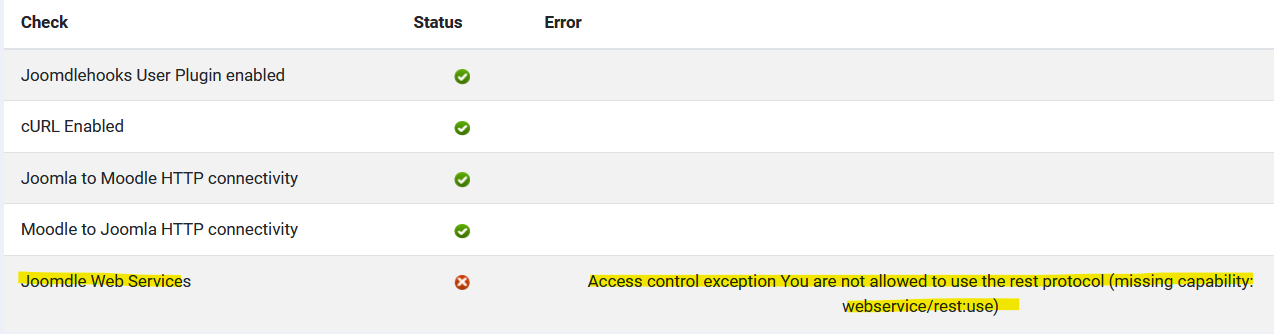
In the Joomla 4.3.1 installation all is set Joomdle configuration as follows:
1. Moodle Auth token is correct as displayed in Moodle install
2. Connection method: cURL
3. Web Services: REST (Moodle and Joomdle)
4. Joomla Auth Token is correct in Moodle installation.
I can view and change the following in Joomdle:
1. Dashboard (See)
2. Configuration - Can make all the changes etc and save.
3. Users: get the following error:
COM_JOOMDLE_WEB_SERVICES_ERROR: Access control exception (You are not allowed to use the rest protocol (missing capability: webservice/rest:use))
4. Mappings: gives me the same error.
5. Course requests give the same error
6. Shop gives the same error.
7. System Check I get the following warning on top with debug in Joomla to max.
Warning: Undefined variable $version in /home/mysite/public_html/administrator/components/com_joomdle/helpers/content.php on line 1157
Joomdle Web Services in the Joomdle control panel give me the following error:
Access control exception You are not allowed to use the rest protocol (missing capability: webservice/rest:use)
In the Joomla 4.3.1 installation all is set Joomdle configuration as follows:
1. Moodle Auth token is correct as displayed in Moodle install
2. Connection method: cURL
3. Web Services: REST (Moodle and Joomdle)
4. Joomla Auth Token is correct in Moodle installation.
I can view and change the following in Joomdle:
1. Dashboard (See)
2. Configuration - Can make all the changes etc and save.
3. Users: get the following error:
COM_JOOMDLE_WEB_SERVICES_ERROR: Access control exception (You are not allowed to use the rest protocol (missing capability: webservice/rest:use))
4. Mappings: gives me the same error.
5. Course requests give the same error
6. Shop gives the same error.
7. System Check I get the following warning on top with debug in Joomla to max.
Warning: Undefined variable $version in /home/mysite/public_html/administrator/components/com_joomdle/helpers/content.php on line 1157
Last edit: 2 years 10 months ago by Wynand Louw.
Please Log in or Create an account to join the conversation.
- Wynand Louw
-
Topic Author
- Offline
- Premium Member
-
2 years 10 months ago - 2 years 10 months ago #2
by Wynand Louw
Replied by Wynand Louw on topic Joomdle Web Services -
OK by searching the Joomdle web services issue I checked the following on Moodle Wiki and found this:
the user that is associated with the web service token didn’t have the capability webservice/rest:use in their system role. Adding the capability to the role fixed the issue.
After activating the above service and going back to Joomdle System Check, I now get the following error message:
Joomdle version is different in Joomla and Moodle
Joomla = 2.1.0 date in Joomla is shown as (2010-04-02 )
Moodle = auth-joomdle is also 2.1.0 (2023012200)
Why would it indicate that the two are different?
the user that is associated with the web service token didn’t have the capability webservice/rest:use in their system role. Adding the capability to the role fixed the issue.
After activating the above service and going back to Joomdle System Check, I now get the following error message:
Joomdle version is different in Joomla and Moodle
Joomla = 2.1.0 date in Joomla is shown as (2010-04-02 )
Moodle = auth-joomdle is also 2.1.0 (2023012200)
Why would it indicate that the two are different?
Last edit: 2 years 10 months ago by Wynand Louw. Reason: Update
Please Log in or Create an account to join the conversation.
- Antonio Durán
-

- Offline
- Moderator
-

Less
More
- Posts: 7895
2 years 10 months ago #3
by Antonio Durán
Replied by Antonio Durán on topic Joomdle Web Services -
Hi.
Glad to know that you fixed it.
> Warning: Undefined variable $version in /home/mysite/public_html/administrator/components/com_joomdle/helpers/content.php on line 1157
This is problem with the version is probably related to the error above.
At the end of this thread: www.joomdle.com/forum/installation2/1286...ore-v2-10-db-problem
You can see a solution proposed by another Joomdle user.
Glad to know that you fixed it.
> Warning: Undefined variable $version in /home/mysite/public_html/administrator/components/com_joomdle/helpers/content.php on line 1157
This is problem with the version is probably related to the error above.
At the end of this thread: www.joomdle.com/forum/installation2/1286...ore-v2-10-db-problem
You can see a solution proposed by another Joomdle user.
Please Log in or Create an account to join the conversation.
- Wynand Louw
-
Topic Author
- Offline
- Premium Member
-
2 years 10 months ago - 2 years 10 months ago #4
by Wynand Louw
Replied by Wynand Louw on topic Joomdle Web Services -
Thanks.
I tested the other three sites, no issue. Only on the latest site that I converted from J3 to J4.
Will do as suggested and give feedback.
I tested the other three sites, no issue. Only on the latest site that I converted from J3 to J4.
Will do as suggested and give feedback.
Last edit: 2 years 10 months ago by Wynand Louw.
Please Log in or Create an account to join the conversation.
- Wynand Louw
-
Topic Author
- Offline
- Premium Member
-
2 years 10 months ago #5
by Wynand Louw
Replied by Wynand Louw on topic Joomdle Web Services -
I have made that change previously. Do not think it is related to the above.
Still, get the message on the Joomdle Web Services:
"Joomdle version is different in Joomla and Moodle" even after I checked for the changes in the file. It is only on this one site.
Still, get the message on the Joomdle Web Services:
"Joomdle version is different in Joomla and Moodle" even after I checked for the changes in the file. It is only on this one site.
Please Log in or Create an account to join the conversation.
- Wynand Louw
-
Topic Author
- Offline
- Premium Member
-
2 years 10 months ago #6
by Wynand Louw
Replied by Wynand Louw on topic Joomdle Web Services -
I have reinstalled Joomdle in Joomla, and now it is happy. Problem resolved.
Please Log in or Create an account to join the conversation.
- Antonio Durán
-
- Offline
- Moderator
-
Less
More
- Posts: 7895
2 years 10 months ago #7
by Antonio Durán
Replied by Antonio Durán on topic Joomdle Web Services -
Thanks for the info.
I was referring to this change:
Which can be fixed by editing the line 31 of that file, replacing manifest.xml by joomdle.xml as such
$xmlfile = JPATH_ADMINISTRATOR.'/components/com_joomdle/joomdle.xml';
Not sure if you did that one.
I did it and the version mismatch problem, as well as the warning message, went away.
I was referring to this change:
Which can be fixed by editing the line 31 of that file, replacing manifest.xml by joomdle.xml as such
$xmlfile = JPATH_ADMINISTRATOR.'/components/com_joomdle/joomdle.xml';
Not sure if you did that one.
I did it and the version mismatch problem, as well as the warning message, went away.
Please Log in or Create an account to join the conversation.
- Wynand Louw
-
Topic Author
- Offline
- Premium Member
-
2 years 10 months ago #8
by Wynand Louw
Replied by Wynand Louw on topic Joomdle Web Services -
Antonio
I did that, but no change. After I activated the Moodle web services:User it was connecting, but this change $xmlfile = JPATH_ADMINISTRATOR.'/components/com_joomdle/joomdle.xml'; did not change the last issue with the mismatch.
So I tried and re-installed the 2.0.1 version and then it worked.
I did that, but no change. After I activated the Moodle web services:User it was connecting, but this change $xmlfile = JPATH_ADMINISTRATOR.'/components/com_joomdle/joomdle.xml'; did not change the last issue with the mismatch.
So I tried and re-installed the 2.0.1 version and then it worked.
Please Log in or Create an account to join the conversation.