
Shop / e-Commerce Integration
J2store3 Courses Category in setup
- Tim
-
 Topic Author
- Offline
- Senior Member
-

Less
More
8 years 9 months ago #1
by Tim
J2store3 Courses Category in setup was created by Tim
I have been able to buy a course and have payment go through and be confirmed successfully using J2store3. However, the user I tested with was not added to the course I bought.
Upon reviewing my Joomdle settings I realized I never changed the "course category" but I have no idea what to put in there. J2store3 uses existing articles as products and I have those products in a number of categories.
In the Joomdle wiki I saw the instruction to:
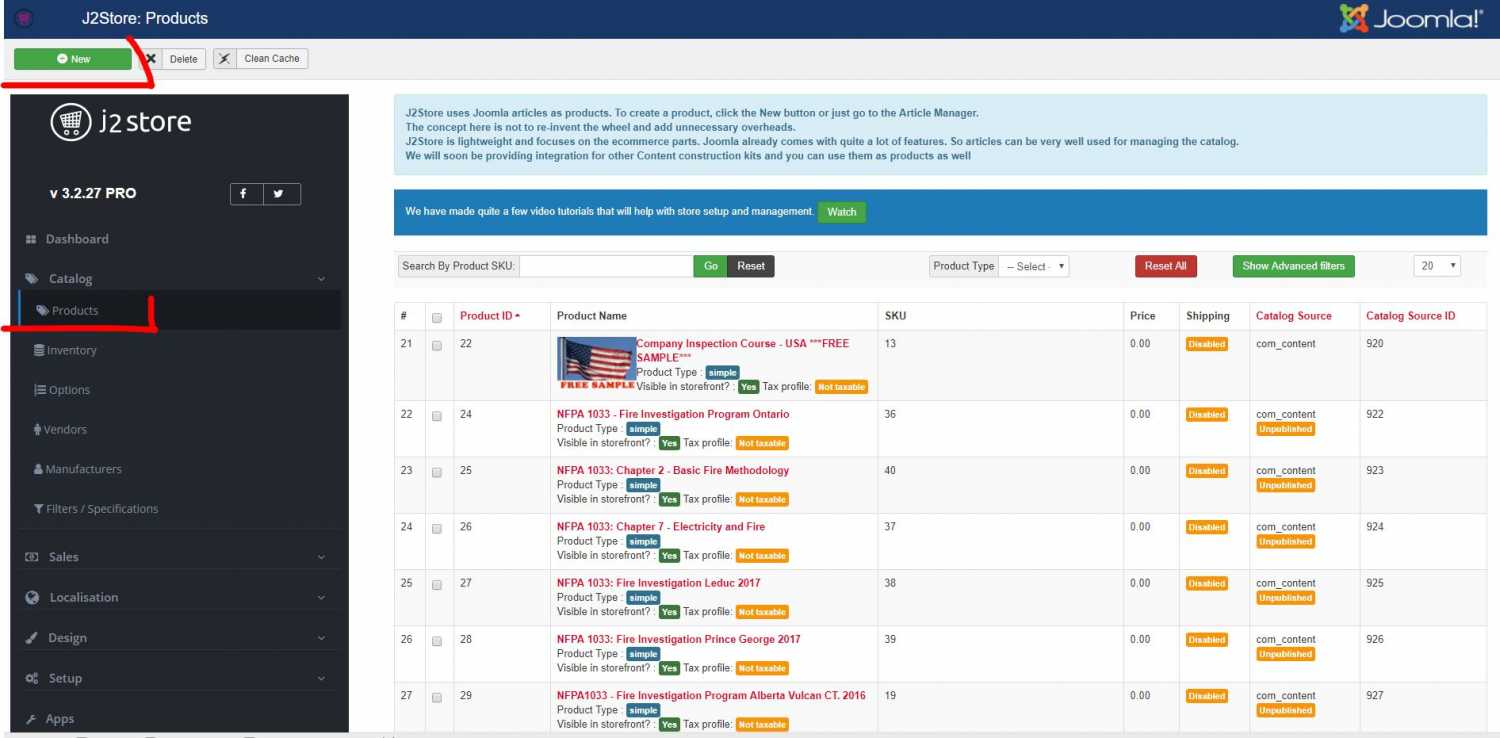
Under the J2Store Product Menu, create a new J2Store Product Category to group your Moodle courses. Take note of Product Category's ID, as you will it later to enter into Joomdle configuration.
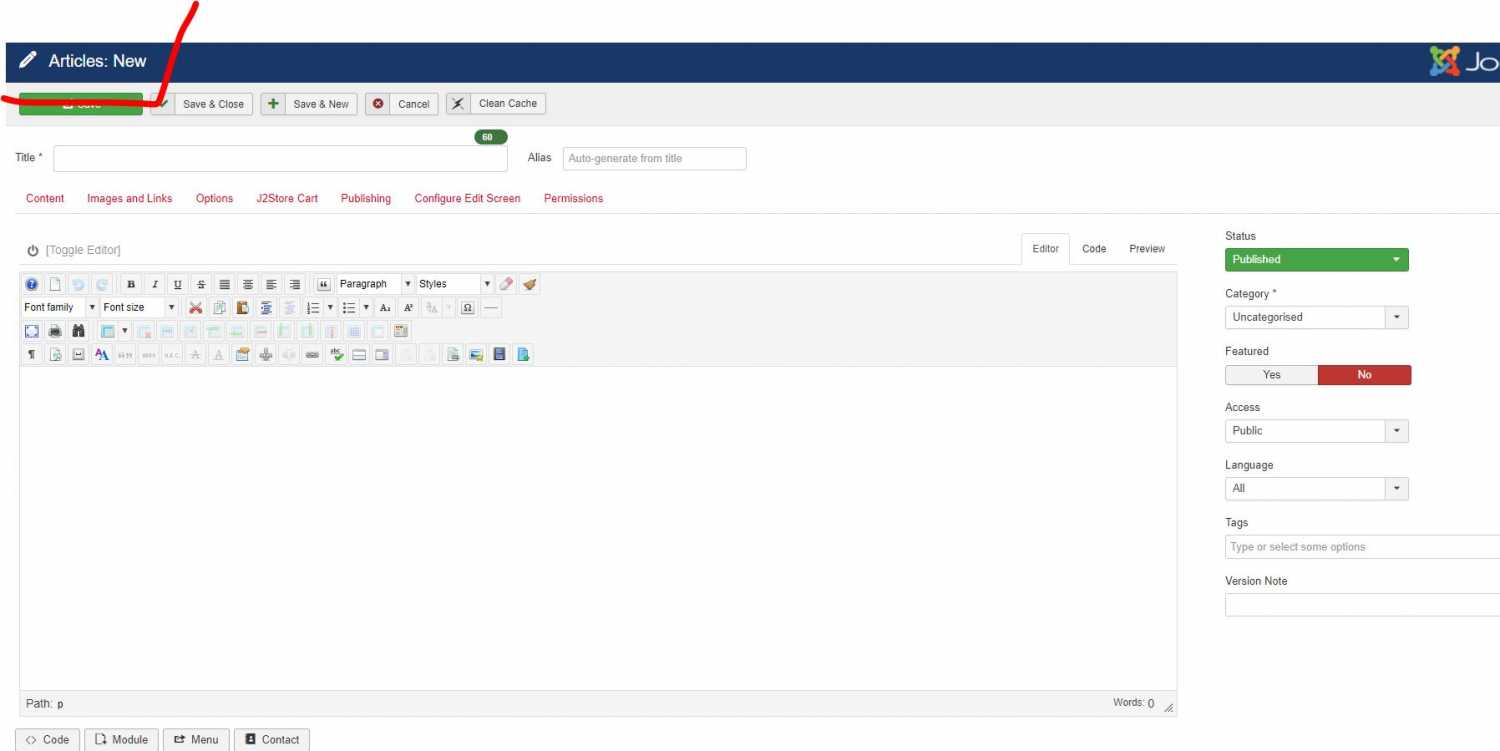
But the only option to create anything new under the product menu creates a new article.
Is something different in J2store3 from J2store2?
Thanks for your help and direction.
Upon reviewing my Joomdle settings I realized I never changed the "course category" but I have no idea what to put in there. J2store3 uses existing articles as products and I have those products in a number of categories.
In the Joomdle wiki I saw the instruction to:
Under the J2Store Product Menu, create a new J2Store Product Category to group your Moodle courses. Take note of Product Category's ID, as you will it later to enter into Joomdle configuration.
But the only option to create anything new under the product menu creates a new article.
Is something different in J2store3 from J2store2?
Thanks for your help and direction.
Please Log in or Create an account to join the conversation.
- Antonio Durán
-

- Offline
- Moderator
-

Less
More
- Posts: 7954
8 years 9 months ago #2
by Antonio Durán
Replied by Antonio Durán on topic J2store3 Courses Category in setup
Hi.
As you say, J2Store uses articles for products. Those articles are in an article category. The ID of that category is what you need to set in Joomdle configuration.
> J2store3 uses existing articles as products and I have those products in a number of categories.
With J2Store, there is a restriction, because articles cannot be in more than one category.
So, to set what you want, you would:
- Create "Courses" category in Content->Categories, and take note of its ID. Set this ID in Joomdle config.
- Create any new categories you may need, as children of the courses category
Then, when you publish a course in Joomdle->Shop, it will be created in Courses category. You can then go to J2Store and change it to be in any of the children categories.
These categories need to be children of the courses category, becasue Joomdle will treat products as courses if they are in courses category, or any of its children.
Please let us know if you need any more info.
As you say, J2Store uses articles for products. Those articles are in an article category. The ID of that category is what you need to set in Joomdle configuration.
> J2store3 uses existing articles as products and I have those products in a number of categories.
With J2Store, there is a restriction, because articles cannot be in more than one category.
So, to set what you want, you would:
- Create "Courses" category in Content->Categories, and take note of its ID. Set this ID in Joomdle config.
- Create any new categories you may need, as children of the courses category
Then, when you publish a course in Joomdle->Shop, it will be created in Courses category. You can then go to J2Store and change it to be in any of the children categories.
These categories need to be children of the courses category, becasue Joomdle will treat products as courses if they are in courses category, or any of its children.
Please let us know if you need any more info.
Please Log in or Create an account to join the conversation.
- Tim
-
Topic Author
- Offline
- Senior Member
-
8 years 9 months ago #3
by Tim
Replied by Tim on topic J2store3 Courses Category in setup
Thanks for that Help.
I have created the courses in the order you suggested and that is working now.
I think I may just leave all courses in that one category and filter them under menus by tags. But it is good to know I can put them in sub-categories afterwards if I want.
If I do, do all the subcategories have to exist before I publish a course in Joomdle and then move it into them or can I create more categories and just move courses already published in Joomdle form category to category as I need to?
I have created the courses in the order you suggested and that is working now.
I think I may just leave all courses in that one category and filter them under menus by tags. But it is good to know I can put them in sub-categories afterwards if I want.
If I do, do all the subcategories have to exist before I publish a course in Joomdle and then move it into them or can I create more categories and just move courses already published in Joomdle form category to category as I need to?
Please Log in or Create an account to join the conversation.
- Antonio Durán
-
- Offline
- Moderator
-
Less
More
- Posts: 7954
8 years 9 months ago #4
by Antonio Durán
Replied by Antonio Durán on topic J2store3 Courses Category in setup
Good to know it is working.
> If I do, do all the subcategories have to exist before I publish a course in Joomdle and then move it into them or can I create more categories and just move courses already published in Joomdle form category to category as I need to?
You can move courses at any point, as long as destination category is a child of Joomdle configured category.
> If I do, do all the subcategories have to exist before I publish a course in Joomdle and then move it into them or can I create more categories and just move courses already published in Joomdle form category to category as I need to?
You can move courses at any point, as long as destination category is a child of Joomdle configured category.
Please Log in or Create an account to join the conversation.