
- Posts: 70
Tips & Tricks
Please do NOT use this section of the forum to request help if Joomdle does not work for you in some particular way. Your post will be deleted.
Please do NOT use this section of the forum to request help if Joomdle does not work for you in some particular way. Your post will be deleted.
VirtueMart - Add all courses to cart
- shekar
-
 Topic Author
- Offline
- Senior Member
-

Less
More
16 years 2 months ago #1
by shekar
VirtueMart - Add all courses to cart was created by shekar
Hi,
Is it possible to add all courses in a category to virtue-mart cart, by clicking the one button.
Thank you
Shekar
Is it possible to add all courses in a category to virtue-mart cart, by clicking the one button.
Thank you
Shekar
Please Log in or Create an account to join the conversation.
- Antonio Durán
-

- Offline
- Moderator
-

Less
More
- Posts: 7954
16 years 2 months ago #2
by Antonio Durán
Replied by Antonio Durán on topic Re: VirtueMart - Add all courses to cart
I don't know. That would be a VM feature, so I have no idea.
Maybe you could ask on the VM forum and tell us what you find out
Maybe you could ask on the VM forum and tell us what you find out
Please Log in or Create an account to join the conversation.
- shekar
-
Topic Author
- Offline
- Senior Member
-
Less
More
- Posts: 70
15 years 11 months ago - 15 years 11 months ago #3
by shekar
Replied by shekar on topic Re:VirtueMart - Add all courses to cart
I got a solution for this and I have tested its working fine.
Step 1
Install the module: redVMMASSCART
Step 2
File: joomla\modules\mod_redvmmasscart\helper.php
Change product sku to id
Step 3
File: joomla\components\com_joomdle\views\coursecategory\tmpl\default.php
Create on array
Step 4
Add this code in loop to get VM Product ID of each course and to store in the array.
Step 5
File: joomla\administrator\components\com_joomdle\helpers\shop.php
Add new function to get the product IDs with comma separated.
Step 6
File: joomla\components\com_joomdle\views\coursecategory\tmpl\default.php
Add a form to submit the all courses in the category.
Results:
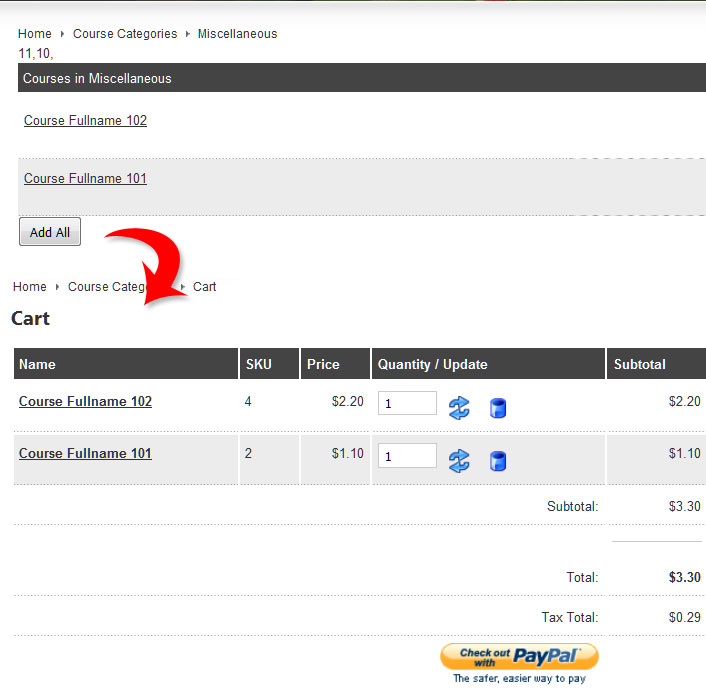
Thanks
Shekar
Step 1
Install the module: redVMMASSCART
Step 2
File: joomla\modules\mod_redvmmasscart\helper.php
Change product sku to id
Code:
$db->query( "SELECT * FROM `#__vm_product` WHERE `product_id`='".trim($mysku[$i])."'" );
Step 3
File: joomla\components\com_joomdle\views\coursecategory\tmpl\default.php
Create on array
Code:
$my_course_ids = array (); //Created new array to store the products ID's (VM)
Step 4
Add this code in loop to get VM Product ID of each course and to store in the array.
Code:
$shop_pid = JRoute::_(JoomdleHelperShop::get_shop_pid_a ($curso['remoteid']));
//echo $shop_pid;
$my_course_ids[] = $shop_pid;
Step 5
File: joomla\administrator\components\com_joomdle\helpers\shop.php
Add new function to get the product IDs with comma separated.
Code:
function get_shop_pid ($course_id)
{
$db =& JFactory::getDBO();
$query = 'SELECT product_id' .
' FROM #__vm_product' .
' WHERE product_sku =';
$query .= $db->Quote($course_id) . " and product_publish='Y'";
$db->setQuery($query);
$product = $db->loadObjectList();
$product_id = $product[0]->product_id;
$shop_pid ="$product_id".",";
return $shop_pid;
}
Step 6
File: joomla\components\com_joomdle\views\coursecategory\tmpl\default.php
Add a form to submit the all courses in the category.
Code:
<form action="" method="post" name="masscart" id="masscart" >
<input type="submit" name="Submit" class="button_cart" value="Add All" />
<input type="hidden" name="skucartadd" value="1" />
<input id="skucart" type="hidden" name="skucart" value="<?php foreach ($my_course_ids as $value) { print_r ($value); } ?>" />
</form>
Results:
Thanks
Shekar
Last edit: 15 years 11 months ago by shekar.
Please Log in or Create an account to join the conversation.
- Chris
-

- Offline
- Moderator
-
15 years 11 months ago #4
by Chris
Replied by Chris on topic Re:VirtueMart - Add all courses to cart
Great. Thanks for sharing your solution with the community. I shall move this to Tips & Tricks
Please Log in or Create an account to join the conversation.