
- Posts: 11
Joomla URL seems to be misconfigured in Joomdle auth plugin
- Luke
- Topic Author
- Offline
- New Member
-

Less
More
12 years 3 months ago - 12 years 3 months ago #1
by Luke
Joomla URL seems to be misconfigured in Joomdle auth plugin was created by Luke
Hi All,
I am having an issue with the health check with Joomdle.
We are running Joomla 1.5
Joomdle 0.82
Moodle 2.2.1
Or server is sitting behind a Load balancer at Rackspace
Everything has been working well, however we have just started getting an issue with the Joomdle users not getting fully created in Moodle. The username is added to the user in moodle but not the First and lastname, email address and city. When a user visits the 'My Courses' Page (moodle course list page) There is an error 'Sorry Can not edit own profile'
If I edit the user in moodle and add the First name, Last name ect (data that is missing) Everything then works fine.
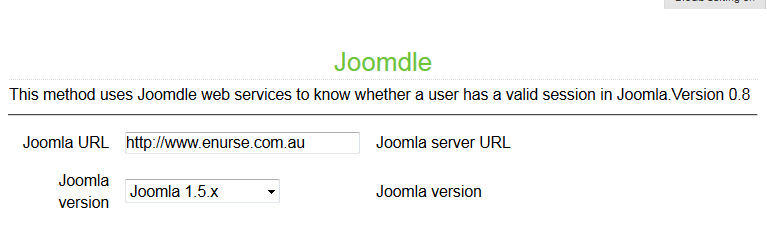
In the Health check we have 1 red cross with 'Joomla URL seems to be misconfigured in Joomdle auth plugin'
I have Checked the URL in the Joomdle Configuration and it is correct. I have been through all of the install instructions and can't seem to find the issue.
I was hoping someone could help point me in the right direction on how to further debug the issue. ie error logs to check ect.
Part of the message is hidden for the guests. Please log in or register to see it.
I am having an issue with the health check with Joomdle.
We are running Joomla 1.5
Joomdle 0.82
Moodle 2.2.1
Or server is sitting behind a Load balancer at Rackspace
Everything has been working well, however we have just started getting an issue with the Joomdle users not getting fully created in Moodle. The username is added to the user in moodle but not the First and lastname, email address and city. When a user visits the 'My Courses' Page (moodle course list page) There is an error 'Sorry Can not edit own profile'
If I edit the user in moodle and add the First name, Last name ect (data that is missing) Everything then works fine.
In the Health check we have 1 red cross with 'Joomla URL seems to be misconfigured in Joomdle auth plugin'
I have Checked the URL in the Joomdle Configuration and it is correct. I have been through all of the install instructions and can't seem to find the issue.
I was hoping someone could help point me in the right direction on how to further debug the issue. ie error logs to check ect.
Part of the message is hidden for the guests. Please log in or register to see it.

Last edit: 12 years 3 months ago by Luke. Reason: Hiding some info from Guests
Please Log in or Create an account to join the conversation.
- Antonio Durán
-

- Offline
- Moderator
-

Less
More
- Posts: 7954
12 years 3 months ago #2
by Antonio Durán
Replied by Antonio Durán on topic Joomla URL seems to be misconfigured in Joomdle auth plugin
If this was working before, some change must have made the error message to appear.
'Joomla URL seems to be misconfigured in Joomdle auth plugin' message is shown when XML response from Joomla is not good.
This can happen for many reasons: for example, that some other un-related plugin is returning errors.
'Joomla URL seems to be misconfigured in Joomdle auth plugin' message is shown when XML response from Joomla is not good.
This can happen for many reasons: for example, that some other un-related plugin is returning errors.
Please Log in or Create an account to join the conversation.
- Luke
- Topic Author
- Offline
- New Member
-
Less
More
- Posts: 11
12 years 3 months ago #3
by Luke
Replied by Luke on topic Joomla URL seems to be misconfigured in Joomdle auth plugin
The only thing that has happened recently is that the server has been resized - For more RAM and CPU. The site was also put behind a Loadbalancer. When i try to access the Server directly (by pass the Loadbalancer) I get the same issue.
No new modules were installed and no other configurations have been changed.
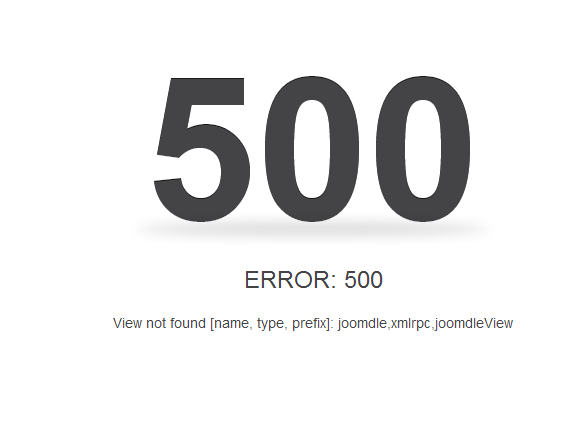
Is there any other way to debug this to find out what is wrong with the the XML response. When I try to the link //index.php?option=com_joomdle&task=ws.server&format=xmlrpc on my site I get a error 500.
Everything is working except the users data in Moodle is not getting completed when a user signs up. Once I edit their profile in Moodle everything works fine ie SSO, Accessing courses ect.
Regards,
Luke
No new modules were installed and no other configurations have been changed.
Is there any other way to debug this to find out what is wrong with the the XML response. When I try to the link //index.php?option=com_joomdle&task=ws.server&format=xmlrpc on my site I get a error 500.
Everything is working except the users data in Moodle is not getting completed when a user signs up. Once I edit their profile in Moodle everything works fine ie SSO, Accessing courses ect.
Regards,
Luke
Please Log in or Create an account to join the conversation.
- Antonio Durán
-
- Offline
- Moderator
-
Less
More
- Posts: 7954
12 years 3 months ago #4
by Antonio Durán
Replied by Antonio Durán on topic Joomla URL seems to be misconfigured in Joomdle auth plugin
If you get an error 500, something is not right. It should left something in log to let you find put what is causing the error 500.
Please Log in or Create an account to join the conversation.
- Luke
- Topic Author
- Offline
- New Member
-
Less
More
- Posts: 11
12 years 3 months ago #5
by Luke
Replied by Luke on topic Joomla URL seems to be misconfigured in Joomdle auth plugin
I have logged a ticket with my host to see if there are any errors in the logs. This is the actual error message that I see
Please Log in or Create an account to join the conversation.
- Luke
- Topic Author
- Offline
- New Member
-
Less
More
- Posts: 11
12 years 3 months ago #6
by Luke
Replied by Luke on topic Joomla URL seems to be misconfigured in Joomdle auth plugin
From searching the forum I think I might have been using the wrong URL to check the XMLRPC. When I go to this URL mysite/xmlrpc/index.php
I get the image below:
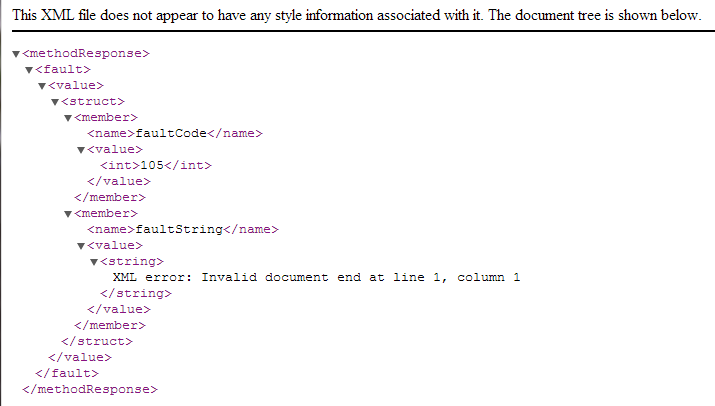
Is this an error, or is this what I should see?
I get the image below:
Is this an error, or is this what I should see?
Please Log in or Create an account to join the conversation.
- Antonio Durán
-
- Offline
- Moderator
-
Less
More
- Posts: 7954
12 years 3 months ago #7
by Antonio Durán
Replied by Antonio Durán on topic Joomla URL seems to be misconfigured in Joomdle auth plugin
That is what you should see.
If you have ssh acces to the site, you can try using wget to fetch that same page from inside Moodle server, to see if it working.
If you have ssh acces to the site, you can try using wget to fetch that same page from inside Moodle server, to see if it working.
Please Log in or Create an account to join the conversation.
- Luke
- Topic Author
- Offline
- New Member
-
Less
More
- Posts: 11
12 years 3 months ago #8
by Luke
Replied by Luke on topic Joomla URL seems to be misconfigured in Joomdle auth plugin
Moodle is hosted on the same server as joomla just in a subdirectory /my-education
Regards,
Luke
Regards,
Luke
Please Log in or Create an account to join the conversation.
- Luke
- Topic Author
- Offline
- New Member
-
Less
More
- Posts: 11
12 years 3 months ago #9
by Luke
Replied by Luke on topic Joomla URL seems to be misconfigured in Joomdle auth plugin
Our Host provider ran some test via ssh and these are the results. I don't really understand them but it seems that it is working:
Part of the message is hidden for the guests. Please log in or register to see it.
Part of the message is hidden for the guests. Please log in or register to see it.
Please Log in or Create an account to join the conversation.
- Chris
-

- Offline
- Moderator
-
12 years 3 months ago #10
by Chris
Replied by Chris on topic Joomla URL seems to be misconfigured in Joomdle auth plugin
Hi there,
A quick note to say that we have received your post. Antonio is away at this moment and this problem is beyond my knowledge so you will need to wait for him to return.
Regards
A quick note to say that we have received your post. Antonio is away at this moment and this problem is beyond my knowledge so you will need to wait for him to return.
Regards
Please Log in or Create an account to join the conversation.