
- Posts: 27
R0.24 No Longer Supported
Module CSS Strip
- Tim s
- Topic Author
- Offline
- Junior Member
-

Less
More
16 years 4 months ago #1
by Tim s
Module CSS Strip was created by Tim s
Good morning
I tried enabling the courses module, but the CSS was stripped from it. I remember I encontered something similar with phoca download, but don't recall how or if we got it fixed (I went with docman).
with the css stripped I can't save my changes or my configurations
Any suggestions?
Thanks
Tim
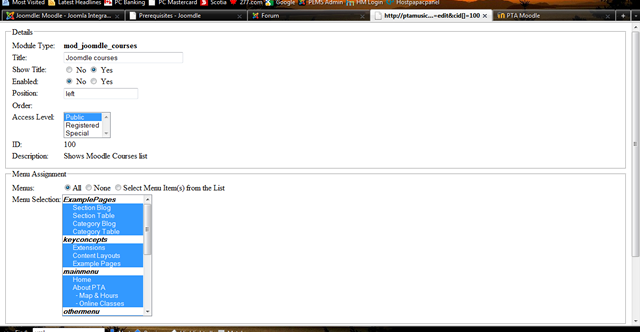
I tried enabling the courses module, but the CSS was stripped from it. I remember I encontered something similar with phoca download, but don't recall how or if we got it fixed (I went with docman).
with the css stripped I can't save my changes or my configurations
Any suggestions?
Thanks
Tim
Please Log in or Create an account to join the conversation.
- Chris
-

- Offline
- Moderator
-

16 years 4 months ago #2
by Chris
Replied by Chris on topic Re: Module CSS Strip
If I am not wrong, this does it for only one of the modules? I came across this just this week on another person's site. Let me see if that has been resolved yet.
Please Log in or Create an account to join the conversation.
- Tim s
- Topic Author
- Offline
- Junior Member
-
Less
More
- Posts: 27
16 years 4 months ago #3
by Tim s
Replied by Tim s on topic Re: Module CSS Strip
Don't quote me on this but I think I solved it by saving the ORDER LIST of the modules.
It was initially a -1. When I recieved the modules list, the problem disappeared.
It was initially a -1. When I recieved the modules list, the problem disappeared.
Please Log in or Create an account to join the conversation.
- Chris
-
- Offline
- Moderator
-
16 years 4 months ago #4
by Chris
Replied by Chris on topic Re: Module CSS Strip
I had hoped that you solved it... I have a test server with the order list at -1 but the css is not stripped  thus it is likely to be something else
thus it is likely to be something else Please Log in or Create an account to join the conversation.
- Kyle
- Offline
- Senior Member
-

Less
More
- Posts: 42
16 years 4 months ago #5
by Kyle
Replied by Kyle on topic Re:Module CSS Strip
Hey Guys,
I had this issue before. This is when I went to the 'Joomdle' system check in Joomla to notice that the 'Web services' did not start.
I checked the Joomdle Module, which had the same messed up CSS. At this point I was really stuck, but try a combination of the below.
SQL commands I used *from Antonio
*NB..run backups before - incase.
- delete from mdl_config_plugins where plugin like '%joomdle%';
- delete from mdl_mnet_host2service where hostid=0 and serviceid=4;
- drop table mdl_joomdle_dummytable
Hope that helps!
www.joomdle.com/en/forum/17-r024-support...es?limit=10&start=10
I had this issue before. This is when I went to the 'Joomdle' system check in Joomla to notice that the 'Web services' did not start.
I checked the Joomdle Module, which had the same messed up CSS. At this point I was really stuck, but try a combination of the below.
-
Check notifications in 'moodle'. Most likely have to run SQL query to clean the database *provided by Antonio
-
Make sure Moodle is referencing the correct URL of your site *most likely not the issue
-
Make sure you have copied the auth_joomdle/enrol_joomdle files to the correct location.
SQL commands I used *from Antonio
*NB..run backups before - incase.
- delete from mdl_config_plugins where plugin like '%joomdle%';
- delete from mdl_mnet_host2service where hostid=0 and serviceid=4;
- drop table mdl_joomdle_dummytable
Hope that helps!
www.joomdle.com/en/forum/17-r024-support...es?limit=10&start=10
Please Log in or Create an account to join the conversation.