
- Posts: 9
Moodle Sort Order & Course Bleeding Off Screen
- Brian
- Topic Author
- Offline
- New Member
-

Less
More
13 years 7 months ago #1
by Brian
Moodle Sort Order & Course Bleeding Off Screen was created by Brian
Okay, so I have a couple of issues…
#1 – My course are not sorted by category, rather, alphabetically. How do I sort them by category or the default sort order in Moodle? From the instructions it indicates that you can sort by name, course, etc. but I found that is not the case. It is very important to be able to sort how I have things setup in Moodle.
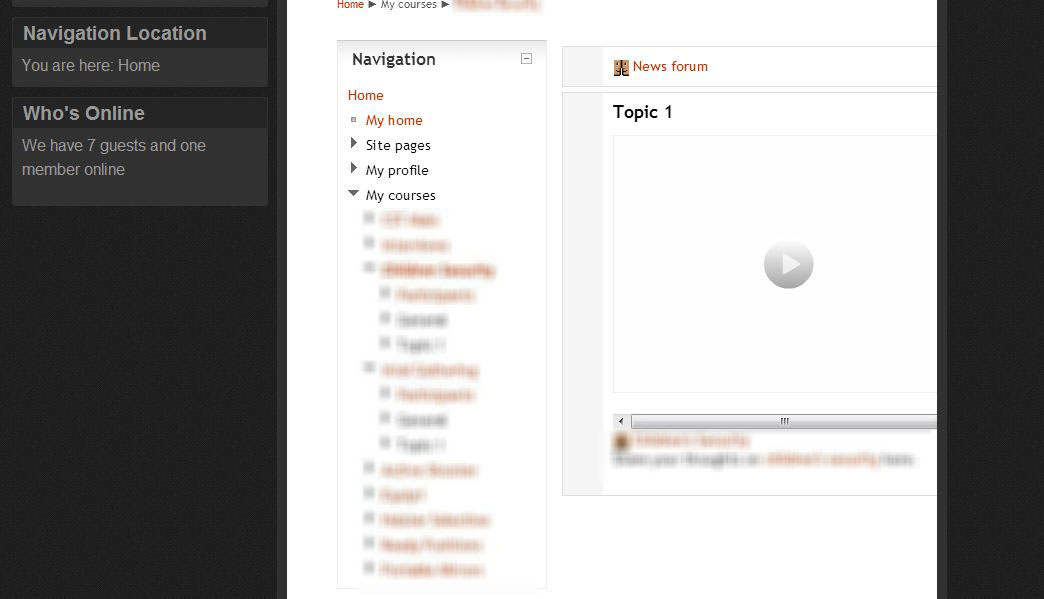
#2 – When my course is displayed, the navigation bar on the left is displaying which is causing my course content to bleed off the page on the right (see screenshot). I have three components to each course. Video, student upload area, and a forum. Is there not a way to map the Navigation to a menu in the left column where it says Navigation Location in my template (see screenshot)?
If I cannot correct these issues, then Joomdle is pretty much useless. Other than that, I like what I’m seeing so far.
Thanks!
Brian
#1 – My course are not sorted by category, rather, alphabetically. How do I sort them by category or the default sort order in Moodle? From the instructions it indicates that you can sort by name, course, etc. but I found that is not the case. It is very important to be able to sort how I have things setup in Moodle.
#2 – When my course is displayed, the navigation bar on the left is displaying which is causing my course content to bleed off the page on the right (see screenshot). I have three components to each course. Video, student upload area, and a forum. Is there not a way to map the Navigation to a menu in the left column where it says Navigation Location in my template (see screenshot)?
If I cannot correct these issues, then Joomdle is pretty much useless. Other than that, I like what I’m seeing so far.
Thanks!
Brian
Please Log in or Create an account to join the conversation.
- Antonio Durán
-

- Offline
- Moderator
-

Less
More
- Posts: 7941
13 years 7 months ago #2
by Antonio Durán
Replied by Antonio Durán on topic Moodle Sort Order & Course Bleeding Off Screen
Order by category: you can use "courses by category" view.
Moodle order: not possible. Just yesterday I added code to deal with that in course list view.
There is no way to map navigation.
Moodle order: not possible. Just yesterday I added code to deal with that in course list view.
There is no way to map navigation.
Please Log in or Create an account to join the conversation.
- Brian
- Topic Author
- Offline
- New Member
-
Less
More
- Posts: 9
13 years 7 months ago #3
by Brian
Replied by Brian on topic Moodle Sort Order & Course Bleeding Off Screen
Thanks for replying Antonio.
So how do I deal with the course bleeding off the screen?
So how do I deal with the course bleeding off the screen?
Please Log in or Create an account to join the conversation.
- Antonio Durán
-
- Offline
- Moderator
-
Less
More
- Posts: 7941
13 years 7 months ago #4
by Antonio Durán
Replied by Antonio Durán on topic Moodle Sort Order & Course Bleeding Off Screen
You can use a Joomla template that gives more space.
You can also try using the joomdedemo template, which hides navigation for students.
You can also try using the joomdedemo template, which hides navigation for students.
Please Log in or Create an account to join the conversation.
- Chris
-

- Offline
- Moderator
-
13 years 7 months ago #5
by Chris
Replied by Chris on topic Moodle Sort Order & Course Bleeding Off Screen
As Antonio has indicated above, you can use the "joomdle" template - moodle template without navigation to remove the moodle navigation from the left side. This will help but not solve all problems with bleeding.
Much of this will depend on how you design your content. Remember that you have moodle content, moodle navigation and Joomla navigation.
Some design considerations:
- For specific moodle pages, you may also wish to use joomla drop down menus from the top rather than the left side.
- You may not wish to rely entirely on menu navigation but also include links in your course materials.
- While you cannot create links to all the moodle content you can still link to some of what you are showing. For example, use a Joomla based user profile editor rather than the Moodle one. You should not need "home" or "site pages" if you are wrapped in Joomla.
Much of this is about user interface design rather than the technology.
Much of this will depend on how you design your content. Remember that you have moodle content, moodle navigation and Joomla navigation.
Some design considerations:
- For specific moodle pages, you may also wish to use joomla drop down menus from the top rather than the left side.
- You may not wish to rely entirely on menu navigation but also include links in your course materials.
- While you cannot create links to all the moodle content you can still link to some of what you are showing. For example, use a Joomla based user profile editor rather than the Moodle one. You should not need "home" or "site pages" if you are wrapped in Joomla.
Much of this is about user interface design rather than the technology.
Please Log in or Create an account to join the conversation.