
- Posts: 19
R0.24 No Longer Supported
Joomdle Web Services
- Richard Henline
- Offline
- New Member
-

Less
More
16 years 3 months ago #11
by Richard Henline
Replied by Richard Henline on topic Re: Joomdle Web Services
I did all that. Followed the Prerequisites to the letter. Un-installed everything and started again, same thing.
Please Log in or Create an account to join the conversation.
- Howard
- Offline
- Senior Member
-

Less
More
- Posts: 46
16 years 3 months ago #12
by Howard
Replied by Howard on topic Re: Joomdle Web Services
What errors are you getting if any. Have you run the Joomdle system check?
Please Log in or Create an account to join the conversation.
- Richard Henline
- Offline
- New Member
-
Less
More
- Posts: 19
16 years 3 months ago #13
by Richard Henline
Replied by Richard Henline on topic Re: Joomdle Web Services
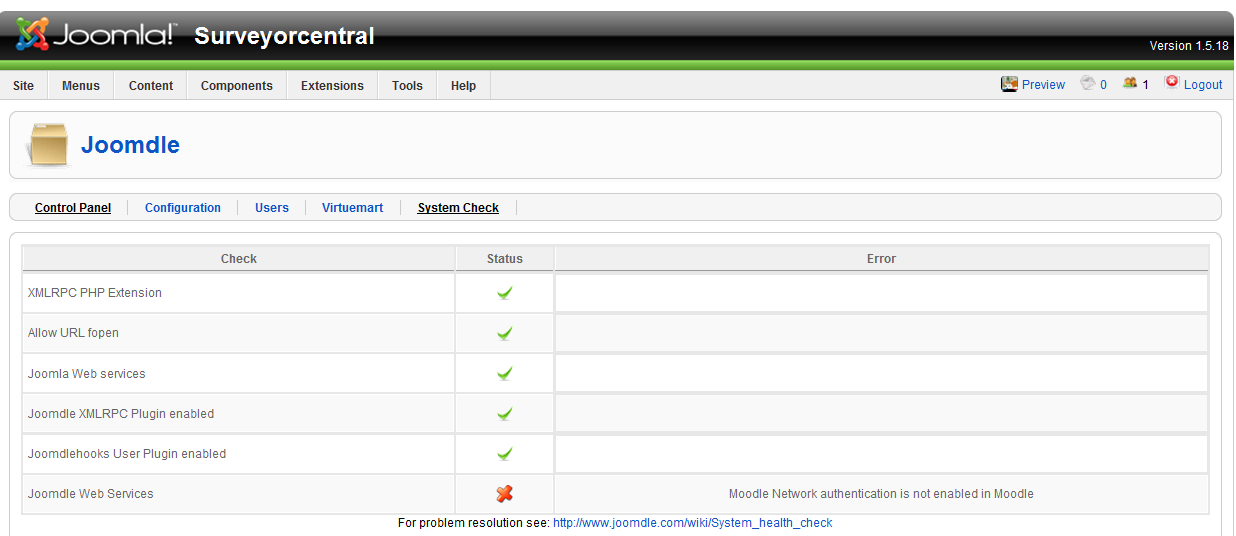
I just did a complete uninstall and reinstall of Moodle and the Joomdle component and I am still getting Joomdle Web Services Status red x Moodle Network authentication is not enabled in Moodle. and I know that it is. Any more ideas?
Please Log in or Create an account to join the conversation.
- Antonio Durán
-

- Offline
- Moderator
-

Less
More
- Posts: 7954
16 years 3 months ago #14
by Antonio Durán
Replied by Antonio Durán on topic Re: Joomdle Web Services
Can you attach a screenshot of the Manage authentication page in Moodle?
Please Log in or Create an account to join the conversation.
- Richard Henline
- Offline
- New Member
-
Less
More
- Posts: 19
16 years 3 months ago #15
by Richard Henline
Replied by Richard Henline on topic Re: Joomdle Web Services
Here you go.


Please Log in or Create an account to join the conversation.
- Antonio Durán
-
- Offline
- Moderator
-
Less
More
- Posts: 7954
16 years 3 months ago #16
by Antonio Durán
Replied by Antonio Durán on topic Re: Joomdle Web Services
Everything seems fine, yet you say you are getting the "Mnet auth not enabled" error.
My only guess here is that there is another error, that is making this one to appear.
What I would do is add a:
print_r ($response);
exit();
in administrator/components/helpers/content.php, function check_joomdle_system, after:
$response = JoomdleHelperContent::call_method_debug ('system_check');
This would show you the response Moodle is giving, so we can know what is wrong.
My only guess here is that there is another error, that is making this one to appear.
What I would do is add a:
print_r ($response);
exit();
in administrator/components/helpers/content.php, function check_joomdle_system, after:
$response = JoomdleHelperContent::call_method_debug ('system_check');
This would show you the response Moodle is giving, so we can know what is wrong.
Please Log in or Create an account to join the conversation.
- Richard Henline
- Offline
- New Member
-
Less
More
- Posts: 19
16 years 3 months ago #17
by Richard Henline
Replied by Richard Henline on topic Re: Joomdle Web Services
I did this but I did it in administrator/components/com_joomdle/helpers/content.php, function check_joomdle_system and it returned a blank page. Here is a screen shot of what I am getting from the system check with out the code added. With it I just get a blank page. I do program in PHP so I know I typed it in correctly.
Please Log in or Create an account to join the conversation.
- Antonio Durán
-
- Offline
- Moderator
-
Less
More
- Posts: 7954
16 years 3 months ago #18
by Antonio Durán
Replied by Antonio Durán on topic Re: Joomdle Web Services
Okay, then it seems a blank value is returned by Moodle web service.
Just to start narrowing the problem: edit moodle/auth/joomdle/auth.php, function system_check().
Put something like:
return array ("XX");
Then, watch the blank page you got before. Yo should see the print_r ("XX");
Then, we can keep on debugging.
Just to start narrowing the problem: edit moodle/auth/joomdle/auth.php, function system_check().
Put something like:
return array ("XX");
Then, watch the blank page you got before. Yo should see the print_r ("XX");
Then, we can keep on debugging.
Please Log in or Create an account to join the conversation.
- Richard Henline
- Offline
- New Member
-
Less
More
- Posts: 19
16 years 3 months ago #19
by Richard Henline
Replied by Richard Henline on topic Re: Joomdle Web Services
OK, administrator/components/com_joomdle/helpers/content.php now looks like this
/* Test Moodle Web services in joomdle plugin */
$system[3] = JText::_ ('CJ JOOMDLE WEB SERVICES');
$response = JoomdleHelperContent::call_method_debug ('system_check');
print_r ("response =". $response);
exit();
if ((is_array ($response)) && (xmlrpc_is_fault ($response)))
{
And moodle/auth/joomdle/auth.php looks like this
$response = file_get_contents($joomla_xmlrpc_url, false, $context);
$data = xmlrpc_decode($response);
$system = $data;
}
return array("XX");
//return $system;
And this is what I get when I load the page.
response =
/* Test Moodle Web services in joomdle plugin */
$system[3] = JText::_ ('CJ JOOMDLE WEB SERVICES');
$response = JoomdleHelperContent::call_method_debug ('system_check');
print_r ("response =". $response);
exit();
if ((is_array ($response)) && (xmlrpc_is_fault ($response)))
{
And moodle/auth/joomdle/auth.php looks like this
$response = file_get_contents($joomla_xmlrpc_url, false, $context);
$data = xmlrpc_decode($response);
$system = $data;
}
return array("XX");
//return $system;
And this is what I get when I load the page.
response =
Please Log in or Create an account to join the conversation.
- Antonio Durán
-
- Offline
- Moderator
-
Less
More
- Posts: 7954
16 years 3 months ago #20
by Antonio Durán
Replied by Antonio Durán on topic Re: Joomdle Web Services
it is not working, so let's try tu put it earlier in the function, to see what is breaking it. Start putting it in the fisrt line.
Please Log in or Create an account to join the conversation.